

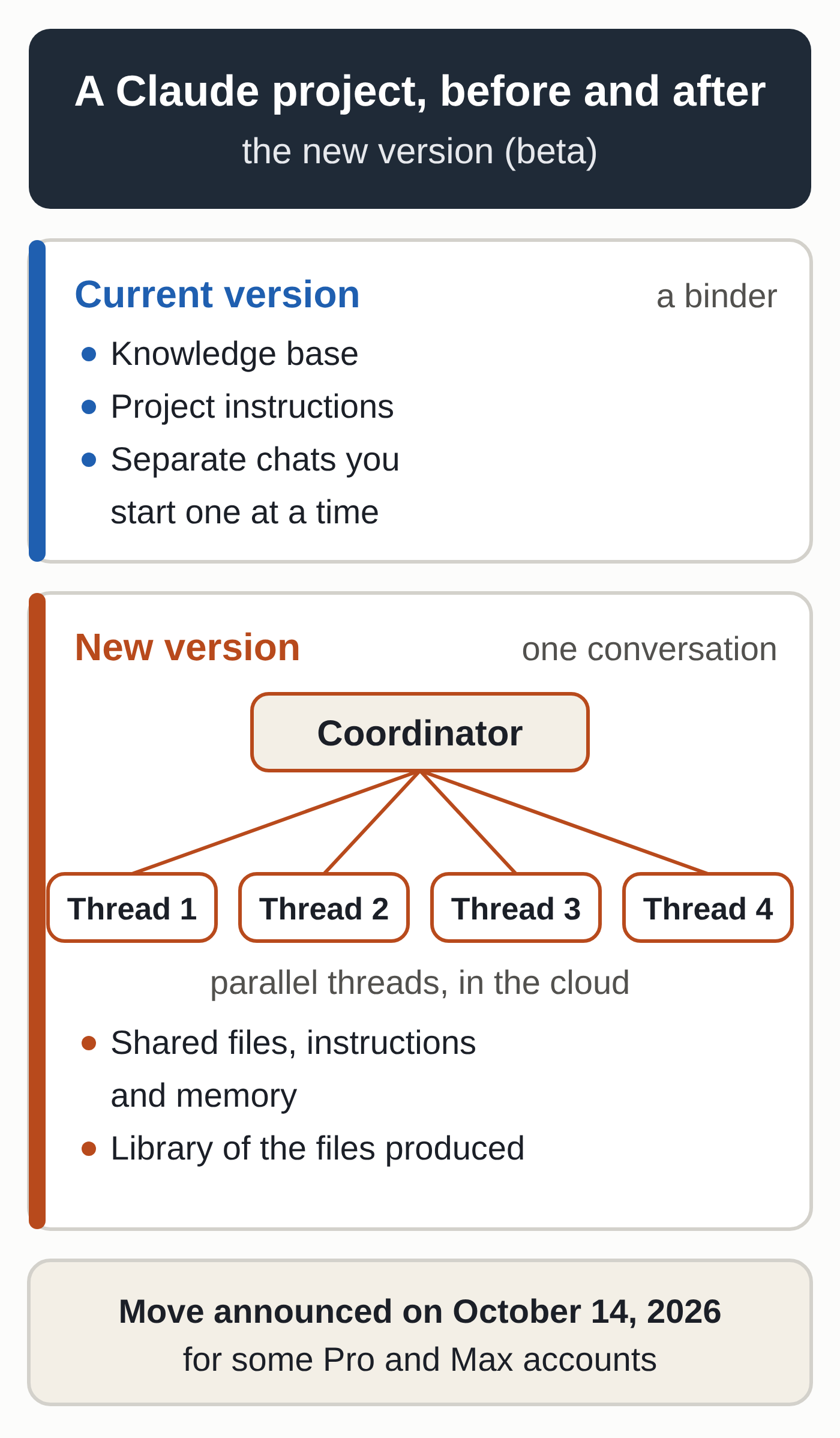
On October 14, 2026, Anthropic added one sentence to the help page that explains Claude projects: “We’ve started moving existing projects for some Pro and Max users to the new version.” If you keep one project per client, per case or per job, each one will change shape once the switch reaches your account. What used to work like a binder of chats and documents becomes a single conversation, where Claude splits the work across several sessions running in parallel in the cloud. The way you work will change too, and you may hit your usage limits sooner.
From binder to conversation
Projects have been part of Claude since June 2024. Each one holds its own chats, a knowledge base (the documents you upload) and standing instructions, such as a formal tone or the perspective of a specific profession. You can use one like a file folder: one project per client, one chat per task.
In a post titled “Projects redesigned: from folder to conversation,” Anthropic announced the new version on September 17, 2026. A redesigned project gives you a coordinator that breaks your request into parts and starts “threads”: separate work sessions that run in parallel and keep going after you step away from your computer. Every thread starts with the project’s files, instructions and memory. A Library collects the files you add and the ones Claude produces.
The name is confusing. On the day of the announcement, VentureBeat reporter Carl Franzen pointed out that Anthropic already had a feature called Projects. On October 5, Wharton professor Ethan Mollick wrote on X that the new projects are “not the same as the old Projects in Claude.” He found them “much better in most ways,” but “not clearly documented.”
The rollout so far
Anthropic first opened the beta in Claude Code on September 17 to some Pro and Max subscribers who used cloud sessions and had no projects yet. On October 9, Anthropic’s ClaudeDevs account posted on X that every Pro and Max user on the waitlist now had access.
On October 14, the help page “What are projects?” announced the next step: existing projects have started moving over, but only for some Pro and Max accounts. Anthropic says that if you’ve used an existing project in the last 30 days, you’ll get an email before the move. Other existing projects in chat and Cowork stay on the current version for now.
Team and Enterprise plans will follow, with no date given. The page doesn’t say whether projects on free accounts, which are limited to five, will move to the new version too.
The same day, Anthropic updated its help page on projects in Cowork (our Claude Cowork tutorial walks you through it). That page describes a change that’s separate from the new version: on Pro and Max, the desktop app now moves projects you created from a folder on your computer into your Claude account. The project’s name, description, instructions (Google Drive links included) and a copy of its memory, if memory is on, go to your account. The folders and files stay on your computer, and nothing is uploaded or deleted.
Your data carries over, your workflow changes
The help page is explicit: “Nothing is lost or deleted in the move.” Your instructions, files, full chat history and scheduled tasks move with the project, and you’ll pick up where you left off.
How you work is another matter. On Reddit, an attorney on the Max plan described their setup on October 14: one project per case, one chat per filing, all drawing on the same documents. The post called the new version a different product that kept the old name.
For an agency, sharing raises a second question. According to the Claude Code documentation, a project in the new version is personal: you’re the only one who can send it work or see its threads. Sharing with colleagues remains limited to Team and Enterprise plans, which don’t have the new version yet.
Usage adds up faster
Each thread is a full session, and several can run at the same time. The coordinator counts against your limits too: it reads what the threads report and decides what to do next. The Claude Code documentation says a new project runs Opus everywhere by default, with high effort for threads and low effort for the conversation. Anthropic warns that on the Pro plan in particular, you should expect to hit your limit sooner on days you run a project.
The same documentation caps new threads at 200 per day across all your projects. A thread that reaches your plan’s limit waits and resumes on its own when the limit resets, which eats into your next usage window without you asking for anything. Sending a message to a thread that has sat idle for more than an hour makes it reread its entire conversation before it acts. A project with no running threads, no watched pull requests and no new messages uses nothing.
If you’re already hitting your limits, our guide to hitting the Claude Pro usage limit explains how the limits work. Prices for each plan are in our Pro, Max or Team comparison. Before you upgrade to Max to absorb the extra usage, read the Anthropic terms that apply to your plan.
Six precautions for a firm or an agency
- Watch your inbox. If you’ve used a project in the last 30 days, Anthropic will email you before the switch happens. Give a heads-up to colleagues who have their own Pro or Max account.
- Keep your own copy. In Settings > Privacy, on the web or in the desktop app (not on mobile), the “Export data” button emails you a download link that expires after 24 hours. The export covers your chats and account data, so copy your key projects’ instructions into a document as well.
- Set the model and effort level. Under Project settings > General, Thread model and Thread effort apply to threads, and Coordinator model and Coordinator effort apply to the conversation. For triaging email or proofreading, a lighter model or a lower effort level may be enough.
- Approve threads before they start. The documentation suggests having the coordinator propose threads before it starts them, running only a few at a time, then lifting those limits once the results look right.
- Put lasting rules in the right place. According to Anthropic, anything Claude must never forget belongs in the project’s memory. Our article on Claude’s memory shows how to review and correct what it remembers.
- Check what goes to the cloud. Cloud threads work on the files and folders added to the project, Google Drive folders included. If your firm is bound by client confidentiality rules, review the list of documents in the Library the way you would before handing files to an outside contractor.
Open questions
Anthropic’s pages don’t all say the same thing. The Claude Code documentation, also updated on October 14, still says the rollout starts with accounts that have no existing projects in chat or Cowork. The help page, by contrast, says those projects have started moving.
None of the pages we checked mentions a way to opt out of the switch or delay it. Anthropic hasn’t given a date for the full rollout, or for Team and Enterprise. What happens to projects shared within a team is still unknown.
What to watch next
Keep an eye on three developments: the new version reaching chat and Cowork for all Pro and Max accounts, its arrival on Team and Enterprise plans along with the question of sharing, and running threads locally. A thread can already run on your own computer, as long as the machine doesn’t go to sleep, Remote Control is turned on and Claude Code is on version 2.1.280 or later.
If you’d rather hand your repetitive office tasks to an assistant that’s already set up for your business, without managing models, usage limits and threads yourself, take a look at the MACCUS AI assistant.