

Anthropic offers Claude in five plans: Free, Pro (€18 a month), Max (€90 or €180 a month), Team (from $20 per seat) and Enterprise. For Pro and Max, these are the prices shown to a Belgian account on claude.ai/upgrade on September 28, 2026, excluding tax. Team and Enterprise stay in dollars, at the US prices on Anthropic’s pricing page: their euro price only appears after you create a team with a work email address.
For a freelancer, Pro is enough in most cases. Max makes sense when you run into the limits several days a week. Team is for when several people need to share projects and a single invoice. This guide gives you a one-week test and two calculations to decide based on your own numbers.
Still torn between two assistants? Read Claude or ChatGPT for a small business first.
Claude plans and prices as of September 28, 2026
| Plan | Price excluding tax | Who it’s for |
|---|---|---|
| Free | €0 | Trying it out, occasional use |
| Pro | €18 a month, or €180 a year (€15 a month) | A freelancer, every day |
| Max 5x | €90 a month | Heavy use |
| Max 20x | €180 a month | Very heavy use |
| Team Standard | $25 per seat per month, or $20 a month billed annually | Teams of 2 to 150 people |
| Team Premium | $125 per seat per month, or $100 a month billed annually | Heavy users within a team |
| Enterprise | $20 per seat per month (annual), plus usage at API rates | Large organizations |
What each plan adds, according to Anthropic:
- Free: chat on the web, desktop and mobile, web search, memory, connectors, up to 5 projects.
- Pro: more usage, projects without the five-project limit, Research, Claude Code, Claude in Chrome and Microsoft 365, delegated and scheduled tasks.
- Max: everything in Pro, with 5 or 20 times more usage per session and priority access at peak times. Monthly billing only. Since October 2026, Max also includes a monthly API credit, like Team, covered in our article on Claude Haiku 5.5.
- Team: shared projects, centralized billing and administration, single sign-on (SSO), admin control over connectors. Two members minimum.
- Enterprise: SCIM, audit logs, custom data retention. The seat only covers access; in self-serve, 20 seats minimum.
Since September 16, 2026, Anthropic has been merging Cowork and chat into a single experience, rolled out first on Pro and Max. How long-running tasks work is explained in the Claude Cowork tutorial for your office tasks. What Pro changes for artifacts (link sharing, saved data, connected apps) is covered in Claude artifacts explained for freelancers.
Claude prices in euros, with VAT, on the web and in the App Store
On the web, claude.ai/upgrade shows the table prices excluding tax, with the note “+ tax” (Belgian account, September 28, 2026). Annual Pro is listed there at €180 a year, with “Save 17%”.
On a personal account, VAT is added: 21% in Belgium, 20% in France. At those rates, VAT included: Pro €21.78 in Belgium and €21.60 in France, Max 5x €108.90 and €108.00, Max 20x €217.80 and €216.00. A VAT-registered business that enters its VAT number is billed at 0%: that is the reverse charge, and you account for the VAT yourself.
In the iPhone app, the subscription goes through Apple. On September 28, 2026, the App Store in France and Belgium listed, VAT included:
- Pro monthly: €22.00
- Pro annual: €249.99
- Max 5x: €149.99
- Max 20x: €299.99
With VAT included, the web works out cheaper: Max 5x costs €108.90 a month there with Belgian VAT, compared with €149.99 in the App Store. For a business, the web also has two documented advantages: Anthropic issues the invoice itself (on mobile, it’s Apple or Google), and you can enter your VAT number and company name.
The tax is calculated from the address of the card you use; on the web, only credit and debit cards are accepted. For VAT accounting, in Belgium as in France, show the first invoice to your accountant.
Claude Pro and Max limits, explained simply
Here is what Anthropic’s help center documents about the limits, and what it doesn’t publish.
- The session limit resets on a rolling five-hour window.
- Paid plans also have a weekly limit, across all models, reset on a fixed day and time specific to your account.
- There is no fixed number of messages. A long conversation, a large file, a more powerful model, high effort, web search, connectors and multistep tasks use more.
- The web, the desktop app, mobile and Claude Code all draw from the same allowance.
- The multipliers apply to the five-hour session: Pro gives at least 5 times Free, Max 5 or 20 times Pro, a Team Standard seat 1.25 times Pro, a Premium seat 6.25 times Pro.
- Not published: the number of messages per session, the size of the weekly limit and its exact ratio between Pro and Max. Anthropic can also add other caps at its discretion.
You can see where you stand in Settings > Usage: one bar for the current session with the time left, one bar for the week with the reset date. If you hit the limit too often, start with seven settings to make Claude Pro last.
When you hit the limit, you can wait, move up to the next plan or turn on usage credits. These credits are prepaid, at API rates, and you can set a monthly cap on them; their price is shown in your account’s currency at the time of purchase. Anthropic also sells credit bundles with a discount of 10 to 30%.
Fable models are the exception: on Pro and Team Standard seats, they run only on credits; on Max and Premium seats, they can use up to half of the weekly limit.
Which plan for which profile
Each profile comes with a one-week test; you read the results in Settings > Usage.
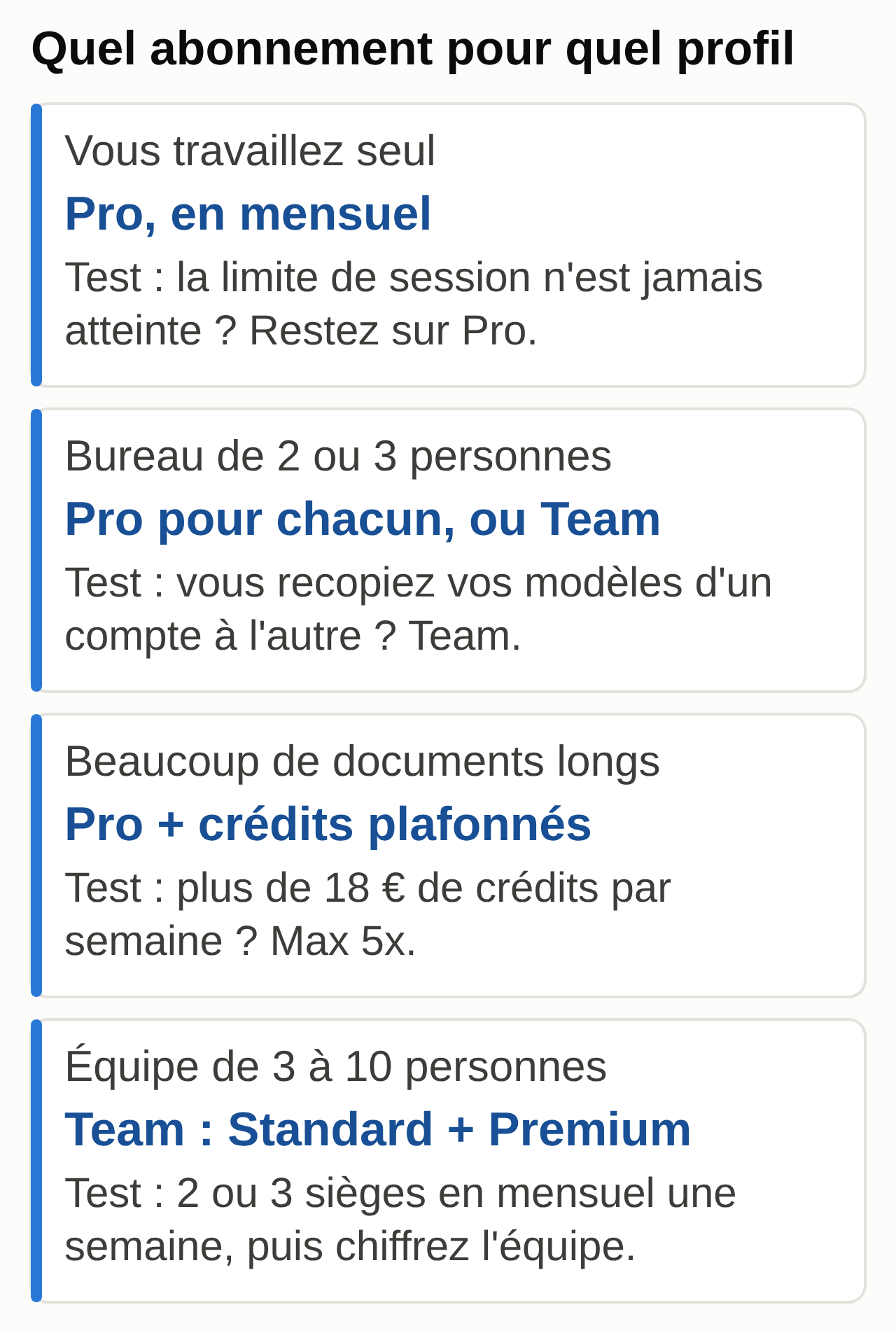
You work alone: Pro
Emails, quotes, meeting notes, a few documents a day. Take Pro with monthly billing.
One-week test: open Settings > Usage every evening and note whether you hit the session limit. If you never do, stay on Pro and switch to annual billing after a month: €180 instead of €216 a year, excluding tax.
Pro for each person or Team for a small office of two or three
Two Pro accounts cost €36 a month excluding tax. Team Standard for two costs $50 a month on monthly billing or $40 a month on annual billing, at US prices: compare with the euro price shown once the team is created. Team brings shared projects, a single invoice and Anthropic’s commercial terms. If you’re building a tool for a client, also read what Claude’s usage policy of November 12, 2026 says about reselling access.
One-week test: create the same “Office templates” project in each account, with your instructions and document templates. If you spend your time copying files from one account to the other, what you’re missing is Team’s project sharing.
Pro plus credits for lots of long documents, then the math
Contracts, 100-page reports, bid responses, bookkeeping. Start on Pro with capped usage credits.
One-week test: keep the usage log and run the calculation in the next section. Max 20x only makes sense if Max 5x still isn’t enough.
Team for a group of 3 to 10 people
Take Standard seats by default and a Premium seat for each heavy user. You can add seats mid-period.
One-week test: start on monthly billing with two or three seats, create a shared project with your templates, read Team’s usage analytics at the end of the week, then price the full team with the method below.
The calculation that settles Claude Pro versus Max
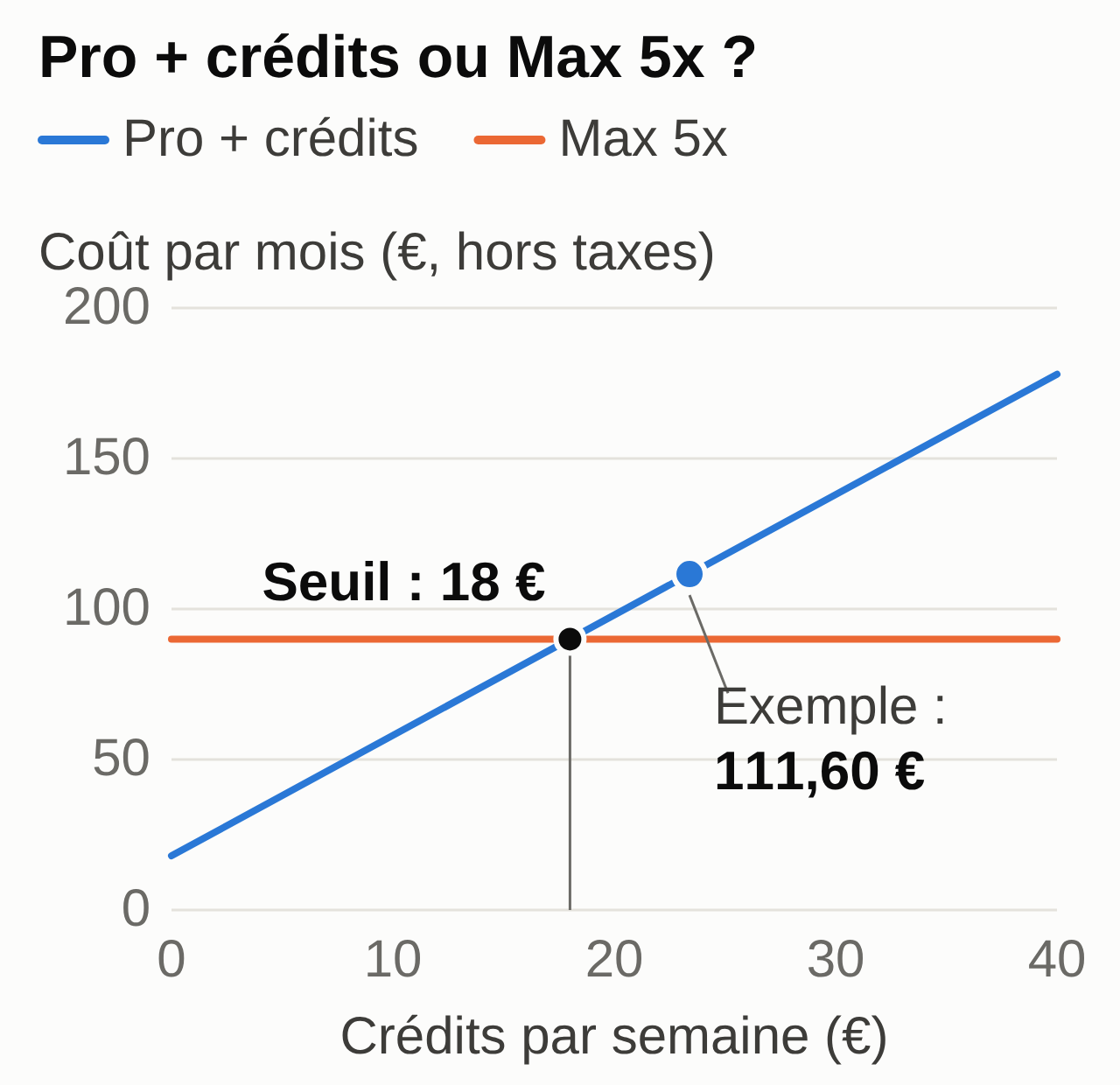
The principle: Max 5x costs €72 more than Pro per month, excluding tax (€90 versus €18). If you spend more than €72 of credits a month, or €18 a week, Max 5x works out cheaper, provided it absorbs that overflow: its weekly limit isn’t published.
Sample files, fictional: journal-usage-semaine.csv and calcul_formule.py (zip) to redo the calculations (both in French).
- In Settings > Usage, turn on usage credits, add a small amount and set a low monthly cap.
- Every evening for five working days, note in the log your main work, whether you hit the session limit (yes or no) and the credits spent that day: the month’s total shown in Settings > Usage, minus the previous day’s.
- At the end of the week, open a new conversation, paste the prompt below, then the contents of the log.
- Redo the sum yourself before you change plans.
Prompt to copy:
Here is my Claude usage log for one week (CSV). Columns: date,
main_work, session_limit_hit (yes/no), credits_eur.

1. Count the days when the session limit was hit.
2. Add up the week's credits, then multiply by 4 to estimate
   a month.
3. Calculate the monthly "Pro + credits" cost with Pro at 18 euros a month.
4. Compare with Max 5x at 90 euros a month and say which one is cheaper.
5. Show every addition and every multiplication so I can check them.
6. Don't make up any line. If a value is missing, flag it instead of
   guessing.
7. End with one sentence: which plan to take next month, and under
   what condition to revisit that choice.

My log:
[paste the contents of journal-usage-semaine.csv here]
Expected result with the sample file:
Days with the limit hit: 3 out of 5 (September 21, 23 and 25)
Credits for the week: 6.80 + 9.40 + 7.20 = €23.40
Estimate for a month: 23.40 x 4 = €93.60
Pro + credits: 18 + 93.60 = €111.60 a month
Max 5x: €90 a month
Max 5x is cheaper by €21.60, if this week is representative.
Human check: recount the three “yes” lines and the sum of the credits. Was it a normal week? A month-end close or a big bid response inflates the figure: in that case, measure again during an ordinary week. After switching to Max 5x, see whether you still hit the limit: if you do, run the same calculation between Max 5x and Max 20x.
Common mistake and fix: the assistant multiplies by 4.33 or by 30 days, or counts the Pro price every week. Restate the instruction: “Multiply the week’s credits by 4, add 18 only once.” The amounts are in euros excluding tax, at Belgian account prices: if your screen shows other prices, replace them in the prompt.
Pricing Claude Team seats for a group
For a business Claude subscription, the question becomes: how many Standard seats, how many Premium, monthly or annual, and what individual accounts would cost. Team seats are priced in dollars here, since there is no euro price before the team is created; individual accounts are priced in euros.
Sample file, fictional: equipe-sieges.csv (in French), six people including a manager who reads long documents every day.
- List the people and their expected use: occasional, regular, heavy.
- Give a Premium seat to heavy users, Standard to the others.
- Paste the prompt below, then your list.
- Check the totals by hand.
Prompt to copy:
Here is the list of people on my team (CSV) with the planned seat.
Claude Team prices as of September 28, 2026, in USD excluding tax (US prices),
per seat per month: Standard 25 (monthly) or 20 (annual), Premium 125
(monthly) or 100 (annual). Individual prices in euros excluding tax, per month:
Pro 18 (monthly) or 15 (annual), Max 5x 90 (monthly only).

1. Count the Standard and Premium seats.
2. Calculate the Team total per month and per year, in USD, with monthly
   billing and then annual billing.
3. Calculate in euros the monthly cost of individual accounts: Pro for each
   Standard seat, Max 5x for each Premium seat, with monthly Pro
   and then annual Pro.
4. Don't convert anything and don't compare a USD amount with a euro
   amount.
5. Present the result in short lines, calculations visible, currency on
   every line.
6. Don't add any price or feature I didn't give you.

My team:
[paste the contents of equipe-sieges.csv here]
Expected result with the sample file:
Seats: 5 Standard, 1 Premium
Team monthly: 5 x 25 + 1 x 125 = 250 USD a month (3,000 USD a year)
Team annual: 5 x 20 + 1 x 100 = 200 USD a month (2,400 USD a year)
Individual accounts, monthly Pro: 5 x 18 + 1 x 90 = €180 a month
Individual accounts, annual Pro: 5 x 15 + 1 x 90 = €165 a month
Human check: recount the seats and every multiplication. The dollar and euro lines can’t be compared with each other: once the team is created, redo the Team line with the euro price shown. Team also brings project sharing, a single invoice, access administration and the commercial terms. The Premium seat also gives slightly more usage per session than Max 5x: 6.25 times Pro against 5 times.
Common mistake and fix: the assistant applies the annual price to monthly billing, puts the manager on a Standard seat or converts the dollars with a made-up rate. Reread the “siege” (seat) column in the file and have it redo the calculation line by line, with no conversion.
Subscription, API and Claude Code are three different things
- The subscription, from Free to Enterprise, gives you Claude on the web, desktop and mobile, with its usage limits.
- The API is purchased separately, in the Claude Console, and paid by volume. A paid subscription doesn’t include it. It’s for building Claude into software.
- Claude Code is Anthropic’s coding tool, in the terminal or the code editor. It is included in the paid plans and draws from the same allowance as your conversations. Watch out: if an ANTHROPIC_API_KEY variable is set on your computer, Claude Code bills the API instead of your subscription. A concrete example: turning a Claude mockup into a WordPress site the client edits themselves, then putting it online with a domain and a business email address.
Usage credits are billed at API rates, but they stay in your Claude account and don’t give you an API key. For the model families (fast, balanced, reasoning) and choosing by task, see the guide choosing an AI model and organizing work with several agents.
Data and privacy by plan
Pro and Max fall under Anthropic’s consumer terms. Their version for the European Economic Area is aimed at consumers: if you pay for Pro or Max for your business, read it before subscribing. For model training, the pricing page says “Opt-out available”: check it in your privacy settings.
If it is on, Anthropic can keep your conversations in de-identified form for up to 5 years. A deleted conversation disappears from your history right away and from the servers within 30 days, with exceptions (flagged content, legal obligation). Incognito conversations aren’t used to improve Claude, even if the option is on.
Team, Enterprise and the API fall under the commercial terms. There, the customer business is the data controller and Anthropic the processor. Content isn’t used for training by default, and a data processing addendum (DPA) with standard contractual clauses is built into the terms. The consumer terms for Pro and Max don’t include one.
No plan makes you GDPR compliant on its own. To run customers’ personal data through it, you need a legal basis, a data processing agreement with the provider and only the minimum data necessary; the reference authorities are the APD in Belgium and the CNIL in France. To learn, work on fictional documents like the ones in this guide.
Five settings before your first payment
- Subscribe on the web, from claude.ai/upgrade, if you want an invoice from Anthropic.
- In Settings > Billing, open the option to update your payment method: enter your VAT number and check the “Use a different name on invoices” option to put the company name on them. An issued invoice can’t be corrected.
- Choose your model improvement setting in your privacy settings (claude.ai/settings/data-privacy-controls) before your first work conversation.
- If you turn on usage credits, set a monthly cap and leave auto-reload off during the test.
- Note the weekly reset day and time shown in Settings > Usage.
In the European Economic Area, Anthropic lets you request a refund in the app during the 14-day withdrawal period. Start on monthly billing: annual billing is available for Pro and Team (Max is monthly only) and is chosen once the plan is confirmed.
The choices the subscription leaves to you
On a paid plan, Claude keeps a memory across conversations and connects to Google Drive, Gmail or Microsoft 365 through connectors. With the new experience, rolling out on Pro and Max, it keeps working on a task in the cloud when you close your computer, runs scheduled tasks, and you can follow or start a task from your phone. The mobile app supports dictation and voice mode. What this memory really retains, and how to check it, is explained in Claude’s memory.
These features are set account by account, and device by device for your files and computer control, which need the desktop app open. A chain that starts from a voice note and acts in your own tools only exists if someone builds it, connects it and keeps it running.
What the subscription doesn’t decide for you:
- Which connectors to set up, with what access. Some software needs a custom connector: see the guide to Claude connectors for Gmail, Drive and Calendar and, for an ERP, connecting Claude to Odoo.
- The instructions, projects and checking rules, to write and keep up to date. To know what to put in a project or in a skill, see Claude skills for non-developers.
- The level of autonomy. By default, Claude asks before acting; switching to automatic mode is your decision.
- Monitoring: a scheduled task that fails, access that expires, a plan or a limit that changes.
- Responsibility for what goes out in your name.
If you’d rather hand off the setup, the connections and the upkeep, that’s the role of the MACCUS AI assistant. It lives in Telegram: you write to it and send it voice notes and documents, in French, English or Dutch.
It runs on your own Claude Pro or Max subscription, in your name: you choose the plan and you see your usage. Connections to your tools are decided case by case, with your access. What goes out in your name remains your responsibility.
Your checklist for the trial week
- Subscribe to Pro monthly on the web, after the five settings above.
- Keep your customers’ personal data out of the tool until the framework is in place.
- Fill in the usage log every evening, five days in a row.
- At the end of the week, run the Pro or Max calculation; for a team, the seat calculation.
- Check the first invoice: name, VAT number, tax amount.
- Review your choice after a month, and only then switch to annual billing.
Next, pick a first concrete task in the guide to AI by profession.