

On October 8, 2026, the ArtCraft team released three free, open-source apps modeled on Word, Excel and PowerPoint: WordCraft, GridCraft and DeckCraft. They open and save .docx, .xlsx and .pptx files, run on Windows, macOS and Linux, and don’t require a subscription or a Microsoft account. Most of their code was written with Claude Opus 5.5, Anthropic’s AI model.
If your small business pays for Microsoft 365 every month, this Word and Excel alternative raises an obvious question: can you use it at work yet? Not for client files. Testing it on copies, though, is worth an afternoon.
Four releases in four days
The three projects’ repositories went up on GitHub on October 7. The first releases followed the next day (Brussels time), and version 0.5.0 shipped on October 11. The project’s creator, identified by Tom’s Hardware as Brandon Thomas, had already released free look-alikes of Photoshop, Illustrator and Premiere Pro under the same brand.
On GitHub, all three projects describe themselves as “clean-room” reimplementations: the code is built from public file-format specifications and from observing how the apps behave, without using Microsoft’s source code. The projects say they are not affiliated with Microsoft. The license (MIT or Apache 2.0, your choice) allows commercial use, and the installers are code-signed.
Claude’s role is visible in the WordCraft repository: the 30 most recent commits, checked during the night of October 11 to 12, all list Claude Opus 5.5 as a co-author. The Register wrote on October 8 that the projects “lean heavily on Claude for development” and are “not ready for production.” Brandon Thomas summed it up on X on October 9: “AI models enable me to work as an entire company” (as quoted by Tom’s Hardware).
Interest took off fast: by that night, WordCraft had passed 5,700 stars on GitHub. On Reddit, the project was one of the weekend’s most popular topics in AI forums, with praise for the speed and doubts about long-term maintenance.
Version 0.5.0, app by app
All three projects call themselves alpha software. Each publishes its own feature-coverage figure and readiness estimate on GitHub.
| App | Modeled on | Stated coverage | Readiness for real work (the projects’ own estimate) |
|---|---|---|---|
| WordCraft | Word | 88% of ribbon features | about 60% |
| GridCraft | Excel | 89% of ribbon commands, 513 of 523 worksheet functions | about 50% |
| DeckCraft | PowerPoint | 79% of features (by breadth) | about 55% |
WordCraft’s roadmap says beta depends on testing against real-world .docx files, which hasn’t happened yet. GridCraft lists .xlsx fidelity on real-world workbooks as its next priority.
The gaps that matter for a business
Each project keeps a public list of its shortcomings. Five of them directly affect a law firm, an agency or a shop, especially one that works in French.
- Language. WordCraft only checks spelling in English, and its interface comes in 11 languages, none of them French. DeckCraft is English only. In GridCraft, formulas use English function names (SUM instead of the French SOMME) and US separators, unless you switch the interface to Spanish.
- Macros. GridCraft drops VBA code when it opens a workbook. WordCraft keeps the macros in a .docm file but doesn’t run them, and DeckCraft leaves VBA out by design.
- Protected files. WordCraft refuses password-protected documents. GridCraft opens an encrypted workbook but saves it without the password, so a protected payroll file would come back unprotected.
- Silent losses. WordCraft drops handwritten ink and drawing canvases without warning, and charts created in Word open as read-only. In GridCraft, a workbook with slicers or Power Pivot comes back simplified after you open and save it, and charts lose their type and options.
- Teamwork. Neither WordCraft nor GridCraft offers cloud storage or real-time co-authoring.
Microsoft 365 is more than three apps
Microsoft raised prices on several Microsoft 365 plans on July 1, 2026. On its US price list, Microsoft 365 Business Standard rose to $14 per user per month, a 12% increase. Converted at the European Central Bank’s rate for October 9, 2026, that comes to about €12.50 (for reference only). Microsoft notes that prices may vary by country and currency, and that existing customers keep their current price until renewal.
The subscription also covers business email (with 50 GB more per mailbox since that update) and, depending on the plan, Teams. So replacing Word, Excel and PowerPoint would only cut part of the bill. Free office suites such as LibreOffice, a project of the nonprofit The Document Foundation, have been around for years. ArtCraft is betting on something else: reproducing the Office ribbon, shortcuts and muscle memory as closely as possible.
Another option is to have AI produce the documents. Anthropic announced on October 8, 2026, that Claude Docs, Slides and Design were out of beta and available on every Claude plan, including Free.
Five precautions before you switch
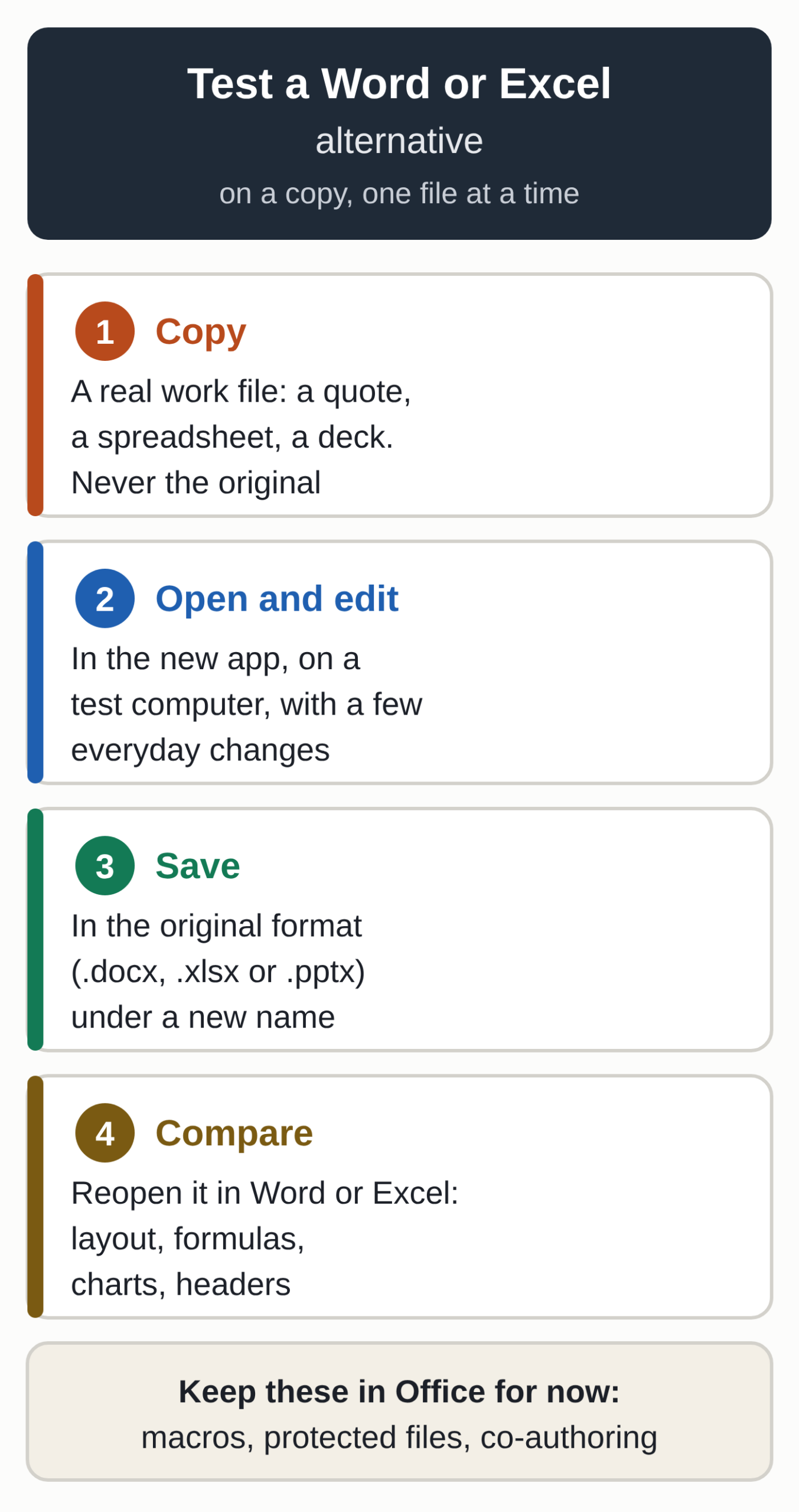
- Install the apps on a test computer, never on the one you use for bookkeeping. Download the installers from the Releases page of the GitHub repository and check that their checksums match the SHA256SUMS list published alongside them.
- Work on copies only. The Register’s advice on WordCraft: “We would keep it away from production workloads for now.”
- Pick five files that represent your work, for example a quote in Word with your letterhead and logo, an Excel workbook with formulas and a pivot table, and a slide deck with charts. Open each copy in WordCraft, GridCraft or DeckCraft, edit it, save it, then reopen it in Word, Excel or PowerPoint to compare the layout, formulas and charts.
- Make a list of your macro-enabled and password-protected files. Those stay in Office.
- Before your Microsoft subscription renews, count the licenses people actually use.
Apps that AI agents can drive
The project also matters if you use AI agents. In WordCraft, every ribbon action maps to a named command, 422 in total, available from the command line, through a JSON control channel and through an MCP server. GridCraft and DeckCraft offer the same access.
Claude Code, for example, can create or edit a document without opening the app’s window: once the command-line tool is installed, it takes a single command to connect the two.
For an agency or a freelancer, the example gives a sense of how fast a small team, led by an experienced developer and assisted by a model like Claude Opus 5.5, can ship a first version. The gap lists show the other side: by the projects’ own estimates, fidelity with real-world files, translation and integration (macros, co-authoring, external data) still require the most hours. If you’re weighing models for this kind of project, our breakdown of Claude Haiku 5.5 pricing covers the cheapest model in the Claude 5.5 family.
Open questions
Every percentage comes from the projects themselves; as of October 12, we had found no published independent fidelity test. The current pace, several releases in four days, rests on a small team of contributors, and support runs through GitHub and Discord.
The legal picture is unclear. Lawyer Neil Brown of the English firm decoded.legal told The Register the outcome would depend on the jurisdiction and that the matter could well end up in court. Microsoft had not given the outlet a substantive response as of October 8.
What to watch
WordCraft’s next milestone is its beta. The roadmap makes beta conditional on several things, including testing against real-world files and keeping charts and SmartArt intact when you save. On languages, DeckCraft lists French among the five it needs for beta. Then there is the rest of the lineup: Tom’s Hardware mentions Autodesk tool clones as a possible next target.
If you’d rather hand your document prep to an assistant set up for your business, take a look at our AI assistant.