

In 2026, a freelance administrative assistant in France most often charges between €30 and €50 excl. VAT per hour, according to rate cards published by providers. Belgian pages show amounts in the same range, from €20 to €70 excl. VAT depending on the profile. A freelance assistant answers the phone, handles your paper mail and signs a service contract with you.
An AI assistant drafts, sorts and summarizes, including at 11 p.m. from a voice note, and reminds you of a deadline. It needs someone to set it up and a person who reviews what goes out.
This guide gives the published rates with their sources, what each one does better, a task split you can copy and a shared brief template. The examples use a fictional carpentry shop, Atelier Maréchal, with files so you can redo every calculation.
Freelance administrative assistant rates posted in 2026
There is no regulated rate. We found no 2026 rate survey published by a professional federation, in France or in Belgium. The figures below come from provider and platform pages, checked on September 28, 2026: they are ranges to compare with the quotes you get.
In France:
- Ereia Solutions, July 14, 2026: most often €30 to €50 per hour for routine assistance. Data entry and filing €25 to €35, invoicing and payment reminders €35 to €50, specialized assignments €40 to €60 and sometimes more.
- SBA Horizon, June 15, 2026: €30 to €50 excl. VAT per hour depending on experience and task complexity.
- 1001secretaires, May 5, 2026: €22 to €30 excl. VAT for a beginner, €30 to €42 with 2 to 5 years of experience, €45 to €70 for a senior or specialized profile, up to €80 for medical or legal secretarial work. Packages: €150 to €250 per month for 5 hours, €300 to €450 for 10 hours, €600 to €900 for 20 hours.
- Plateya, March 31, 2026: €30 to €55 excl. VAT per hour, €200 to €400 excl. VAT per day.
In Belgium:
- LVSecretariat, page updated December 17, 2025: from €20 to €70 excl. VAT per hour for a freelance secretary.
- Marie Trekker, page updated September 18, 2025: €30 to €50 per hour, monthly package from €300 for 10 hours.
- SOS Services, Brussels, undated page: €37.50 excl. VAT per hour for its own offer.
Four things move the price: the specialty (medical, legal or accounting work costs more), urgency (a file needed “by tomorrow morning” is billed higher than a planned task), working in your offices, which can add travel costs, and volume: a monthly package usually works out cheaper per hour than a one-off request.
What you will actually pay, with and without VAT
In France, a freelance secretary can operate as a micro-entrepreneur; in Belgium, as a self-employed worker, full-time or on the side. For you, the visible difference is the VAT on the invoice.
In France, for a service business, the VAT exemption threshold in 2026 is €37,500 of revenue for the previous year and €41,250 for the current year (Service Public Entreprendre, page checked on January 1, 2026). Above that threshold, the freelancer charges VAT at the standard 20% rate.
In Belgium, the small business exemption scheme covers annual revenue of €25,000 excl. VAT at most (SNI, May 13, 2026). An increase of €1,000 a year, up to €30,000 in 2031, was announced in spring 2026: check the threshold in force when you get the quote. Above that threshold, the freelancer charges VAT at the standard 21% rate.
If your company recovers VAT, only the amount excluding VAT matters to you. Otherwise, compare the quotes including VAT.
For Atelier Maréchal, which needs about 11 hours of assistant time per month (see the task split below), the budget ranges from €330 to €550 excl. VAT per month at €30 to €50 per hour.
What a freelance assistant does better when you outsource your office admin
Some tasks need a person. A freelance administrative assistant:
- answers the phone, calls a client back, negotiates a time slot and can tell when the person on the other end is annoyed;
- opens the paper mail, scans it, files the originals and goes to mail a registered letter;
- judges a delicate situation: a good client who is late paying does not get the same message as a client who has stopped responding;
- keeps up a long-term relationship with your clients and suppliers;
- represents you with a third party, within the limits of a written mandate you define;
- signs a service contract and can carry professional liability insurance: ask for the certificate.
If what you need is limited to calls, a phone answering service is another form of admin outsourcing, billed per call or as a package. In this guide, the phone, paper and relationships stay on the human side.
What an AI assistant does, and the setup it needs
An AI assistant works on text, files and reminders. It can:
- turn an end-of-day voice note into a visit report and a draft email;
- sort an inbox and suggest replies that you review;
- prepare a list of payment reminders from an invoice export;
- give a supplier invoice a first read and flag a total that does not add up;
- remind you of a deadline on the set date.
The consumer apps already do a lot. As of September 28, 2026, ChatGPT offers scheduled tasks (including in the free version, with limits), memory from one conversation to the next, voice dictation and, depending on the plan and region, connected apps such as Gmail or Google Drive, linked in Settings > Plugins. In Claude, the Gmail, Google Calendar and Google Drive connectors are open to every account (Customize > Connectors): Claude can prepare an email or create an appointment. On September 16, 2026, Anthropic also announced that chat and Cowork are merging into a single Claude app, rolling out gradually on the Pro and Max plans: a task keeps running in the cloud after you close your computer, and a scheduled task runs with no device switched on.
On budget, the free version is enough to replay the examples in this guide. The paid individual subscription is listed in the French and Belgian App Stores, as of September 28, 2026, at €22.99 per month for ChatGPT Plus and €22.00 for Claude Pro, VAT included; the web price may differ. On top of that price comes time: the initial setup, then reviewing every message that goes out.
What remains to be done, whatever the tool:
- Someone sets it up: the account, the connections, the permissions granted on each tool, the standing instructions. On an individual plan, these settings live in your account and on your devices: keeping them up to date is your job.
- A person reviews everything that goes out. ChatGPT can ask for confirmation before sending something or changing data, and Claude asks by default before acting: keep that setting for any message meant for a client.
- You remain responsible for what goes out in your name.
- A voice note dictated on your phone can already become a draft email or an appointment, if you have linked those tools to your account. For software without a connector (a quote in your invoicing software, a record in your ERP), someone has to build the chain, test it and maintain it.
- As soon as a provider, whether a freelance assistant or the maker of an AI tool, processes your clients’ personal data on your behalf, the GDPR requires a contract that governs that processing (Article 28). At Anthropic as at OpenAI, that processor framework covers the business plans and the API, not individual subscriptions. An opt-out from training does not replace it. The competent authority is the CNIL in France and the Data Protection Authority in Belgium.
The AI assistant also makes mistakes: an amount misread on a scan, a date calculated wrong. Hence the human check in each task below. For email in particular, see sorting and answering your email with AI in Gmail and Outlook.
The hybrid model: splitting your tasks on one page
Do this split first: it tells you how many assistant hours to buy.
Tools: a spreadsheet, then the AI assistant of your choice (ChatGPT, Claude, Gemini or Le Chat). Input: the file admin-inventory.csv, twelve tasks from one month at Atelier Maréchal.
Steps:
- For two weeks, write down each administrative task and the time spent. Scale it to one month.
- For each line, note what it takes: phone, paper, writing, sorting, reminder, document reading, decision or signature.
- Open a new conversation, paste the prompt, then your table.
- Recount the totals yourself in the spreadsheet.
Prompt to copy:
Here is the inventory of my administrative tasks over one month, in CSV
format (task; minutes per month; what it takes).
Put each task in exactly one of three columns, using these rules:
- "assistant" if the task needs the phone or paper;
- "AI assistant" if it needs writing, sorting, a reminder or
  reading a document, always with my review;
- "you" if it needs a decision or a signature.
Return:
1. a table: task | column | minutes per month;
2. the total for each column in hours and minutes;
3. the tasks where the rule is unclear, with the reason.
Don't add any task and don't change any duration.

[paste the content of admin-inventory.csv here]
Expected result, for the totals:
assistant     : 11 h 00  (phone, mail, registered letters, phone reminders)
AI assistant  : 10 h 00  (visit reports, email sorting, written reminders,
                          deadlines, supplier total checks)
you           :  2 h 20  (quotes and prices, signatures)
total         : 23 h 20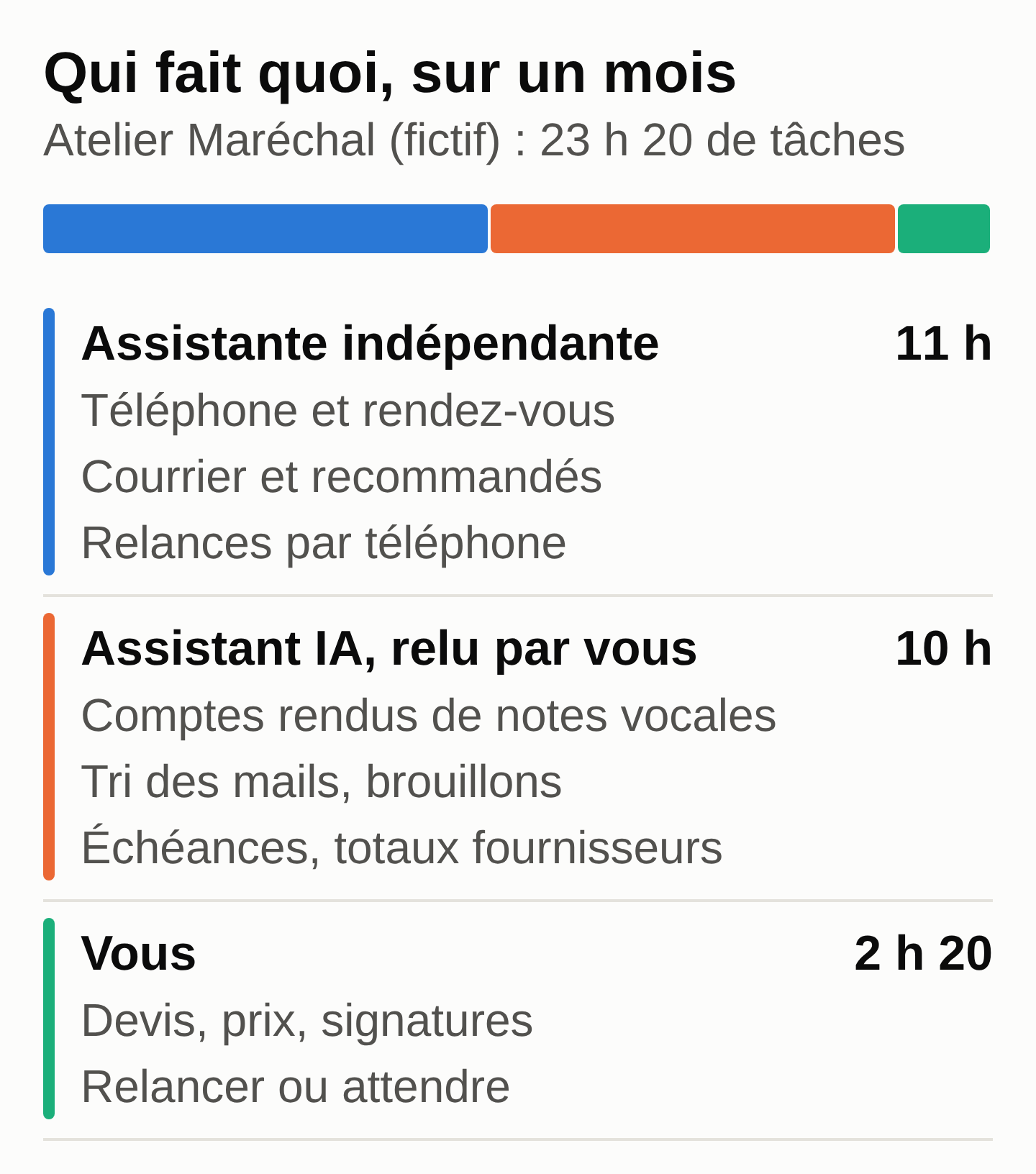
admin-inventory.csv.The page to copy (task-split.md (zip) in the examples) fits in three lists:
- Freelance assistant, 11 hours per month: phone during jobs, booking appointments, mail and registered letters, phone reminders beyond 30 days overdue.
- AI assistant, with your review: visit reports from your voice notes, email sorting, draft reminders, deadline tracking, supplier total checks.
- You: quotes, prices, signatures, and the choice to chase or to wait.
Human check: recount the minutes in the spreadsheet, since a model can add up wrong. Check that no duration has changed.
Common mistake: the AI files “call clients more than 30 days overdue” on the AI side, because it sees the word overdue. Reply: “The phone always goes to the assistant. Reclassify and redo the totals.”
Briefing a human or an AI assistant with one template
A good brief works for both. Copy this outline (brief-template.md (zip) also contains a filled-in example) and fill it in once per task.
1. Context: who you are, your clients, the tone to use.
2. Task: what has to be produced, in one sentence.
3. Inputs: where to find the information (file, folder, voice note).
4. Expected result: format, length, an example if you have one.
5. Rules: what never goes out without your approval, what is never promised.
6. Deadline and frequency.
7. When in doubt: who to alert, and how.
8. Access: which tools, with which account (never your password).
9. Budget and control: a maximum number of hours for
   the assistant; for the AI assistant, who reviews and how quickly.
An example with the 11 p.m. voice note
Tool: your AI assistant’s mobile app, or the transcript pasted into a conversation. Input: voice-note-transcript.txt, a fictional note recorded on Monday, September 28, 2026, at 11:04 p.m.
Steps:
- Paste the prompt below, which follows the brief.
- Right after it, dictate the note or paste its transcript.
- Reread the three blocks, correct them, then send the email yourself.
- Schedule the reminder for Monday, October 5, in your calendar or as a scheduled task for the AI assistant.
Prompt to copy:
Context: I run Atelier Maréchal, a 4-person carpentry shop.
My clients are private individuals and retailers. Tone: polite, direct,
formal.
Task: from my voice note below, prepare three blocks.
1. A visit report in 5 lines at most.
2. A draft email to the Peeters family announcing that the job
   is postponed. Give no reason other than the one in my note.
3. The list of actions: action | who (me, assistant or AI assistant)
   | deadline as a full date. A phone call goes to the assistant.
   A price or a quote goes to me. An email to a client: drafted by
   the AI assistant, sent by me after review.
Rules: don't invent any price, lead time or measurement. If a piece of
information is missing, write "to be confirmed". It is Monday, September 28, 2026,
in the evening: "tomorrow" means Tuesday, September 29, 2026, and a day
mentioned without a date means the next one coming. "Remind me" means
a reminder for me, handed to the AI assistant, not a call to make.
Nothing goes out without my review.

Voice note:
[paste the transcript here]
Expected result (the wording will vary):
Visit report
- Mrs. Janssens: measuring done, L-shaped kitchen, 3.20 m by 2.80 m.
- Solid oak, no lacquer. Quote expected before Friday, October 2, 2026.
- Boisdor: panel delivery running late, call back.
- Peeters job postponed from Monday, October 5 to Monday, October 12, 2026.
- Van insurance: reminder on Monday, October 5, 2026, in the morning.

Subject: Start of your job moved to October 12

Dear Mr. and Mrs. Peeters,
Your job will start on Monday, October 12, 2026 instead of
Monday, October 5, because of a delay in the delivery of panels
from our supplier. Please accept our apologies for
this change.
Kind regards,
Atelier Maréchal

Actions
- Janssens kitchen quote | me | before Friday, October 2, 2026
- Call Boisdor back (panel delivery) | assistant | Tuesday, September 29, 2026
- Van insurance reminder | AI assistant | Monday, October 5, 2026, morning
- Postponement email to the Peeters family | AI assistant (draft), me (sending) | Tuesday, September 29, 2026
Human check: verify the dates (October 5 and October 12, 2026 do fall on a Monday), the measurements (3.20 m by 2.80 m) and that nothing was added, such as a promised delivery date or a detail the note does not give (it does not say the Peeters job is a kitchen).
Common mistake: the AI puts “Monday morning” on the same day, reads “remind me” as a call to make, or assigns itself the job of sending the email. The prompt’s rules on days, reminders and emails prevent these slips. Delete any time of day you did not say.
The same brief, on the assistant’s side, fits in one message: “Call Boisdor on Tuesday about the late panel delivery. Goal: a firm date. Budget: 15 minutes. If the date is later than October 9, let me know before I write to the Peeters family.”
A complete case with invoice reminders handled by both
Here, the AI prepares, the assistant calls, and you decide.
Tools: the export from your invoicing software, your AI assistant, then the phone. Input: open-invoices.csv, six fictional invoices as of September 28, 2026.
Steps:
- Export your open invoices: number, client, due date, amount, status. The name of a private client is still personal data, even replaced with a code: until the tool is covered by a contract (point 5), practice on the fictional file.
- Paste the prompt and the export into the AI assistant.
- Recalculate the days overdue and the total in the spreadsheet.
- Pass the list of calls to the assistant. Reread the emails and send them yourself.
Prompt to copy:
Today is September 28, 2026. Here is the export of my invoices
(semicolon-separated CSV, amounts including VAT in euros).
1. Set aside paid invoices and those whose due date has not passed.
2. For each overdue invoice, calculate the number of days since
   the "due_date" column (not since the invoice date).
3. Sort them: more than 30 days = "call by the assistant + email";
   30 days or less = "reminder email".
4. Return the list: number, client, amount, days overdue, action,
   then the total overdue.
5. Write a courteous draft reminder email for each overdue
   invoice, with no penalty or threat.
Don't invent any invoice and don't change any amount.

[paste the content of open-invoices.csv here]
Expected result:
F-2026-071  Boulangerie Lemaire     €1,850.00  57 d  call + email
F-2026-078  Cabinet Dufour            €640.00  39 d  call + email
F-2026-083  Peeters family          €3,200.00  19 d  reminder email
F-2026-090  Résidence Les Tilleuls    €980.00   1 d  reminder email
Total overdue: €6,670.00
Set aside: F-2026-085 (paid), F-2026-094 (due October 15, 2026)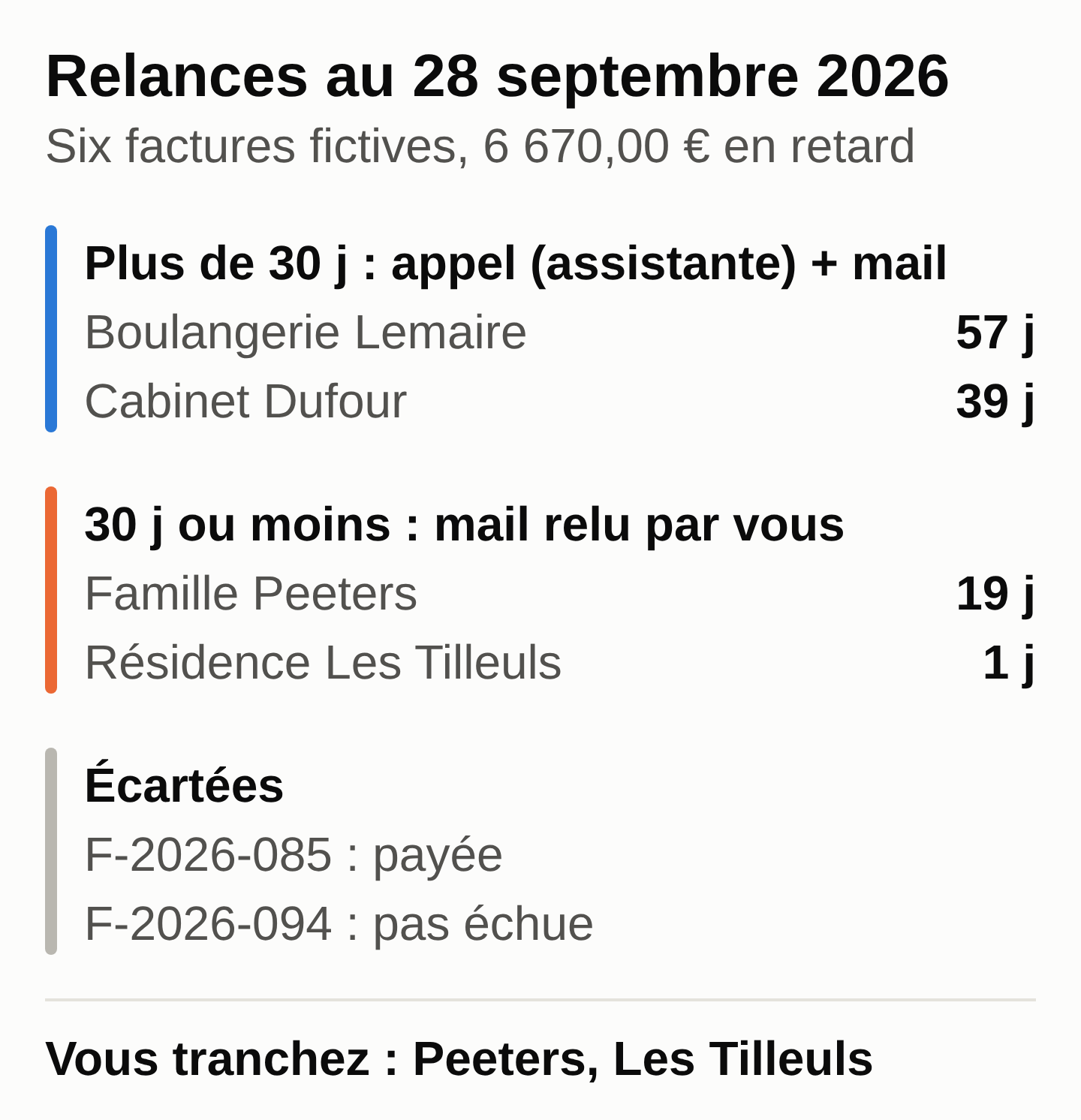
open-invoices.csv, with delays counted from the due date.Human check: recalculate the days with a spreadsheet formula (today’s date minus due date) and compare the total, €6,670.00.
Then use your judgment. The Peeters family owes a €3,200 deposit, and this week you are telling them the job is postponed: sending both emails together would be clumsy. Résidence Les Tilleuls is only one day late, so a reminder can wait a week. Both decisions are yours.
Common mistake: the model counts the paid invoice, or calculates the delay from the invoice date. Reply: “Remove the paid invoices and calculate from the due_date column.”
The brief for the assistant: “Call Boulangerie Lemaire (F-2026-071, €1,850.00, 57 days) and Cabinet Dufour (F-2026-078, €640.00, 39 days). Goal: a payment date. Budget: 30 minutes. No payment plan without my approval.”
Five questions before you choose
- How many of your hours need the phone or paper? If that is most of them, start with an assistant.
- Do your tasks come in at night, in a jumble, as notes? An AI assistant puts them in shape, and you review.
- Who reviews what goes out to your clients, and when?
- Which data are you handing over, and under which contract?
- What volume? The packages mentioned above start at 5 hours (1001secretaires) or 10 hours per month (Marie Trekker): below that, pay by the hour; above it, compare packages.
Checklist for your next work session
- Start the two-week inventory, using
admin-inventory.csvas a model. - Ask two or three assistants for quotes, excluding and including VAT, with the billing method.
- Replay the three examples with the files provided. Before you put client data into them, check the tool’s contract (point 5 above).
- Write a brief for each task with the outline above.
- Set the rule: nothing goes to a client unless a person has read it.
For a first step-by-step task with an AI assistant, start from the guide using AI in your profession. If you are a consultant, the guide for consultants and freelancers prepares an invoice from a time log. Before connecting an agent to your tools, read what to prepare before installing an AI agent in a small business.
Handing the AI part to someone else
If the “AI assistant” column appeals to you but you do not want to set up the connections, access rights and review rules yourself, MACCUS sets up a personal assistant in Telegram: text, voice notes, documents and images, in French, English or Dutch. Connections to your tools (calendar, Drive, email, ERP) are assessed case by case. It does not make phone calls: for the phone and the mail, a freelance assistant is still the right answer. To talk it through from your own task split, see the MACCUS AI assistant.