
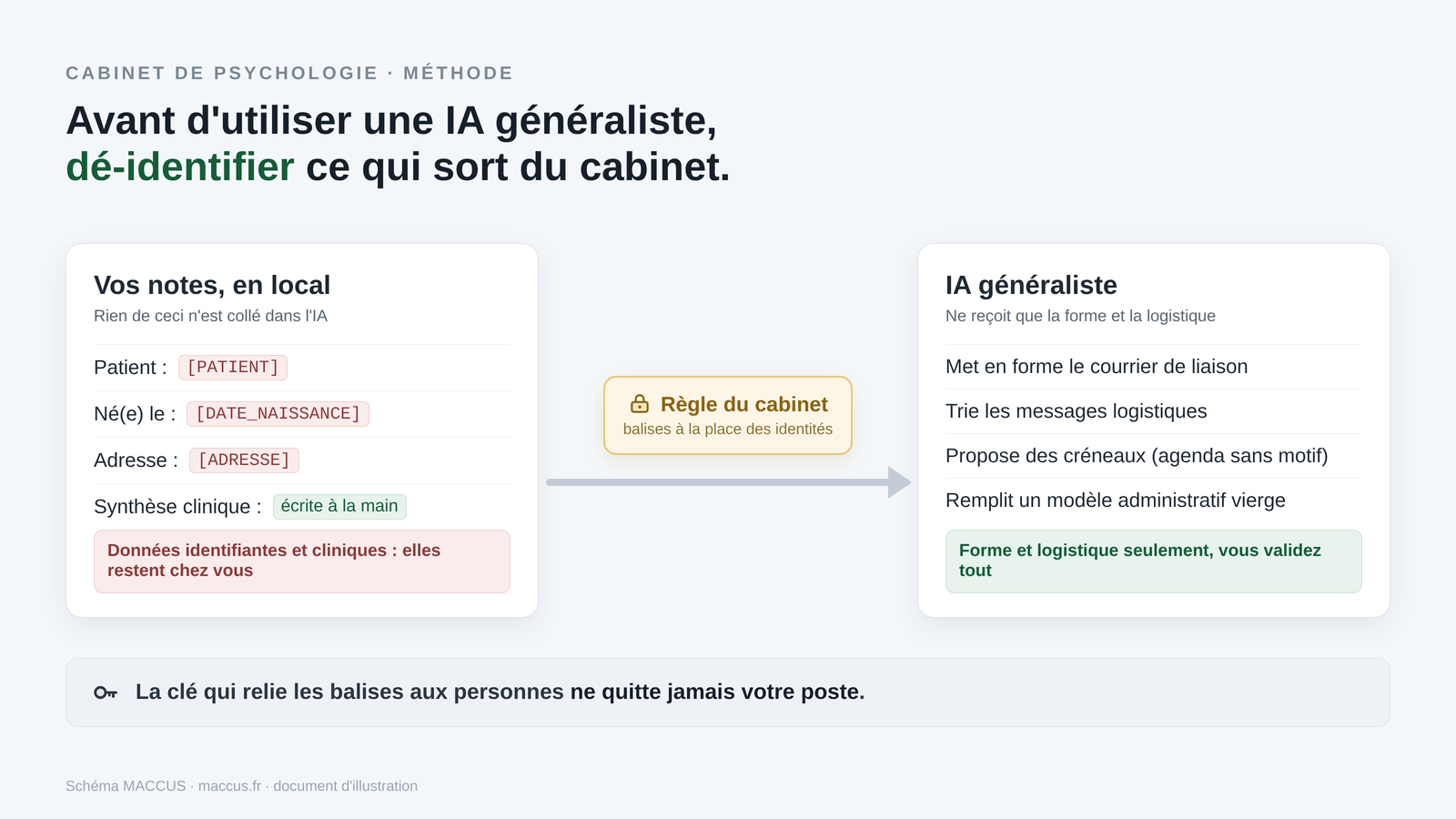
You spend time on tasks that have nothing clinical about them: letters to the patient’s GP, answers to logistics requests, offering appointment slots, preparing paperwork for the insurer or the health insurance fund. A general-purpose AI can help you with these tasks, on one condition that governs everything else: no identifiable health data may leave your practice for a consumer tool.
This article gives you three tasks to carry out today, with fictional examples, prompts to copy, an expected result and a human check at every step. You come away with a repeatable method you can test today.
The examples are set in France and Belgium. The rules differ by country, so they are pointed out each time.
The three deliverables
- A referral letter to the patient’s GP, formatted from sample notes, with the clinical summary written by you.
- A sorted set of fictional messages, with draft logistics replies ready to review.
- Three appointment slot suggestions from a fictional calendar with no reasons for visits, and a draft of a blank administrative document.
What you need
- An account on a consumer AI assistant: ChatGPT (OpenAI), Claude (Anthropic), Gemini (Google), Le Chat (Mistral) or Microsoft 365 Copilot. A free account may be enough for these fictional files. Project features, connectors and their limits depend on the product and the plan, so check what’s available in your account.
- The fictional sample files provided below. All the exercises use these made-up files, never real patient data.
- The underlying rule, explained just after: here, a consumer AI only receives fictional data. Using it on real data is a separate project, governed separately.
Sample files (fictional, to copy)
These four files are made up. None contains real data. Expand them to copy their content, or create your own on the same model.
notes-liaison.txt
Notes for a referral letter (fictional example, no real data)
The square brackets are placeholders. The AI must NEVER fill them in.
You replace the placeholders yourself, locally, AFTER generation, including
the clinical summary, which you write in your own hand.

Recipient          : Dr [DOCTOR], GP
Patient            : [PATIENT] (initials), age [AGE]
Seen since         : [START_DATE], [NB] sessions held
Patient consent    : yes, obtained in session
Purpose of letter  : share a summary and request a medical opinion

Clinical content to share : [CLINICAL_SUMMARY]
  This block stays empty here. You write it locally; it never goes through the AI.

Request to the doctor : [REQUEST_TO_DOCTOR]
Desired register      : collegial, factual, no intimate detail that isn't useful for care.
messages-patients.csv
id,date,sender,subject,message
1,2026-09-10,C.D.,Reschedule,"Hello, I need to move my Thursday appointment, something came up at work. Is another slot possible next week?"
2,2026-09-10,E.F.,Certificate,"Could you send me the certificate for the September 2 session again for my insurer? Thank you."
3,2026-09-11,G.H.,Time,"Is my next session at 2 p.m. or 3 p.m.? I can't find your message anymore."
4,2026-09-11,I.J.,Difficult,"I'm not doing well at all these days, I don't know if I can hold on until the appointment."
5,2026-09-11,K.L.,Payment,"Hello, did you receive the payment for the last session? I didn't get a confirmation."
agenda-extrait.csv
date,day,time,initials,status
2026-09-29,Tuesday,09:00,M.R.,follow-up
2026-09-29,Tuesday,14:00,,free
2026-09-29,Tuesday,15:00,P.S.,follow-up
2026-09-30,Wednesday,11:00,,free
2026-09-30,Wednesday,14:00,,free
2026-09-30,Wednesday,16:00,,free
2026-10-01,Thursday,09:00,R.T.,follow-up
2026-10-01,Thursday,10:00,,free
2026-10-02,Friday,14:00,T.V.,follow-up
2026-10-03,Saturday,11:00,,free
gabarit-attestation.txt
Certificate / administrative document template (BLANK TEMPLATE, fictional)
A template is for preparing a draft. It doesn't replace your signature,
the validation of codes, or the rules of your insurer or fund.

[PRACTICE HEADER: name, psychologist title, registration/visa number,
 address, company number (BE) or professional ID (FR)]

Subject: administrative document for a session (draft)

Patient (initials)         : [INITIALS]
Session date               : [DATE]
Type of service            : [TYPE]
Amount                     : [AMOUNT] EUR
Payment method             : [PAYMENT]

Belgium block (INAMI first-line network, if applicable)
  Pseudocode               : [PSEUDOCODE]
  Mental health network    : [NETWORK]

France block (Mon soutien psy program, if applicable)
  Type of session          : [ASSESSMENT_OR_FOLLOW_UP]
  Care form                : [CARE_FORM_REFERENCE]

Issued on: [TODAY]
Practitioner's signature: ______________________________
The rule that makes everything else possible
Data about a person’s mental health is sensitive data under Article 9 of the GDPR. Processing it is prohibited by default, unless there is a legal basis and consent or a regulated care purpose. That also covers what you paste into a chat window.
Replacing a name with initials isn’t anonymization. It’s pseudonymization. The CNIL and the European Data Protection Board point out that the two concepts are different: as long as a key can link the information to the person, the data remains personal and remains subject to the GDPR. A detailed clinical account is almost impossible to truly anonymize, because the contextual details are often enough to identify someone.
The consequence for this article: all the exercises use fictional files. You never paste a real name, a real reason for consultation or a real file into a consumer AI. Three habits make sure of it:
- Fictional data. The files provided are made up. To create another exercise, invent a case from scratch, without reusing a real file. A calendar, initials or a simple logistics message can already be personal data: removing the names isn’t enough.
- Placeholders kept. The information in square brackets,
[PATIENT],[DATE_OF_BIRTH],[ADDRESS],[CLINICAL_SUMMARY], stays as placeholders. The AI doesn’t fill them in; you do it locally, once you have the text back. - Account settings. Turn off training on your data when the option exists. It helps, but it doesn’t turn a consumer account into a tool for health data.
What these have in common: here, the AI works on fictional examples, on form and logistics, and never on a real clinical file.
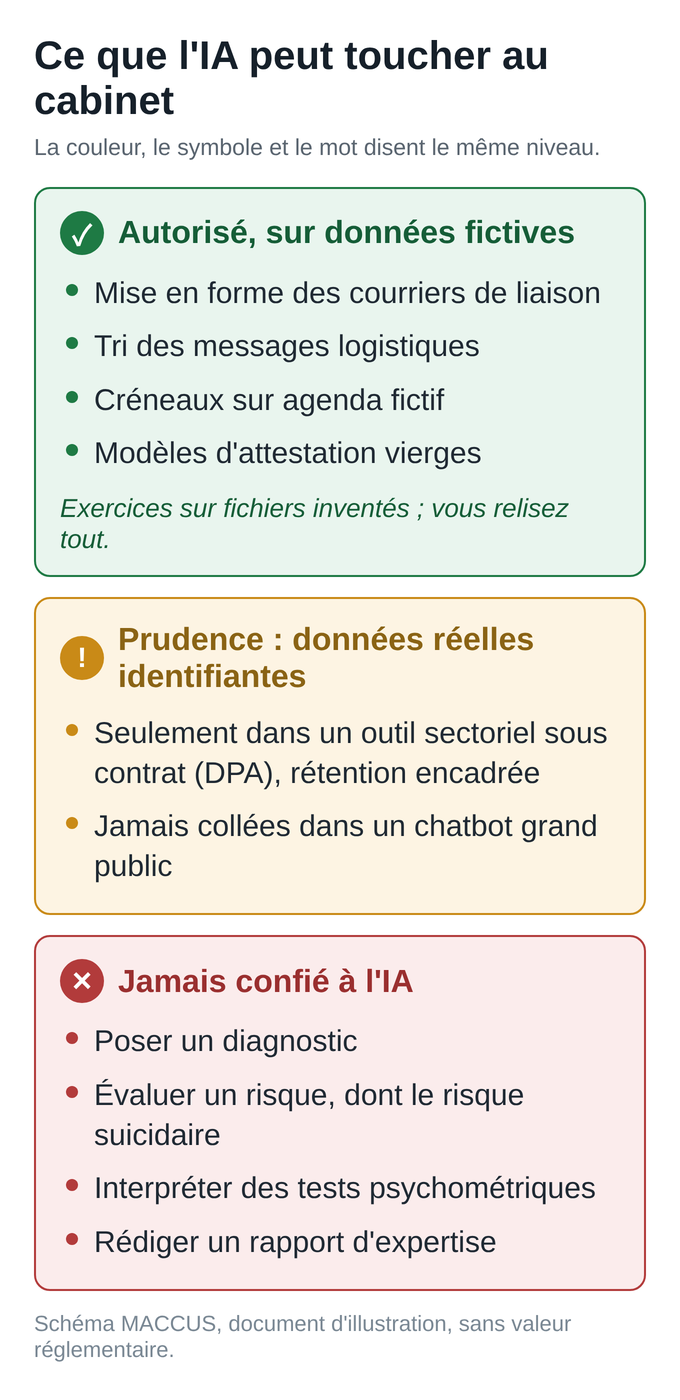
And for real data? That’s a separate project. Using AI on real patient data requires an assessment specific to your practice: legal basis, data minimization, a tool whose contract covers processing on your behalf (the DPA in Europe), appropriate permissions and retention rules to check. A locally installed model keeps the notes from leaving the practice, but it doesn’t exempt you from that assessment.
A DPA, a “no training” switch, simply removing names or a vendor being French: none of these is enough on its own. Until that assessment is done, stick to fictional examples.
Format a referral letter to the GP (task 1)
This is the simplest task, with no technical connection at all. You copy, you paste, you review. One point governs everything else: the AI formats the letter, and it doesn’t write the clinical part. The clinical summary stays with you. You write it by hand in your word processor, and it never goes through the assistant.
App: any assistant from the list above.
Safe input: the notes-liaison.txt file provided. It contains the administrative outline (recipient, initials, dates, patient consent, purpose) and a [CLINICAL_SUMMARY] placeholder left empty.
Steps:
- Open the assistant in a fresh conversation.
- Paste the prompt below, then the sample notes.
- Read the formatted letter. Check the tone and that all the placeholders are still there.
- Copy the text into your local word processor. Replace the placeholders with the real information and write the clinical summary yourself in place of
[CLINICAL_SUMMARY]. Sign it.
Prompt to copy:
You are my writing assistant. From my notes, write the
structure of a collegial referral letter to a GP:
salutation, an opening sentence introducing me as the patient's
psychologist, mention of the patient's consent, a transition to the summary,
the request, and a final collegial closing.

Strict constraints:
- leave all the placeholders in square brackets as they are, including
  [CLINICAL_SUMMARY]: write no clinical content, no symptom,
  no history, no interpretation
- don't fill in any missing information, don't invent anything
- plain, collegial tone

My notes:
[paste the content of notes-liaison.txt here]
Expected result (excerpt):
Dear Dr. [DOCTOR],

I am writing to you as the psychologist following your patient,
[PATIENT], age [AGE], whom I have been seeing since
[START_DATE] ([NB] sessions). The patient has consented to this
communication.

Please find below a summary of this follow-up:
[CLINICAL_SUMMARY]

I would welcome your opinion regarding [REQUEST_TO_DOCTOR].

I remain available for any further discussion.

With collegial regards,
[SIGNATURE]
Human check: make sure all the placeholders are still there, especially [CLINICAL_SUMMARY]. You write the clinical content, locally. You alone remain responsible for the letter.
Common error and fix: the AI fills in a placeholder or writes a clinical summary on its own. Reject that text, restate the instruction “leave [CLINICAL_SUMMARY] empty, don’t invent any clinical content,” and run it again. If it happens again, remove everything from your notes that isn’t strictly administrative.
Sort messages and prepare drafts (task 2)
The goal is to clear the bulk of the inbox without ever sending anything automatically, and to spot what needs to come back to you first.
App: the same assistant. Safe input: the messages-patients.csv file, a set of fictional messages (senders reduced to initials) that mixes logistics requests with a message of distress. It’s there to show how to spot and escalate a sensitive message by hand, and doesn’t represent a real inbox.
Steps:
- Open a fresh conversation and paste the prompt.
- Paste the content of the
messages-patients.csvfile. - Read all the messages yourself, then use the table to prioritize. The sorting helps you put things in order and never filters your inbox: you see every message.
- For the logistics drafts, review, adjust, and then you alone click send.
Prompt to copy:
You are my administrative assistant. Here is an excerpt of fictional messages
(initials only). Do two things:

1) A sorting table with the columns: id, category (reschedule, certificate,
   time, payment, for me to handle), priority (high, normal).
2) For the logistics messages only, a short, polite draft reply,
   in a formal tone. Do NOT write a reply to a message that expresses
   distress or an emergency: mark it "for me to handle" with high priority
   and don't make up any advice.

If you're unsure about a message's category, classify it "for me to
handle." Don't make any medical decision. Don't send anything.

Messages:
[paste the content of messages-patients.csv here]
Expected result (excerpt):
Sorting table
id | category           | priority
1  | reschedule         | normal
2  | certificate        | normal
3  | time               | normal
4  | for me to handle   | high
5  | payment            | normal

Drafts (logistics only)
id 1: "Hello, no problem moving it. I can offer [SLOT_1] or
       [SLOT_2] next week, let me know which works for you."
id 3: "Hello, your next session is on [DATE] at [TIME]. See you
       soon."
id 4: no draft. For you to handle first.
Human check: message 4 expresses distress. It must never get an automatic reply. You handle it yourself, following your usual risk management framework.
This is an absolute rule: assessing a risk is not a task for an AI. Never leave it to the AI alone to decide what is urgent. A distress message wrongly filed under “reschedule” gets caught because you go through the whole list yourself.
Common error and fix: the assistant writes a “reassuring” reply to the sensitive message anyway. Rephrase the prompt to explicitly forbid any reply to distress messages, and always check that row of the table first.
Suggest slots and prepare an administrative document (task 3)
This is the flow many practitioners are after: at the end of a session, the assistant reads the calendar, suggests free slots in the week you have in mind, then prepares the administrative document. Here is what can be done today, from the simplest to the most technical, and what can’t.
Option A, with no connector, by copy and paste (recommended to start)
App: the same assistant. Safe input: the agenda-extrait.csv file, an export that only shows the date, time, initials and the status “free” or “follow-up.” No reasons for visits.
Steps:
- Use the sample file
agenda-extrait.csvprovided above. It’s fictional and contains no reason for visit and no full name. - Paste the prompt and the excerpt.
- Read the three suggested slots. Choose the one to keep; entering it in the calendar remains a manual step on your part.
- Go on to preparing the document (see below).
Prompt to copy:
Here is a fictional calendar excerpt (initials only, no reasons for visits). You
see patient A.B. in the afternoon and you've already chosen the week of
Monday, September 28, 2026. Suggest three FREE afternoon slots
that week. Give the date, the day and the time. Don't create any
appointment, only suggest.

Calendar:
[paste the content of agenda-extrait.csv here]
Expected result:
Three free afternoon slots, week of Monday, September 28, 2026:
1. Tuesday, September 29, 2:00 p.m.
2. Wednesday, September 30, 2:00 p.m.
3. Wednesday, September 30, 4:00 p.m.
Human check: these three slots do match the afternoon “free” rows in the excerpt. If the AI suggests a morning time or a slot that’s already taken, the excerpt was ambiguous or the AI “filled” a gap. Correct it by asking it to only suggest rows with the “free” status.
Preparing the administrative document
App: the same assistant. Safe input: the gabarit-attestation.txt file, a blank template with placeholders.
Prompt to copy:
Here is a blank template for a session administrative document and some
fictional data. Fill in only the fields in square brackets using the
data provided. Don't invent any code, number or amount. If a
piece of data is missing, leave the placeholder. This is a draft, not a document
valid for submission.

Data: initials A.B.; date 2026-09-15; type "follow-up session";
amount 50; payment "paid in session."

Template:
[paste the content of gabarit-attestation.txt here]
Expected result (excerpt):
Patient (initials) : A.B.
Session date       : 2026-09-15
Type of service    : follow-up session
Amount             : 50 EUR
Payment method     : paid in session
Pseudocode         : [PSEUDOCODE]        (for you to complete)
Care form          : [CARE_FORM_REFERENCE]  (for you to complete)
Signature          : ______________________
Human check: this is where compliance is decided, and it’s entirely up to you.
- In France, under the Mon soutien psy program, a session costs 50 euros, with no extra fees, reimbursed 60% by the national health insurance and 40% by the supplementary insurer, up to 12 sessions per calendar year per patient. The patient usually pays for the session and is then reimbursed, except where direct billing (tiers payant) applies, which is reserved for certain situations (complémentaire santé solidaire, AME, ALD, workplace accident, pregnancy from the 6th month). You hand over a care form. Charging more than the agreed fee gets the form rejected. Check the exact reference of the current form on ameli.fr.
- In Belgium, for INAMI-agreed first-line psychological care, billing goes through the mental health networks and specific pseudocodes. Patients under 24 pay nothing. For adults, the first individual session is free, then a co-payment applies, around 11 euros per session, or 4 euros for those entitled to increased reimbursement. Double-check these amounts with your health fund and on inami.fgov.be. A coding error gets the document rejected. Sector-specific INAMI billing software, such as easyPsy, handles this coding far better than a general-purpose AI.
The AI prepares a readable draft. It certifies nothing and signs nothing, and its output is never valid for submission without your approval.
Option B, with a connector (more powerful, more technical)
Some assistants can read and write to a connected calendar, through an official connector or the MCP protocol linked to a router such as Zapier. In practice:
- Reading a connected calendar is generally available.
- Writing an appointment, or sending a document or an email, depends on the provider, the plan and the admin settings. It’s often turned off by default, or limited to a shared calendar rather than your personal one. Don’t count on it until you’ve tested it in your account.
- Safety rule: any outgoing action (creating an appointment, sending a document) must go through an approval step where you confirm before it runs. Treat this confirmation as mandatory in your organization, even when the tool doesn’t require it.
What the exercise covers and where it stops
In this copy-and-paste exercise, nothing happens on its own: you start each step. Running an assistant on a connected calendar, with scheduled tasks and automatic writing, is possible, but it requires connectors, permissions and configuration.
That’s a separate project, described below. In every case, a document produced here remains a draft: validating the codes, signing and submitting to the insurer or the fund are human acts.
Save your instructions in a reusable project
Instead of copying your rules every time, save them once in a “project”: Claude Projects, ChatGPT projects or Gemini Gems. A project keeps reusable instructions and reference documents for all your related conversations.
A project doesn’t turn into an autonomous system on its own. It’s a working framework that you reopen and restart each time: it keeps your instructions and reference documents, but it doesn’t act on its own and doesn’t connect to anything unless you’ve configured it.
Project instruction to copy:
Role: administrative assistant for a psychology practice. Language: English,
formal tone.

Data rules (mandatory):
- use only the fictional files from this exercise or blank
  templates; refuse real patient data, even pseudonymized
- never a full name, reason for consultation, diagnosis or identifying
  clinical content
- use only initials or an ID; keep the placeholders
  in square brackets as they are
- invent nothing; if a piece of data is missing, leave the placeholder

Allowed scope: referral letters, sorting logistics messages,
slot suggestions, filling in blank administrative templates.

Prohibited: diagnosis, risk assessment, interpreting tests,
expert reports, replying to a distress message.

Output: suggest, never send or create an appointment without my approval.
This project stays limited to exercises on fictional data. Using it on real data requires the assessment described above.
Choosing a model for the task
Four providers cover most of a practice’s needs: OpenAI (ChatGPT), Anthropic (Claude), Google (Gemini, built into Workspace) and Mistral (Le Chat, a French company). If your practice works in Outlook and OneDrive, Microsoft 365 Copilot is a natural addition.
The choice comes down to two families:
- A fast, inexpensive model, for simple and repetitive tasks: sorting messages, short rephrasing, extracting a field. There’s no point paying for a reasoning model for that.
- A reasoning model, for tasks that call for nuance or a consistency check: a collegial letter, a summary, checking a table. It’s slower and more expensive. Don’t assume it “understands better”: test both families on the same task, with the same fictional file, and keep the one whose output passes your check.
Also tell these often-confused terms apart: the model is the engine; the consumer app (ChatGPT, Le Chat) is the interface; the subscription gives access to certain features; the API is for custom integrations; the connector links the AI to a piece of software; the automation engine (Zapier, Make, n8n) runs sequences of steps.
On data residency, no consumer interface on its own guarantees storage and computing in Europe. A vendor being European, like Mistral, isn’t proof of that either: the storage and processing region depends on the product, the plan, the region chosen and the contract.
Enterprise offers (Mistral, Claude through AWS Bedrock in a European region, the data boundaries of Google Workspace or Microsoft 365) can offer processing in the EU, but check the region, the categories of data processed and the contractual commitments for your specific case. None of them on its own makes a clinical file compliant: that takes a DPA, data minimization, human approval and an assessment specific to your profession.
Model names and prices change quickly. We keep an up-to-date reference page, the guide to models and agents, and you can check service status and pricing on the official pages: status.openai.com, status.anthropic.com, status.cloud.google.com, and each vendor’s pricing page.
What a coordinator with subagents really is
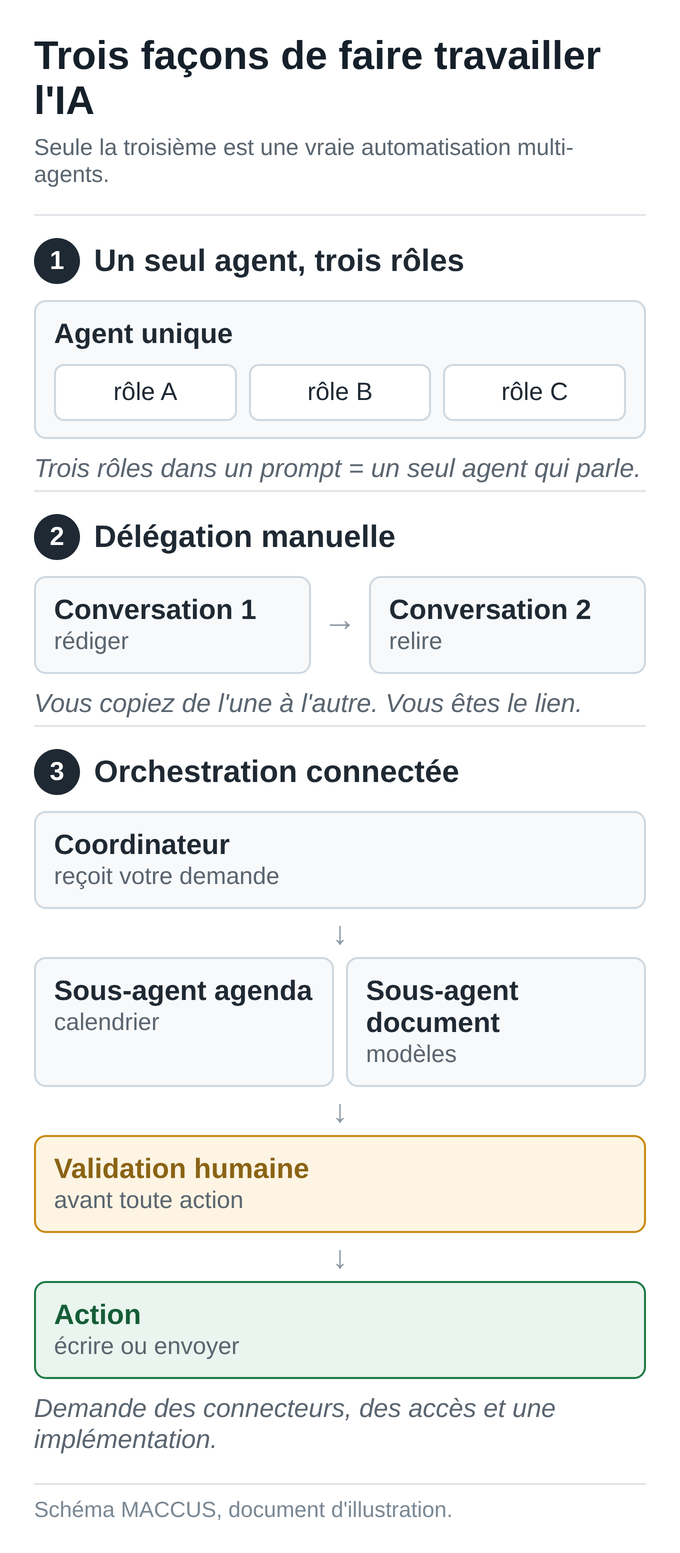
You often hear that you just need to “give the AI three roles” to get a team of agents. That’s wrong, and the confusion is costly.
- Three roles in a single prompt are still one agent talking. It’s useful, but it isn’t delegation.
- Copying a result from one conversation to another is manual delegation: you’re the link.
- A real “coordinator and subagents” system requires connected tools, authorized access and a technical setup. A consumer project doesn’t do it on its own.
A manual exercise you can do today, in two steps:
- Conversation 1, the writer: generate the letter from task 1.
- Conversation 2, the reviewer: open a new conversation and paste the letter with this prompt: “You are an ethics and data protection reviewer. Check that no identifying data remains, that the tone is collegial and that there is no unnecessary clinical interpretation. List what needs to be removed.” You apply the corrections.
You’ve just orchestrated two “agents” by hand. The data stays fictional, every handoff from one conversation to the other is manual and nothing is sent, which shows the limit clearly: nothing happened on its own.
The real automated flow for a practice looks like this. A coordinator receives your voice request. A “calendar” subagent, linked to your calendar, suggests and, after your approval, books the appointment. A “document” subagent, linked to your templates, prepares the certificate.
A human approval step comes before any write or send. This setup requires connectors, controlled permissions and implementation work. That is work for a configured service; a consumer account left on its own doesn’t do it.
Your checklist for the next work session
- Do the three tasks on the fictional sample files provided.
- Choose an assistant and a subscription, and check the price in your account.
- Turn off training on your data in the settings, if the option exists.
- Add the project instruction so you don’t have to retype it.
- Note what worked and what failed, to adjust your prompts.
- Before any use on real data, do the assessment described above (legal basis, tool under a DPA contract, minimization, permissions, retention) and choose a suitable sector-specific tool.
Going further
If you want a configured flow, linked to your calendar and your templates, with an approval step before any action, that’s the kind of setup we scope case by case. Connections to a piece of software depend on whether they’re feasible and on your authorizations, and nothing is turned on without your agreement.
We don’t make diagnoses, we don’t sign documents and we don’t guarantee turnkey compliance for health data: that requires an assessment specific to your practice. To discuss it, see the MACCUS assistant, and start by choosing your first task. For a broader healthcare practice, see also AI in a medical practice.