

A local AI is a language model installed on a computer in your office or company. Your letters, contracts and notes are processed on that machine and never go to a provider. As of October 10, 2026, a €1,709 Mac mini (VAT included, 32 GB of memory) runs a mid-size open model for a small team; for bigger models or more people, you need a Mac Studio, a PC with a graphics card or a server.
This guide is for deciding before you buy: the protection each option offers, realistic tasks and limits, a calculator that turns your team and your uses into a machine and a price in euros, then installation, maintenance and four cases by profession.
Local, European cloud or subscription: how much protection each option gives
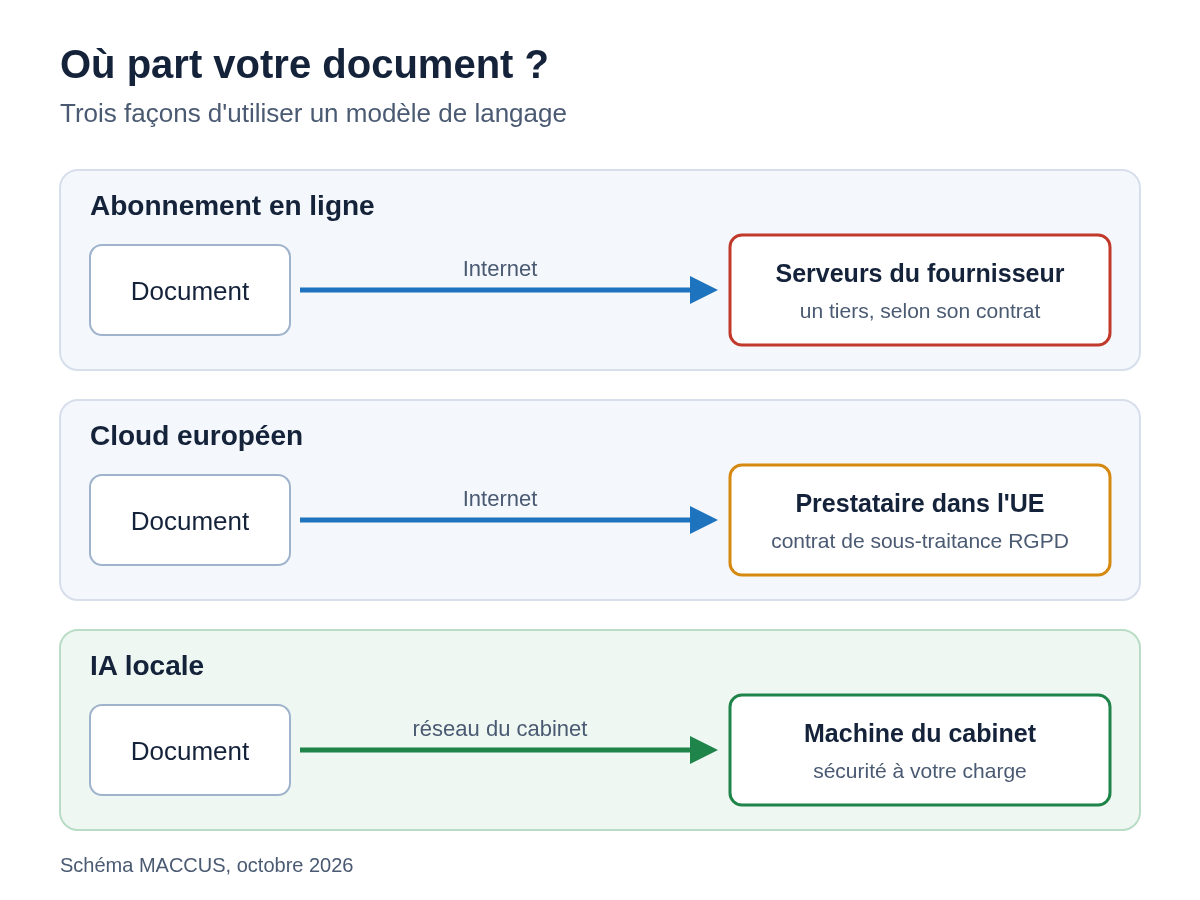
For each of the three options, ask the same question: who, besides you, can read what you send?
With a subscription to an online assistant (ChatGPT, Claude, Gemini, Copilot), every question and every attachment goes to the provider’s servers. The text is processed by a third party, under the terms of its contract and its privacy settings. To compare the plans of one of these services, our guide on which Claude plan to choose goes through the offers.
With a European cloud, the model runs at a provider based in the European Union. For example, Mistral AI, a French company, offers a Team plan at €29.99 per user per month, VAT included, as of October 10, 2026. The data is still processed by a third party: you need a processor agreement under Article 28 of the GDPR and a careful read of the terms.
With a local AI, the model and the documents stay on a machine you own. No one else receives them, as long as you turn off the software’s online features. Ollama, one of the free programs that run these models, also offers “cloud” models that run on its own servers; its documentation explains how to turn them off.
In its Q&A on generative AI (in French), published on July 18, 2024, France’s data protection authority, the CNIL, writes that for personal data or sensitive documents, “it generally seems more appropriate and more secure to favor deploying ‘on-premises’ solutions.” It also acknowledges that the cost of an on-premises setup will often make a hosted system the simpler option, provided it is governed by a processor agreement.
Going local shifts the responsibility without removing it. The GDPR still applies: record of processing activities, data security (Article 32), individuals’ rights. In Belgium, the Data Protection Authority plays the CNIL’s role, under the same regulation. Since February 2, 2025, the EU AI Act has also required deployers to take measures for their staff’s AI literacy (Article 4). Since July 27, 2026, Regulation (EU) 2026/1744 has relaxed that text: the aim is now to “promote the development of AI literacy,” without guaranteeing a specific level for each person. A firm that installs a model on its own Mac for its professional work is a deployer. The machine’s security becomes your job: access, disk encryption, updates, backups.
Tasks to give a local model in 2026
Several open models released in 2025 and 2026 handle everyday office work. Google’s Gemma 4 supports more than 140 languages and reads up to 256,000 tokens per request, which is several hundred pages. Mistral Small 3.2 and Ministral 3 come from a French developer. OpenAI’s gpt-oss models are released under the Apache 2.0 license, which allows commercial use.
Realistic uses for a firm or a small business fall into a few groups:
- drafting a letter or email from your notes, in your tone;
- summarizing a thirty-page file into one page, with the points to check;
- pulling the dates, amounts and parties from a contract into a table;
- sorting incoming emails by type of request;
- reading an invoice or a scanned document, since Gemma 4, Mistral Small 3.2 and Ministral 3 accept images as input;
- answering questions about your own documents, provided you add a document search tool in front of the model.
On each of these tasks, human review stays the rule: the model prepares the first draft, and the decision and the signature remain yours.
Limits to know before you start
A local model doesn’t search the internet by default. It only knows its training data: it doesn’t know last month’s case law or the current rates. Some web search options exist, but they send your queries off the machine, which cancels the point of going local for those requests.
Document length is a setting. Ollama reads 4,096 tokens by default, which is a few pages; a longer document gets cut off until you raise that setting. The calculator below reminds you of the value to enter.
Reading and writing don’t cost the same. NVIDIA’s technical documentation describes two phases: reading the text you provide, which uses computing power, then producing the answer word by word, which is limited by memory bandwidth. A long document can therefore mean a wait before the first word, even on a machine that writes fast, so measure it with your own files.
A local model doesn’t read your email or your business software without integration work. Preparing the data, access and rules is a project in itself, described in our guide to preparing an AI agent for your business. Online assistants use connectors for this, listed in our directory of MCP connectors by business tool.
Size the machine and its cost for your team
The calculator picks a model based on your use (you can force a different one), estimates the memory needed and suggests the cheapest of the seven reference Apple configurations that is enough, with a PC equivalent, an indicative speed and a monthly cost compared with a cloud subscription.
Calculator: hardware and cost of a local AI
Enter your team and how you’ll use it. The calculation runs in your browser: nothing is sent and nothing is stored.
Result
The result appears here once JavaScript is enabled.
An estimate, not a quote. Apple prices including VAT taken from the apple.com/fr configurator, and model sizes taken from ollama.com, on October 10, 2026. Electricity: a ceiling calculated at the maximum power draw stated by Apple. Installation and maintenance time not included.
How the calculator works and what it assumes
The automatic choice picks Gemma 4 26B A4B for the first three uses: it writes fast on a small machine and reads up to 256,000 tokens. For demanding reasoning, it switches to gpt-oss 120B. These are starting points to test on your documents, not a ranking.
The memory needed is the sum of two items. The first is the size of the model file as shown on ollama.com on October 10, 2026, in its default compressed version. To convert pages into tokens, we count about 800 tokens per page of text, an assumption to adjust to your documents. The second is the context memory, which grows with the length of the document and the number of requests handled at the same time. We count it at 0.164 MB per token: that is the formula published by NVIDIA applied to the Mistral Small 3.2 configuration (40 layers, 8 key-value heads of 128 dimensions, 16-bit storage). It is a cautious value for the calculator's other models, except Mistral Medium 3.5: its published configuration (88 layers) gives 0.36 MB per token, the value the calculator uses for that model. Ollama can compress this memory (q8_0 setting), which roughly halves it according to its documentation.
The number of simultaneous requests is your headcount multiplied by the share using the AI at the same moment. The default 20% is an assumption: a firm where everyone runs their summaries at 9 a.m. should raise that figure. On a Mac, we only count three quarters of the memory for the model, with the rest going to macOS and your apps.
Writing speed depends mainly on memory bandwidth, which Apple publishes for each chip (for the 18-core M5 Pro, we use the 307 GB/s Apple publishes for that chip). For each word it produces, the machine rereads the model's active parameters. The calculator therefore divides the bandwidth by the size of the active parameters, then applies an efficiency between 35% and 70%, which is why it gives a range rather than a single figure. "Mixture-of-experts" models such as gpt-oss or Gemma 4 26B A4B activate only a small part of their parameters for each word, so they write much faster than a dense model of the same size.
Electricity is a ceiling: the maximum continuous power draw stated by Apple (155 W for the Mac mini, 480 W for the Mac Studio), multiplied by the hours it is switched on and the price per kWh. The default price is the French regulated rate (EDF's Tarif Bleu) on the Base option, €0.2001 per kWh including VAT for 3 to 6 kVA since August 1, 2026; in Belgium, enter the price from your contract. The monthly cost adds the purchase depreciated over the period you choose. Installation and maintenance time is left out of the calculation; the maintenance section gives an idea of it.
Reference configurations as of October 10, 2026
The following table lists the seven Apple configurations the calculator uses, with 512 GB of storage when Apple offers it. Macs share unified memory between the processor and the graphics chip: a 65 GB model fits entirely in a 128 GB Mac Studio, while NVIDIA's largest GeForce card, the RTX 5090, has 32 GB.
| Configuration | Memory | Bandwidth | Price incl. VAT | Maximum power draw |
|---|---|---|---|---|
| Mac mini M6 (12-core CPU, 12-core GPU), 256 GB | 16 GB | 153 GB/s | €1,049 | 155 W |
| Mac mini M6 (12-core CPU, 12-core GPU), 512 GB | 24 GB | 170 GB/s | €1,489 | 155 W |
| Mac mini M6 (12-core CPU, 12-core GPU), 512 GB | 32 GB | 170 GB/s | €1,709 | 155 W |
| Mac mini M5 Pro (18-core CPU, 20-core GPU), 512 GB | 48 GB | 307 GB/s | €2,879 | 155 W |
| Mac mini M5 Pro (18-core CPU, 20-core GPU), 512 GB | 64 GB | 307 GB/s | €3,319 | 155 W |
| Mac Studio M5 Max (18-core CPU, 40-core GPU), 512 GB | 128 GB | 614 GB/s | €5,859 | 480 W |
| Mac Studio M5 Ultra (30-core CPU, 64-core GPU), 1 TB | 256 GB | 1,200 GB/s | €10,999 | 480 W |
Method: prices taken from the Apple Store France configurator (the 512 GB versions of the Mac mini M5 Pro and the Mac Studio M5 Max are the 1 TB price minus the €330 shown by the configurator), bandwidth and maximum continuous power draw taken from Apple's tech specs, on October 10, 2026. We recheck these figures with every update of the guide, at least once a year.
Apple lists a 512 GB option for the M5 Ultra chip on its store, available at the end of October 2026. It isn't in the calculator because no price has been published yet.
Mac, PC with a graphics card or a dedicated box
On a PC, what counts is the graphics card's memory. To keep it fast, the model and its context memory must fit in it entirely. NVIDIA lists 32 GB of GDDR7 memory on the GeForce RTX 5090 and 96 GB on the RTX PRO 6000 Blackwell professional card, with a bandwidth of 1,792 GB/s for the latter. That bandwidth is higher than the Mac Studio M5 Ultra's (1,200 GB/s). A PC like that is custom-built and priced by quote. We didn't include a graphics card price: enter the one from your quote in the calculator.
Two families of compact boxes also target this market. NVIDIA's DGX Spark has up to 128 GB of unified memory at 273 GB/s, with a 240 W power supply; NVIDIA says it can run models of up to 200 billion parameters. The Framework Desktop, with an AMD Ryzen AI Max processor, comes in versions with 32 to 192 GB of memory. In both cases, compare the stated bandwidth with that of the Macs in the table, since it sets the writing speed.
Seven open models to try
These models can be downloaded for free from the Ollama library.
| Model | Developer | License | Size | Maximum context (tokens) | Parameters |
|---|---|---|---|---|---|
| Ministral 3 8B | Mistral AI | Apache 2.0 | 6 GB | 256,000 | 8 billion |
| gpt-oss 20B | OpenAI | Apache 2.0 | 14 GB | 128,000 | 21 billion, 3.6 billion active |
| Mistral Small 3.2 | Mistral AI | Apache 2.0 | 15 GB | 128,000 | 24 billion |
| Gemma 4 26B A4B | Google DeepMind | Apache 2.0 | 16 GB (QAT) | 256,000 | 25.2 billion, 3.8 billion active |
| Gemma 4 31B | Google DeepMind | Apache 2.0 | 19 GB (QAT) | 256,000 | 30.7 billion |
| gpt-oss 120B | OpenAI | Apache 2.0 | 65 GB | 128,000 | 117 billion, 5.1 billion active |
| Mistral Medium 3.5 | Mistral AI | Modified MIT | 80 GB | 256,000 | 128 billion |
Method: sizes of the compressed versions offered by default in the Ollama library (QAT version for Gemma 4), licenses and parameter counts taken from the model cards published by the developers, on October 10, 2026.
The license matters for a business. Apache 2.0 allows commercial use and modification. Mistral Medium 3.5 uses a modified MIT license, with an exception for companies with very large revenue: read it before you use the model. To choose between several models depending on the task, our guide to choosing your AI model offers a testing method.
Step-by-step installation for non-technical users
For one person on their own computer, installation takes six steps. Do it on a machine you already have before you buy one.
- Check the machine. LM Studio requires a Mac with Apple silicon and macOS 14 or later, with 16 GB of memory recommended; on a Windows PC, 16 GB of memory and a graphics card with at least 4 GB are recommended.
- Download Ollama from ollama.com (a .dmg file on Mac, OllamaSetup.exe on Windows) or LM Studio from lmstudio.ai. Ollama is free, and LM Studio has also been free for business use since July 8, 2025.
- Download a model that fits your memory. With 16 GB, start with Ministral 3 8B (6 GB); with 32 GB, try Gemma 4 26B A4B or Mistral Small 3.2. In a terminal, the command
ollama pull mistral-small3.2downloads the latter. - Turn off the online features. For Ollama, the documentation gives the setting
OLLAMA_NO_CLOUD=1, or the line"disable_ollama_cloud": truein the file~/.ollama/server.json. - Set the context length to match your documents, for example
OLLAMA_CONTEXT_LENGTH=32000for about forty pages. - Test on made-up documents. A sample contract, an invented letter, an example invoice: ten questions you know the answers to, and write down every error.
Plan for 6 to 80 GB of disk space per model (the ~/.ollama/models folder on Mac).
Sharing the machine with the whole team
By default, Ollama only accepts requests from the computer it runs on (address 127.0.0.1, port 11434). To make it reachable from the office's other computers, you have to change that setting, for example with OLLAMA_HOST=0.0.0.0:11434. Any device on the network can then query it, so a separate network, a firewall and an interface with individual accounts become necessary. That is the time to call in an IT professional.
By default, Ollama handles one request at a time per model. The OLLAMA_NUM_PARALLEL setting raises that number, and each parallel request reserves its own context memory: its documentation states that a 2K-token context served to four parallel requests is equivalent to an 8K-token context. The calculator takes this into account.
How much time does maintenance take?
A local AI needs a person in charge, even very part-time, and a few regular tasks.
Software and models change fast. Qwen released its 3.5 series in February 2026, then its first 3.6 models. Update Ollama or LM Studio regularly; a model change, on the other hand, gets retested on your ten reference documents before the team adopts it.
On the machine side: macOS or Windows updates, disk encryption, and backups of conversation histories if your interface keeps them, since they contain the text of your files. Plan for disk space too: three mid-size models quickly take up 50 GB.
Record the processing in your GDPR register, set out in writing what can be submitted to the model, and train the team, in the spirit of Article 4 of the AI Act. A one-hour slot each month to review uses and the errors you've seen prevents bad habits.
Four cases from law, medicine, psychology and accounting
Law firm
France's National Bar Council (CNB) is clear in its practical guide of September 2024: "lawyers must never communicate data covered by professional secrecy to generative artificial intelligence." Its guide "Ethics and artificial intelligence," published in April 2026, recommends pseudonymizing or anonymizing data and mentions closed AI systems developed by firms, which make it possible to work while respecting secrecy. It also lists the security points to check, including when the models are hosted locally.
A local model meets this containment requirement, provided the machine is protected and access is limited to authorized people. The starting tasks are the ones on our page on AI for lawyers: fee reminders, pulling the key data from a contract, a factual timeline of a case, always reviewed. In Belgium, check your bar's recommendations.
Medical practice
In France, the law requires health data hosting (HDS) certification for anyone who hosts health data on behalf of a professional, an institution or a patient (Article L. 1111-8 of the Public Health Code). Under that text, a machine installed in the practice and managed by the doctor personally isn't hosting on behalf of a third party. If a provider manages the machine remotely, have its status checked against that certification. HDS certification is a French rule; in Belgium, the GDPR and medical confidentiality govern the matter.
Start with administrative work, as our page on AI in a medical practice suggests: the practice's information documents, sorting the front desk's messages, analyzing billing rejections. Diagnosis and prescriptions stay outside the tool's scope.
Psychologist in private practice
Session notes are health data under the GDPR, which explicitly covers physical or mental health (Article 4). A local model keeps them from leaving the practice, but the rule of caution still applies: submit only what is necessary, with no name or identifying detail.
Reasonable uses are organizational: a referral letter to the doctor, sorting messages, proposing appointment slots, administrative documents. Our page on AI for psychologists covers these tasks without exposing case files.
Accounting firm
An accounting firm handles its clients' financial and payroll data, often from scanned documents. Models that read images, such as Gemma 4 or Mistral Small 3.2, can extract amounts, dates and VAT numbers from a supplier invoice into a table, to be matched afterward against the original documents. Checking a bank reconciliation and chasing missing documents follow the same principle.
Checks stay human, and they go number by number: each extracted amount is compared with the source document, never with a second model's opinion. The tasks and checks are described on our page on AI for accounting firms.
Before you buy the machine
Write down three specific tasks the local AI must handle. Gather twenty test documents with no real data. Run the calculator with your headcount and your document size, then try a model on a computer you already have: a 16 GB Mac with Apple silicon is enough for Ministral 3 8B. To place these tasks in your profession, our guide to AI by profession gives a starting point for each trade.
A local machine needs installation and follow-up. If your uses don't require the data to stay in the office and you'd rather not manage hardware, the MACCUS AI assistant runs on Telegram, in French, English or Dutch: installation and hosting are taken care of, and it connects to your tools as you need.