

You probably already use a chat AI to write an email or summarize a document. This page goes further. It teaches you three things you can reuse in any line of work: choosing the right model for a given task, testing what the AI produces before you trust it, and understanding what the “agents” everyone talks about really mean.
The three exercises below are done at the keyboard, with fictional documents provided. No connectors, no technical setup, no real data. Allow a little under an hour for all three. By the end, you will have a method you can apply to the profession-specific articles on this site.
The model names cited are valid as of September 11, 2026. The market moves fast: each table links to the official page, where you should check again.
Sample files
These files contain only fictional data (in French).
- Fictional customer email
- Fictional invoice
- Fictional project brief
- Invoice answer key, to open after the exercise
Six words to tell apart first
The confusion almost always comes from the vocabulary. Six terms come up everywhere, and they mean different things.
- The model is the engine that produces the text. Claude Opus 5, gpt-5.6, Gemini 3.x and Mistral Large 3 are models.
- The consumer app is the window where you talk to the model. ChatGPT, Claude, the Gemini app, Le Chat and Copilot are apps. To decide between the first two on office tasks, see our Claude or ChatGPT comparison for small businesses.
- The subscription is the paid plan that unlocks features and sets your usage limits (Free, Plus, Pro, Max, Team, Business, Workspace). For Claude, see which plan to choose between Pro, Max and Team.
- The API is developer access, billed by usage. It is used to plug a model into in-house software, not to chat in a window.
- The connector is the bridge between the AI and software you already use (Gmail, Drive, a CRM, an ERP). It gives the AI permission to read or write somewhere. For Claude, the guide to the Gmail, Google Drive and Calendar connectors shows where to click and which permissions to set.
- The automation runner, often called an agent runner, is what runs a real agent without you: it chains the steps, calls the connectors, and stops for approval. Copilot Studio, Workspace Studio, Zapier, Make, n8n or a managed service play this role.
Remember the hierarchy: a model lives in an app, unlocked by a subscription, possibly linked to your software by connectors, and set in motion by an automation runner.
Choosing a model family
To compare models, you can separate three usage profiles: simple tasks to handle quickly, everyday work, and tasks that need in-depth analysis. This is a simple rule of thumb, to adjust as you test. A short, one-off task with no document and no research is often handled very well by the fast model.
A task that requires reasoning, reading long documents, or that carries real stakes (numbers, a contract, an important client) often justifies the reasoning model. In between, the balanced model covers everyday use. The right choice depends on the task: check on your own tasks rather than going by reputation.
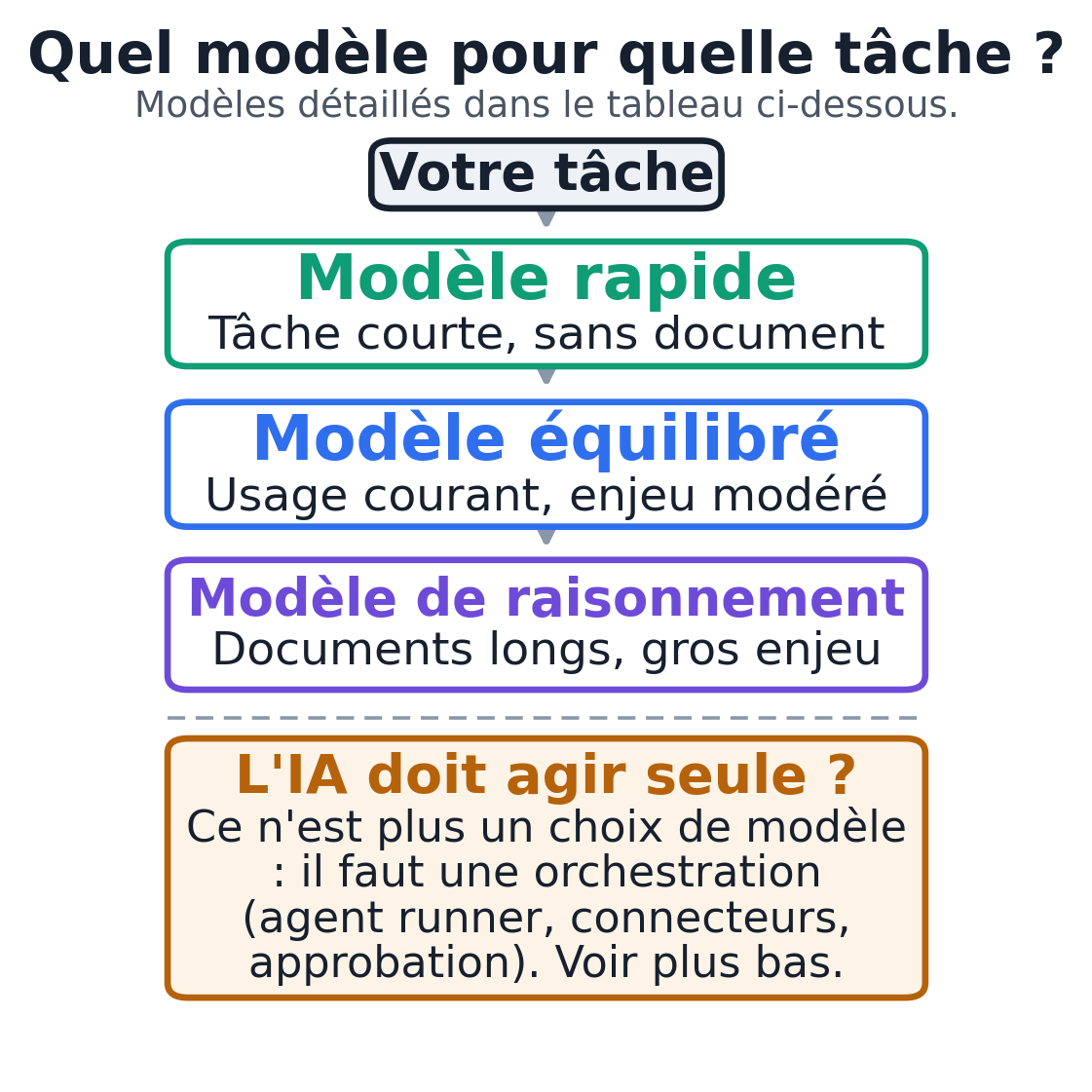
Here are the common models by need, according to the providers’ official pages on September 11, 2026. After that date, Anthropic launched Claude Haiku 5.5 on October 7, 2026, which takes over from Haiku 4.5 as the fast model in its lineup, at a much lower price, and on October 12 Meta introduced Muse Wonder, its new series of AI models, which is not in this table. These are the underlying models. Their exact name in a consumer app’s model picker can differ, and some (such as gpt-5.6-luna) are API identifiers, not labels you will see in ChatGPT. In the app, look for the family (fast, balanced, reasoning) rather than a precise identifier.
| Need | OpenAI | Anthropic | Mistral | |
|---|---|---|---|---|
| Fast, simple, high volume | gpt-5.6-luna | Claude Haiku 4.5 | Gemini Flash-Lite | Mistral Small 4 |
| Balanced everyday use | gpt-5.6-terra | Claude Sonnet 5 | Gemini Flash | Mistral Medium 3.5 |
| Reasoning, documents, high stakes | gpt-5.6-sol or gpt-6-astra | Claude Opus 5 or Fable 5.1 | Gemini 3.1 Pro or 2.5 Pro | Mistral Large 3 |
Microsoft does not expose its own models in consumer Copilot: Copilot mostly relies on OpenAI’s models, inside Word, Excel and Outlook. If your business lives in Microsoft 365, that is where the question comes up. Check what is available in your license. If, on the contrary, you are thinking of leaving Microsoft’s suite, first read our analysis of WordCraft, the Word alternative written with Claude, and its limits.
Two points to watch before you entrust these tools with data. On consumer plans, your conversations can be used to train future models unless you turn the option off by hand; business plans generally exclude this training by default, but check the policy for your product and your plan.
On data residency in Europe, the options depend on the product and the plan. Mistral is a French company that documents European hosting. At OpenAI, eligible plans such as ChatGPT Enterprise or Education offer content storage in Europe, with in-region processing (inference) as an option; storage and processing are two separate things, and residency does not necessarily cover every step or every third-party integration. To keep data on your own premises, open models can also run on a company machine: see our guide to local AI for businesses.
A provider’s nationality proves nothing on its own, and no plan is “GDPR compliant” in itself: check the product, the plan, the contract, the categories of data, the region and the processing terms, and plan an assessment specific to your profession for regulated use.
The up-to-date pages: OpenAI models, Anthropic models, Google models, Mistral models.
Choosing the right model for a task (exercise 1)
Goal: decide for yourself which model a task deserves, instead of taking the first one that comes along. Deliverable: a completed comparison grid and a personal rule.
Prerequisites: an AI app that lets you change models in the picker (a paid plan usually allows it; the free plan often limits the choice). You do not need to know the API identifiers: find, in the menu, the model presented as the fastest and the one presented as the most advanced.
If your app offers only one model, do the exercise on that model and note that the comparison was not possible. The provided file email-client-exemple.txt is a fictional customer email with several requests.
- Open a conversation and choose the model your app presents as the fastest or cheapest (often a name with “mini”, “Flash”, “Haiku” or “Small”; see the first row of the table for the families).
- Paste the prompt below, then the contents of the fictional email.
- Note the answer.
- Open a new conversation, this time choose the model presented as the most advanced or “reasoning” model (often “Pro”, “Opus”, “Thinking” or “Large”; third row of the table), and paste the same prompt and the same email.
- Compare the two answers with the grid given below.
Prompt to copy:
You are a professional's assistant. Here is an email received from a customer.
Do exactly three things, in this order:
1. Rate the urgency in one line (low, medium, high) and justify it in one sentence.
2. List all of the customer's separate requests, as bullet points.
3. Write a short draft reply, polite and formal, that handles
   each request and clearly flags what you cannot decide
   for me.
Do not promise any date or any price. If I am missing information to
reply, say so instead of inventing it.

Customer's email:
<< paste the contents of email-client-exemple.txt here >>
Expected result. The email contains four requests: a guaranteed delivery date, room to negotiate on price, an invoice in the name of the parent company, and a quick decision. A good result finds all four, rates the urgency as “high” because of the deadline on the 30th, and writes a draft that commits to neither a date nor a price.
On a task this short, a good recent fast model often already finds the four requests and avoids committing. Also compare the results on a longer fictional example or one with more constraints. The grid lets you measure the differences on your own tasks.
Checking grid, to fill in for each model: are the four requests listed, is the urgency justified, does the draft avoid any promise of a date or price, is the tone right. Count one point per box.
Human check: always reread the list of requests before the draft. If a request is missing from the list, the draft will be incomplete, whatever the model.
Common mistake and fix: if both models perform the same on your task, keep the faster one; it costs less and answers sooner. The reasoning model is only worth it where it makes a real difference. Your personal rule comes from this measured gap, not from a reputation.
Testing an extraction and reconciling the numbers (exercise 2)
Goal: see for yourself that AI reads fast but sometimes gets things wrong, and learn to cross-check. Deliverable: a checking sheet that catches an invoice error.
Prerequisites: an app with a model that can read a document. The provided file facture-fixture.txt is a fictional invoice. Set aside facture-fixture-valeurs-attendues.txt, which contains the right values and the hidden error. Do not give it to the AI.
- Open a conversation with a balanced or reasoning model.
- Paste the prompt below, then the contents of the fictional invoice.
- Read what the AI returns.
- Recalculate the total yourself from the line items, or ask for the detailed calculation in a second message.
- Compare the recalculated total with the total printed on the invoice.
Prompt to copy:
You are extracting data from an invoice. Return only a table with, for
each line: description, quantity, unit price before VAT, total before VAT. Then,
below it, give the printed subtotal before VAT, the printed VAT and the printed total
including VAT, exactly as they appear on the document. Do not correct anything and
do not add any comment at this stage.

Invoice:
<< paste the contents of facture-fixture.txt here >>
Expected result of the extraction:
Ergonomic chair "Demo"      3   149.00   447.00
Adjustable desk "Demo"      2   320.00   640.00
LED lamp "Demo"             5    39.50   197.50
Printed subtotal before VAT: 1,284.50
Printed VAT 21%            :   269.75
Printed total incl. VAT    : 1,545.25
Reconciliation. Add up the line totals: 447.00 + 640.00 + 197.50 = 1,284.50. VAT at 21% gives 269.75. The correct total is therefore 1,284.50 + 269.75 = 1,554.25. Yet the invoice prints 1,545.25. It is 9.00 short: two digits were swapped. The expected values file confirms this gap.
Human check: the key point of this exercise is to compare the number the AI read with a recalculation, not with another AI’s opinion. An AI can faithfully copy a wrong total. Only the recalculation, or a comparison with a known source, proves anything.
Common mistake and fix: if you ask right away to “check this invoice”, the model may quietly “correct” the total and you will never see the original error. Always keep extraction and checking separate, in two steps, as here.
What is an AI agent, and what do “agent” features really do?
A chat assistant writes text and then stops. An agent receives a mission, plans steps, uses tools, corrects itself and goes all the way to a deliverable. Here, with no promises, is what each product allows today.
OpenAI. ChatGPT’s agent mode runs multi-step research, drives a browser to visit websites, reads your files through connectors (Gmail, Google Drive, GitHub, SharePoint) and can schedule recurring tasks.
Projects group instructions and reference files for one topic. Prerequisites: a paid plan, with some features reserved for team plans. Actions with real impact ask for your confirmation.
Anthropic. Claude offers Projects to isolate a context, connectors and the open MCP protocol to link Claude to other software (Notion, a CRM, an ERP), and Claude Code, an agent that works in developers’ terminals. Prerequisites: a Pro or Max plan; a custom connector requires technical setup. To hand office tasks to Claude’s agent mode, follow the Claude Cowork tutorial.
Google. Gems are custom assistants with saved instructions. Gemini is built into Gmail, Docs, Drive and Calendar in Google Workspace. Workspace Studio builds no-code automations, described in plain language and connected to apps such as Asana or Salesforce. Prerequisites: a suitable Google plan.
Mistral. Le Chat links the AI to your software through connectors (registered MCP servers) and offers a way of working where the agent prepares an action and then waits for your approval before carrying it out, for example before sending a message or changing data. The company is French. Prerequisites: a Le Chat account and admin rights to connect your tools.
Microsoft. Copilot sorts the Outlook inbox, drafts follow-ups and helps manage the calendar in Microsoft 365. Copilot Studio is used to build custom agents. Prerequisites: a Microsoft 365 license and the Copilot add-on. Check what is turned on in your organization.
A useful clarification. Projects and Gems are folders of reusable instructions: they keep your context and your rules, but a folder of instructions does not turn by itself into a multi-agent system that acts in your software.
Memory, scheduled tasks, voice and connectors already exist in several consumer tools. What the exercises on this page leave switched off is access to your real data: everything stays on fictional files. Where a managed service differs is in the connections and permissions decided with you, and in clear responsibility for the result.
Types of AI agents, by the classic definition
The vocabulary of agents comes from artificial intelligence research. Stuart Russell and Peter Norvig’s textbook, Artificial Intelligence: A Modern Approach, describes four types of agents, from the simplest to the most elaborate, then the learning agent, which can improve each of them:
- The simple reflex agent reacts to what it perceives right now, with “if this, then that” rules. Example: a filter that files an email as soon as it contains a given word.
- The model-based reflex agent keeps a representation of what it can no longer see, for example a case’s history, and decides based on that state.
- The goal-based agent chooses its actions according to a goal to reach, like a GPS that calculates a route to an address.
- The utility-based agent compares several ways of reaching the goal and picks the best one by a criterion: the cheapest, the fastest.
- The learning agent improves its rules from the results it gets.
The agents in ChatGPT, Claude or Copilot combine these approaches: a language model that plans toward a goal, keeps the context of the conversation and calls tools.
A coordinator and specialized agents
For long work that touches several pieces of software, a single conversation can lose focus. A common approach is to split the roles: a coordinator and sub-agents. A main AI receives the request, breaks it down, hands each piece to a specialized agent, then pulls everything together. Useful when the task justifies it, not by default.
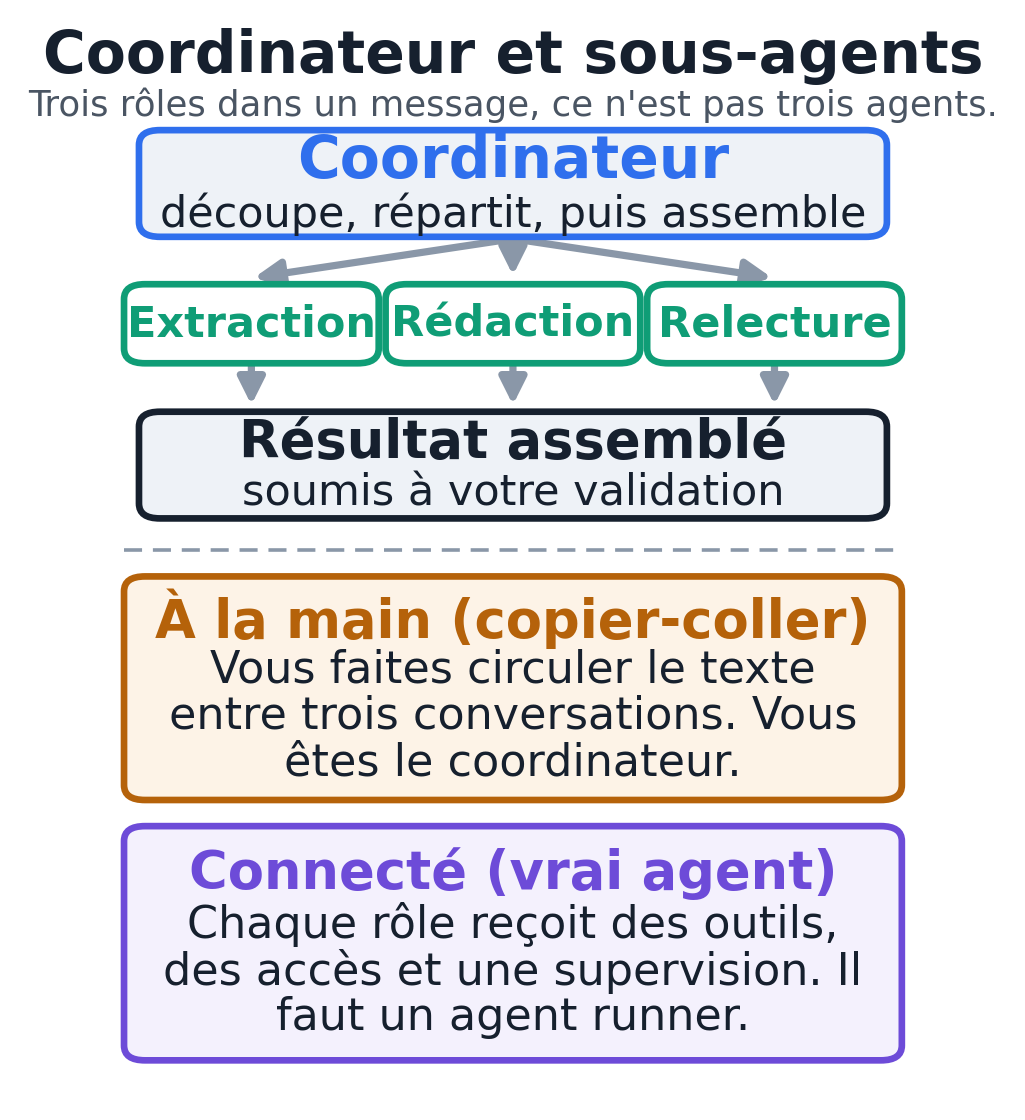
One confusion to avoid at all costs. Writing “act as an extractor, then as a writer, then as a reviewer” in a single message gives you one AI playing three roles in a row, with no independent agents involved.
Copying an answer from one window to another is also delegation, but you are the one doing it by hand. A Project folder or a Gem does not turn by itself into a connected multi-agent system. A truly automatic chain requires an automation runner, access to the software and an implementation.
When this setup is worth it: the task touches several pieces of software, chains several steps, requires cross-checks, or carries a real risk of error. When a single AI is enough: the task is short, self-contained and uses no outside data, like correcting a text or suggesting titles.
A coordinator, a specialist and a reviewer, by hand (exercise 3)
Goal: get a feel for the multi-agent setup without any tooling, with you as the coordinator. Deliverable: a one-page business proposal, written and then reviewed.
Prerequisites: a single AI app is enough. The provided file brief-mission-exemple.txt is the fictional brief of a florist who wants to redo their website. You will open three separate conversations.
- “Coordinator” conversation. Paste the coordinator prompt and the brief. You get the client facts to respect and an outline in bullet points.
- “Specialist” conversation. Paste the writing prompt, then the brief and the outline produced in step 1. You get a draft.
- “Reviewer” conversation. Paste the review prompt, then the brief, the outline and the draft from step 2. You get a list of corrections.
- Go back to the coordinator conversation, paste the draft and the corrections, and ask for the final version.
Coordinator prompt:
You are the coordinator of a small engagement. Here is a client's brief.
Break the work down into a clear outline for a one-page business
proposal. Give three things: the client facts to respect (3 to 5 points taken
from the brief), the sections of the proposal in one line each, and the three
questions to ask the client before committing. Do not write the
proposal yet.

Brief:
<< paste the contents of brief-mission-exemple.txt here >>
Writing specialist prompt:
You are writing a one-page business proposal, in a simple and concrete tone,
formal, with no jargon. Stay true to the client's brief and follow the outline
exactly. Do not invent any fact about the client, any price or any timeline: write
"to be agreed" wherever a decision is needed.

Client's brief:
<< paste the contents of brief-mission-exemple.txt here >>

Outline to follow:
<< paste the outline produced by the coordinator here >>
Reviewer prompt:
You are reviewing a text with a critical eye, without rewriting it and without inventing
new sections. Compare the draft with the brief and the outline below.
Check for: client facts left out or invented compared with the brief, sections
missing compared with the outline, price or timeline promises that should not
be there, sentences that are too vague, and a tone that is too salesy. Return a list of
precise corrections that points out each gap.

Client's brief:
<< paste the contents of brief-mission-exemple.txt here >>

Approved outline:
<< paste the outline produced by the coordinator here >>

Text to review:
<< paste the draft produced by the specialist here >>
Expected result: an outline that lists the client facts to respect, five to seven sections and three questions for the client; a draft that follows the outline, stays true to the brief and leaves prices “to be agreed”; a list of concrete corrections that points out any gap with the brief. The final version includes the corrections.
Human check: you decide which corrections to keep. The reviewer suggests; you have the final say. That is exactly the role an automation runner would keep under your approval in a connected version.
Moving to the connected version. For this chain to run on its own, you would need three building blocks: an automation runner that calls the roles in order, connectors to your software (the client file, your proposal template, your email), and an approval step before anything is sent. It is a project to scope, with defined access and responsibility, not a box to tick in a consumer chat. For a first try on a simple task, building an AI agent without coding shows how to build the same agent with Claude, ChatGPT and n8n.
Reusable project instructions
You are not going to rewrite your rules every time. Projects (at OpenAI and Anthropic) and Gems (at Google) save standing instructions for one type of work. Create one per recurring activity.
In it, write who you are, your tone, what the AI must always do (use formal address, never promise a date or a price, flag what is missing) and what it must never do. Add one or two reference documents, such as a blank proposal template. You do not need to know how to code or build anything technical: a folder of instructions and two reference files are enough.
Checking that information is still current
Lineups change every few months and outages happen, sometimes at several providers on the same day. Do not rely on a dated article, this one included. Two habits are enough.
For models and capabilities, open the provider’s official page (links above). To find out whether a service is working right now, check its status page: status.openai.com, status.anthropic.com, status.cloud.google.com for Google, and Mistral’s help page. For prices and limits, only the pricing page shown in your account, in your country, is authoritative.
Your next session
- Choose a task you repeat and redo exercise 1 on it, with a sample document that contains no sensitive data. Removing the names from a real file is not enough to anonymize it: for sensitive real data, you need an assessment and authorizations specific to your profession before you hand it to an AI.
- Write down your rule: which model for this task, and why.
- On any task that involves numbers, keep the habit from exercise 2: extract first, check afterward, against a known source.
- Find a long task that touches several pieces of software. Do it once by hand, as in exercise 3, before you consider automating it.
- Keep an approval step on anything that is sent or written, until you trust the setup.
To start with a concrete task and find which article to follow for your profession, begin with the guide Using AI in your line of work. The profession-specific tutorials, for example for accounting firms or psychology practices, apply the method on this page to real cases.
When a chain deserves to run on its own, with your software and an approval step, it is a project to scope. That is MACCUS‘s work: building a configured assistant with you, with its connections and permissions decided together, and seeing what is realistic for your business.