On Thursday, November 19, 2026, Google gave Gemini, its AI assistant, the ability to operate a Mac on the user’s behalf. From the Gemini app for Mac, the assistant can click, type, scroll, open menus and fill out forms, in installed software and on the web. Google’s own help page lists seven risks, including access to the user’s signed-in accounts in Mac apps and the ability to read login codes shown on screen.
Google calls the feature “computer use.” It is rolling out in the U.S. only, in English, to adults who pay for a Google AI subscription. Google has given no date for Europe, for other languages or for work accounts.
This kind of agent, an AI program that acts on the computer itself, already exists elsewhere. Since November 3, the self-hosted AI chat interface Open WebUI has also let AI take the mouse on a desktop. Open WebUI runs on a server its user installs and manages.
An agent that works in a separate window
Michael Friedman, a group product manager for the Gemini app, wrote the announcement on Google’s official blog. Users describe what they need, the post says, and “Gemini handles the clicking, typing, menus, and forms for you.” Google pitches the feature as a way to save time on “the repetitive work that normally takes dozens of clicks.”
Gemini works “inside an isolated background window with a live preview right in your chat.” Google’s help page calls this window a “virtual screen.” The main screen and cursor stay free, so the user can keep typing or take a call while the agent works.
Google gives four examples. Gemini can adjust the colors of a batch of photos in design software. It can fill out shipping quote forms with weights, dimensions and addresses pulled from PDFs stored on the Mac. It can also build a Google Slides presentation from live online dashboards, or prepare clothing resale listings from a folder of photos.
The help page adds a fifth example: an expense report filled in from receipts in the Downloads folder.
Computer use builds on Task (formerly Gemini Spark), the Gemini feature that carries out multi-step jobs. According to the tech site 9to5Google, Task could already read files on the Mac and work with connected apps such as Gmail and Google Calendar. It could not operate the Mac’s own desktop apps. 9to5Google also spotted new “Desktop” connectors that link Gemini to installed software, including the 3D program Blender and the product design tool Autodesk Fusion.
Permission granted one app at a time
To turn the feature on, the user goes to “Computer use” in Gemini’s settings and grants two permissions in macOS, the Mac’s operating system. The first, Accessibility, lets one app control others. The second is Screen & System Audio Recording. The user then starts a task and types “@Computer use” in the request.
The first time Gemini needs an app, it asks for permission. Choosing “Allow once” covers only that step or chat. Choosing “Always allow” adds the app to an “Allowed apps” list, and Gemini stops asking about that app.
A “Blocked apps” list holds the apps Gemini will never open. A “Stop task” button ends a task at any time.
“For sensitive tasks, Gemini will ask you for confirmation before continuing,” Google writes. According to the Gemini release notes, the agent also pauses for logins and payments. An optional setting has Gemini back up the files it changes, keeping copies for 24 hours or until the user’s next request. Google adds that Gemini “is not always able to do so.”
U.S. only, personal accounts only
A footnote to the announcement sets the requirements. The Mac must have Apple silicon, the chips Apple designs itself, and run macOS Sequoia 15.0 or later. The user must be 18 or older, with a personal Google account and a paid Google AI subscription at the Plus, Pro or Ultra level.
“For better quality responses,” the help page recommends “Gemini Hydrogen 4 or newer models.” Google introduced that AI model on November 12 under the name Gemini 4 Hydrogen. The same day, the company made it the default model for AI Mode, the conversational version of Google Search.
“For now,” the help page says, the feature works only with personal accounts, “not work or school accounts.” Businesses that use Gemini through Google Workspace, Google’s online office suite, can’t use the feature.
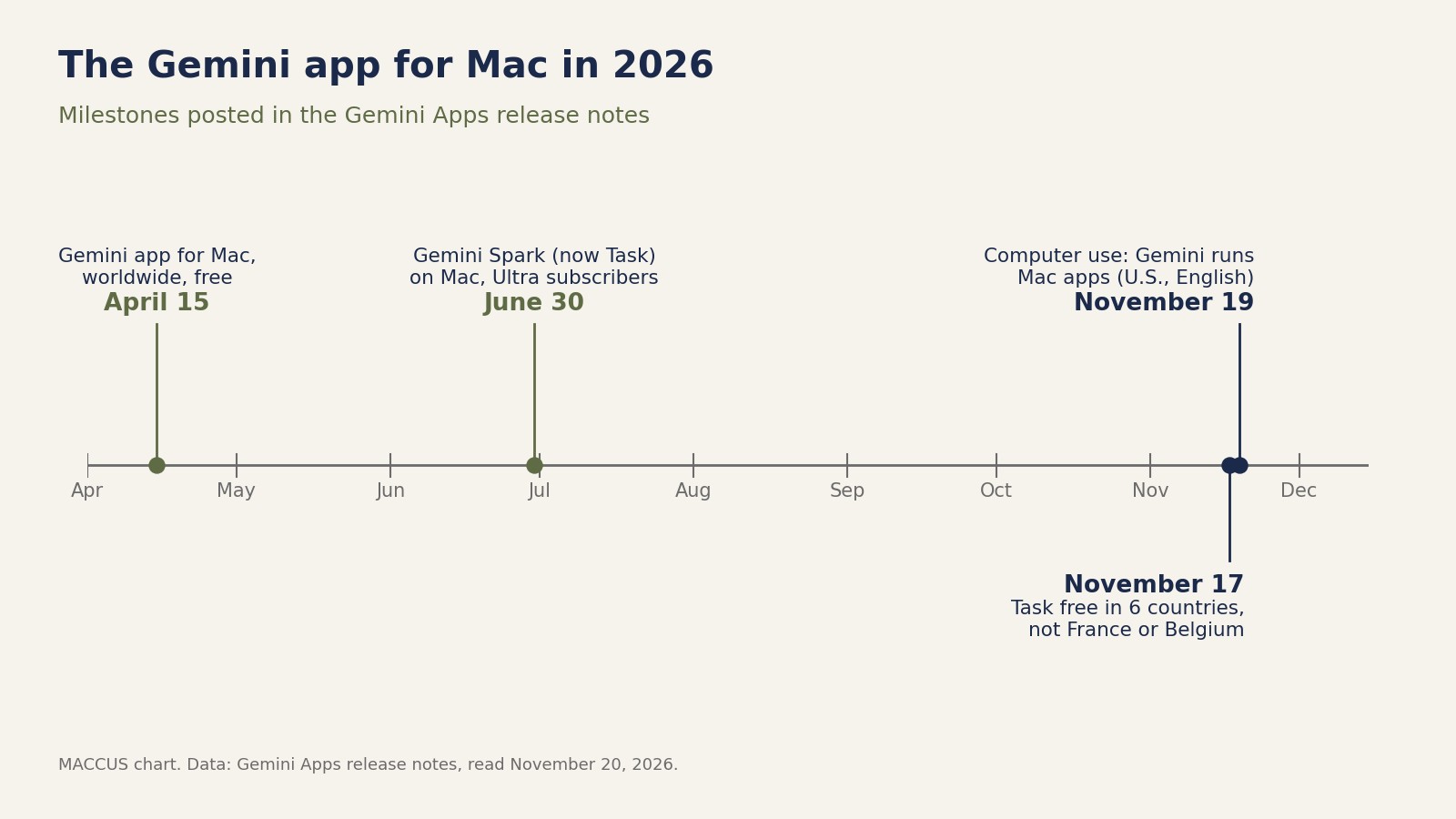
The Gemini app for Mac has been available worldwide, for free, since April 15, 2026. But computer use depends on Task, and another Google help page says Task is not offered in the European Economic Area. That area covers the EU countries plus Iceland, Liechtenstein and Norway. Task is also unavailable in Switzerland and the UK.
On November 17, Google began making Task free in six countries: the U.S., India, Canada, Australia, Japan and South Korea. No European country is on the list.
Google “didn’t say when it would expand to other markets or platforms,” TechCrunch reports. Neither the announcement nor the help page mentions computer use for the Gemini app on Windows.
Seven risks, listed by Google
The help page ends with a section on “the possible risks of using agentic AI,” meaning AI that acts on the user’s behalf. Google reminds readers that “Gemini can make mistakes and do unexpected things,” then lists seven points.
Three points concern data and accounts. First, Gemini “can share info with apps on the desktop too, not just websites.” Second, it “has access to logged-in accounts and active sessions inside native mac desktop apps, not just chrome.”
The third covers multi-factor authentication, the extra proof of identity many logins ask for. Gemini “can read or interact with multi-factor authentication (MFA) prompts or codes visible in desktop/messaging apps.”
Two points concern what Gemini can be led to do. The first reads: “Untrusted content on screen in one app can manipulate Gemini into jumping across application boundaries to take actions in other allowed Mac desktop apps.” On another page, Google describes this technique, called prompt injection. Malicious instructions are hidden in a web page, an email or a document, and the agent reads them and may follow them.
The second covers developer tools. Giving Gemini access to a code editor or developer tools can “enable shell execution or broader file system changes.” That means running system commands or making wider changes to files.
The last two points cover consequences. Some actions can’t be undone, whether or not backups are on. Automating some third-party apps “may conflict with those apps’ Terms of Service.” Google says the user is responsible for choosing which apps Gemini uses.
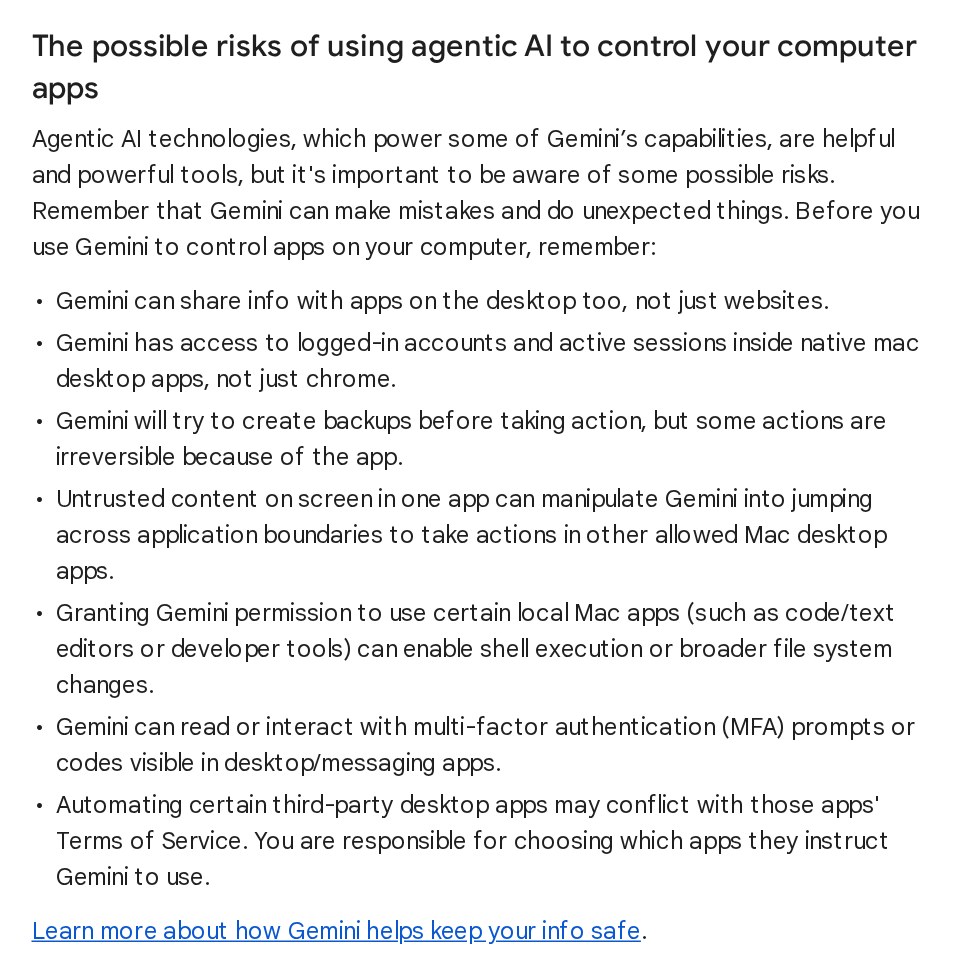
These seven points are warnings written by Google. AppleInsider, a site that covers Apple, notes that they are “not evidence that the new feature is routinely damaging files or compromising accounts.” The site still advises against giving an AI agent broad control over a primary Mac.
No success rate published
Google says “privacy and safety are built in.” According to Google, users choose which apps Gemini can access and watch every step live. They can pause at any time and approve key actions.
Google publishes no success rate, no scores on standard benchmark tests and no examples of failures. On its help page about tasks, Google itself calls Gemini’s ability to handle tasks “experimental.” It also says its safeguards “don’t guarantee protection against all risks.”
Neither the announcement nor the help page says what happens to the screen images Gemini reads during a task. Nor do they say whether those images can be used to train Google’s AI models. Running a task also requires Gemini History to be on. On November 16, Google announced that it would split the History setting from the setting for training its models; until then, one setting covered both.
The race for desktop AI agents
TechCrunch calls Google “a little late to the game,” since OpenAI, Anthropic and Meta already offer agent features in their desktop apps. AI agent launches often start in the U.S., with no date for Europe. That was the case for Claude Duet, the agent Anthropic launched on October 21, and for ChatGPT Wallet, which since November 13 has let OpenAI’s agents pay online.
Apple may be building its own agent that can use a computer, TechCrunch reports, citing a job listing spotted by Bloomberg; Apple didn’t respond to TechCrunch. According to AppleInsider, Apple released its second test version of macOS 27.3 for developers on November 16. It adds settings that limit which apps an automation tool can control.
What it means
On the Mac, Gemini’s Task feature had worked only with files and connected apps. It can now operate software that was never designed for it. The audience is still narrow: paying consumers in the U.S. who use Gemini in English on recent Macs. Google Workspace work accounts are left out for now, and so is Europe.
Google’s help page is unusually direct. It admits that an agent that can see the screen also sees open sessions and login codes. It also warns that booby-trapped text in one app can make the agent act in another. Google’s safeguards include per-app permission and confirmation for sensitive actions, but the company publishes no measure of how well they work.
Three questions remain open: how reliable the agent is on long tasks, what happens to the screen images, and when Europe and work accounts will get access. For Europe, the first sign would be Task arriving in the European Economic Area, since computer use depends on it.
Sources
- Let Gemini tackle repetitive chores on your Mac, Google (Michael Friedman), November 19, 2026
- Use Gemini to work with apps on your Mac, Gemini Apps Help, read November 20, 2026
- Manage your tasks & workflows in Gemini Apps, Gemini Apps Help, read November 20, 2026
- Gemini Apps’ release updates & improvements, Google, entries from April 15 to November 19, 2026
- Gemini app for Mac adds computer use to control desktop apps, 9to5Google (Abner Li), November 19, 2026
- Google gives Gemini the ability to use your Mac for you, TechCrunch (Sarah Perez), November 19, 2026
- Gemini can now control Mac apps, but you still shouldn’t let it, AppleInsider (Andrew Orr), November 19, 2026
- Apple may be developing its own AI agent that runs your Mac, TechCrunch (Lucas Ropek), November 19, 2026
Header image: MACCUS chart. Data: Google, announcement of November 19, 2026, and Gemini help pages read November 20, 2026