Open WebUI, a chat interface for AI that people install on their own servers, now lets AI models operate a computer. Version 0.13.0, released on November 3, 2026, gives a model a Linux desktop, a web browser and Git, a tool that tracks changes to code. The model moves the mouse itself, and the user can watch, take over or approve each action.
Open WebUI’s code is public. The AI models it connects to can run locally through engines such as Ollama or llama.cpp, which run models on the user’s own hardware. They can also run at an AI provider, reached through an API, a link that lets one program talk to another. On November 6, the project had 157,862 stars, or bookmarks, on GitHub, the site where it publishes its code.
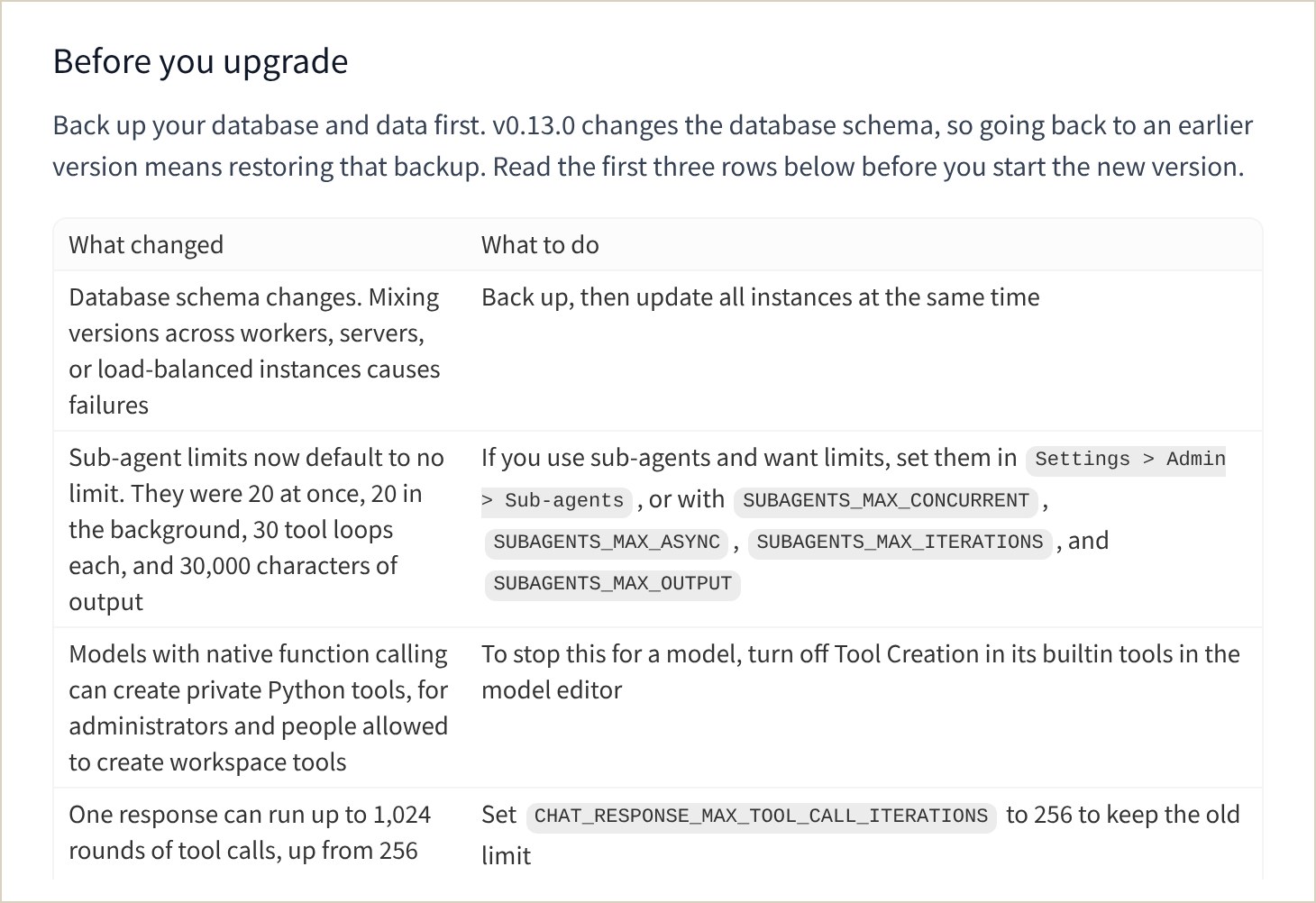
Version 0.13.0 also includes security fixes that the team has not described yet. It changes the database too, so going back to an older version requires a backup.
A desktop, a browser and Git beside the chat
Open WebUI presented the release on November 4 in a blog post titled “Your model gets a computer.” The desktop runs through Open Terminal, a separate self-hosted program from the same team. In Open Terminal, a model can run commands and manage files.
An administrator connects Open Terminal once. After that, every user with access finds the desktop in a tab next to the chat, with nothing to install.
Docker runs software in sealed-off spaces called containers. The post recommends Open Terminal’s standard Docker image, a ready-to-run package of about 4 GB, because the slimmer versions leave out the desktop. Inside the container, the desktop is an isolated Linux system, kept apart from employees’ own computers.
Open Terminal can also be installed on a Mac or a Windows PC with pip, an installer for software written in Python. In that case, the model works on the screen of whoever is logged in, with that person’s permissions. For teams, the developers recommend Docker.
To drive the desktop, a model must be able to call tools, which means triggering actions. It must also read images, because the desktop tools send it screenshots.
The Browser tab has a Chrome mode, where the user and the model share one browser session. A “proxy” mode is still available for simple previews. The model can browse sites, fill in forms and test the web apps it has just written.
A Git panel shows the model’s code changes, which can be saved to the project’s history or sent to a shared copy without leaving the chat.
Despite its name, Open WebUI Desktop is a separate app for macOS, Windows and Linux. It reached version 0.1.0 on November 1 and 0.1.4 the next day. The app installs and runs Open WebUI on the computer itself and no longer connects to remote servers. It can also run local models through the open-source llama.cpp engine, but that option is unchecked by default.
Sub-agents on other models, and fewer limits by default
Sub-agents are helper AIs that a model hands part of a job to. In Open WebUI 0.13.0, they can run on a different model, so a large model can pass simple questions to a small one. Until now, sub-agents always used the same model as the main agent.
Sub-agents are off by default. Once they are on, they run with no limits until an administrator sets some. In the previous version, the default caps were 20 sub-agents at once, 20 in the background, 30 tool loops each and 30,000 characters of output. The limit on rounds of tool calls in a single response also rose to 1,024, from 256.
When a user asks, models that can call tools can also write their own tools in Python. This works for administrators and for users with permission to create tools. A setting on each model turns it off.
By default, a “Full access” setting runs every tool call right away. An administrator can switch on an approval mode instead. Each tool call then waits for approval, including on the desktop and in the browser. The sidebar flags chats that are waiting.
Security fixes still unexplained after three releases
The release notes for 0.13.0 announce security fixes and urge users to update “as soon as possible.” The changelog, the detailed list of changes, omits them. The team says it will publish security advisories, which describe each flaw, once CVE numbers are assigned. CVE numbers are public IDs for security flaws.
The same paragraph appeared in the notes for versions 0.12.4 and 0.12.5, released on October 25 and 29. As of November 6, no advisory describes the fixes in these three releases. The newest advisory on the project’s GitHub security page dates from October 18. It covers a medium-severity flaw fixed in version 0.12.2.
Earlier advisories did not follow a regular schedule. After version 0.11.4, released on September 21, the project published 19 advisories on September 27 and 28, four of them rated high severity. The notes for version 0.12.0, released on October 10, also announced security fixes. No advisory published since then covers a fix in that version.
The release notes do not say whether these flaws were exploited. AI tools for developers remain a target. On October 29, a tampered version of the Claude Code extension stayed on the extension store of the Cursor code editor for about 11 hours. Claude Code is Anthropic’s coding assistant.
Updating still takes some preparation. Version 0.13.0 changes the structure of the database, so going back means restoring a backup. Installations on several servers must all upgrade at once. Updating one server at a time causes failures, the release notes warn.
The demos ran on OpenAI models
The launch post presents the tool as self-hosted and says screenshots go to whichever model is chosen. A local model keeps them on the company’s hardware, while a cloud model sends them to its provider.
The post’s videos, however, were recorded with two models that OpenAI offers through its API: gpt-6.1-sol as the main model and gpt-6-luna for the sub-agents. None of the demos shows a local model running the desktop.
The post does address local models that click in the wrong place. It suggests a fix in the system prompt, the model’s standing instructions. That prompt should say that clicks use pixel positions on the latest screenshot and give the screenshot’s size. Without that, some local models place clicks on a grid from 0 to 1,000.
Risks in the browser and in shared setups
The launch post also lists risks. A web page can carry instructions aimed at the model, whether the model is local or not. The model can also use every account logged in on the shared browser. For sites the user does not control, the team recommends running Open Terminal in Docker, keeping approvals on and staying logged out of important accounts.
Since version 0.15.5, released on November 2, Open Terminal’s Docker images switch off a built-in browser protection by default. That protection is the sandbox of Chromium, the open-source base of Chrome. It is turned off so the browser can start under Docker’s standard restrictions.
The container’s isolation does not change, the release notes say, but Chromium no longer protects the files and programs inside it. A setting restores the sandbox where the environment allows it.
Open Terminal’s multi-user mode does not isolate people from one another, its GitHub page says. Everyone on the same connection sees the same files and the same running programs. A separate tool, Terminals, gives each person their own container but requires an Enterprise license for production use.
Open Terminal shipped five releases on November 5. Version 0.16.3 lets the Browser tab open pages in the user’s own Chrome, where they are already logged in to their sites. This “personal” mode must be turned on manually, works for one user only and asks for permission in Chrome. The following night, version 0.16.7 added an “agents” Docker image with the Codex and Claude Code coding tools preinstalled.
What it means
Open WebUI keeps growing beyond a plain chat interface. Earlier versions already connected models to sub-agents and to a terminal, the window where commands are typed. Version 0.13 adds a desktop, a browser and a Git panel. These resemble the “computer use” features of online AI assistants, which let a model operate a computer.
Open WebUI’s claimed difference is where the software runs: with a local model, screenshots and files stay on the company’s own machines. Teams that chose local AI for privacy make the same case. So do companies that run open models, which anyone can download, on their own servers. One example is Revolut and its self-hosted Chinese model.
On that point, the launch claims more than it shows. Its demos use OpenAI models. The post describes local models’ clicking errors but does not measure how often they succeed.
Administrators also get more work. The database change is hard to undo, and sub-agent limits are gone by default. Models can now write tools, and the content of the security fixes is unknown.
Two questions stand out. What flaws has the team fixed since 0.12.4, and how serious are they? Can open models actually run a desktop without mistakes?
The security advisories, expected once CVE numbers are assigned, should answer the first question. The first public tests of the desktop with a model on Ollama or llama.cpp should answer the second.
Sources
- Release v0.13.0, Open WebUI (GitHub), November 3, 2026
- Open WebUI v0.13.0: your model gets a computer, Open WebUI, November 4, 2026
- Security Overview, open-webui/open-webui, Open WebUI (GitHub), accessed November 6, 2026
- Open WebUI Desktop v0.1.0, Open WebUI (GitHub), November 1, 2026
- Open Terminal, Open WebUI (GitHub), accessed November 6, 2026
- Open Terminal releases (v0.15.5 to v0.16.7), Open WebUI (GitHub), November 2 to 6, 2026
Header image: MACCUS chart, data from the release notes and security advisories in the open-webui/open-webui GitHub repository, read on November 6, 2026.