

A primary care practice loses hours to admin: rewriting patient information sheets, sorting the front desk’s messages, figuring out why billing claims get rejected. This guide shows how to have an AI prepare a first draft of these three tasks, on made-up data, and then how to check its work before you approve it.
One rule runs through the whole guide: the AI prepares the admin work, and you stay in control of anything that touches the patient. No identifiable health data goes into a consumer assistant.
No diagnosis, no clinical triage, no prescriptions, no automatic coding of procedures. The examples below are made up, on purpose: they let you learn the method without ever opening a real patient file.
This guide is for general practitioners, physical therapists, independent nurses, dentists and speech therapists, in Belgium and in France, working alone or in a group practice.
The three deliverables in this guide
By the end of this guide, you’ll have three repeatable deliverables:
- a clear information sheet for your patients, plus an appointment reminder template, built from rough notes;
- a sorted list of the front desk’s administrative messages, with draft replies for routine requests and anything clinical or urgent clearly set aside;
- an analysis of billing rejection reasons from an export, with an action note for the front desk.
What you need: access to an AI assistant (any account works for this guide’s made-up files) and a spreadsheet to open the CSV files. No technical skills, no installation and no connectors are needed. Simple copy and paste is enough for all three tasks.
The exercise’s three made-up files (in French): notes_cabinet.txt, messages_secretariat.csv and rejets_facturation.csv.
Medical confidentiality and health data come first
This section is more than a formality. It decides what you’re allowed to do.
Health data is sensitive data under Article 9 of the GDPR. The CNIL, France’s data protection authority, puts it plainly: “Health data is a special category of personal data because it is considered sensitive.” It’s covered by medical confidentiality and by your professional body’s code of ethics. A consumer AI assistant is not a secure health channel.
Four practical rules hold in every case.
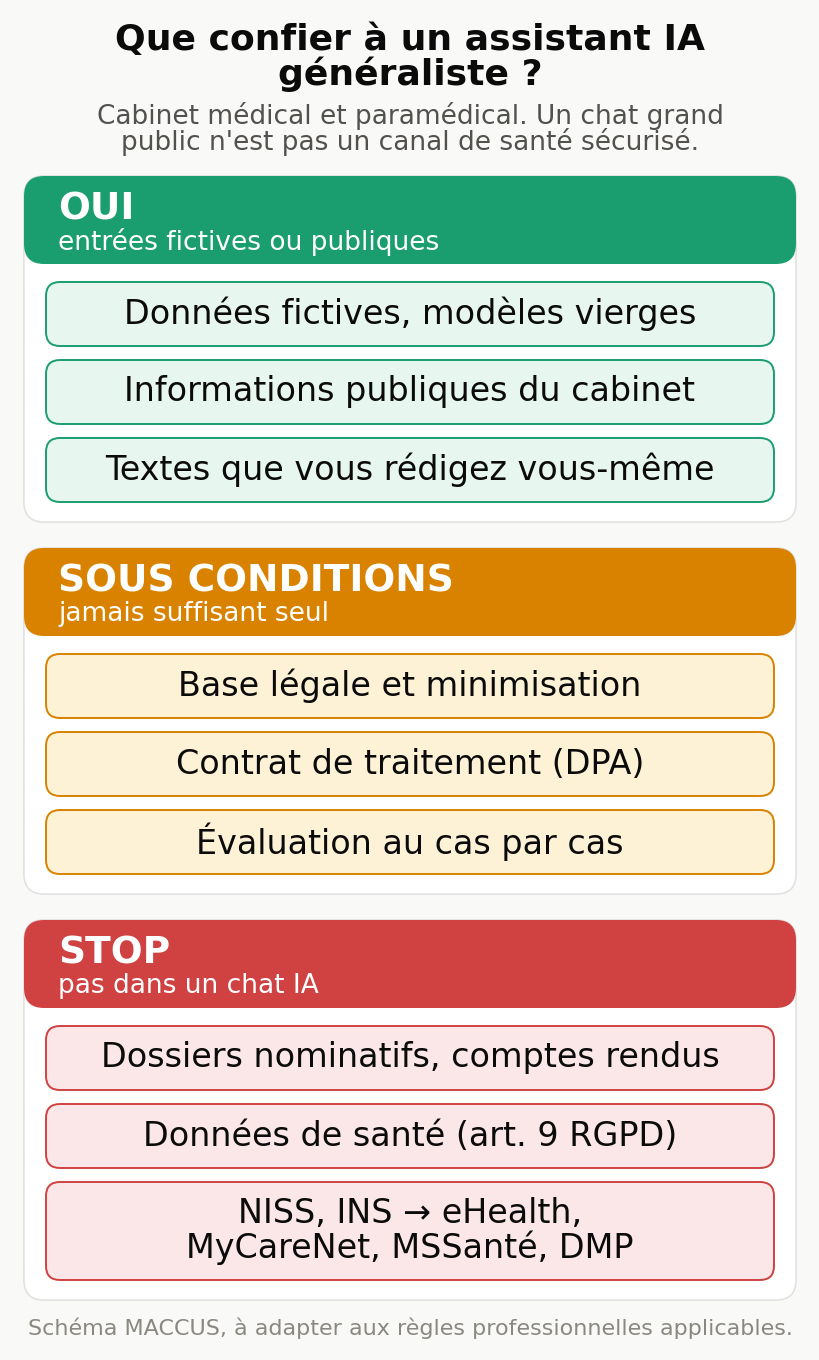
- Never enter identifiable health data into a consumer assistant. To learn and test prompts, use made-up data, blank templates or text you write yourself, like the files in this guide.
- For the made-up files and public information in this guide, any account works. As soon as real practice data would be involved, the reuse of what you type to train the model becomes an issue: the actual settings (training opt-out, retention, region) vary by provider and plan, and you check them in the product’s contract and documentation, never by trusting a general promise.
- A pseudonym or a training opt-out does not, on its own, make a clinical record compliant. Real patient data requires a legal basis, data minimization, a processing agreement with the provider, and in some cases an impact assessment. That decision rests on the applicable professional rules and, where relevant, on your data protection officer or a qualified adviser.
- In France, hosting identifiable health data with a third party on behalf of a healthcare provider falls under HDS certification (certified health data hosting): the requirement covers outsourced health data hosting and does not mean everything has to be hosted in Europe. Secure channels already exist for exchanges between healthcare professionals: Ségur, the shared medical record (DMP), MSSanté secure messaging, the national health identifier. In Belgium, they are eHealth, MyCareNet and Recip-e. A general-purpose AI chat isn’t part of any of these channels.
On data residency, keep in mind that the public web interface of most assistants doesn’t guarantee storage in Europe.
If you have a strict location requirement, check the exact storage and processing region plan by plan in the contract rather than going by the provider’s name: it varies with the offer and the configuration (for example some Mistral offers, Claude through AWS Bedrock in a European region, or the data boundaries of Google Workspace and Microsoft). The section on models points to the reference article for details. A model installed on a machine in the practice is another route, described in our guide to running AI locally in a business.
The professional bodies’ position is consistent. In France, France’s National Medical Council (CNOM, Conseil national de l’Ordre des médecins) points out that using AI cannot dilute the practitioner’s responsibility: care can’t be delegated to an algorithm.
In Belgium, the Order’s opinion on big data and AI stresses data governance and a prior risk analysis. AI remains an aid; the decision and the responsibility remain yours. Check the version of your professional body’s opinion currently in force before processing real data.
The diagram below sums up what you can hand to a general-purpose assistant and what must stay within health channels. It’s provided in assets/ as an image.
Task 1, rewriting the practice’s information documents
Goal: turn rough notes into a clear information sheet for patients, plus an appointment reminder template. It’s the lowest-risk task to start with, because it contains no patient data: you work on the practice’s public information, all by copy and paste.
App: any AI assistant (ChatGPT, Claude, Gemini, Le Chat); for these made-up, public notes, a basic account is enough.
Input: the file examples/notes_cabinet.txt, made-up notes about an imaginary practice. Replace them with your practice’s real information, which is public.
Steps:
- Open a new conversation in your AI assistant.
- Paste the prompt below.
- Then paste the content of
notes_cabinet.txt. - Read the sheet it produces and run the checks described below.
Prompt to copy:
You are helping a medical practice write its information documents for
patients. From the notes I'll paste next, produce two things.

1. A patient information sheet, polite and formal, short sentences.
   Organize it under these subheadings: Opening hours, Booking or canceling an
   appointment, Payment and health insurance, Getting here, What to bring.

2. A short SMS appointment reminder template, with fields in square
   brackets to fill in: [first name], [day], [time].

Rules:
- Use only the information in my notes. Don't invent any opening
  hours, fees or services that aren't written there.
- Don't give any medical advice. This document is purely practical.
- If a piece of information is missing, write "to be completed" instead of guessing.
Expected output, on the made-up notes: a sheet that gives the opening hours (Monday, Tuesday, Thursday, Friday from 8 a.m. to 6 p.m.; Wednesday until 12:30 p.m.; Saturday from 9 a.m. to noon; closed on Sunday), the 24-hour cancellation rule, the payment methods and direct billing to insurers, step-free access and blue-zone parking, and the list of documents to bring.
Plus an SMS along the lines of: “Hello [first name], this is a reminder of your appointment on [day] at [time] at the Cabinet du Parc. To cancel, please let us know at least 24 hours in advance.”
Human check: reread the sheet and check each opening time against your notes. This is the moment to fix the tone and add what’s missing. A document read by hundreds of patients deserves a careful read.
Common mistake and fix: the assistant adds a service you don’t offer, or smooths over an opening time. The safeguard is in the prompt (use only the notes, otherwise write “to be completed”). If you see added information, ask again: “Quote the exact line from my notes this information comes from.”
Task 2, sorting front desk messages and preparing replies
Goal: sort a batch of administrative messages, prepare a draft reply for routine requests, and set aside anything clinical or urgent so you handle it yourself. Here again, simple copy and paste is enough, on made-up messages.
App: an assistant that can read attached files, or you can copy and paste their content.
Input: two made-up files. examples/messages_secretariat.csv, six incoming messages (two are deliberately clinical or urgent, to check that the AI sets them aside instead of answering them), and examples/notes_cabinet.txt, the practice’s front desk notes (opening hours, cancellations, payment) that the administrative answers come from. Provide BOTH: the list of messages alone contains neither your opening hours nor your cancellation notice. Never use real patient messages for this exercise.
Steps:
- Drop both files into a conversation, or paste their content one after the other.
- Paste the prompt below.
- Read the sorting table, check each classification, then check that no clinical message got a reply.
Prompt to copy:
You are assisting the front desk of a medical practice. I'm providing two items:
the practice's front desk notes (opening hours, cancellations, payment) and a list
of incoming messages. Handle only administrative matters.

Produce a table with one row per message and the columns:
id, category, action.

Possible categories: opening hours, appointment, document, contact details,
forward to the practitioner.

Mandatory rules:
- For any factual information (opening hours, cancellation notice, payment
  methods), use only the front desk notes. If the requested information
  isn't there, leave a field in square brackets, for example
  [to be completed], instead of inventing it.
- Classify as "forward to the practitioner" any message that mentions a symptom,
  pain, a treatment, an emergency or a health question.
- For those messages, write NO reply and give NO medical
  advice. Write only: "forward to the practitioner, do not reply
  to the medical content". If the message describes a possible life-threatening emergency,
  add: "direct to 112 (BE) or 15 (FR) without delay".
- For a request that involves an action on a file or sending something (address
  update, duplicate of a document), never state that it's done:
  acknowledge receipt and prepare a draft, leaving the front desk to
  carry out the action.
- For the other administrative requests, write below the table a short,
  friendly, formal draft reply. Don't invent any
  information; if a piece of data is missing, leave a field in square brackets.
Expected output, on the six made-up messages:
| id | category | action |
|---|---|---|
| 1 | opening hours | reply: open on Saturday from 9 a.m. to noon |
| 2 | appointment | reply: how to cancel, 24 hours’ notice |
| 3 | document | acknowledge receipt and prepare to send the duplicate, without stating it has already been sent |
| 4 | contact details | acknowledge receipt of the change of address request, without stating the file has been updated |
| 5 | forward to the practitioner | do not reply to the medical content; direct to 112 or 15 without delay |
| 6 | forward to the practitioner | do not reply to the medical content |
Then four short drafts, for messages 1 to 4 only. No draft for messages 5 and 6.
Human check: the most important check in this guide. Read the six original messages yourself and check each classification, including the ones filed as administrative. The AI doesn’t decide on its own which messages a practitioner gets to see.
Then confirm that messages 5 and 6 got no substantive reply and no advice; message 5 describes signs that may be serious, so it goes to you, not to a draft.
The exercise is made up from start to finish, and the instruction to direct people to 112 or 15 is a test case, not automated emergency triage. You always handle clinical and urgent matters yourself.
Common mistake and fix: the assistant, helpful by nature, slips some advice into a clinical message (“get some rest,” “it’s probably nothing”). That’s exactly what it must not do.
If you see it, remove the reply and tighten the prompt: “For any health message, the only allowed output is to forward it to the practitioner.” Never let the tool answer in place of the clinician.
Task 3, analyzing billing rejection reasons
Goal: understand why claims are rejected, by grouping the rejections by reason from an export, then prepare an action note for the front desk. The AI analyzes a trend; it doesn’t touch procedure coding or fee schedule codes.
One firm rule first. Procedure coding and fee schedules (CCAM and NGAP in France, INAMI codes in Belgium) are too complex and change too often to be handed to an AI.
A coding error leads to rejections, blocks payments and can trigger an audit. The code is corrected in your software and resubmitted through your usual channels (SESAM-Vitale, MyCareNet), never by the assistant. Here, the AI is only used to see where the rejections are concentrated.
App: an assistant that can read a CSV file, or a spreadsheet with a built-in assistant (for example Microsoft 365 Copilot in Excel if your practice already runs on Office).
Input: examples/rejets_facturation.csv, nine lines of made-up rejections, with the date, the organization, the reason and the amount. Do the exercise on these made-up lines. Analyzing real billing returns is a different project: it involves the practice’s real data and falls under the framework described above, to be decided according to the applicable professional rules and, where relevant, with your DPO, rather than by simply removing a few columns.
Steps:
- Drop the file into the conversation, or paste its content.
- Paste the prompt below.
- Read the ranking of reasons, then check the totals in the spreadsheet.
Prompt to copy:
You are analyzing billing rejections for a healthcare practice. The file
provided contains one line per rejection, with date, organization, reason and amount.

Produce:
1. A table of reasons, sorted from most to least frequent, with
   for each one: the reason, the organization, the number of rejections, the total amount.
2. The total amount rejected, all reasons combined.
3. A short action note for the front desk: for each frequent reason, one
   simple administrative prevention step (for example checking coverage
   before the appointment).

Mandatory rules:
- Use only the lines in the file. Don't suggest any fee schedule
  code or any coding, and never say which code would be
  "correct". Corrections are made in the practice's software.
- If a reason calls for a technical check, write "to check in
  your software" rather than deciding.
- Recalculate and show the sum of the amounts so I can check it.
Expected output, on the nine made-up lines:
| Reason | Organization | Count | Amount |
|---|---|---|---|
| Insured person’s coverage not active | MyCareNet | 3 | 90.50 |
| Carte Vitale not up to date | SESAM-Vitale | 3 | 80.00 |
| Prescriber’s INAMI number missing | MyCareNet | 1 | 40.00 |
| Duplicate billing | SESAM-Vitale | 1 | 25.00 |
| Certificate submitted late | MyCareNet | 1 | 22.00 |
Total rejected: €257.50. Action note: check that coverage is active before the appointment, ask patients to update their Carte Vitale at a terminal, fill in the prescriber’s number before submitting, check for duplicates before sending. Each correction is still made in the software.
Human check: reopen the CSV and recalculate the total by hand (90.50 + 80.00 + 40.00 + 25.00 + 22.00 = 257.50). Confirm that the AI didn’t suggest any code or coding. Always check its analysis against the source file, not against another AI’s opinion.
Common mistake and fix: on a large export, the assistant adds up a column wrong or invents a reason that isn’t there. Ask for the detailed figures and check the totals in the spreadsheet. Split a large file by month rather than handing over everything at once.
Creating a reusable Project for the practice
Pasting the same instructions into every conversation wastes time. The main assistants offer a reusable workspace: Projects in ChatGPT and in Claude, Gems in Gemini. You put standing instructions and a few non-sensitive reference documents there, and every new conversation starts with that context.
One caveat about plans. In Claude, Projects exist even on the free plan; whether training is turned off by default depends on the plan and is checked in the product’s terms.
Never put a document containing patient data into a Project, whatever the plan. Keep it for instructions, blank templates and the practice’s public information.
Standing instruction to paste into the Project:
You assist the front desk of a medical practice. You prepare administrative
documents, message sorting and draft replies; you never
make a diagnosis, you give no medical advice, you suggest
no coding and no fee schedule codes. Any message mentioning a symptom,
pain, a treatment or an emergency is "forward to the practitioner",
with no substantive reply. You use only the information provided and you
flag "to check" or "to be completed" as soon as a piece of data is missing. You reply
in English, formally, in short sentences.
A Project is still just a space for reusable instructions. It doesn’t turn into an autonomous system on its own, as the next section shows.
Choosing the model for the task
You don’t need to know every model. Only one distinction matters day to day: quick task versus reasoning task.
- For sorting, short extraction or rephrasing, a fast, inexpensive model is enough. Each provider has its fast range, for example the Haiku range at Anthropic (Claude Haiku 4.5 in September 2026), the small GPT models at OpenAI, Gemini Flash at Google, Mistral Small at Mistral.
- To analyze an export, write a polished sheet or follow a long, strict instruction, use a long-context reasoning model. Each provider has its top-end range, for example the Opus range at Anthropic, the GPT reasoning range at OpenAI, Gemini Pro at Google, Mistral Large at Mistral.
Names and version numbers change almost every month. Don’t learn them by heart: first choose the category (fast or reasoning), then take the matching model offered in your account. For the current lineup and the selection method, see the reference article on models and agents, and check exact availability on the vendor’s official page.
Don’t mix up the building blocks. The model is the engine. The consumer app (ChatGPT, Claude, Gemini, Le Chat) is the interface. The subscription is the plan that gives access to the models and sets the usage limits.
The API is how developers access the models. A connector links the assistant to a piece of software. An automation runner (Zapier, Make, n8n, or a scheduled task) triggers and runs things without you.
If your practice already lives in Excel and Outlook, Microsoft 365 Copilot works where you are. If your priority is keeping data in Europe, check plan by plan the processing and storage region stated in the contract: you find it in the specific offer, not in the provider’s name.
In every case, this choice doesn’t exempt you from the framework described above: no model and no interface makes a patient file compliant on its own.
What a coordinator and sub-agents really mean in healthcare
You’ll read everywhere that a “multi-agent system” automates a practice. Here’s what actually holds up.
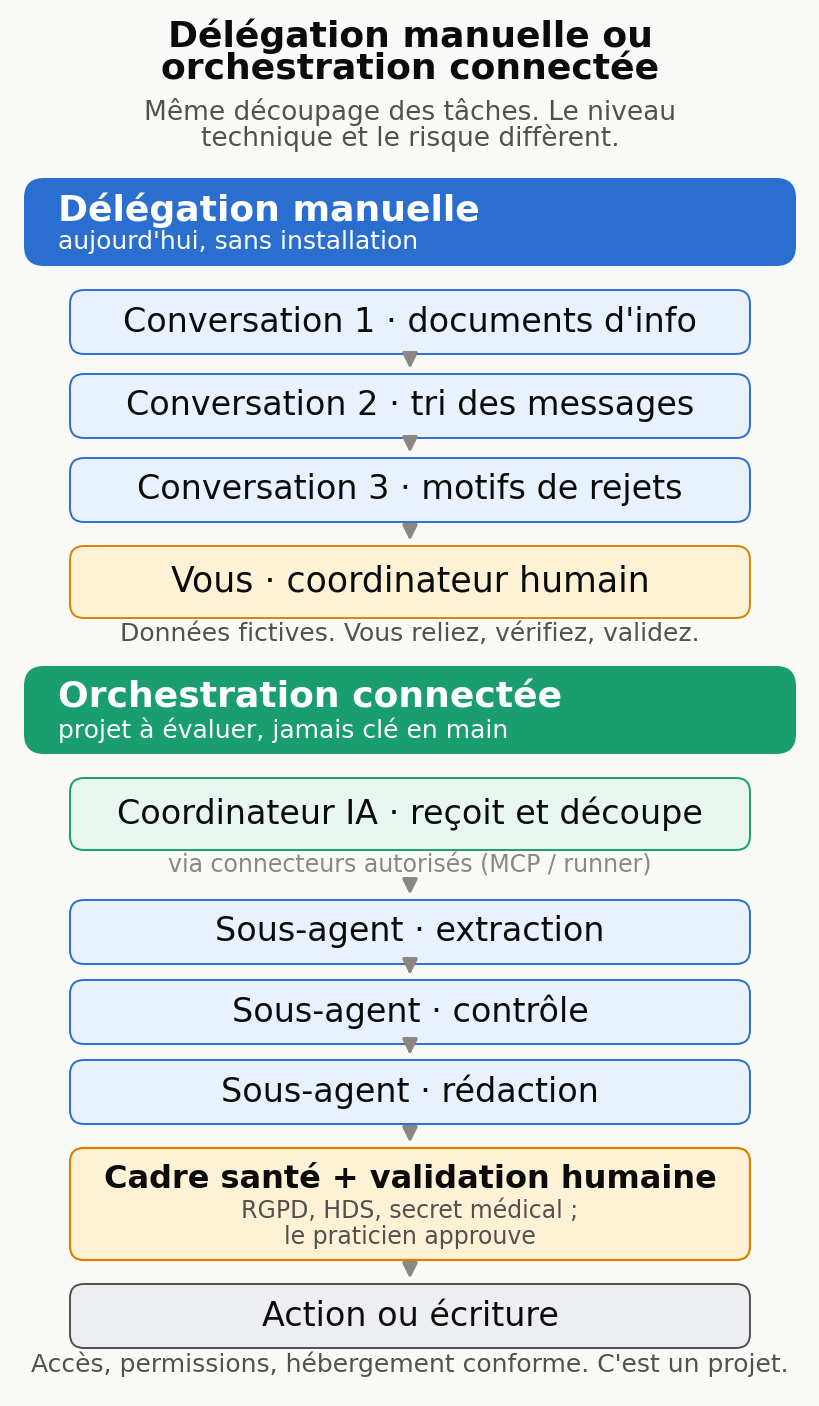
The coordinator-plus-sub-agents setup mirrors how a practice is organized. A coordinator receives the request, breaks it down and hands each piece to a specialist: one extracts data, another checks, a third writes. The coordinator gathers the results, checks them, then submits the outcome to a human for approval.
Watch out for the trap. Giving three “roles” in a single prompt doesn’t create three agents. Copying an answer from one conversation into another is manual delegation: you are the coordinator.
A consumer Project doesn’t magically become an autonomous system. Real connected orchestration requires tools, authorized access and a technical setup.
A manual exercise you can do today without installing anything. Run the three tasks in this guide in order, playing the coordinator yourself:
- Conversation 1, documents: Task 1 on your practice’s information.
- Conversation 2, messages: Task 2 on a batch of made-up administrative messages.
- Conversation 3, billing: Task 3 on a made-up rejection export.
- You, the human coordinator: you connect the three, you check, you approve.
This exercise gives you the benefit of splitting the work with concrete safeguards: made-up inputs, no account connected to the practice’s software, no automatic sending or writing. Every step stays in front of you.
What real orchestration changes, and why it’s a bigger undertaking in healthcare. For a coordinator to read your calendar and prepare the next day’s logistics on its own, you have to connect the assistant to software that holds patients’ identities. Two routes exist in 2026: an MCP connector when the software vendor offers one, or an automation runner that bridges the two.
But a medical calendar is full of identifiable health data, so that connection falls under the GDPR, HDS hosting in France and medical confidentiality. It’s a project in its own right, assessed profession by profession, with authorized access, data minimization and human approval before any action. The diagram below sums up the difference.
Your checklist for the next session
- For this guide’s made-up files, any account works; for real practice data, first check the product’s settings (training, retention, region) in its contract.
- Redo the three tasks on this guide’s made-up files, then on non-sensitive documents from your practice.
- Never enter identifiable health data into a consumer assistant.
- Handle any clinical or urgent message yourself; the AI only answers administrative ones.
- Recalculate one total from each analysis by hand before relying on it.
- Create a practice Project with the standing instruction, with no document containing patient data.
- Check the applicable professional rules and, where relevant, consult your DPO or an adviser before using any real data.
Going further
For the overview and choosing a first task based on your profession, read the main guide. To compare models and set up a more serious coordinator exercise, see the reference article.
In a psychology practice, organizing the calendar and the admin without exposing patient files follows the same logic: see the article for psychologists. For billing, supplier documents and the Belgian Peppol requirement, the article for accounting firms details the method.
If you want to turn this trial into an installed workflow, with connections and permissions decided with you, MACCUS sets up an assistant you reach through Telegram, by text, voice and documents, in French, English and Dutch, on your own Claude subscription.
Connections to software, a calendar or email are assessed case by case based on your access rights, and every outgoing action goes through the approval step you choose. In healthcare, that connection is decided with the GDPR, medical confidentiality and data hosting in mind.
It is neither an all-in-Europe solution nor a guarantee of compliance, and the assistant makes no diagnosis, codes no procedures and bills nothing on your behalf. Let’s talk about your specific case: maccus.fr/en/ai-assistant