

You run an online store, alone or with a few people. The catalog is waiting for descriptions, a batch of orders ships tomorrow, and the customer service inbox fills up while you pack the parcels.
This article shows three tasks you can do today with a chat AI and a simple export from your store, without installing anything and without connecting your software to an outside service.
By the end, you’ll have three concrete deliverables: product pages written from your real specifications, an order check that flags anomalies before shipping, and draft customer service replies ready to proofread.
The examples use fictitious files provided with the article. You can run them as is, then move on to your own data once you have the method down and have taken the precautions (see below).
An AI account, a CSV export and a spreadsheet
Prerequisites for the three tasks:
- An account on a chat AI: ChatGPT (OpenAI), Claude (Anthropic), Gemini (Google), Le Chat (Mistral) or Copilot in Microsoft 365. Any of them works for these exercises.
- The ability to export a CSV file from your platform, or the
commandes.csvfile provided so you can do the exercise without exporting anything. Export paths vary by tool: Shopify exports orders as CSV from the Orders page, with one row per item in the order (see the Shopify guide to exporting orders); WooCommerce exports products as CSV natively, from the Products menu and then the Export button (see the WooCommerce guide), but exporting orders requires a dedicated extension. Whatever the tool, open the file and check that each row contains the quantity, the unit price, the total and the address (country, postal code, city). This is a manual export, not a technical integration. - A spreadsheet to open and clean up the CSV: Excel, Google Sheets or LibreOffice Calc.
The examples below require no connection: you paste or drop the fictitious files provided into the chat window. No connector is needed. Moving to real data requires the assessment described below.
About accounts: to work on real customer data, use a business or team plan that contractually excludes your data from model training. Free and consumer plans don’t give that guarantee by default. Check availability and the exact terms in your own account, on the vendor’s subscription page.
A rule to set before you start
Three safeguards that apply to everything that follows.
For the exercises below, use the fictitious files provided: no real data leaves your computer. The day you process real orders, don’t paste a raw export into a consumer AI. Remove what the task doesn’t need: name, email, phone, full address.
Replacing the name with a reference (C-482) is pseudonymization, not anonymity: linked to the order history, the reference is still personal data. For a format check, the country, postal code and city only help spot a missing or mistyped field; they don’t prove that an address exists or that it can receive deliveries.
Processing real customer data takes more than a technical setting: a legal basis and suitable terms, data minimization and, depending on the volume and sensitivity, an impact assessment. Neither pseudonymization nor exclusion from training is enough, on its own, to give you that right. Product pages with no personal data, on the other hand, can be reused freely.
Keep a human in charge of decisions. The AI prepares; it doesn’t approve. A price, a refund, a promised delivery time go through you before they go out. Apply this principle in each of the tasks.
If you set up a chatbot that talks directly with your customers, Article 50 of the EU AI Act (applicable since August 2, 2026) requires informing people that they are interacting with an AI, unless that is already obvious from the context.
What matters is that the customer knows they’re talking to a machine. The tasks in this article prepare drafts that you proofread and send yourself: the customer doesn’t talk to the AI, so this case doesn’t apply to you.
Sample files
The four exercise files are fictitious and provided with the article. You can open them below or get them from the examples/ folder. They contain no real data. The downloadable files are in French; the blocks below show their content in English, so you can copy it directly.
- produits.csv: three fictitious items for task 1.
- commandes.csv: six fictitious orders for task 2.
- messages-sav.txt: three fictitious customer messages for task 3.
- politique-retour.txt: a fictitious return policy, to replace with yours.
produits.csv
reference,name,category,material,dimensions_cm,weight_g,color,capacity,feature,price_incl_vat_eur,stock
SAC-001,Canvas tote bag,Bags,Cotton canvas 340 g/m2 with leather handles,42x38x14,620,Ecru,,Inner lining and zipped pocket,79.00,24
MUG-114,Glazed stoneware mug,Tableware,Glazed stoneware,diameter 8.5 height 10,320,Midnight blue,35 cl,Dishwasher and microwave safe,18.50,60
BOU-050,Scented plant wax candle,Home,Rapeseed wax and cotton wick,diameter 7.5 height 8,220,,180 g,Fig scent about 40 h burn time,24.00,15
commandes.csv
order,date,customer_ref,country,postal_code,city,item_ref,quantity,unit_price_incl_vat,line_total_incl_vat,shipping_method,payment_status,full_address
CMD-1007,2026-09-08,C-482,BE,7500,Tournai,MUG-114,2,18.50,37.00,bpost,paid,yes
CMD-1008,2026-09-08,C-517,FR,59000,Lille,SAC-001,1,79.00,79.00,Colissimo,paid,yes
CMD-1009,2026-09-09,C-540,FR,75011,Paris,BOU-050,3,24.00,60.00,Colissimo,paid,yes
CMD-1010,2026-09-09,C-541,BE,,Gent,MUG-114,1,18.50,18.50,bpost,paid,no
CMD-1011,2026-09-09,C-559,FR,13006,Marseille,SAC-001,0,79.00,0.00,Colissimo,pending,yes
CMD-1012,2026-09-10,C-560,NL,1012,Amsterdam,BOU-050,2,24.00,48.00,bpost,paid,yes
messages-sav.txt
Three fictitious customer messages, to paste into the AI for the task 3 exercise.
No real data. The order references point to the commandes.csv file.

--- Message 1 (parcel tracking) ---
Subject: where is my order?
Hello,
I ordered the blue mug (order CMD-1007) five days ago and I still
haven't heard anything about the parcel. Can you tell me where it is?
Thanks in advance.

--- Message 2 (return request) ---
Subject: returning a bag
Hello,
the tote bag I received (order CMD-1008) isn't right for me, the color
is darker than in the photos. I'd like to send it back and get a refund.
How should I go about it?
Regards.

--- Message 3 (damaged item) ---
Subject: candle broken on delivery
Hello,
my candle (order CMD-1009) arrived with the jar lid cracked.
The product can't be used as it is. What do you suggest?
Thanks.
politique-retour.txt
Fictitious return policy (example for task 3). Replace it with your
actual policy before any use.

Atelier Nord store (example)

1. Right of withdrawal
   For a distance purchase by a private individual, the customer has 14 days
   after receiving the item to tell us they are withdrawing, without
   giving a reason. They then have 14 days to send the item back. This
   matches the right of withdrawal provided by consumer law in
   France and Belgium. Some products are excluded (for example
   personalized items or items unsealed for hygiene reasons).

2. Condition of the returned product
   We ask you to send the item back complete and carefully packed,
   in its original packaging if possible. You may have unpacked and
   tried it to check its characteristics, as you would in
   a store: this doesn't make you lose the right of withdrawal. Handling
   beyond what is necessary can only lead to
   a reduced refund for loss of value, not to a refusal of the return.

3. Return costs
   Return shipping costs are paid by the customer, unless we made an error or
   the product is defective.

4. Refund
   The refund is made within 14 days of receiving the
   withdrawal decision, using the original payment method. We may
   delay the refund until we receive the item or until the customer
   provides proof of shipping.

5. Damaged or defective product
   The customer sends a photo of the defect. After checking, we offer a
   replacement or a refund. No refund is approved without
   a manager's agreement.

6. Return address
   Atelier Nord, returns department, rue de l'Exemple 1, 7500 Tournai (fictitious).
Task 1. Write product pages from a CSV of specifications
Goal: turn a row of technical specifications into a product page ready to proofread, without inventing any attribute.
App: any chat AI.
Input file: produits.csv (provided), three fictitious items with reference, material, dimensions, capacity, special feature and price.
Steps:
- Open
produits.csvin your spreadsheet and check that each column is correct. The quality of the page depends on the quality of that row. - Open a new chat in your AI.
- Paste the prompt below, then paste the contents of the CSV under it (or drop the file if the tool accepts attachments).
- Read the page it produces and compare each statement with the row in the table.
Prompt to copy:
You are a copywriter for an online store. Using the table below,
write a product page in English for the item with the reference
MUG-114.

Rules:
- Use only the information in the table. Don't invent any
  characteristic, material, dimension or use that isn't in it.
- Structure: a short title, an opening paragraph of two to three sentences,
  then a bulleted list of characteristics (material, dimensions, capacity,
  care).
- Clear, concrete tone, no superlatives, no promises that can't be checked.
- Don't claim anything about origin, certification or sustainability unless it's
  written in the table.
- End with a sentence giving the price including VAT as it appears in the table.

Table:
[paste the contents of produits.csv here]
Sample expected result (for MUG-114):
Midnight blue glazed stoneware mug, 35 cl

A glazed stoneware mug in midnight blue, with a capacity of 35 cl. It
measures 8.5 cm in diameter and 10 cm in height, and it is both dishwasher
and microwave safe.

- Material: glazed stoneware
- Dimensions: diameter 8.5 cm, height 10 cm
- Capacity: 35 cl
- Care: dishwasher and microwave safe

Price: €18.50 including VAT.
Human check: go through the page line by line against the CSV. Is the stated capacity really 35 cl? Is the mug really microwave safe according to your supplier? Delete any sentence that goes beyond the table.
Common failure and fix: the AI adds an attribute that isn’t there (“handmade,” “artisan ceramics”) or a vague marketing claim. Send it the instruction again: “Rewrite the page, removing everything that isn’t in the table, and list separately the points you removed.” If the tone is still too promotional, add “no superlatives, short sentences.”
This task is a good starting point because it can be checked: every word on the page must come from a column. It’s also the easiest to adapt for a multilingual catalog, since you can ask for the same page in Dutch or French right after, still working from the same table.
Task 2. Check a batch of orders before shipping
Goal: go through an order export with a fine-tooth comb to spot anomalies before you prepare the parcels.
App: a chat AI, alongside a spreadsheet.
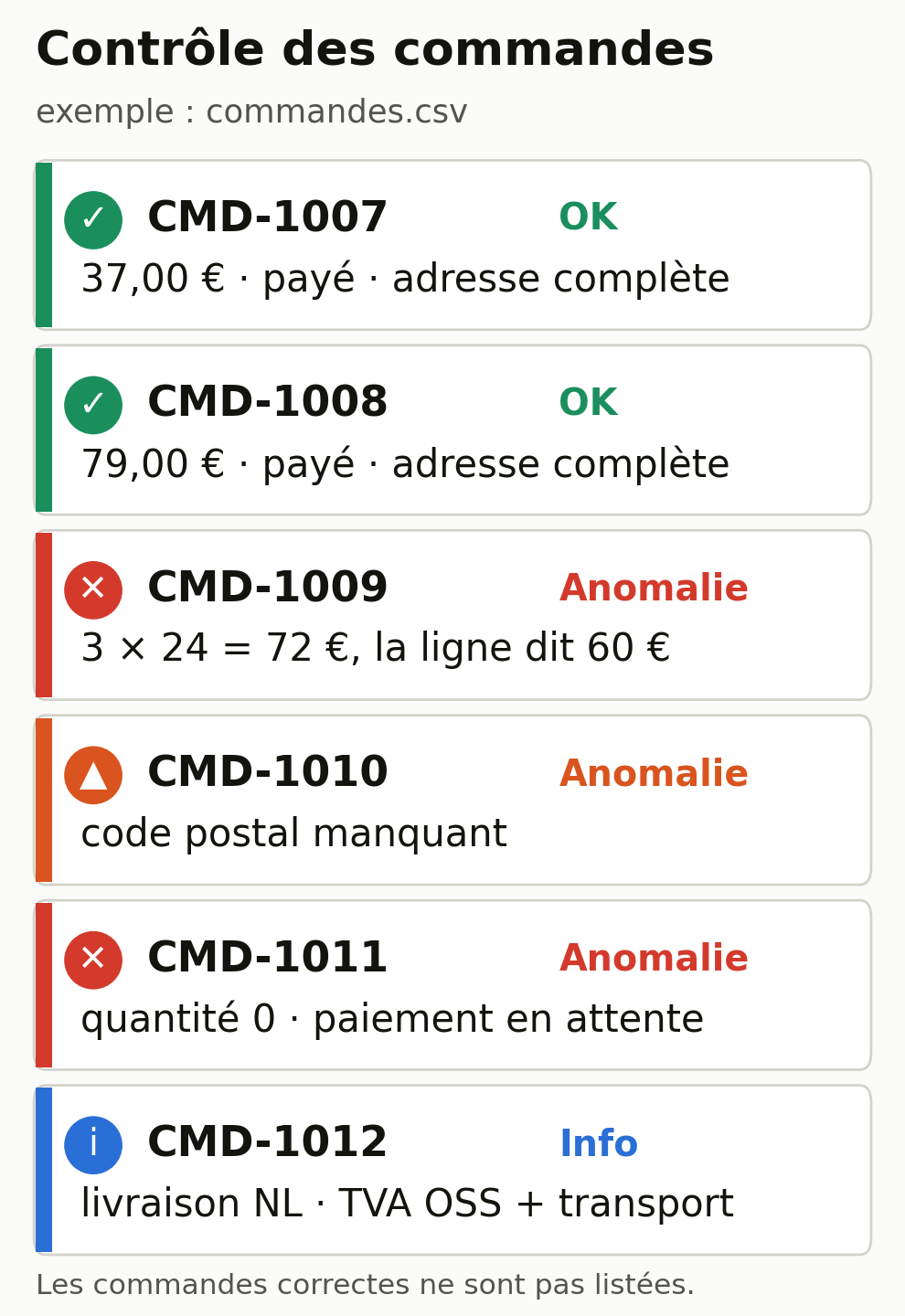
Input file: commandes.csv (provided), six fictitious orders, three of which have a problem.
Steps:
- For the exercise, open the
commandes.csvfile provided: it is already fictitious and cut down to the useful columns. For your real orders later, export them as CSV, then remove what the check doesn’t need (name, email, full address) and keep a neutral reference, the country, postal code, city, item, quantity, unit price, total and payment status. Only move to real data with the precautions described above (an account that excludes training, minimization, legal basis). - Paste the prompt below, then the contents of the CSV.
- Read the list of anomalies, then check each flagged amount yourself in the spreadsheet.
Prompt to copy:
You are a logistics assistant for an online store. Here is an export of
orders. Check each row and flag only the anomalies, without
shipping anything or deciding for me.

Check for each order:
- Total consistency: quantity multiplied by the unit price must equal the
  line total. Show the calculation when there is a difference.
- Address fields present: country, postal code and city filled in. Flag any that are missing (a presence check, not address validation).
- Quantity greater than zero.
- Payment status: flag any unpaid order.
- For this fictitious store, the usual destinations are Belgium
  and France. Flag any other destination separately, without treating it as
  an error (VAT and carrier checks).

Return a table: order, type of anomaly, detail. Don't list the
correct orders.

Data:
[paste the contents of commandes.csv here]
Sample expected result:
| Order    | Anomaly                  | Detail                                             |
|----------|--------------------------|----------------------------------------------------|
| CMD-1009 | Inconsistent total       | 3 × 24.00 = €72.00, the line shows €60.00          |
| CMD-1010 | Incomplete address       | Postal code missing, full_address = no             |
| CMD-1011 | Do not ship              | Quantity 0 and payment pending                     |
| CMD-1012 | Other country (info)     | NL delivery: check OSS VAT and carrier             |
Human check: recalculate the flagged totals yourself in the spreadsheet. A chat AI sometimes gets arithmetic wrong. For CMD-1009, the total column should be €72.00, not €60.00: decide whether the price shown to the customer was wrong or whether the difference comes from a forgotten discount. The AI raises the doubt; you decide.
Common failure and fix: the AI miscalculates or misses a difference. Two remedies. Ask it to show the calculation line by line (“show quantity × price for each order”), which makes the error visible.
Or keep the total calculation in a spreadsheet formula and use the AI only for format checks (address, status, country). A correct formula gives you a reproducible total you can check at a glance; the AI handles the rest.
Task 3. Prepare customer service replies
Goal: produce draft replies to common customer messages, based on your actual policy, with a clear signal when a human decision is required.
App: a chat AI.
Input files: messages-sav.txt (three fictitious messages) and politique-retour.txt (a fictitious return policy to replace with yours).
Steps:
- Open a chat and first paste your return and shipping policy. In the example, use
politique-retour.txt. - Paste the prompt below, then the three customer messages.
- Proofread each draft. Deal first with the one the AI marked “to be approved.”
Prompt to copy:
You are a customer service agent for an online store. Write a draft
reply in English for each of the messages below.

Rules:
- Answer only on the basis of the policy provided above. If information
  is missing (actual status of a parcel, refund approval), don't
  invent it: leave a [to be completed] field and explain what needs to be
  checked.
- Don't grant any refund and don't promise any goodwill gesture. Prepare
  the reply and mark it "to be approved by a manager" when a decision
  is needed.
- Courteous, plain tone, no over-the-top phrasing.
- For a damaged product, apply the procedure in the policy.

Messages:
[paste the three messages here]
Sample expected result (extracts):
Message 1 (CMD-1007, parcel tracking)
Hello,
thank you for your message about order CMD-1007. We're checking the status
of your parcel with the carrier.
Status at this point: [to be completed from the carrier].
Tracking link: [to be completed].
We'll get back to you as soon as we have the information.

Message 2 (CMD-1008, return) [TO BE APPROVED BY A MANAGER]
Hello,
you have 14 days after receiving the item to let us know that you
wish to withdraw, then 14 days to send the item back. To start
the return: [return procedure]. Return shipping costs are your responsibility.
The refund is made within 14 days of your withdrawal
request; we may delay it until we receive the item or
proof of shipping.
[Check eligibility before sending.]

Message 3 (CMD-1009, damaged candle) [TO BE APPROVED BY A MANAGER]
Hello,
we're sorry the item arrived damaged. Could you send us a
photo of the cracked lid? After checking, we'll offer you a replacement
or a refund.
[Replacement or refund decision to be approved by a manager.]
Human check: verify the facts the AI doesn’t know. The parcel status comes from the carrier, not from the AI. Refund or replacement decisions (messages 2 and 3) wait for your approval. Never let an unfilled [to be completed] field go out.
Common failure and fix: the AI invents a tracking status or a return rule that doesn’t exist in your store. The instruction “answer only on the basis of the policy provided, otherwise leave [to be completed]” fixes most cases. If it promises a refund, add “never decide on a refund, mark the reply to be approved.”
Reusable project instructions
Copying your rules into every chat wastes time and creates inconsistencies in tone. The major AIs offer a workspace that keeps instructions and reference files, applied to every chat inside it: Projects in ChatGPT and Claude, Gems in Gemini, and spaces in Le Chat.
These spaces keep your standing instructions, your reference files and the history of their chats in one place. For these three tasks, a well-configured workspace is enough, and you have nothing else to install.
Watch out for one limit: a workspace like this applies your rules, but it doesn’t carry out actions in your software on its own. This difference from real orchestration is covered below.
Create a Project named “Store, copywriting and customer service” and paste these instructions into it:
Context: I run an online store. You help me write product
pages and prepare customer service replies.

Standing rules:
- Never invent a product characteristic missing from the data provided.
- Never grant a refund and don't promise any delivery time; mark "to be
  approved" any reply that commits the store.
- Answer on the basis of the project's reference files (tone guide,
  return policy, shipping FAQ). If the information is missing, leave
  [to be completed].
- Clear English, short sentences, no superlatives.
Files to add to the Project: your tone guide, your return policy, your shipping FAQ. Every chat opened in this Project will then follow the same rules without you having to copy them again.
Which model to choose
A word on vocabulary first, because these terms often get mixed up. The model is the engine (what the vendor updates regularly).
The consumer app is what you open: ChatGPT, Claude, Gemini, Le Chat, Copilot. The subscription is your plan. The API is used to plug the model into software, which requires development work.
A connector links the AI to a third-party tool. An automation engine (Zapier, Make, n8n) chains steps between apps. For the three tasks above, all you need is a consumer app and a subscription.
To choose, think in terms of task type rather than model name:
- Short rewriting, quick sorting, a draft reply: a fast model is enough, and costs less.
- A full pass on a catalog, cross-checking a CSV, reading long documents: try a reasoning-oriented model, often slower. Judge it on the evidence: run it on a small sample whose correct result you already know, compare, then hand it the rest only if it passes that test.
Version names change often. Take the current model your app offers when you open it, rather than memorizing a number. The four providers to know are OpenAI, Anthropic, Google and Mistral, plus Microsoft 365 Copilot if you already work in Outlook and Excel.
On data location, everything depends on the provider, the plan and the contract: the storage region and the processing region can vary depending on the product, the plan and the configuration.
Don’t rely on the vendor’s nationality, or on the mere fact of a paid plan or a European server: check the residency and the terms stated for your plan. The reference article keeps this detail up to date, by plan and by region.
For up-to-date details on models, plans and data residency, the reference article choosing your AI model and organizing work with several agents keeps this list separately, so it isn’t repeated, and quickly outdated, in every article.
What a coordinator and sub-agents really are
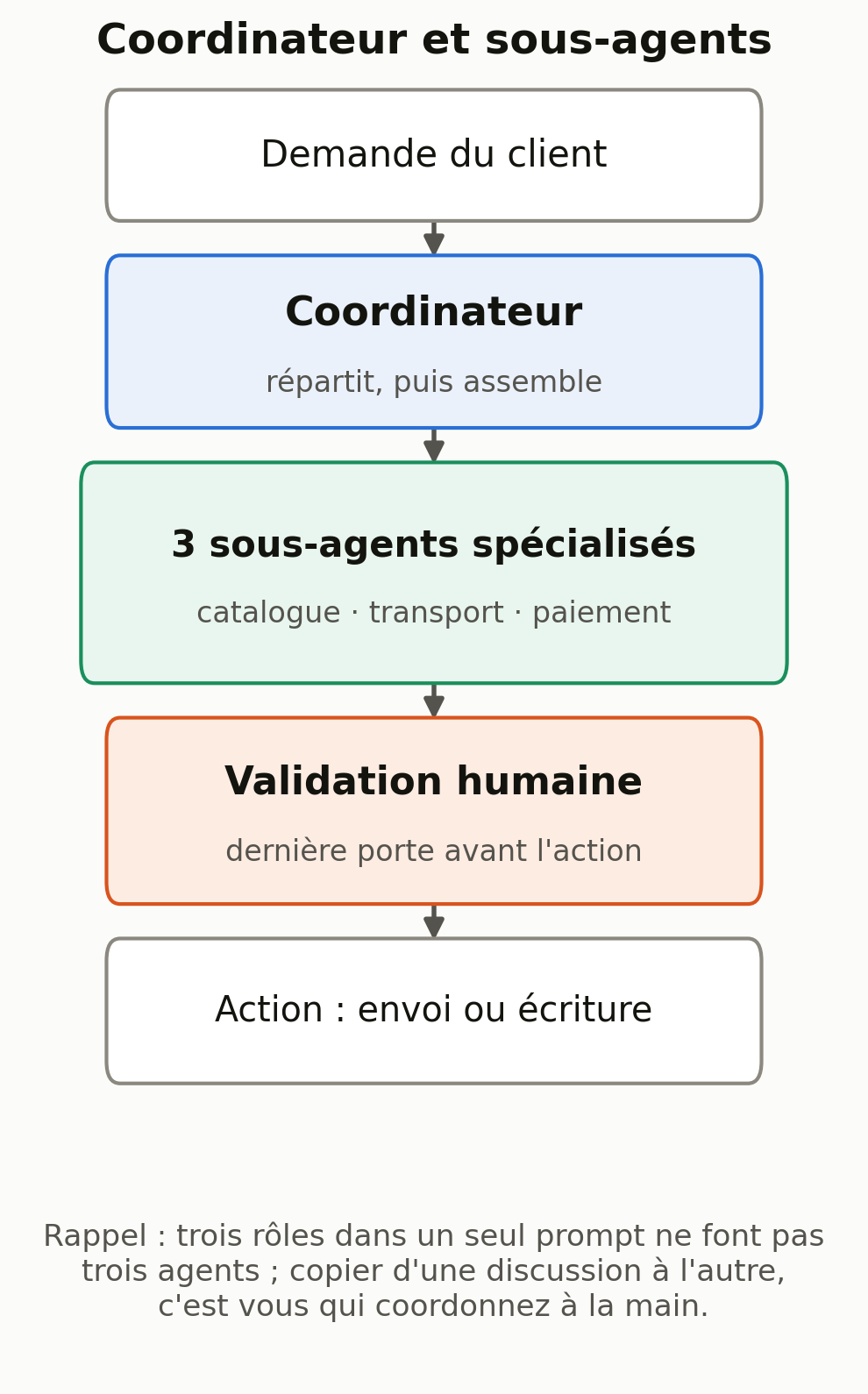
You’ll often read that you can hand a whole process to a team of AI agents: a coordinator splits the work among specialized sub-agents, one reads the CMS, another the carrier, a third prepares a refund. The setup is real, but you need to know what it requires, because one point is easy to misunderstand.
Giving an AI three roles in a single prompt (“act as a writer, then as an editor, then as a proofreader”) gives you one AI acting out a scene, with no independent agents involved. Copying the result from one chat into another doesn’t create agents either: you’re doing the coordination by hand. A Project doesn’t turn into an autonomous system on its own either.
The manual exercise, within your reach today, is useful in itself: chain the three tasks in this article and steer them yourself. Task 1 produces the pages, you paste the result of task 2 into your parcel preparation, task 3 drafts the replies. You’re the coordinator, and every step goes through your approval. That’s the safest way to start.
Real connected orchestration, where agents read and write in your software on their own, takes something else: technical connections to your tools (through a connector or an automation engine), precise access permissions, an engine that runs the steps, and an approval step before anything is sent or written.
That’s a setup project, not a chat trick. The diagram below shows its structure, with human approval as the last gate before action.
Checklist for your next session
- First run the three tasks on the sample files provided, to get the hang of the method.
- To move to your real data: minimize (remove name, email, full address), work in an account that excludes training, and check that you’re allowed to (terms, legal basis).
- Rerun task 1 on three of your products, then compare each page with the table.
- Rerun task 2 on today’s orders and recalculate the flagged totals.
- Paste your real return policy and test task 3 on three typical messages.
- Create a Project with your standing instructions and your reference files.
- Decide, for each task, which decision always stays human.
Going further with MACCUS
If you want an assistant to handle these tasks every day within your workflow, with connections decided case by case and an approval step before anything is sent, MACCUS sets up this kind of assistant, available through Telegram by text, voice and documents.
Connectors to your tools are assessed and scoped to fit your needs; this isn’t a ready-made integration with every piece of software. Let’s talk about your workflow and your connectors.
For a broader first step, the pillar guide to using AI in your profession walks through a complete first task and points you to the article for your line of business. If your focus is payment reconciliation and accounting, the article on AI for accounting firms covers checking documents and verifying amounts in detail.