On November 13, 2026, YouTube announced a new version of YouTube Studio, the tool creators use to manage their channels and track their stats. On desktop, the numbers now come with plain-language summaries, and a new tab helps creators find video ideas.
The Analytics page is now called “Insights.” A new “Research” tab replaces Trends and flags videos on other channels that are getting far more views than usual. Ask Studio, the AI assistant built into YouTube Studio, is now available in the mobile app and can take up to ten images at once.
The announcement came from TeamYouTube, the platform’s support team. A Google employee posted it on November 13 on the YouTube Help Community, YouTube’s official help forum. Creator Insider, YouTube’s channel for creator product news, posted a three-minute video the same day.
Insights adds plain-language summaries to the numbers
YouTube says Insights “highlights the story behind your data in plain, natural language.” The summaries point out which videos brought in new viewers and where watch time peaked. They also compare a channel’s latest uploads with its typical results.
YouTube’s English help page says the company has “updated the ‘Analytics’ page to the ‘Insights’ page on desktop.” According to the same page, YouTube Studio Insights offers personalized performance summaries, explanations of metrics and advice tailored to each channel. The page describes seven tabs: Overview, Content, Reach (how viewers find a channel), Engagement, Audience, Revenue and Trends. The Revenue tab is limited to members of the YouTube Partner Program, who earn a share of ad revenue.
The raw numbers haven’t gone away. An “Advanced Mode” opens the detailed report in full screen, with comparisons, custom date ranges and data exports. According to the Creator Insider video, Advanced Mode and real-time stats aren’t changing. Watch time, retention and click-through rate are explained in our introduction to analytics for creators.
Channels with access to Ask Studio also get a summary card written by the assistant. PPC Land, a news site that covers online advertising, reviewed the Creator Insider video. It reports that the card breaks down key channel trends, the top videos driving the channel and audience behavior.
Research takes over from Trends
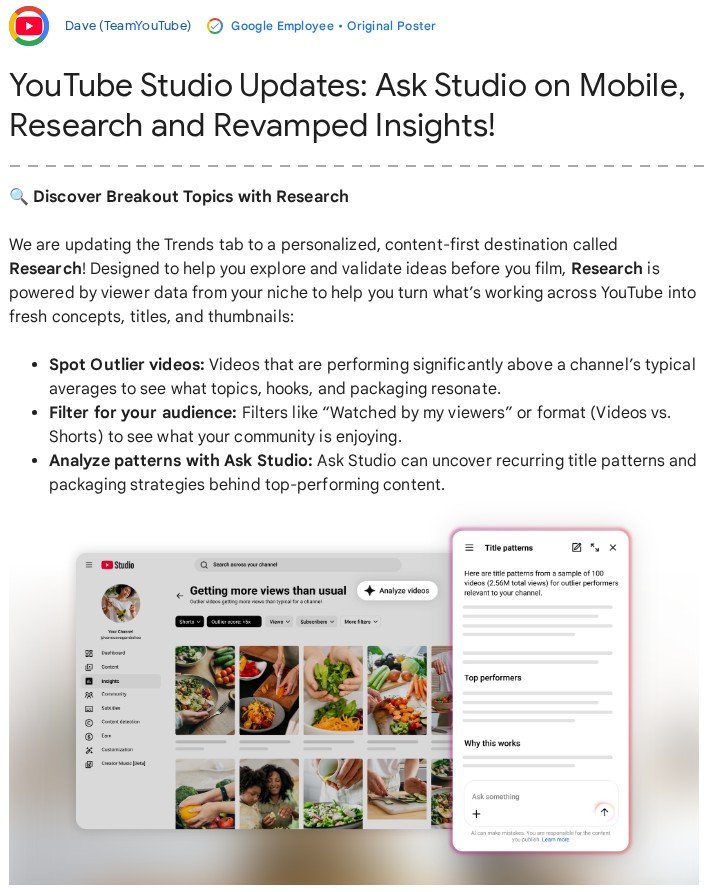
The old Trends tab showed what a channel’s audience and YouTube users were searching for. Its replacement, Research, starts with videos that are already doing well. YouTube describes it as a place to explore and validate ideas before filming, “powered by viewer data from your niche.” YouTube places the tab inside Insights, on desktop.
Research highlights “outlier” videos, ones that get far more views than their channel’s usual average. YouTube measures that gap with an outlier score. The help page gives an example: a long-form video with a 5x score got five times more views than the channel’s earlier long-form uploads.
The help page lists eight commonly used filters. Seven of them filter by format, view count, outlier score, upload date, subscriber count, video length and channel age. The format filter separates long videos from Shorts, YouTube’s short vertical videos.
The eighth filter, “Watched by my viewers,” shows what a creator’s audience watched on other channels in the past month. Ask Studio can then point out the title and thumbnail formulas that recur among the best-performing videos.
YouTube had been testing the tab since the summer. On August 5, 2026, a YouTube spokesperson confirmed the test to Tubefilter, a news site that covers online video. The test involved “a small number of users.”
Mario Joos describes himself as a retention director for YouTubers such as MrBeast. Retention is a video’s ability to keep viewers watching. In a LinkedIn post cited by Tubefilter, he noted that creators had relied on third-party tools to come up with ideas. He called the “Watched by my viewers” filter the place where “YouTube wins over any other tool.”
Ask Studio comes to mobile
Ask Studio runs on large language models, the technology behind assistants like ChatGPT. According to YouTube’s help pages, creators can use it to brainstorm video ideas, analyze a channel’s performance and generate titles and thumbnails. It now works in the YouTube Studio app for Android and iPhone, where creators can dictate requests by voice. Conversations sync between phone and computer.
The assistant also accepts up to ten images per message, on desktop and mobile. TeamYouTube gives two examples: comparing thumbnail concepts side by side, and sharing reference graphics for a set design or a graphic overlay (text or images laid over the video).
Ask Studio is open to “most YouTube creators globally.” Official Artist Channels (musicians’ official channels), made-for-kids channels and creators under 18 don’t have access. YouTube doesn’t publish a list of countries. In eligible countries, it works in any supported language chosen for the YouTube interface.
Gaps in the announcement
YouTube’s own texts don’t all say the same thing. TeamYouTube’s post presents Insights as a complement to the existing analytics tools, “which are still fully available in Studio whenever you need them.” The Creator Insider video’s title calls Insights “the new Analytics,” a mismatch PPC Land pointed out. The English help page says the Analytics page was “updated” to Insights, while the French version says it was replaced.
The help pages haven’t caught up. On November 15, the English and French versions of the Insights help page still described a “Trends” tab, though the announcement says Research replaces it. Neither the announcement nor the help pages say what time window the outlier score covers.
In July, Net Influencer, a news site about the creator economy, reported that Mario Joos thought the score appeared to cover a video’s first seven days. He also said he wasn’t sure how YouTube calculates it. The same site reported that YouTube was retiring the keywords saved in the old Trends tab on desktop, and that creators had three months to download them. None of YouTube’s November publications mention them.
YouTube also doesn’t explain how the Insights summaries are produced or checked. For Ask Studio, the help page warns that the “quality and accuracy of responses may vary.” It advises against relying on the assistant for professional advice, including medical, legal or financial advice.
According to the Creator Insider video, as quoted by PPC Land, images sent to the assistant “stay strictly private to your active session and are automatically deleted after 30 days.”
The Ask Studio help page qualifies that promise on two points. To remove an uploaded image, a creator has to delete the whole conversation. Human reviewers may also read conversations once they have been disconnected from the user’s Google account. The page asks users not to share anything confidential.
PPC Land counted 123 comments under the video by November 14, most of them thanking the team. It counted 26 replies to TeamYouTube’s post. The most-liked comment under the video came from a creator who misses the old side-by-side tabs: moving between a video’s reports now means going back each time.
What it means
The redesign changes the page where creators track their numbers. On desktop, that page keeps its charts, but written summaries now come first and the detailed tables sit one click away, behind a card. YouTube announced Insights and Research on desktop with no eligibility requirements, while the assistant remains limited to eligible channels. PPC Land notes that a YouTube help page still describes a gradual rollout that began in July 2026.
In the Creator Insider video, as cited by PPC Land, YouTube says the summaries “explain the why behind the metrics.” YouTube hasn’t published its method or an error rate. PPC Land gives the example of a card that credits a rise in views to loyal viewers: that is a judgment about cause. The raw numbers in Advanced Mode remain the way to check it.
Paid third-party tools already offered outlier scores, according to Mario Joos as quoted by Net Influencer. Research brings them into YouTube Studio. The “Watched by my viewers” filter, on the other hand, relies on data only YouTube holds, PPC Land notes.
The score is relative to each channel’s own average, so a 5x video on a small channel may total only a few thousand views. It counts views and says nothing about audience quality or sales, PPC Land points out.
The redesign comes as platforms compete for creators. Instagram is testing horizontal videos of up to 90 minutes, a format it unveiled on October 26. In early November, YouTube opened its Shopping affiliate program to Amazon, Cdiscount and Leroy Merlin products for French creators. Cdiscount and Leroy Merlin are French retailers.
Several questions remain open. One is whether Insights and Research, announced for desktop, will come to the mobile app. The English and French help pages also still need updating. YouTube hasn’t explained how the outlier score is calculated or what happens to the saved keywords from the old Trends tab.
Sources
- YouTube Studio Updates: Ask Studio on Mobile, Research and Revamped Insights!, TeamYouTube, YouTube Help Community, November 13, 2026
- New! Ask Studio on Mobile, Image Uploads, Research Tab, Insights are the new Analytics, Creator Insider (YouTube), November 13, 2026
- Get started with YouTube Insights, YouTube Help, accessed November 15, 2026
- Research content & find trends, YouTube Help, accessed November 15, 2026
- Learn about Ask Studio in YouTube Studio, YouTube Help, accessed November 15, 2026
- YouTube Studio’s numbers learn to talk as Analytics becomes Insights, PPC Land, November 14, 2026
- YouTube’s new video ideation tool has two “massive” features for creators, Tubefilter, August 5, 2026
- YouTube Tests Redesigned Studio Analytics With AI Insight Cards, Net Influencer, July 17, 2026
Header image: MACCUS diagram, data from the TeamYouTube announcement and YouTube Help (November 2026)