

Since October 12, 2026, Google Ads automated promotions let Google read the offers shown on your website and add them to your ads on its own. Google’s examples include “20% off on black sweaters” and “Buy one get one free.” The feature is on by default for Search and Performance Max campaigns that show a store address. If you manage the ads for your store, restaurant or salon yourself, an offer that nobody entered in the account can now appear under your ad, a little over six weeks before Black Friday on November 27, 2026.
Google notified some advertisers by email, and Search Engine Roundtable published the message on October 5, 2026. Starting October 12, the email says, Google Ads finds and extracts promotions from advertisers’ sites and applies them to their campaigns unless they opt out. PPC News Feed had spotted Google’s help page on the feature in early September. The email is what set the date and made clear the setting is on by default.
How an offer moves from your site to your ad
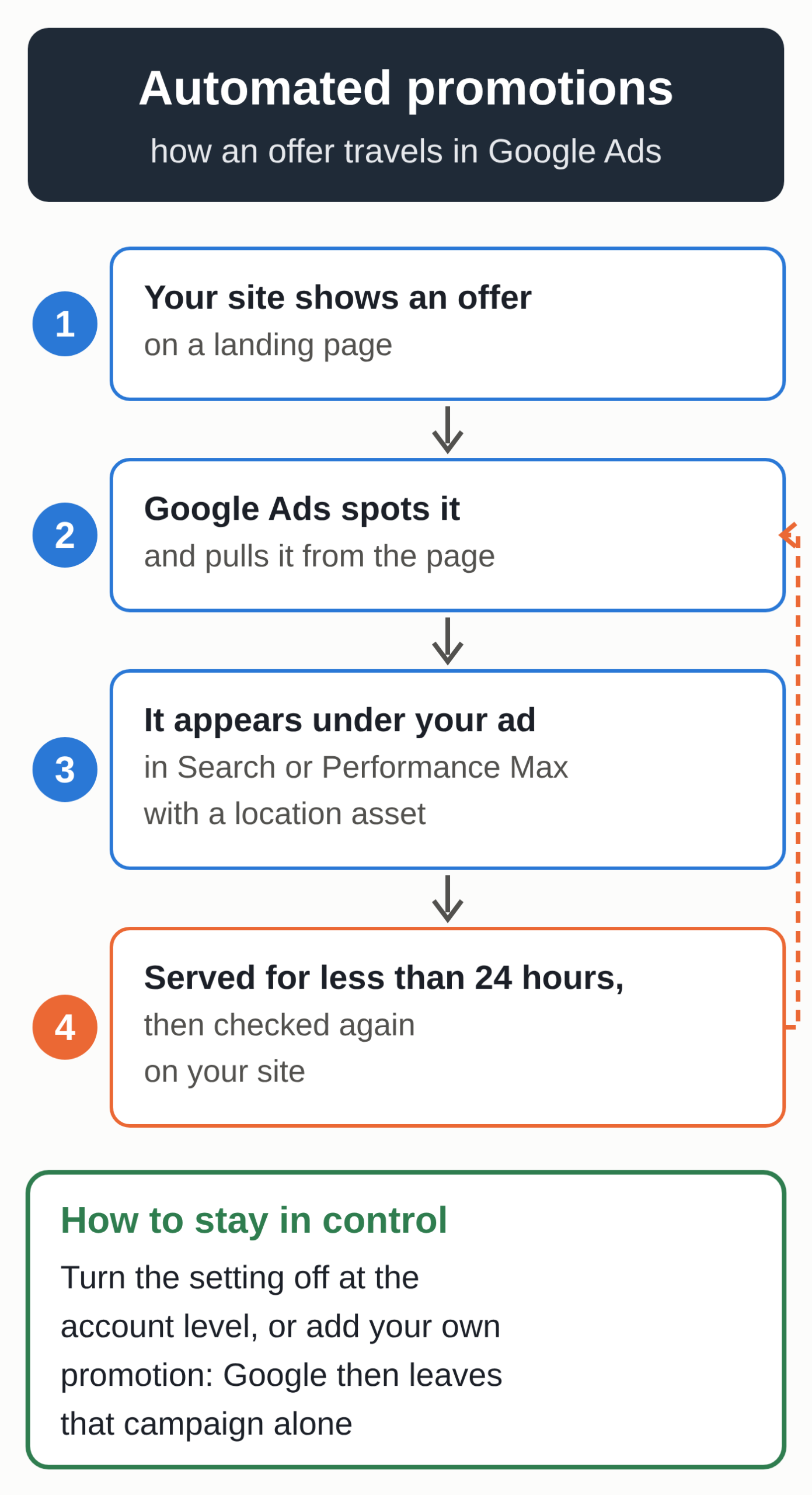
According to Google’s help page on automated promotions, the system finds active offers on your landing pages and attaches them to eligible campaigns. Your ad then shows the discount right in the search results. Google says each promotion found this way serves for less than 24 hours. After that, it can run again if Google’s systems still see it on your site.
Google expects this to change once it can extract the start and end dates of promotions. Its page on account-level automated assets also says the offers can come “from your website and other sources,” but doesn’t say which ones.
Google doesn’t charge for adding the asset. Per its help page on promotion assets, a click on the promotion costs the same as a click on the ad headline.
Which campaigns are affected
Google sets three conditions. The campaign has to be an active Search or Performance Max campaign with linked location assets, local ad campaigns included. Location assets hold your store addresses. The campaign also can’t already be running a promotion you added manually, and it has to comply with Google’s standard advertising policies.
In practice, the feature mostly affects stores and service businesses with a physical location, usually linked to Google Ads through their Business Profile. An online store with no address isn’t covered by this setting.
Merchant Center offers a feature by the same name for free listings and Shopping ads. That one is separate: it’s still in closed beta and limited to merchants based in eight countries, including France. Belgium isn’t one of them.
In its table of Performance Max settings, Google lists “automated location assets” as on by default, just like automated promotions. Its page on account-level automated assets says that if you haven’t added any locations, Google Ads can link your business to known locations on its own, using your landing pages, for example. So check your campaigns even if you’ve never entered an address.
The risk for a store before Black Friday
Black Friday falls on November 27, 2026, and many retailers put discount banners on their sites around that time. Google can read an old sale page that was never taken down, a loyalty-only offer or a discount that requires a minimum purchase. PPC Land points out that Google doesn’t explain how it decides an offer is “high-quality,” what happens when a page still shows an offer that has ended, or how often it crawls your pages.
The under-24-hour window raises a second problem. Google says its validation only lets through active, unexpired offers, but it doesn’t say how it detects one that has ended. In theory, an offer you take off your site in the morning could stay in an ad until the next check.
Your reports also leave out promotions that never served, according to Google’s email as quoted by PPC Land. So you only see the ones that have already run. On Reddit, one campaign manager brought up the familiar complaint about ad text written by Google’s AI: advertisers only saw it after the ad went live.
Six checks, from your Google Ads account to your website
- Find the affected campaigns. In the Campaigns menu, open “Assets” and check whether your Search or Performance Max campaigns have a linked location asset.
- Look for promotions Google has already added. Still in “Assets,” filter by “Asset type,” then “Promotion.” Automated promotions are labeled “Google AI” in the “Added by” column. Hover over that label to see where the offer came from.
- Decide whether to keep the feature. To turn it off, open “Assets,” click the three-dot icon in the filter bar and choose “Account level automated assets,” then click the three dots again and select “Advanced settings.” In the “Automated promotions” drop-down, choose “Off” and give a reason if Google asks for one. The setting applies to the whole account, so if you manage several accounts, repeat it in each one.
- Create your own holiday promotion. Google skips campaigns that already have a promotion you added manually, and creating it yourself lets you set the dates. With the “Black Friday” occasion, your promotion asset can serve from October 15 to December 15.
- Clean up your site. Take down banners for offers that have ended, and spell out the terms of each discount on the same page where it appears.
- Measure the results. Google recommends segmenting your reports by click type and looking at impressions and conversions for the whole campaign.
If you’re also getting your Facebook and Instagram campaigns ready, our article on the AI tools Meta announced on October 6 covers the Meta settings to review before Black Friday.
AI-written ad text you can now preview
Google’s AI also writes some of your ad text. Text customization, formerly called automatically created assets, generates extra headlines and descriptions from your domain, your landing pages, your existing ads and your keywords. According to Google’s help page on text customization, campaigns using it were set to move to AI Max automatically starting in September 2026.
Google now lets you see this text before you turn the feature on, a change Search Engine Roundtable reported on October 9, 2026. In the “Asset optimization” section, enter a page URL and select “Preview examples.” Google shows up to 10 sample headlines and descriptions, usually in under 30 seconds. Previews work in French and Dutch, and Google calls them a representative sample, so they aren’t necessarily the exact text that will run.
Try it with your upcoming Black Friday page. If a sample promises a delivery option you don’t offer or uses wording that doesn’t sound like you, text guidelines let you exclude specific terms and set your tone of voice. They’re still in a pilot, so your account may not have access yet.
Open questions
Google’s help page gives no launch date and no list of countries, and the email only went to some advertisers. Google also doesn’t explain how to report a promotion it misread. PPC Land flagged that gap too.
A well-maintained Business Profile and clear site pages mean fewer surprises, in Google Ads and in local search. For customer reviews, our Google reviews kit covers the rules you need to know.
If your local search presence needs an overhaul, our local SEO pack for small businesses gives you a starting point and a method to keep managing it yourself.