

To get more Google reviews, ask every customer the same way, with a link that opens the review form directly. Offer nothing in return, don’t filter for happy customers, and don’t suggest a rating or what to write. Then reply to the reviews that get published and report the ones that break Google’s rules.
This kit brings together Google’s rules and the legal framework in France and Belgium, a link and QR code generator, request templates for text messages, email, WhatsApp and the counter, reply templates for each situation, and the reporting procedure. As of October 10, 2026, the rules cited were checked against Google’s official pages, Légifrance and Justel (the official French and Belgian legal databases).
Google’s rules on asking for reviews
Google sets out its rules in the Maps user-generated content policy, under “Deceptive and fake content.” The principle fits in one sentence: every review must reflect a genuine experience at the business.
Requests that are allowed
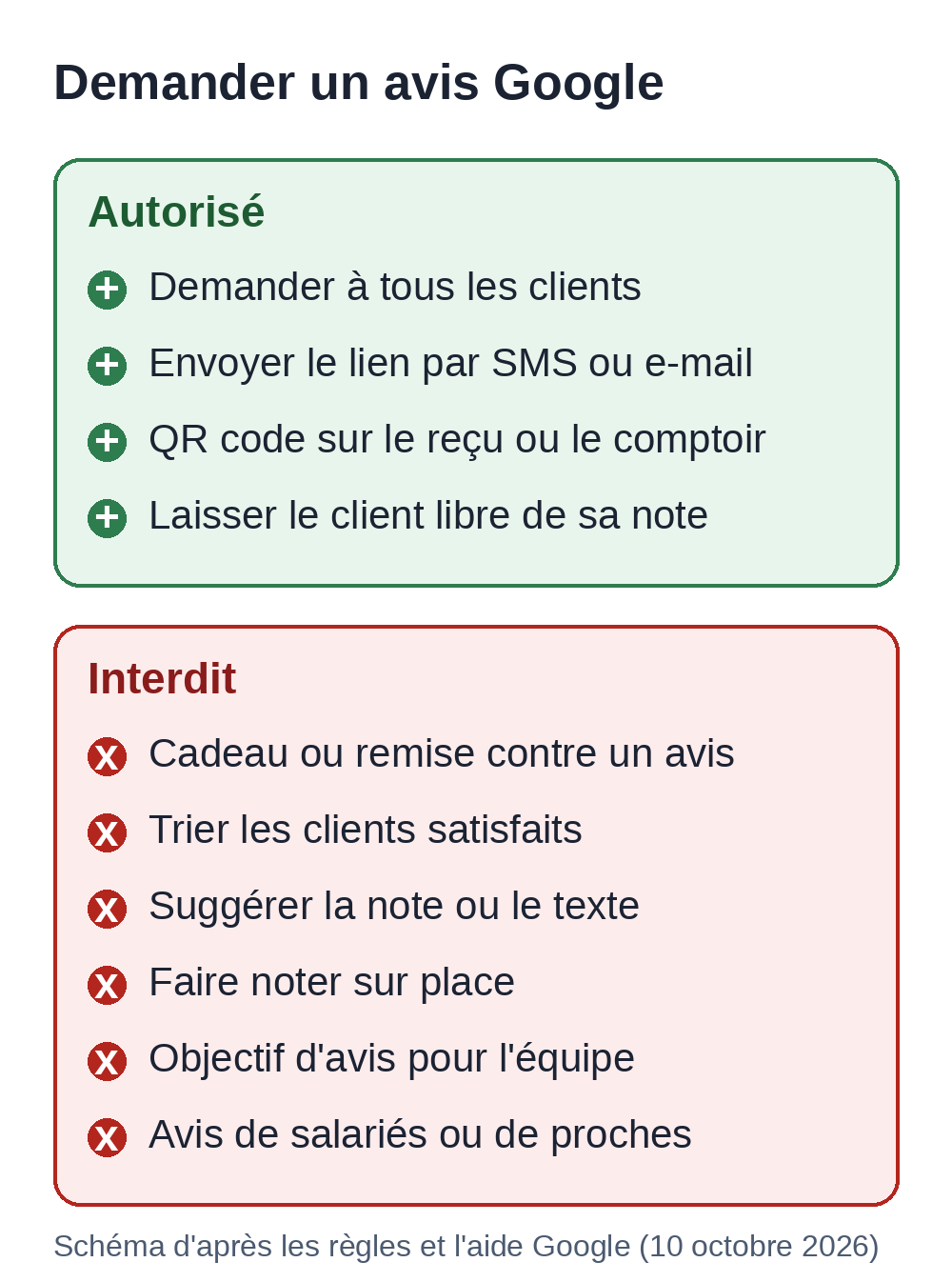
You’re allowed to ask for a review. Google lets merchants request or encourage reviews that describe a genuine experience, “without offering incentives in exchange, or attempting to influence the rating or content of the review.” Its help page Tips to get more reviews goes further: a mix of positive and negative reviews often comes across as more trustworthy.
Prohibited practices
Google’s policy prohibits businesses from doing the following:
- offering an incentive (payment, discount, free product or service) in exchange for a review, for changing a review or for removing a negative review;
- discouraging or prohibiting negative reviews;
- selectively soliciting positive reviews;
- requiring a customer to rate or write a review on the spot, or pressuring them to do so;
- asking for specific content, such as the first name of a staff member;
- setting the team a target number of reviews;
- posting a review from several accounts, or posting on a competitor’s profile to harm them.
Reviews written by your employees, former employees, partners or relatives count as a conflict of interest, which Google classifies as rating manipulation.
Three common habits fall under these prohibitions. The first is the satisfaction survey that sends happy customers to Google and unhappy ones to an internal form: that’s selective solicitation. The second is the line “leave us 5 stars” or “mention Julie in your review.” The third is the tablet handed to the customer so they rate you before leaving the counter: that’s pressure to review on the spot.
Several discussion threads from English-speaking small business owners, read on October 10, 2026, advise asking only your most enthusiastic customers or requesting five stars. That advice contradicts the two rules above: ask everyone.
Possible penalties for your profile
Google removes reviews that break its rules. Its page Restrictions on Business Profiles gives three examples of additional penalties, in a non-exhaustive list: the profile stops receiving new reviews for a set period, existing reviews stop being published for a set period, or a warning tells visitors that fake reviews have been removed. Google notifies the owner by email, and the owner can appeal. The text of the profile itself follows other rules, tightened in September 2026 for promotions and calls to action: see our article on the Google Business Profile rules.
French and Belgian law on reviews
Both countries apply the same EU directive on unfair commercial practices, amended in 2019 by Directive (EU) 2019/2161. The European Commission’s guidance of December 2021 gives concrete examples of prohibited manipulation: requesting and publishing only positive reviews, deleting negative ones, giving customers prefilled positive review templates, or contacting them during moderation to get them to change or withdraw a negative review.
In France
Since May 28, 2022, Article L121-4 of the Consumer Code has listed two review-related practices among the commercial practices considered misleading in all circumstances. Item 27 covers claiming that reviews come from consumers who actually used or bought the product without having taken the steps needed to check it. Item 28 covers publishing or having others publish “fake consumer reviews or recommendations,” or altering reviews to promote products.
The penalties are set by Article L132-2 (in French): two years in prison and a 300,000 euro fine, an amount that can be raised to 10% of average annual revenue. Since the law of May 10, 2024, the practice committed online is punishable by five years in prison and a 750,000 euro fine.
The DGCCRF, France’s consumer protection authority, actively enforces these rules. In a reply published in the French Senate’s Official Journal on June 26, 2025, the ministry stated that more than 1,200 businesses had been inspected since July 1, 2023 and that a tool for detecting suspicious reviews, Polygraphe, had been in use in its services since September 2023.
In Belgium
The Code of Economic Law includes the same prohibitions in Article VI.100, items 25 and 26, in force since May 28, 2022: claiming without reasonable checks that reviews come from real customers, submitting or having others submit fake reviews, or distorting reviews to promote products. Without bad faith, the offense carries a level 2 penalty (Article XV.83): a criminal fine of 26 to 10,000 euros, or 4% of annual revenue if that amount is higher. Committed in bad faith, it falls under level 3 (Article XV.84): 26 to 25,000 euros, or 6% of annual revenue. The surcharges (“décimes additionnels”) of Belgian criminal law apply to these amounts.
Reviews displayed on your own website
If your website displays reviews, even through a Google widget, the law requires you to state whether and how you check that they come from real customers (Article L121-3 in France, Article VI.97, § 7 in Belgium). Put this information next to the reviews, for example under the widget: “Reviews posted by users on our Google profile and displayed without filtering, from newest to oldest. We don’t verify on our end that the reviewers are customers; Google applies its own checks.” The sentence must stay accurate: if you filter or verify reviews, say on what basis.
In France, Article L111-7-2 (in French) also covers anyone whose business involves, even as a side activity, collecting or publishing online consumer reviews. They must in particular say whether reviews are checked and display the date of each review.
On the SEO side, Google’s documentation on review snippets (updated on September 18, 2026) says that when a business controls the reviews about itself, a page marked up as LocalBusiness or Organization can’t get stars, including when the reviews come from an embedded Google review widget. So marking up those reviews won’t earn stars in the results. Our schema markup guide details the types that do. To identify your business, the Organization type is still useful: our page on entity SEO provides a generator for it.
This summary doesn’t replace advice from a lawyer on a specific case.
Healthcare and regulated professions
Professional bodies add their own rules. The French Medical Council’s practical guide “Préserver sa réputation numérique” (protecting your online reputation, in French), still online in October 2026, says a doctor is not allowed to encourage patients to post online reviews.
So a doctor practicing in France won’t use the request templates in this kit. The reply templates can still be used, with the minimal reply described below. Lawyers, dentists, physical therapists and other regulated professions: check the rules of your professional body before making any request.
Your direct link to the review form
A customer who has to search for your profile, open the reviews tab and then find the button often gives up along the way. A direct link opens the form in one tap. The customer must be signed in to a Google account to post; Google says they can create one with an address other than Gmail.
The official method from your profile
The page Create a link or QR code to ask for reviews describes the procedure:
- Open your Google Business Profile while signed in to the account that manages it.
- Select “See reviews,” then “Get more reviews.”
- Choose “Copy” for the link.
- For the QR code, right-click it and choose “Save image as.” As of October 10, 2026, Google only generates this QR code in a desktop browser.
This is the link to use first: Google provides and maintains it.
The link built from the Place ID
The Place ID is a place’s unique identifier at Google, for example ChIJN1t_tDeuEmsRUsoyG83frY4. You can find it with Google’s Place ID finder, no account needed. Google notes that the same place can have several IDs and that an ID can change over time.
With this ID, the address search.google.com/local/writereview?placeid= followed by the ID opens the review form. This format doesn’t appear in Google’s public help, but tools on the market use it. Tested on October 10, 2026 without being signed in, it redirects to the Google sign-in page with the review form as the destination. A made-up Place ID produces exactly the same redirect: so always test the link on your phone, signed in to your Google account, before you print anything.
This link is mainly useful when you don’t have manager access to the profile yet, or when an agency prepares materials for a client.
Link and QR code generator
Paste your Place ID or the link copied from your profile. The generator builds the review link, a check link to Google Maps to confirm the ID points to your business, a QR code to print and your personalized templates. Everything happens in your browser: nothing is sent, nothing is stored.
Google review link generator
Runs in your browser. No data is sent or stored.
Your review link
Test it on your phone, signed in to a Google account: open the link.
Check: see this Place ID on Google Maps. The profile shown should be yours.
QR code to print
Personalized text message
Personalized email
QR card text
The QR code points directly to Google's address, with no redirect service. Many free generators go through their own short link, which can stop working if the service shuts down or starts charging: your printed cards would then be useless.
Review request templates to copy
The templates below follow the rules described above: no incentive, no suggested rating, no prefilled review text, and the same request for every customer. Replace the items in square brackets. Send one reminder at most: beyond that, the request turns into pressure.
Pick a fixed moment in your process (the end of the appointment, delivery, handing over the keys) and send the request to every customer at that stage. The generator above automatically fills in the name and the link in three of these templates: the text message after an appointment, the email after a delivery and the QR card.
Text message after an appointment or a service
For a hairdresser, a garage, a tradesperson, a consulting firm: send it the same day or the next day.
Hi [First name], thanks for visiting [Business]. Your Google review, whether positive or critical, helps other customers find us: [link]
[Signature]
One-time reminder by text message
Send it only once, a few days after the first request, and only if the customer hasn't responded.
Hi [First name], a quick reminder from [Business]: if you have two minutes, your review would really help us. Here's the link: [link]
If we don't hear back, we won't remind you again. Thank you!
Email after a delivery or a job
For an online store, a building contractor, an agency: send it once the customer has received or seen the result.
Subject: Your review of [Business]

Hi [First name],

Your [order / project / case] was completed a few days ago. We hope everything went well.

If you have a moment, tell us about your experience on our Google profile. Reviews, positive and critical alike, help us improve and help future customers decide.

Leave a review: [link]

Something still not resolved? Just reply to this email and we'll make it a priority.

Best regards,
[Signature]
[Business]
Email to a business client
For a firm, an agency or a B2B provider, at the end of an engagement.
Subject: End of the project and a favor to ask

Hi [First name],

The [project name] project is now closed. Thank you for your trust.

Could you describe in a few lines, on our Google profile, how our collaboration went? Your feedback, whatever it is, helps companies that are unsure about contacting us.

The form: [link]

Kind regards,
[Signature]
WhatsApp message
Google lists WhatsApp among the channels for sending requests. Only message customers who have already contacted you through that channel.
Hi [First name]! Thanks again for stopping by [Business]. If you have a moment, a Google review would help us a lot: [link]
QR card for the counter or the table
The text to place next to the QR code, on a table card, a counter display, a parcel label or the bottom of an invoice.
Your review matters
Scan this code with your phone's camera to leave a review on Google.
Praise or criticism, we read everything.
[Business]
What to say at the register
Say it to every customer when they pay or pick up their order, without waiting for them to do it in front of you.
Thank you so much! If you have a moment at home, a Google review helps us enormously. The QR code is [on your receipt / on the counter].
Reply templates for reviews
Replies are posted from your profile: "See reviews," then "Reply" next to the review. According to the page Manage customer reviews, Google checks each reply before it's published, usually within 10 minutes and sometimes up to 30 days. It appears under the business's name, the reviewer is notified and can still edit their review.
Google's tips include short, polite replies, no private information about the reviewer, no personal attacks, your name or initials as a signature, and a quick response. Google also says there's no need to publicly thank every reviewer. If an AI tool prepares your draft replies, reread each one before posting it: the "review before sending" exercise in our AI training session plan trains your team to do exactly that check.
Detailed positive review
Thank you, [reviewer's first name or username], for this feedback. We'll pass your words on to [the team / the person concerned if the reviewer named them]. [A useful piece of information: something new, extended hours, a service the reviewer may not have noticed.] We look forward to seeing you again.
[First name], [Business]
Mixed review with a specific criticism
Thank you for this balanced review. You're right about [the point criticized]: [the concrete change you've made or will make]. As for the rest, we're glad you enjoyed [the positive point mentioned].
[First name], [Business]
Justified negative review
Acknowledge the mistake, without details about the customer, and offer to talk offline.
Hello, you're right, and we apologize. [What went wrong, in one factual sentence.] We have [action taken]. To talk about it and find a solution, contact us at [phone] or [email], mentioning this review.
[First name], [Business]
Any goodwill gesture is discussed in private and never depends on the review being changed: Google's policy prohibits offering an incentive in exchange for changing or removing a negative review.
Partly inaccurate negative review
Google advises explaining your constraints without taking the blame for what you didn't do. Stick to facts anyone can check.
Hello, thank you for taking the time to write. We're sorry your experience wasn't a good one. One clarification for readers: [a verifiable fact, for example "our Saturday hours are posted in the window and on this profile: 9 a.m. to 1 p.m."]. We're available at [phone] to discuss it.
[First name], [Business]
Customer not found in your records
Don't accuse them of lying and don't publish anything from your files. Reply briefly and calmly, then report the review if it breaks the rules.
Hello, we can't find any [appointment / order] matching this description. If you did visit us, please call us at [phone]: we want to understand what happened.
[First name], [Business]
The minimal reply for professions bound by confidentiality
For doctors, the French Medical Council's guide recommends expressing surprise if the criticism is unfounded, stating that a full reply would breach medical confidentiality, and offering a way to get in touch. The reply must say nothing about the consultation, even if the reviewer described it. Other professions bound by confidentiality can follow the same pattern, subject to their professional body's rules.
Hello, we have read your message. Our duty of confidentiality doesn't allow us to reply in detail on a public website. You can reach us at [practice phone number] to talk about it.
[Name], [Practice]
Reporting a fake or abusive review
Only reviews that break the policy can be removed. Google says so on its page Report inappropriate reviews: don't report a review because you disagree with what it says, since Google doesn't take sides in a dispute between a business and a customer. The accepted grounds are those in the policy: fake reviews, conflict of interest, harassment, hate speech, personal information, profanity, off-topic content.
The procedure from your Business Profile
- Open your Business Profile and select "See reviews."
- Next to the review in question, select "Report."
- Choose the reason, for example "Spam" or "Profanity."
- Confirm with "Report."
Google's assessment usually takes several days. Note the date, the reviewer's display name and the reason you chose: you'll need them if you appeal.
Follow-up and the single appeal
The review management tool, available from the same help page, shows the status of each report: "Decision pending," then "Report reviewed" with "No policy violation" if Google keeps the review. In that case, you can appeal once. In the tool, select "Check the status of a review I've already reported and my appeal options," then "Appeal eligible reviews"; you can select up to 10 reviews. Google sends the final decision by email.
In the appeal form, stick to the facts. This template helps you structure the text:
Review posted on [date] by [display name], rating [x/5].
Policy we believe is broken: [fake review / conflict of interest / harassment / personal information].
Verifiable facts: [no order or appointment on that date in our records; the reviewer is a former employee who left on [date]; the review describes a service we don't offer].
Similar reviews posted the same day: [links to the reviews, copied with "Share review"].
We're not asking for a justified criticism to be removed, only content that breaks the policy.
To copy a review's link, open Google Maps, search for your business, select "Reviews," then the review's menu and "Share review."
Negative review blackmail
A sudden wave of one- or two-star reviews, followed by a demand for money to make them go away, is extortion. The page Report extortion scams asks you not to pay and not to negotiate. Gather screenshots of the messages with the date, time and sender's contact details, the links to the suspicious reviews and the time the wave started, then fill in the extortion report form linked from that page. Filing a police report strengthens your case.
The legal route for illegal content
For a defamatory or disparaging review, Google offers a separate form, "Report content that violates local law," available from its page Content removal for legal reasons. Google's page on contributor appeals also points to the dispute resolution options provided for by the EU Digital Services Act. For legal action, a lawyer can assess how the content qualifies legally and which deadlines apply.
A simple monthly tracker
A table with one row per month is enough to see whether the method works. Record the figures on the first day of the month, from your profile and the review management tool.
| Month | Requests sent | New reviews | Average rating shown | Reviews without a reply | Reports pending |
|---|---|---|---|---|---|
| Example: October 2026 | 40 | 9 | 4.6 | 1 | 0 |
| November 2026 | |||||
| December 2026 |
Two figures deserve your attention. The number of reviews without a reply should be back to zero every month. The ratio of requests sent to new reviews tells you which channel works: if text messages bring in more than emails, shift your effort, without ever limiting the request to customers you think are happy.
Reviews are also a source of information about your service. Note recurring criticisms in an extra column: they're often the most profitable fixes. For the role of reviews in local SEO, see our complete guide to local SEO and, for a restaurant, the Google Business Profile guide for restaurants. On Bing, the local ranking of Bing Places listings also takes into account reviews posted on Yelp and Tripadvisor.
Frequently asked questions
Can you offer a discount or a prize draw in exchange for a review?
No. Google's policy prohibits any incentive in exchange for a review, and the European Commission's guidance lists reviews obtained in exchange for an undisclosed incentive among the practices that distort consumers' choices. A loyalty program that rewards every purchase is still possible, as long as it doesn't depend on a review.
Can your employees leave a review?
No. Current or past employment is a conflict of interest for Google, and a review written by the team to promote the business can be a fake review within the meaning of Article L121-4, item 28 in France and Article VI.100, item 26 in Belgium.
Can you get a negative review removed?
Only if it breaks Google's policy or the law. A harsh but justified criticism stays online. The best response is then a calm public reply, followed by fixing the problem.
Can a review disappear for no reason?
Yes. Google says its automatic spam detection can remove legitimate reviews by mistake. In that case, contact Google Business Profile support from the reviews help page.
Setting up the kit this week
- Copy the review link from your profile, or generate it above, then test it on your phone.
- Print the QR code with the card text and place it where your customers pay or wait.
- Pick a fixed moment in your process and a channel, then send the request to every customer at that stage.
- Reply to pending reviews with the templates above, starting with the negative ones.
- Report reviews that break the policy and log them in your monthly tracker.
If you'd rather hand off the preparation, our AI assistant on Telegram drafts replies from the reviews you send it, and you approve them before they're posted.