

Google Ads is beta testing a generative AI tool that lets you translate an entire Google Ads Search campaign into another language: ads, sitelinks, callouts, keywords, text inside images and, optionally, even the landing page. Search Engine Roundtable flagged Google’s help page on October 5, 2026. That page sets a limit that matters to any advertiser who writes in French: the source campaign has to be in English (US).
If you want to translate a Google Ads campaign written in French into Dutch or German, the tool can’t help you today. French does make the list of ten target languages, though. The change matters to businesses that already advertise in English, and to those that could find themselves bidding against foreign competitors whose ads were translated in a few clicks. After automated promotions switched on by default on October 12, Google is handing another copywriting job to its AI.
A new campaign, with the original left untouched
According to Google’s help page on the AI campaign localization tool, the tool never modifies the original campaign. It creates a new, independent campaign in the language and location you pick, and translates the headlines, descriptions, sitelinks, callouts and keywords. When an image contains text, the AI removes it from the image and adds the translated message as text assets.
The process takes five steps. You launch the tool from the Campaigns table, the Tools menu (“Localization”) or an optimization score recommendation. Next, you pick the target language, location and budget, with an optional free-form field for global instructions. Google’s examples are “Do not translate the brand name” and “Keep the tone formal.”
A review table then shows four columns: your original English text, the translation, a back-translation into English and translation notes. Google says you don’t need to know the target language to review it, since the back-translation shows whether the meaning has shifted. Last, you choose a landing page method and publish. By default, the campaign is published as paused, for a final check before it goes live.
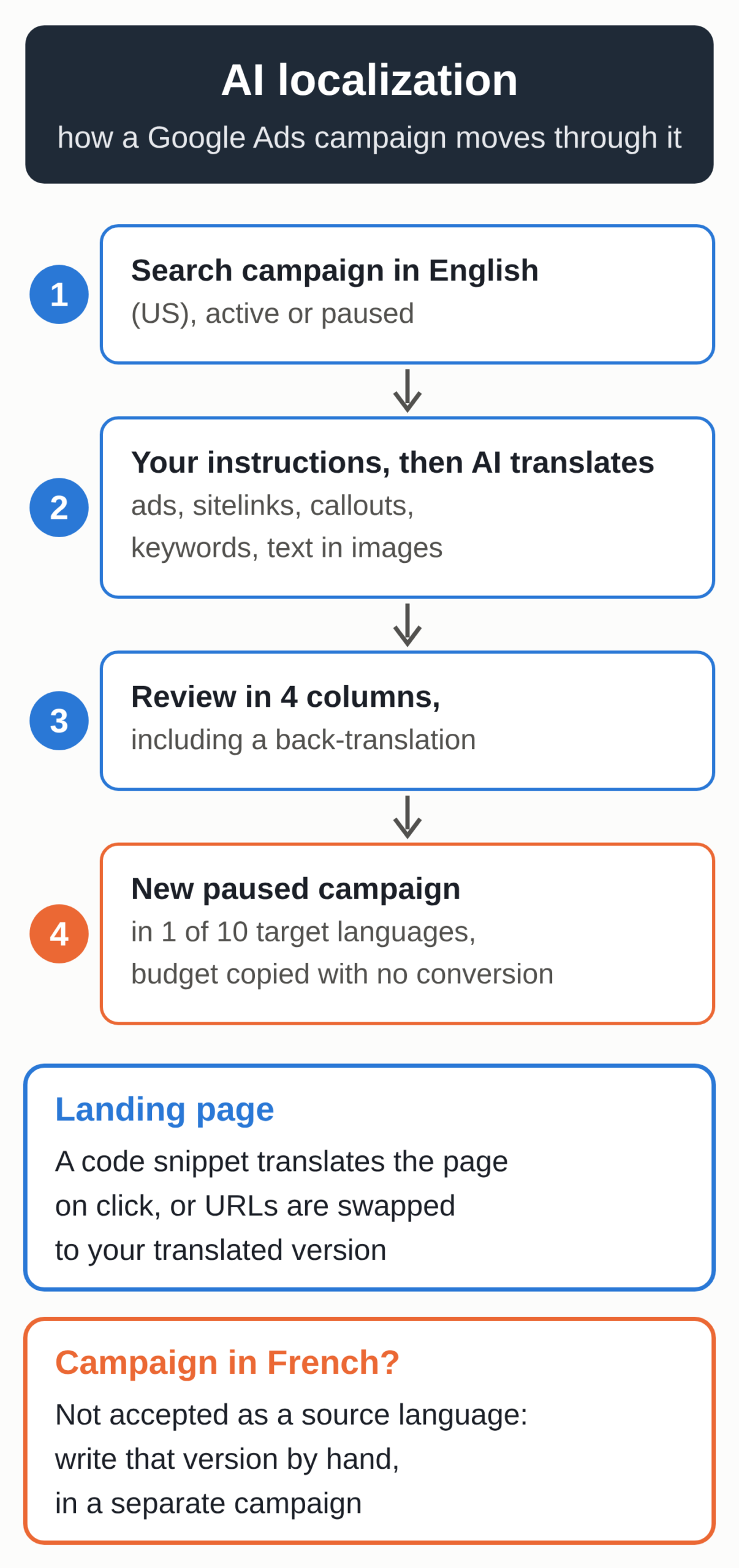
Budgets and bids are copied from the original campaign, with no currency conversion or exchange rate calculation, Google says. You set the budget at the language step and check bids afterward, market by market.
Ten target languages, one source language
The target languages are Dutch, French, French (Canada), German, Italian, Polish, Portuguese (Brazil), Portuguese (Portugal), Spanish (Spain) and Spanish (Latin America and the Caribbean). For the source language, Google only accepts English (US), and its help page doesn’t announce any other. A campaign with even one asset or keyword in another language can’t be localized. The help page also excludes advertisers whose identity has been verified for election ads.
Does this affect your business?
If you only advertise in French, writing an English version just to run it through the tool means translating twice, and the meaning can drift at each pass. To expand into Flanders, the Netherlands or Germany, the manual route is still the right one: a separate campaign with ads and keywords written in that market’s language.
If you already run an English (US) campaign for exports, tourism or software sold abroad, the tool can produce a German, Dutch, Italian or Spanish version in a few clicks. Each one still needs a review, market by market.
Then there’s the case where you sell in France, Belgium, Switzerland or Quebec without any English-language ads. You may feel the effects without ever using the tool, because English-speaking advertisers with access to the beta can quickly produce French versions of their campaigns for those markets. There’s no data yet to measure that effect.
Another change gives the language of your ads more weight. According to Google’s help page on language targeting, Search campaigns lose their campaign-level language setting starting in September 2026. Google then matches ads to users based on the language the ads are written in, and prioritizes ads that match the language of the search. A clumsy translation may therefore be shown to native speakers, who will notice the awkward phrasing.
A landing page translated on the fly
For the landing page, Google offers two methods. The first is a JavaScript snippet you add to your site, which translates the page text when someone clicks the ad. The tag only has to be installed once per account, even with several localized campaigns, and PPC News Feed reports that it can be deployed through Google Tag Manager. The other method rewrites your page URLs with a find-and-replace rule, such as example.com/en to example.com/fr.
If your site already has a version in the target language, rewriting the URLs is the safer choice, because visitors land on a page you’ve reviewed. Nothing on the help page says the snippet creates a translated page that search engines could index. To be found in Dutch without paying for every visit, you need a version of your site in that language, handled with the same care as the rest of your organic marketing. Our guide to SEO for a multilingual website covers the method, from URLs to hreflang tags.
Before you launch a localized campaign
- Check that the source campaign is active or paused, entirely in English (US) and within Google Ads entity size limits. Removed, draft, experimental and shadow campaigns aren’t supported.
- Write your global instructions: brand and product names to keep as they are, the level of formality, and the units and currency of the target market.
- Review the back-translation column, which checks the meaning, then have a native speaker from that country read the headlines and keywords. Only they can tell you whether the wording sounds right.
- Check the translated keywords in the Google Ads Keyword Planner. A literal translation doesn’t always match what people actually search for.
- Set a budget and bids for each market, since Google copies the original campaign’s settings with no currency conversion.
- Choose your landing page method, publish the campaign as paused and review it one last time before turning it on. For the first few weeks, track it on its own, with its search terms and conversions.
Signals to watch
On Google’s side, two announced changes are worth following. The help page says Performance Max support will arrive “starting September 2026,” yet as of October 14 it still describes a Search-only tool. It also announces more target languages by the end of 2026. For advertisers in France and Belgium who write in French, the tool becomes useful the day French is accepted as a source language.
In your own account, the Auction insights report in Google Ads compares your performance with that of other advertisers in the same auctions, in Search and in Performance Max. If a new foreign site shows up there on your French keywords, keep an eye on it, even though the report doesn’t say how its ads were made.
Unknowns in the beta
The tool is in beta, and Search Engine Roundtable’s report rests on the help page alone, so it’s unclear which accounts can see it today. Slator, a trade publication that covered the tool on October 12, notes that its exact launch date is hard to pin down: people in online advertising started noticing it in early October. The help page gives no measure of translation quality.
Nor does it say how the translation snippet handles the cookie consent banner on a European website, or whether it translates the messages in a form or a shopping cart. Test it on your own site before going live, starting with pages that show prices, terms of sale or a form, where a mistake costs you leads or causes a misunderstanding with a customer.
A version of your website in another language
A localized campaign sends visitors to a page in their language, and you pay for every click. If you want people in that market to find you without an ad, each language version of your site has to be built for organic search. That’s what our multilingual SEO service is for.