

For a multilingual website to rank in each language, every version needs its own address, has to be linked to its translations with reciprocal hreflang tags, must be listed in a sitemap and use the words people search for in its market. This guide goes through these steps in the order you’ll put them in place.
The technical rules quoted come from Google’s official documentation (Search Central and the Search Console help center), the official Bing blog and the W3C, checked on October 7, 2026. When a piece of advice comes from our own practice, we say so.
Multilingual or multi-regional: what you’re targeting
Google distinguishes two cases. A multilingual site offers its content in several languages, for example a French version and a Dutch version. A multi-regional site explicitly targets several countries, for example with different prices for Belgium and for Switzerland.
A Belgian site in French and Dutch that also sells in France is both at once. Write down the languages and countries you’re targeting from the start: that choice determines the URL structure and the hreflang codes.
Step 1. Give each language its own address
Google recommends a different URL for each language version of a page, rather than content that changes based on cookies or browser settings. The reason is practical: its crawler most often crawls from the United States and doesn’t send an Accept-Language header. A page that adapts its language to the visitor therefore risks being crawled in only one version.
There are four structures. Here are their strengths and limits according to Google:
| Structure | Example | Strengths | Limits |
|---|---|---|---|
| Country-code domain | example.be | clear geotargeting, server location doesn’t matter, sites clearly separated | cost, more infrastructure, sometimes strict eligibility rules, only one country targeted |
| Subdomain | nl.example.com | easy to set up, separate servers possible, sites clearly separated | “nl” can be read as a language or as a country |
| Subdirectory | example.com/nl/ | easy to set up, low maintenance with a single host | targeting hard to read in the URL, a single server location, sites less separated |
| URL parameter | example.com?loc=nl | not recommended by Google | segmenting by URL is difficult, targeting hard to read in the URL |
For a business adding one or two languages to an existing site, we generally recommend the subdirectory: a single domain and a single host to maintain, which Google lists among its strengths. That’s our practice: Google presents these structures as options, without requiring any one of them.
Two useful clarifications. Google treats .eu as a generic domain, just like .com: to target a country with these domains, use hreflang. The words in the URL can be translated, for example /nl/diensten/ rather than /nl/services/, as long as the URLs are encoded in UTF-8.
Step 2. Link the versions with hreflang tags
The hreflang attribute tells Google that a page exists in other languages, so it can show the right version to the right reader. Google accepts three equivalent methods: link tags in the head section of the HTML, an HTTP header (handy for PDFs) or the XML sitemap. One is enough: according to Google, combining them adds nothing in search and can make maintenance harder.
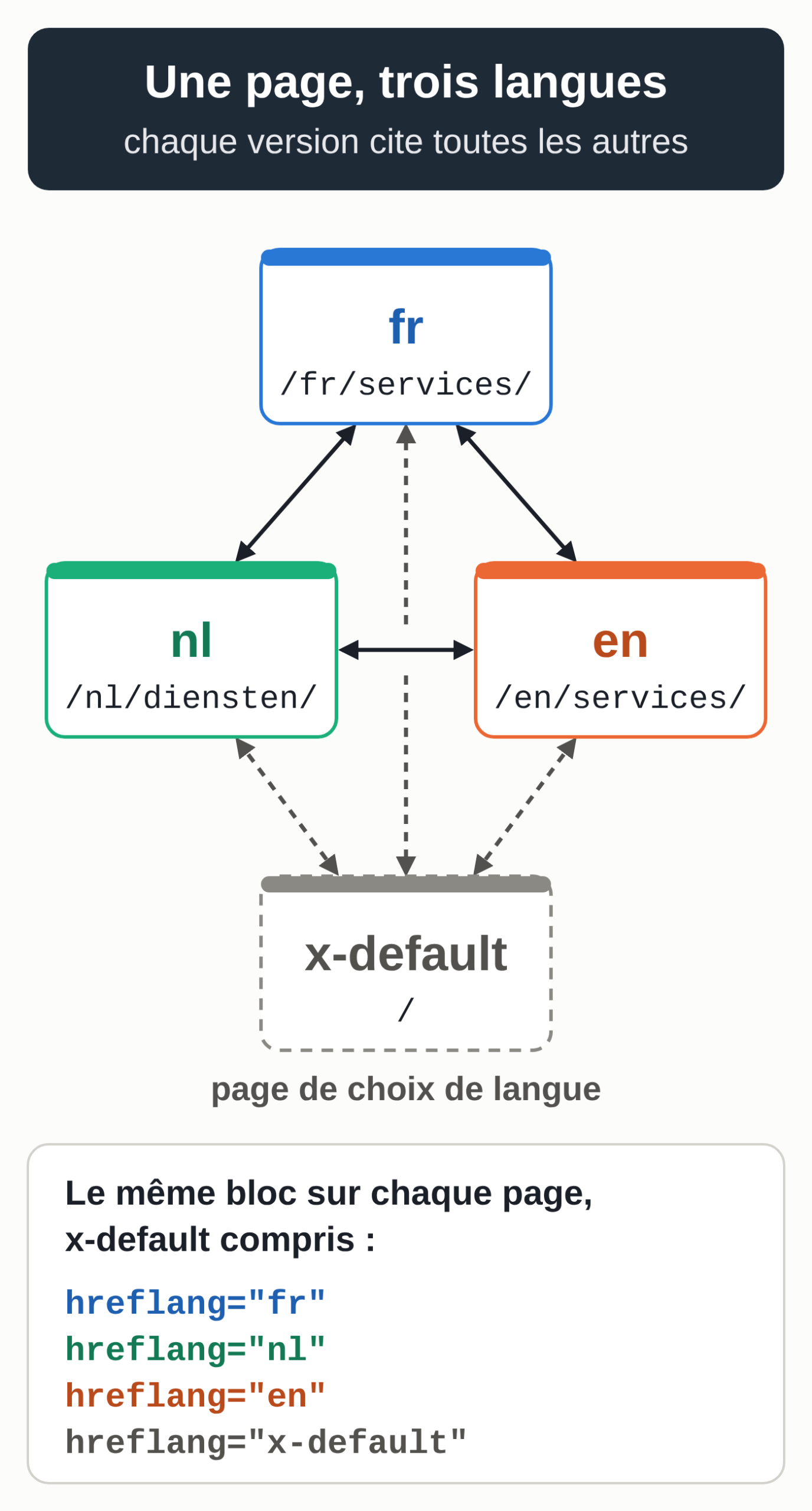
For a site in French, Dutch and English, each of the three versions, as well as the language selection page marked as x-default, carries exactly the same block in its head tag:
<link rel="alternate" hreflang="fr" href="https://www.example.com/fr/services/" />
<link rel="alternate" hreflang="nl" href="https://www.example.com/nl/diensten/" />
<link rel="alternate" hreflang="en" href="https://www.example.com/en/services/" />
<link rel="alternate" hreflang="x-default" href="https://www.example.com/" />
The rules to follow, all taken from Google’s documentation on localized versions:
- Each version lists itself and all the others.
- The links go both ways. If the French page lists the Dutch page but the Dutch page doesn’t list the French one, Google ignores those annotations.
- The URLs are complete, with https:// and the domain. A path like /nl/diensten/ isn’t enough.
- The code starts with the language (ISO 639-1 standard), followed if needed by the country (ISO 3166-1 alpha-2 standard). To target Belgium: fr-BE, nl-BE or de-BE. The code “be” on its own means Belarusian, and a country code on its own isn’t valid.
- Reserved codes such as EU, UN or UK have no effect. For the United Kingdom, the country code is GB, for example en-GB.
- The x-default value designates the page to show when no version matches the reader’s language. Google designed it for language selection pages.
Step 3. Declare the translations in the sitemap
The XML sitemap lets you declare the same relationships without touching the pages’ code. Each URL has its own entry, and each entry lists all the versions of the page, including itself. For two versions, the file looks like this:
<?xml version="1.0" encoding="UTF-8"?>
<urlset xmlns="http://www.sitemaps.org/schemas/sitemap/0.9"
        xmlns:xhtml="http://www.w3.org/1999/xhtml">
  <url>
    <loc>https://www.example.com/fr/services/</loc>
    <xhtml:link rel="alternate" hreflang="fr" href="https://www.example.com/fr/services/"/>
    <xhtml:link rel="alternate" hreflang="nl" href="https://www.example.com/nl/diensten/"/>
  </url>
  <url>
    <loc>https://www.example.com/nl/diensten/</loc>
    <xhtml:link rel="alternate" hreflang="fr" href="https://www.example.com/fr/services/"/>
    <xhtml:link rel="alternate" hreflang="nl" href="https://www.example.com/nl/diensten/"/>
  </url>
</urlset>
The usual limits apply: 50,000 URLs or 50 MB uncompressed per file, and the xhtml:link lines don’t count toward the URL limit. On a site with several hundred pages, we often prefer this method, because all the annotations are generated in one place.
Google also says that submitting several sitemaps lets you track each one in Search Console. One sitemap per language therefore lets you filter the page indexing report language by language. Our complete guide to sitemaps covers creating and submitting them. For AI agents, the llms.txt proposal also lets you place one file per language folder: see our article on the llms.txt file.
Step 4. Set the canonical, the language and the redirects
Three other settings matter as much as the hreflang tags.
The canonical stays in the same language
When you use hreflang, Google requires the canonical page to be in the same language as the page. In the usual case, each version declares itself canonical. A canonical tag that points the Dutch version to the French original goes against this rule. Our guide to canonicalization explains how this tag works.
One language per page
Google determines a page’s language from its visible content. It doesn’t use the lang attribute, hreflang or the URL for this. So write the text and navigation of each page in a single language, without side-by-side translations.
Translating only the menu and the footer isn’t enough: for Google, localized versions are only duplicates if their main content isn’t translated.
Bing has documented other signals. Its official blog said in March 2011 that Bing read the content-language meta tag, then the lang attribute of the html tag, to determine a page’s language and country. In December 2025, the same blog recommended hreflang for targeting by language and region.
Fill in the lang attribute anyway: it’s the basic technique for success criterion 3.1.1 of the WCAG accessibility guidelines (language of page), and it helps screen readers, for example, choose the right pronunciation.
No automatic redirects
Google advises against redirecting visitors to the version you assume is theirs, based on their browser language or IP address. These redirects can stop visitors and search engines from seeing all the versions. Instead, put a link on each page to its other language versions, as Google suggests.
Finally, apply the same robots.txt rules and the same meta robots tags in every language.
Step 5. Translate with each market’s own words
A faithful translation doesn’t always produce the query your customers type. Before translating an important page, look in each language for the term that keeps coming up in the search engine’s suggestions and in the pages that already rank. Then put it in the title, the meta description, the first paragraph and the URL. This check ties in with our article on search intent.
Also adapt what changes from one country to another: currency, units, date format, contact address and phone number, legal notices. Google lists the local language, the currency, local addresses and phone numbers among the signals that help it understand who a page is for.
Then there’s machine translation. Google’s spam policy targets what it calls scaled content abuse: many pages created mainly to manipulate rankings, with little or no value for readers, however they were produced. Its examples include scraping content to generate many pages, including through automated transformations such as translation, when they add little value for users. Another example covers using generative AI tools to produce many pages with no added value for users. Our rundown of the September 2026 Google spam update recaps what these rules target.
If your translations go through AI, Google’s guidance on AI-generated content applies too. It asks you to check and review this content before publishing, including title tags, meta descriptions and image alt text. So plan a quality check in each language, and a review by someone fluent in the language for the pages that matter most to your business.
Step 6. Build internal linking in each language
Google uses links to discover new pages to crawl. In each language, translate the menu, the breadcrumb and the related article blocks, and point each link to the page in the same language.
The language selector leads to the same page in the other language. Use real HTML links for this, with an a tag and an href attribute, which search engines know how to follow. The general principles are in our guide to internal linking.
Step 7. Track each language separately
In Search Console, the performance report is split into tabs: Queries, Pages, Countries. Add a “URLs containing” /nl/ filter to isolate the Dutch version, then compare clicks, impressions and position language by language. For traffic from Bing, Bing Webmaster Tools gives the same metrics by query and by page.
Start by checking that the translated pages are indexed and getting impressions, before you judge their traffic. A language with no impressions at all often points to a structure or hreflang problem rather than to the quality of the translation. That last point comes from our practice. In ChatGPT or Perplexity answers, you can also track each language separately, using questions written in that language: see our comparison of AI visibility tools.
The most common mistakes
Google itself names missing return links and incorrect language or country codes as the most common hreflang errors. The other pitfalls in this list each break a rule covered above:
- relative URLs in the hreflang annotations;
- a canonical that points every language to the original;
- an automatic redirect based on IP address or browser language;
- half-translated pages, where only the menu and the footer change;
- robots rules that differ from one language to another;
- a language selector that sends people to the home page of each version.
Results of the method on our main site
We apply these steps on our main site, marcwiner.com, a cooking site written in French and translated into 23 languages with our own systems, developed in-house. It belongs to Marc Winer, the managing director of MACCUS.
Its translations bring in more than 460,000 sessions a month in 23 languages (September 2026). In these languages, traffic grew more than eightfold in a year, and they account for nearly 40% of the site’s traffic.
These are our site’s figures. Another site’s results depend on its market, its content and its starting point.
Doing the work yourself or handing it off
On a site with a few languages and a few dozen pages, you can carry out these seven steps yourself, with your CMS and Search Console for tracking.
If you’d rather hand the structure, the translations and the per-language tracking to a team that applies them on its own site, take a look at our multilingual SEO service.