Open WebUI, the AI chat interface that companies install on their own servers, introduced a desktop app called Tether on November 8, 2026. Tether connects a user’s computer to that interface. AI models can then work in its files and browser and run commands on it. So can coding agents, AI tools that write and run code.
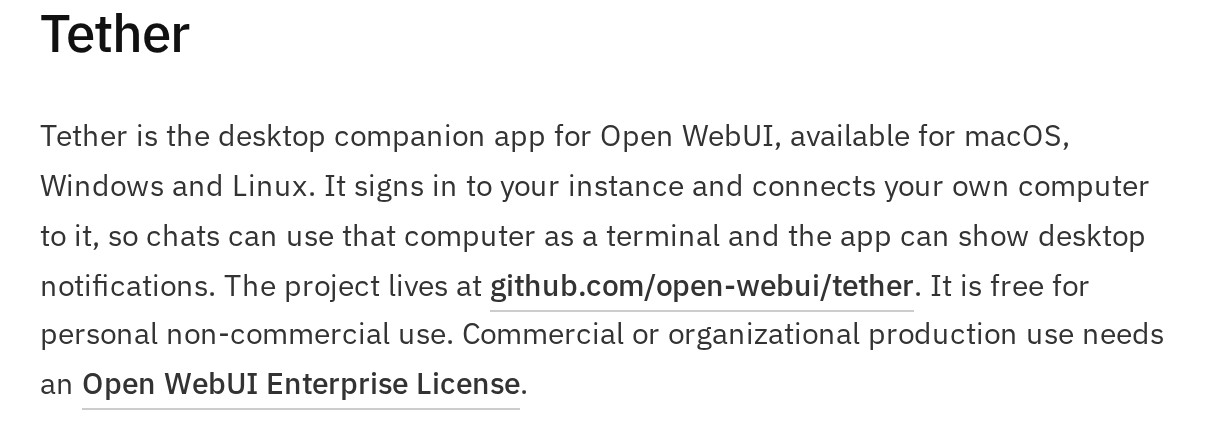
Open WebUI itself stays free for internal use, but Tether is free only for personal use. A company that wants to use it in production, beyond testing, has to buy an Enterprise License, and the price is not published.
Open WebUI announced Tether in its version 0.13.1 release notes, posted on November 8 at 11:07 a.m. UTC on GitHub, a code-hosting site. Open WebUI can use online AI models or models that run locally, on a company’s own machines, through software such as Ollama. On November 9, its GitHub page had 158,138 stars, the site’s version of bookmarks.
An app that opens the computer to AI
Tether runs on macOS, Windows and Linux. According to the documentation, the app signs in to an Open WebUI server and adds the computer to it as a terminal. In Open WebUI, a terminal is a machine where the AI can run commands. Only that user sees the computer in their list.
The release notes say the computer connects out to the server, so no inbound port, an entry point for outside traffic, has to be opened. Models, agents and scheduled tasks can then work on the machine’s real files, code projects and tools. The user can follow them from any browser, including on a phone. By default, unused sessions expire after 90 days.
Tether does this by running Open Terminal, an Open WebUI tool that lets AI models run commands. In a manifesto published with the code, the team warns that “real access is real access.” It advises connecting Tether only to a trusted server.
Tether’s first public release, version 0.1.1, came out on November 5, and ten more followed by the evening of November 8. Version 0.1.1 lets the AI use the Chrome browser the user already has open, with their accounts signed in, once the user approves it in Chrome. Its notes also say the starting folder picked in the file browser does not limit which files commands can reach.
Tether 0.1.8 added an option to reach the terminal from other devices on the network. That access requires a key, a kind of password, but is not encrypted.
A license unlike the rest of the Open WebUI family
Tether is released under the “Open WebUI Enterprise License,” which limits production use to holders of a valid Enterprise License that includes Tether. The license must cover the right number of seats, meaning users. Development and testing are allowed without a subscription. An exception covers personal, non-commercial use, “provided it is not on behalf of an employer or other organization.”
The “Open WebUI for Enterprise” page of the documentation lists Tether and Terminals among the offerings reserved for Enterprise License holders. Terminals gives each user their own container, a workspace isolated from everyone else’s.
To get a license, a company has to contact the sales team from a work email address and give its expected number of users. Messages sent from Gmail, Outlook or Yahoo “will not receive a response.” Open WebUI does not sell licenses to individuals.
Since version 0.6.6, released in May 2025, Open WebUI has had its own license: the BSD-3 open-source license plus a branding clause. Andreas Nigg, co-founder of the consulting firm Pondhouse Data, summarized it in a guide updated on November 6. With more than 50 users in a 30-day period, the Open WebUI name and logo must stay visible, but commercial use remains free.
Open Terminal uses the MIT license, which allows commercial use. Open WebUI Desktop, an app that installs Open WebUI on a single computer, uses AGPL-3.0, another open-source license.
Claude Code and Codex in the model list
Open WebUI 0.13.1 also brings coding agents into the chat interface. When a connected terminal offers them, Claude Code, Codex and Pi appear in the model list. Claude Code is Anthropic’s coding agent, and Codex is OpenAI’s.
Each conversation uses a single agent. There, the user can chat with it, talk to it by voice, choose how hard it thinks and approve its tool requests.
Open WebUI 0.13.3, released late on November 8 (UTC), adds these agents to scheduled tasks, which post their results in a conversation. With Tether, the agent’s terminal can be a user’s own computer.
At the bank Revolut, Claude Code is now the exception. Revolut moved its engineers to a Chinese model hosted on its own servers and says it pays a tenth of what it did.
Attachments, document search and tool approval
Two changes in Open WebUI 0.13.1 alter what the model receives. The first concerns native function calling, the default mode, where the model uses its tools on its own.
In that mode, attached files are no longer copied automatically into the text sent to the model. The model has to open them with its file tools. A model without tools no longer sees attachments, unless the “Preload files” option is turned on in its settings.
Second, document search now returns 10 excerpts per query instead of 3, unless a different value was already saved. The release notes warn that prompts drawing on a knowledge base, a stored set of documents, get longer.
Version 0.13.1 also adds “Auto,” a third tool-approval mode alongside full access and manual approval. It is off by default. Once an administrator turns it on, it applies to every user who has not picked a mode.
According to the release notes, a review model checks each tool call and runs it right away if it judges that no approval is needed. For that check, the tool, its inputs and the latest messages are sent to a scoring API, an outside service.
The documentation, updated the same day, describes a different default: the conversation’s own model decides, following approval rules added to its instructions. The outside service is only a second engine. By default, that engine points to OpenAI’s API and the gpt-6-luna model.
Security fixes and a same-day patch
Like versions 0.12.4, 0.12.5 and 0.13.0, Open WebUI 0.13.1 announces security fixes but leaves them out of the changelog. Its release notes recommend updating “as soon as possible.” The team says it will publish advisories once the flaws get CVE numbers, the public IDs for vulnerabilities. As of early November 9, the newest advisory on the project’s security page was dated October 18.
AI tools for developers remain a target. In late October, a malicious Claude Code extension turned up in the extension store of Cursor, a code editor.
Version 0.13.1 also changes its database, as 0.13.0 did. The release notes recommend a backup before updating. In multi-server installations, every machine has to switch versions at the same time.
Version 0.13.1 kept chats from opening on local networks without HTTPS, the encrypted version of the web. Over plain HTTP at a local server address, the chat page stayed stuck on a loading spinner.
A bug report flagged the problem on November 8 at 11:30 a.m. UTC, and version 0.13.2 fixed it 23 minutes later, at 11:53 a.m. According to the report, the function involved generates random identifiers, and browsers offer it only over HTTPS or on the machine itself.
An unknown price and a four-day-old app
As of November 9, Open WebUI had not published a blog post about 0.13.1. Its latest post, from November 4, covered version 0.13.0, which maccus.fr reported on November 6.
The Tether license price is still unknown, as is any minimum number of seats. The license also says nothing about freelancers who work for clients, although its free exception covers only “non-commercial” use.
Tether is four days old. Its release notes already deal with adding servers, unrecognized security certificates and sign-in through an identity provider, a central account service. Its GitHub page had 63 stars on November 9, compared with 158,138 for Open WebUI.
What it means
Open WebUI Inc., the company behind the software, is drawing a clearer line between a free core and paid add-ons. Tether and Terminals, both Enterprise-only, target organizations. Terminals isolates each employee’s workspace, and Tether lets AI act on their work computers.
A team that installed Open WebUI for privacy or lower costs keeps the interface free. To connect its employees’ computers through Tether in production, it has to negotiate a license with no public price. Open Terminal, under the MIT license, can still be installed on a machine and connected with its address and a key. The server then has to reach that machine over the network, a step Tether avoids.
The promise of self-hosting holds for the server. Several new features still connect to online services. Claude Code and Codex are tools from Anthropic and OpenAI, and Auto mode’s second engine points to OpenAI’s API by default.
The next things to watch are the price and terms of the Tether license and the security advisories promised since version 0.12.4. Other features could join the Enterprise offerings. Another test is whether an app that shipped eleven versions in four days proves stable.
Sources
- Release v0.13.1, Open WebUI (GitHub), November 8, 2026
- Release v0.13.2, Open WebUI (GitHub), November 8, 2026
- Tether (README, LICENSE, MANIFESTO, releases v0.1.1 to v0.1.11), Open WebUI (GitHub), November 5 to 8, 2026
- Tether, Open WebUI documentation, accessed November 9, 2026
- Open WebUI for Enterprise, Open WebUI documentation, accessed November 9, 2026
- Tools (Tool Approval, Auto), Open WebUI documentation, accessed November 9, 2026
- Security Overview, open-webui/open-webui, Open WebUI (GitHub), accessed November 9, 2026
- Open WebUI: What It Is, How to Install It and What It Costs, Andreas Nigg, Pondhouse Data, updated November 6, 2026
Header image: MACCUS chart, data from the LICENSE files of Open WebUI’s GitHub repositories and the “Open WebUI for Enterprise” page, checked November 9, 2026.