

On October 14, 2026, Google announced two optional settings in Google Ads: channel prioritization and budget allocation. In a Search campaign, Google Ads channel prioritization lets you rank Google Search, Search partners and the Display Network as High or Low priority. For Low priority channels, you can then set a maximum share of the daily budget that Google will try to stay within. According to Google’s help page, the settings are rolling out gradually to Search, Shopping, Performance Max and Demand Gen campaigns starting October 15, 2026.
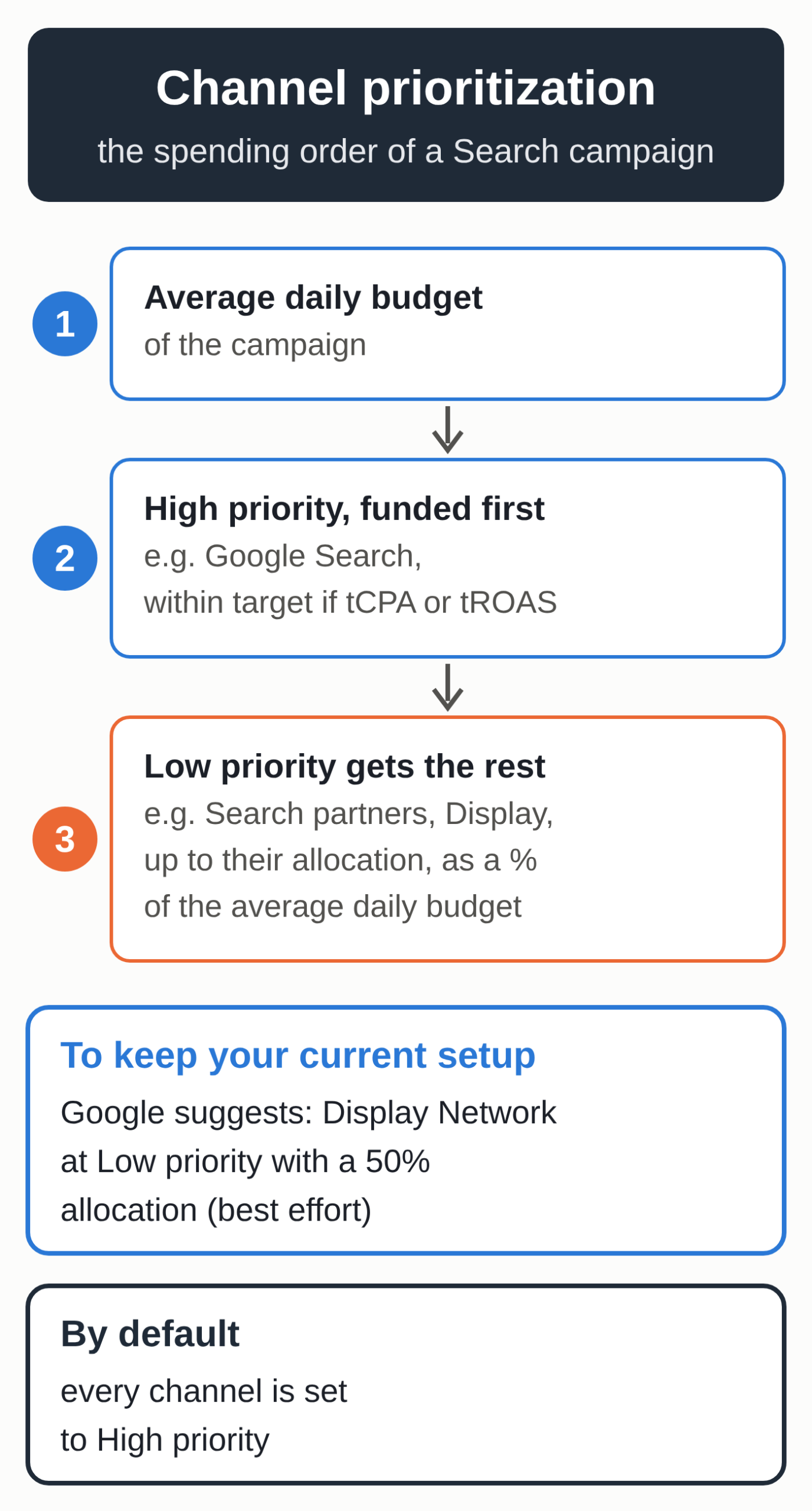
One part of the announcement isn’t optional. In February 2027, Search campaigns that also run on the Display Network will automatically move to the new system, and Google warns that your spend may then shift between networks. To keep your current setup, Google recommends setting the Display Network to Low priority with a 50% allocation. If you run your own ads, check this setting campaign by campaign.
A priority order and a spending cap
Channel prioritization sets the order in which your budget is spent. According to the post by Tal Akabas, Director of Product Management at Google Ads, a campaign fully funds its High priority channels first, staying within your target if you bid with Target CPA or Target ROAS. Whatever budget is left then goes to Low priority channels. By default, every channel is set to High priority.
Budget allocation only applies to Low priority channels: you enter a percentage of the campaign’s average daily budget, and Google aims to keep spend on that channel under it. With an average daily budget of €30, a 10% allocation targets no more than €3 a day on that channel. The allocation resets every day, and unspent or overspent amounts don’t carry over. An allocation of 0% means Google won’t spend anything on that channel.
You set these options once at the account level, for each campaign type, and can then override them for a shared budget or a single campaign. For now, you manage them in the Google Ads interface and in Search Ads 360. Google says support for the API and Google Ads Editor is coming soon. A manager account can’t apply them to its client accounts, so you have to set them in each account.
Which channels can you rank in each campaign type?
| Campaign type | Channels you can rank | Percentage cap |
|---|---|---|
| Search | Google Search, Search partners, Display Network | Yes |
| Shopping | Google Search, Search partners | Yes |
| Performance Max | “Google channels,” Search partners, Display Network | Yes |
| Demand Gen | “Google channels,” Display Network | No, priority only |
In Performance Max and Demand Gen, Google groups Search, YouTube, Maps, Gmail and Discover together as “Google channels.” That means you can’t rank YouTube below Search in a Performance Max campaign. If you want channel-by-channel control, Google points you to Search and Demand Gen campaigns, where you can opt out of each supported channel individually.
The automatic switch in February 2027
Today, Display Expansion on a Search campaign draws on budget that Search hasn’t used. According to Search Engine Journal, which attended Google’s press roundtable before the announcement, this built-in preference for Search over Display doesn’t apply to Search partners.
Starting in February 2027, every Search campaign with Display Expansion turned on will automatically switch to channel prioritization, and the old mechanism will go away. Since every channel defaults to High priority, your spend could shift between Google Search, Search partners and Display if you don’t change anything, Search Engine Journal notes.
The help page on channel prioritization adds two details. Search campaigns that use the Target Impression Share bid strategy will stop serving on the Display Network. If you set priorities on a Search campaign before February, they take effect right away and replace the current Display Expansion behavior for that campaign.
The 50% Google recommends comes from the old setup. Google’s help page on Display Expansion, updated in October 2026, describes that setup this way: ads ran on the Display Network “using unspent budget at similar cost per conversion as Search and with a 50% budget allocation applied in the backend.” The suggested setting keeps the same cap, now visible in your settings.
For a small business, it comes down to bidding
If your campaign is limited by budget and you’ve set Search partners or Display to Low priority, Google Search gets funded first and those channels only get what’s left. If your Target CPA or Target ROAS campaign isn’t limited by budget, Google aims for your target across all channels, and priority generally doesn’t change anything. In that case, only the percentage cap has an effect.
Search partners are worth a look. Google includes them by default when you create a Search campaign, so if you’ve never opened your network settings, they’re probably on. Until now, your only choice was to keep them or turn them off. Once the setting shows up in your account, you can move them to Low priority with a cap, such as 20% of the daily budget, the example Search Engine Journal gives.
The same logic applies if you turned Display off to be safe. Google presents the cap as a way to test these networks with clear limits instead of switching them off entirely.
The timing lands in the middle of prep for Black Friday, which falls on November 27. Google itself ties these settings to the holiday season, but the rollout is spread over the coming months, so there’s no guarantee the setting will appear in your account before then. If you’re also preparing Meta campaigns, we’ve covered the Meta Ads settings to review before Black Friday.
Seven steps in your account
- Open the settings for each Search campaign, go to Networks, and note whether the boxes for Search partners and the Display Network are checked.
- Segment the campaign’s stats by network over the last three months to compare cost, conversions and cost per conversion for each one. According to Search Engine Journal, Google expects to add fuller channel reporting to Search campaigns in the first quarter of 2027. Until then, network segmentation is your tool.
- If Display brings in conversions at an acceptable cost, follow Google’s recommendation to keep today’s behavior: Low priority with a 50% allocation. If it spends without converting, choose a lower allocation, set it to 0% or uncheck the Display Network.
- If a campaign bids with Target Impression Share, expect it to lose Display in February, regardless of your settings.
- When the “Channel Prioritization” card appears in your account settings, set a default for each campaign type, then adjust the campaigns that need something different.
- For two weeks after that, check spend by network every day. A setting applied before February replaces the old behavior immediately. An account-level default allocation can also shift spend in campaigns that were spending more than the chosen percentage on that channel.
- If you use shared budgets, make sure all the campaigns on a budget are the same type. The settings only apply when they are.
What to watch before February
Google has only said the migration will happen in February 2027, without an exact date. For the new controls themselves, the help page warns that availability depends on campaign type and rollout timing. Two promises reported by Search Engine Journal have yet to arrive: a one-click migration option, and account-level budget allocation insights to help advertisers choose their settings.
For Performance Max, where Google channels stay grouped, Google is separately testing more advanced channel controls with a small group of advertisers, according to Search Engine Journal. Tal Akabas also said his team is looking into separating spend controls for different types of search and AI-based experiences, MediaPost reports. Neither comes with a date.
Two other Google Ads changes arrived in the past few days: automated promotions, on by default since October 12, and an AI campaign translation tool, in beta.
A cap with no guarantee
The cap is only a target. Google describes it as a limit it tries to respect, with no guarantee: a channel’s spend can go over its allocation on some days, including when the campaign spends more than its average daily budget. PPC Land points out the tension with the 0% option, which the help page presents as stopping spend on the channel, while the same page declines to guarantee the allocation.
Visibility on Google without paying for every click
These settings help you split an ad budget more effectively, but the visits it buys stop when the budget does. If you want customers in your area to find you when they search for what you do on Google, local SEO has no cost per click. That’s what our local SEO package for small businesses is for.