

You come back from a viewing with scribbled notes. Three listings are waiting to be rewritten for three portals with different formats. A seller wants a report, and preparing a preliminary sales agreement means rereading sixty pages of meeting minutes.
AI won’t sign your listing agreements or replace your real estate license. It does get through the writing and reading part of these tasks quickly.
This guide has you produce three concrete deliverables, from fictional examples provided, without writing a line of code. You can test everything tonight with a free account.
Two rules hold it all together. You never paste real client data into a consumer tool; you work on fictional examples. And you validate every result before using it: the AI prepares, you decide.
Three results ready to review
By the end of this guide, you will have three results ready to review:
- A listing adapted into three formats (agency website, portal, short print ad), from a property fact sheet.
- A structured viewing report and a draft email to the seller, from raw notes.
- A summary of the key points in a condominium file, with the amounts and the points to check.
What you need. An account on an AI chat app (OpenAI’s ChatGPT, Anthropic’s Claude, Google’s Gemini or Mistral’s Le Chat). The free versions are enough for these three tasks, with lower usage limits.
If your agency already runs on Google Workspace or Microsoft 365, you probably have access to Gemini or Microsoft 365 Copilot in your usual tools; check availability in your account. The example files used here are entirely made up.
This guide does not cover prospecting. To reach out to your professional partners (notaries, property managers, businesses) without breaking LinkedIn’s rules, follow the B2B prospecting method with Claude.
Two safeguards specific to real estate
Before the tasks, two compliance points that are not negotiable in this business.
Personal data. Do not enter a real client’s name, exact address, contact details or financial situation into a consumer AI app. These offerings may reuse what you type to train their models, unless you opt out or have a business contract.
For real use on client data, you need a business environment with a contractual commitment not to train on your data, and you need to check where the data is stored and processed. An “enterprise” label does not by itself guarantee hosting in Europe: that is a separate question, to check for each provider.
What AI does not decide for you. Four concrete limits:
- Never let the AI invent a feature of the property (floor area, energy rating under the Belgian PEB or French DPE, materials, availability). An inaccurate description is a misleading commercial practice and puts your liability on the line, whether you hold a carte T in France or IPI accreditation in Belgium.
- Since August 2, 2026, Article 50 of the EU AI Act imposes transparency obligations. The most concrete one here: virtual home staging, meaning an image of a real property altered by AI, must be flagged as generated or altered by AI when it is published. This disclosure duty falls on the professional who publishes the content (the “deployer,” Article 50(4)). The technical marking of the file in a machine-readable format is the job of the tool’s maker (paragraph 2). A chatbot on your website must also tell visitors that they are talking to an AI.
- Do not use AI to score, rank or reject rental applicants on socioeconomic criteria. Choosing a tenant is a high-stakes decision that stays human; the GDPR governs automated individual decisions (Article 22) and anti-discrimination law applies in Belgium as in France.
- The legal compliance of a sales file (easements, zoning) is up to you and the notary. The decision to file an anti-money-laundering suspicious activity report (Tracfin in France, CTIF in Belgium) stays a human call.
Writing a listing from a property fact sheet (task 1)
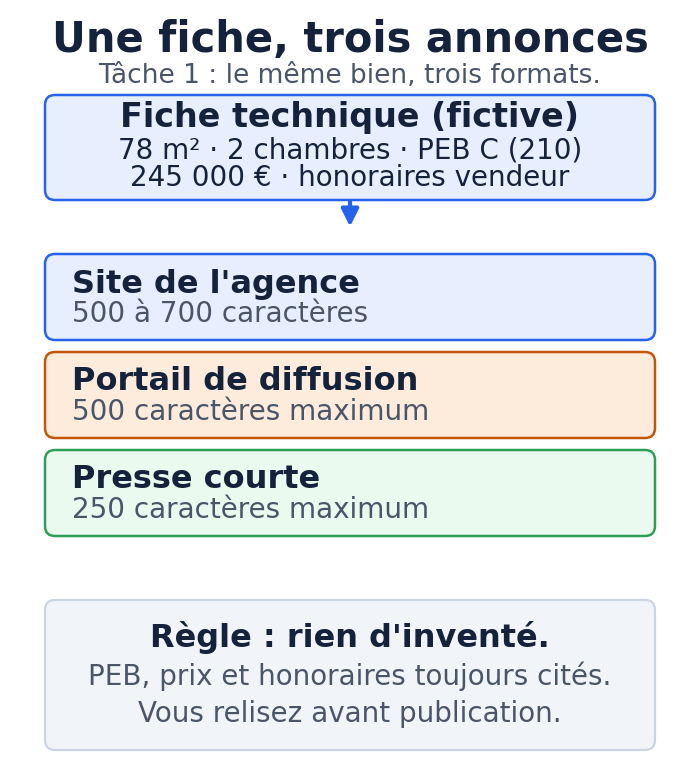
This is the simplest place to start, with no integration at all: you copy, you paste, you review. Some real estate software already offers a built-in writer (Netty, for example, generates three versions of a listing text). The method below works with any chat app, even without industry software.
App: ChatGPT, Claude, Gemini or Le Chat.
Sample input (fictional):
Type: 2-bedroom apartment
Location: fictional "Les Tilleuls" neighborhood, mid-sized town (Belgium)
Floor: 2nd of 4, with elevator
Living area: 78 m² (PEB measurement)
Living room: 28 m², facing southwest, 6 m² balcony
Fitted kitchen; 2 bedrooms (14 m² and 11 m²); bathroom with tub; separate toilet
Heating: gas, condensing boiler (2019); PVC double glazing
PEB: class C, 210 kWh/m²/year
Condo fees: €145/month; one cellar; one outdoor parking space
Asking price: €245,000; agency fees paid by the seller
Steps:
- Open a new conversation in the app you chose.
- Paste the prompt below, fact sheet included.
- Read the three versions it produces.
- Correct them by hand, then publish from your software or your portals.
Ready-to-copy prompt:
You are a real estate listing writer for an agency.
From the fact sheet below, write three versions of the text, in English, in a professional and understated tone:
1. Agency website version: 500 to 700 characters, one or two short paragraphs.
2. Portal version: 500 characters maximum, dense and factual.
3. Short print version: 250 characters maximum.

Strict rules:
- Use only the information in the fact sheet. Don't add any feature that isn't there (no "bright" if it isn't stated, no material that isn't mentioned).
- Mention the PEB class and its value, the price, and that the agency fees are paid by the seller.
- If a mandatory piece of information is missing, list it under a heading "To complete" instead of making it up.
- No empty superlatives, no hype, no emoji.

Fact sheet:
2-bedroom apartment, "Les Tilleuls" neighborhood, mid-sized town (Belgium).
2nd floor of 4, elevator. 78 m² living area. 28 m² living room facing southwest, 6 m² balcony.
Fitted kitchen. Bedrooms of 14 and 11 m². Bathroom with tub, separate toilet.
Gas heating, 2019 condensing boiler, PVC double glazing.
PEB class C, 210 kWh/m²/year. Fees €145/month. One cellar, one outdoor parking space.
Asking price €245,000, agency fees paid by the seller.
Sample expected output:
Website version: “Two-bedroom, 78 m² apartment on the second floor of a building with an elevator, in the Les Tilleuls neighborhood. The 28 m² living room faces southwest and opens onto a 6 m² balcony. The kitchen is fitted, the two bedrooms measure 14 and 11 m², the bathroom has a tub and the toilet is separate. Gas heating with a 2019 condensing boiler, PVC double-glazed windows. PEB class C (210 kWh/m²/year). Condo fees of €145/month. A cellar and an outdoor parking space complete the property. Price: €245,000, agency fees paid by the seller.”
Portal version (under 500 characters): “2-bedroom apartment, 78 m², 2nd floor with elevator, Les Tilleuls neighborhood. 28 m² southwest living room with 6 m² balcony. Fitted kitchen, bathroom with tub, separate toilet. Gas heating (2019 boiler), PVC double glazing. PEB C, 210 kWh/m²/year. Fees €145/month. Cellar and parking. €245,000, fees paid by seller.”
Print version: “2-bed apt, 78 m², 2nd floor with elevator, 6 m² balcony. PEB C, 210 kWh/m²/year. Cellar and parking. Price: €245,000, agency fees paid by the seller.”
Your check: reread each version with the fact sheet next to it. Only one test counts: every feature in the text must exist in the fact sheet. Check that the PEB, the price and the fee statement are there. Fix the style if the tone does not sound like you.
Common mistake and fix: the model adds “solid hardwood floors” or “sought-after neighborhood” with no source. Reply “Remove any feature not in the fact sheet and rewrite,” or add the rule “don’t add any mood adjective the fact sheet doesn’t justify” before running it again.
Turning viewing notes into a report and an email to the seller (task 2)
After a viewing, the seller expects feedback. The AI cleans up your notes and prepares a draft email that you review before sending.
App: ChatGPT, Claude, Gemini or Le Chat.
Sample input (fictional): raw notes about a first-time buyer couple, real interest but no rush, two open questions (fees, work in the building), financing at the mortgage preapproval stage, and a second viewing requested.
Steps:
- Open a conversation and paste the prompt with your notes.
- Collect the structured report and the draft email.
- Review, adjust the tone, and send from your email.
Ready-to-copy prompt:
You are preparing the follow-up to a property viewing for the agent.
From the notes below, produce two blocks.

Block 1, internal report, as a list:
- Level of interest (high, medium, low) with one sentence of justification taken from the notes
- Positive points noted
- Objections or reservations
- Visitor questions still pending
- Financing situation as stated
- Agreed next step

Block 2, draft email to the seller, factual and reassuring tone, 120 words maximum:
- Summarize the viewing without promising an offer or a timeline
- Say which documents the agency will send the buyer
- End with a sentence about your availability

Rules:
- Don't invent any commitment, offer or timeline that isn't in the notes.
- Don't announce "several offers" or "imminent sale" if it isn't stated.
- Keep it understated, no superlatives.

Notes:
Apartment at €245,000. First-time buyer couple. Liked the bright living room and the balcony.
Finds the 2nd bedroom small for an office. Asked about the condo fees and the condominium bylaws.
Asked whether any recent work had been done in the building.
Financing: bank preapproval in progress, no written offer.
Wants a 2nd viewing with a parent. Comparing with two other properties.
Agreed step: send the condominium bylaws and the PEB.
Sample expected output:
Report: medium to high interest (a couple who want a second viewing and are comparing two other properties); positive points, bright living room and balcony; reservation, second bedroom found small; pending questions, amount of the fees and work in the building; financing, preapproval in progress, no written offer; next step, send the condominium bylaws and the PEB.
Draft email: “Hello, I’m following up after the viewing. The couple showed real interest in the apartment, especially the living room and the balcony. They are comparing it with other properties and would like a second viewing. I’m sending them the condominium bylaws and the PEB certificate, and I’m keeping an eye on how their financing progresses. I’ll let you know as soon as I have concrete feedback. I’m happy to talk it over whenever works for you.”
Your check: the report must contain only facts that are in your notes. The email promises neither an offer nor a price. You remain the sender: nothing goes out without your reading it.
Common mistake and fix: the model oversells to the seller with lines like “an offer should follow shortly.” Add the constraint “don’t announce any unconfirmed offer or timeline” and run it again.
Pulling the key points out of a large file (task 3)
Preparing a preliminary sales agreement means reading general meeting minutes, inspection reports and title deeds. The AI reads fast and produces a list of points to check. It does not validate legal compliance.
App: an app that can read a document (Claude, ChatGPT and Gemini accept file uploads; a property manager on Microsoft 365 can query its SharePoint files with Copilot, depending on its license).
Sample input (fictional): an excerpt from minutes mentioning a facade renovation approved at €92,000, a roof quote requested with no amount, an elevator upgrade to current standards mentioned but not costed, and a reserve fund balance not disclosed.
Steps:
- Upload the document, or paste its text into the conversation.
- Ask for an extraction as a table, citing the source.
- Check every line against the document.
Ready-to-copy prompt:
You are analyzing an excerpt from the minutes of a condominium general meeting.
Produce a four-column table: Topic | Decision | Amount | Watch point.
For each line, cite the item number in the minutes.

Strict rules:
- Use only the content of the document. If a piece of information isn't there, write "not mentioned".
- Don't calculate any total or projection that isn't in the text.
- Add a last line "To request" listing the missing information that matters for the sales file.
- State in one sentence that the legal interpretation is up to the agent and the notary.

Document:
Item 3, facade renovation: work approved, budget €92,000 for the building, share for a 78 m² unit about €3,100 in two installments, starting next spring.
Item 4, roof: quote for partial repair requested, no amount approved.
Item 5, elevator: maintenance contract renewed, upgrade to current standards mentioned, not costed.
Item 6, heating: not applicable, individual gas heating.
Item 8, reserve fund: provision maintained, balance not disclosed at the meeting.
Sample expected output:
| Topic | Decision | Amount | Watch point |
|---|---|---|---|
| Facade renovation (item 3) | Work approved | €92,000 for the building; ~€3,100 for the 78 m² unit, in two installments | Upcoming special assessment, to flag to the buyer |
| Roof (item 4) | Quote requested | Not mentioned | Possible future expense, not costed |
| Elevator (item 5) | Maintenance renewed | Not mentioned | Upgrade mentioned, not costed |
| Heating (item 6) | Not applicable | Not mentioned | Individual gas heating |
| Reserve fund (item 8) | Provision maintained | Balance not mentioned | Balance to request from the property manager |
| To request | Reserve fund balance, roof quote, any costing for the elevator |
Your check: open the document and check off each amount. The “To request” line tells you what to ask the property manager for. The AI flags; you and the notary decide the legal implications.
Common mistake and fix: the model invents a total or a reserve fund balance. The rule “if the information isn’t in the document, write not mentioned” and the requirement to cite the item in the minutes put a stop to this kind of addition.
Creating a reusable workspace
You are not going to retype your instructions in every conversation. The apps offer a reusable workspace: Projects in Claude and ChatGPT, Gems in Gemini. You upload your reference documents there once (your approved listing templates, your tone guide, your list of mandatory statements) along with a standing instruction.
Every new conversation opened in that space inherits these rules. Claude’s Projects are available to every account, including free ones, with a limit on the number of spaces.
A space like this is a framework you reuse yourself, with no autonomy of its own. Nothing runs on its own; you open the space, make your request and review.
Instruction to paste into an agency Project or Gem:
Role: writing and preparation assistant for a real estate agency.
Language: English, polite and professional tone, understated, no superlatives or emoji.
Standing rules:
- Never invent a feature of a property. Use only the data provided.
- Flag any missing mandatory information (PEB or DPE, price, agency fees) under "To complete".
- Don't write any unconfirmed promise of an offer, a price or a timeline.
- Don't score or rank any rental applicant. Refuse this task if asked.
- End every sensitive deliverable with a note "To be checked by the agent".
Reference documents: my three listing templates, my list of legal statements, my tone guide.
Which model to choose for which task
A little vocabulary avoids confusion. The model is the engine (for example the model families from OpenAI, Anthropic, Google or Mistral). The consumer app is the window you type in (ChatGPT, Claude, Gemini, Le Chat, Microsoft 365 Copilot).
The subscription sets your usage limits. The API is for custom development. A connector links the AI to a piece of software. An automation runner (Make, n8n) chains steps together without you.
To choose, one simple rule. A short, well-defined task (rewording a listing, sorting a text, proofreading) runs very well on a fast, inexpensive model. A reasoning task or a long read (analyzing a condominium file, comparing leases) deserves a more powerful model built for reasoning and documents.
On the provider side, OpenAI, Anthropic and Google offer both fast models and reasoning models. Mistral, a French company, highlights data hosting in Europe; if European data residency matters to your choice, check it in the terms of the plan you pick rather than inferring it from the vendor’s nationality. Microsoft 365 Copilot makes the most sense for property managers who already work in Word, Excel and SharePoint.
Model names change fast and versions are replaced within months. Check the available model and its price on the vendors’ official pages rather than in a dated article, and keep a manual fallback: service outages happen. The details are in our reference article on choosing a model and organizing work across several agents.
Coordinator and sub-agents, by hand or with tools
You will hear about “multi-agent” systems. The idea: a coordinating AI breaks a job into steps, hands each step to a specialized sub-agent, then pulls it all together. It is useful when a task touches several pieces of software, combines data from several sources and carries a high risk of error.
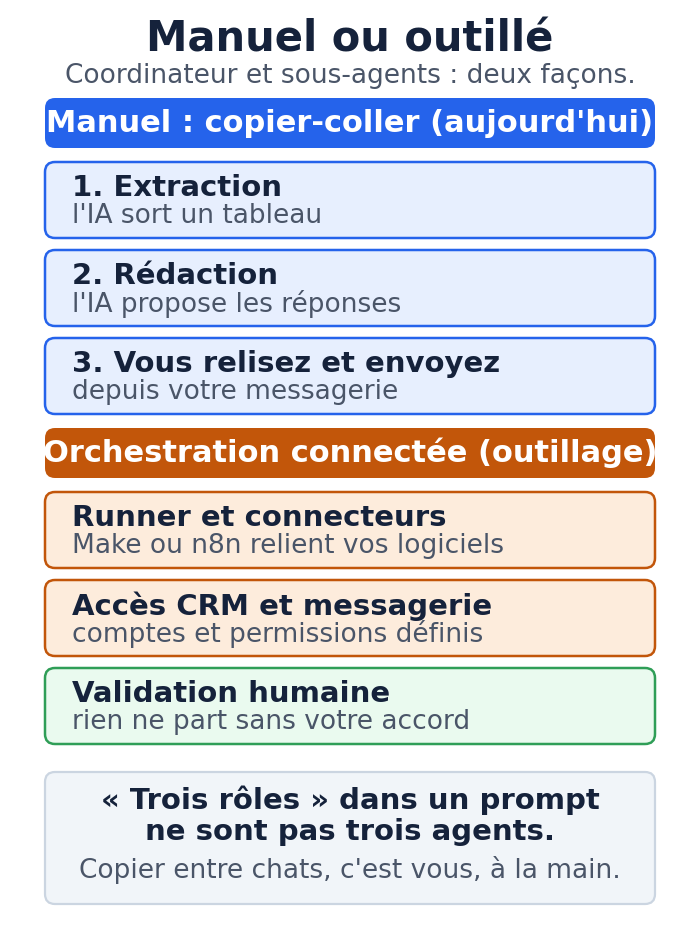
One point of caution that saves a lot of disappointment. Giving an AI “three roles” in a single prompt does not make three independent agents. Copying an answer from one conversation into another is a manual delegation you do yourself. A Project or a Gem does not automatically become an autonomous system. Real automation takes tooling.
A manual exercise you can do today, with no integration, on emails requesting a viewing (on the buyer side, never to sort tenants):
- Pass 1, extraction. Paste three fictional emails and ask: “For each message, extract the name, the property concerned and the question asked, as a table.”
- Pass 2, drafting. Paste the table and ask: “For each contact, write a courteous acknowledgment. Use [SLOT 1 TO CONFIRM] and [SLOT 2 TO CONFIRM]: no times are provided. Don’t invent any availability.”
- Pass 3, human check. You review, correct and send from your email.
You have just played the coordinator, by hand. You can repeat it tonight.
Connected orchestration, on the other hand, requires an automation runner or connectors, authenticated access to your CRM and your email with defined permissions, and a human approval step before anything is sent or written.
How to connect a specific CRM depends on the API or exports documented by its vendor: check with the vendor rather than assuming a ready-made connector exists. The diagram below sums up the difference.
Your checklist for the next session
- Create an account on an AI chat app, or check your access to Gemini or Copilot.
- Take the fictional fact sheet and generate your three listing versions (task 1).
- Create an agency Project or Gem with the instruction provided and your three listing templates.
- Test the file summary on the fictional minutes excerpt (task 3).
- For each task, write down your checkpoint before publishing.
- Do not paste any real client data until you have set up a business environment.
Going further with MACCUS
You can do these three tasks on your own, in a chat window. If you want a configured assistant that uses your templates and your rules, reachable on Telegram by text, voice note or document, in French, Dutch or English, MACCUS sets it up using your own Claude subscription.
Connections to your tools (calendar, Drive, email, industry software) are assessed case by case, according to your permissions, and are not turned on by default; anything sent goes through an approval step that you decide. Let’s talk about your workflow and your connectors.
Sources and pages to check
- EU AI Act (Regulation (EU) 2024/1689), Article 50 transparency obligations applicable since August 2, 2026, official European Commission page: digital-strategy.ec.europa.eu
- Reusable workspaces (Projects), available even on a free Claude account (five spaces maximum): support.claude.com
- To go deeper: our pillar article “Using AI in your profession” and the reference article on models and agents. For billing agency fees and accounting, see our guide for accounting firms.