

It’s Monday morning, and you have three Google reviews to handle, a supplier invoice announcing price increases, and a group dinner request that has gone unanswered since Friday. These tasks don’t fill the dining room, but they take up real time in your week. This guide shows you how an AI assistant helps you prepare them faster, with examples you can reproduce today.
You don’t need a developer or any connection to your POS system. Each task starts from a file or a piece of text you copy yourself, and ends with a result you review before using it. The AI prepares, you approve. That rule holds the whole guide together.
Three deliverables in one session
Three concrete deliverables, in one session:
- Drafted replies to three customer reviews, ready to post once you’ve checked them.
- A ranking of supplier price increases and their effect, in figures, on the cost of a dish.
- A reply to a group request, along with an internal memo of the tasks to do.
What you need: an account with a consumer AI assistant (OpenAI’s ChatGPT, Anthropic’s Claude, Google’s Gemini or Mistral’s Le Chat). All three exercises work in an ordinary conversation, including on a free plan: you paste the sample text and the reference sheet provided, with no file upload or project.
Spreadsheet analysis and “projects” are a convenience on top, and they often require a paid plan. Check the exact price and the availability of these features on your provider’s page when you pay, without relying on a price shown on a blog.
The safety rule, before anything else: don’t paste your customers’ non-public personal data into a consumer assistant. Reservation lists, contact details and complaints that name a person have no place there, because that amounts to transferring personal data to a third party without a legal basis. The examples in this guide are all fictional, so you can learn without exposing real data.
Stick to these examples for practice. Moving to real data takes more than removing a name: a deleted name doesn’t make a text anonymous, and a public review is still personal data. Before using real customer data, carry out a proper assessment first (data minimization, legal basis, correct account settings, opting out of training); that is outside the scope of this exercise.
Task 1, replying to customer reviews
Goal: get polite draft replies that match your tone, for Google or TripAdvisor reviews, without ever improvising a reply in the heat of the moment. Google’s rules for these replies, with a model reply for each situation, are gathered in our Google reviews kit.
Tool: any general-purpose assistant from the list above. The example uses an assistant with a “projects” feature.
Input: three fictional reviews, with no personal data (file avis-clients.txt, in French). One positive review, one mixed review about the wait, one negative review about the bill. Content to copy:
Review 1 (5 stars): Excellent welcome, tasty dishes and quick service at lunch on a weekday. The homemade tiramisu was perfect. We'll gladly come back.
Review 2 (3 stars): Good food, fresh ingredients. However, we waited almost 40 minutes between the starter and the main course on a Saturday night. A shame, because everything else was good.
Review 3 (1 star): The bill was too high for what it is. Nobody offered us the dessert menu. I don't recommend it.
Steps:
- Open a conversation. If your plan offers projects, create one and name it “Review replies”; otherwise, an ordinary conversation works just as well.
- As reference documents, use the sheet provided (
examples/fiche-restaurant.txt), which contains a fictional menu and a tone guide. In a project, upload it; without a project, you’ll paste it into the prompt. Excerpt from the tone guide: stay polite and understated, thank the guest for visiting, admit no unverified fault, never promise a discount, offer to continue by email in case of a dispute. - Paste the three fictional reviews provided (
examples/avis-clients.txt). They contain no personal data: keep the exercise on these examples. - Send the prompt below.
- Review each draft and adjust it. For your real reviews later, you are the one who posts the approved reply on the platform.
Prompt to copy:
You are the manager of a restaurant. Use the reference sheet
below (menu and tone guide); if you're working in a project, these
items are already uploaded there. Write a public reply to each review.
Rules: stay polite and understated, thank the guest for visiting, admit no
unverified fault and no wrongdoing I haven't confirmed, offer no
discount or goodwill gesture, and invite the guest to continue by email if the review
describes a dispute. Three to four sentences per reply. Don't mention any names.

Reference sheet: [paste the contents of fiche-restaurant.txt]

Review 1 (5 stars): [paste review 1 from avis-clients.txt]
Review 2 (3 stars): [paste review 2]
Review 3 (1 star): [paste review 3]
Expected output (excerpt):
Reply to review 2: “Thank you for your visit and for this feedback. We’re glad you enjoyed the food. The wait you describe on a Saturday night falls short of what we aim for, and we’re working on it. We look forward to welcoming you again.”
Human check: reread each reply and check three points. No made-up discount or compensation, no personal data, and no admission of a fault you haven’t verified (food poisoning, for example) that could make you liable. A real, confirmed fault can be acknowledged, but in the case of a serious complaint, don’t post a generated reply without first talking to your insurer or your legal adviser.
Common mistake and fix: the AI sometimes slips in “we’d like to offer you a coffee on your next visit”. Delete the sentence and restate in the tone guide that no goodwill gesture should be offered. If the tone is too warm or too long, ask for “more understated, three sentences at most”.
Task 2, measuring a supplier price increase
Goal: quickly spot the ingredients whose prices rose the most, and put a figure on the effect on a dish’s food cost, from a small export. For this fictional calculation, the supplier prices and the 19-euro menu price are all excluding VAT.
Tool: an assistant that can read a CSV file. You can also paste the table straight into the conversation.
Input: a hausses-fournisseurs.csv file with eight rows, showing the previous price and the current price of each ingredient. A second file, fiche-technique-plat.csv, gives the quantities per portion for one dish, here a salmon fillet with dill sauce and crushed potatoes.
Full contents of the two sample files (hausses-fournisseurs.csv and fiche-technique-plat.csv, in French, with a comma as the decimal separator), to copy as is:
ingredient;fournisseur;prix_precedent_eur;prix_actuel_eur;unite
Filet de saumon frais;Metro;24,50;28,90;kg
Beurre doux;Metro;7,80;9,40;kg
Farine T55;Sligro;0,95;1,05;kg
Creme liquide 35%;Metro;3,20;3,95;L
Huile de tournesol;Sligro;2,10;2,45;L
Pommes de terre;Primeur local;0,90;1,15;kg
Citron;Primeur local;0,32;0,38;piece
Aneth frais;Primeur local;2,80;3,10;botte
plat;ingredient;quantite_par_portion;unite
Pave de saumon sauce aneth et ecrase de pommes de terre;Filet de saumon frais;0,180;kg
Pave de saumon sauce aneth et ecrase de pommes de terre;Creme liquide 35%;0,05;L
Pave de saumon sauce aneth et ecrase de pommes de terre;Beurre doux;0,03;kg
Pave de saumon sauce aneth et ecrase de pommes de terre;Pommes de terre;0,25;kg
Pave de saumon sauce aneth et ecrase de pommes de terre;Citron;0,5;piece
Pave de saumon sauce aneth et ecrase de pommes de terre;Aneth frais;0,10;botteSteps:
- Open a conversation and attach the two files, or paste their contents.
- Send the prompt below.
- Read the output table, then redo one calculation by hand to check it (see below).
Prompt to copy:
Here are two CSV files separated by semicolons, with a comma as the
decimal separator (Belgian and French format). First file: supplier
prices, previous and current. Second file: the recipe card for a
dish, with the quantities per portion.

1. For each ingredient, calculate the increase as a percentage, rounded to one
   decimal place, and rank them from largest to smallest.
2. Calculate the dish's food cost per portion, at the old and the new prices,
   then the difference in euros and as a percentage.
3. Present the result in two tables. Show your calculations line by line
   so I can check them. Don't make up any data that isn't in the files.
Expected output (figures calculated from the sample files):
Ranking of the increases:
| Ingredient | Previous price | Current price | Increase |
|---|---|---|---|
| Potatoes | €0.90/kg | €1.15/kg | +27.8% |
| Heavy cream 35% | €3.20/L | €3.95/L | +23.4% |
| Unsalted butter | €7.80/kg | €9.40/kg | +20.5% |
| Lemon | €0.32/each | €0.38/each | +18.8% |
| Fresh salmon fillet | €24.50/kg | €28.90/kg | +18.0% |
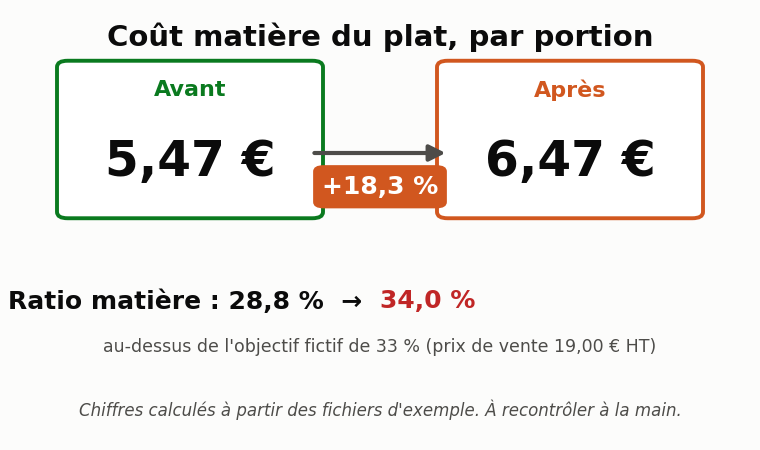
Food cost of the dish, per portion: €5.47 at the old prices, €6.47 at the new ones. A difference of €1.00 per portion, or +18.3%. At a menu price of €19.00 excluding tax, the food cost ratio goes from about 28.8% to 34.0%, above the 33% target this fictional restaurant set for the exercise (set your own based on your menu and your margins).
Human check, calculation redone by hand (always check an AI’s figures):
- Potatoes: (1.15 − 0.90) ÷ 0.90 = 0.25 ÷ 0.90 = 0.278, or +27.8%. Correct.
- Salmon cost per portion, new price: 0.180 kg × €28.90 = €5.20. Adding up the six ingredients on the recipe card, you do get €6.47 per portion.
The AI does these calculations and you check them again. Treat them as a decision aid; they are no substitute for official bookkeeping.
Common mistake and fix: on a CSV in Belgian or French format, the AI sometimes reads “24,50” as two numbers because of the comma.
If a result looks absurd, state in the prompt “the comma is the decimal separator, the semicolon separates the columns”, or ask the AI to convert the numbers before calculating. Also check the units: a price per kilo and a quantity in grams must be converted to the same unit.
Task 3, preparing a reply to a group request
Goal: turn a group dinner request into a draft reply to the customer and an internal memo of the tasks to do, without committing to a price or a date the AI might have made up.
Tool: a general-purpose assistant, ideally in a project where you’ve uploaded your menu and your group terms.
Input: a fictional email (demande-groupe.txt, in French) asking for a dinner for 32 people on a Thursday evening, mostly fish, with two vegetarians. It contains no personal data: use it as is for the exercise. Content to copy:
Subject: Year-end dinner
Hello, we'd like to organize a team dinner for 32 people on the evening of Thursday, December 10. We're hoping for a menu built mostly around fish, with two vegetarians in the group. Could you tell us whether the date is possible and suggest a set menu? Thank you in advance.
Steps:
- Use the reference sheet provided (
fiche-restaurant.txt, in French) for the menu and the group terms (a single set menu above 15 guests, deposit, confirmation deadline). In a project, upload it; without a project, you’ll paste it into the prompt. - Paste the fictional request (
demande-groupe.txt). - Send the prompt below.
- Check the date in your reservation calendar, fill in the deposit and the price from your rate sheet, then send. Availability, the deposit and the price never come from the AI.
Prompt to copy:
Using the reference sheet below (menu and group terms),
or the documents uploaded to your project, write two things for the request
below.

1. A draft reply to the customer: polite, confirms that we'll get back
   to them, restates our group terms, asks the useful questions
   (exact time, allergies, budget per person), and suggests a set menu
   built mostly around fish with a vegetarian option. Don't state any firm
   price, deposit amount or availability that I haven't
   confirmed: leave [to be confirmed] in those places.
2. An internal memo, as a list, of the tasks I need to do before
   sending: check the room, estimate the quantities, check the staff.

Reference sheet: [paste the contents of fiche-restaurant.txt]
Request: [paste the contents of demande-groupe.txt]
Expected output (excerpt from the internal memo):
- Check that the room is available on the evening of Thursday, December 10 for 32 guests.
- Estimate the fish quantities for 30 portions and 2 vegetarian menus, then the food cost.
- Check the staff scheduled that Thursday; bring in extra help if needed.
- Fill in the price per person from the group rate sheet, then confirm the date.
Human check: availability and price don’t come from the AI. Check the date in your reservation system, replace each [to be confirmed] with your real information, and reread the tone. Never send a generated quote or date commitment without this check.
Common mistake and fix: the AI sometimes suggests a price “for example €45 per person”. Replace it with your real rate, or tighten the instruction to “no price figures, only [to be confirmed]”. For allergens and the details of the dishes, you make the call: the AI must not draw up an allergen list on its own, because that statement is your legal responsibility.
Reuse your work with projects
The three tasks above work better inside projects, if your plan offers them. A project is a reusable workspace where you keep reference documents and instructions ready to use again.
Depending on the tool, this feature is called “Projects” (ChatGPT, Claude), “Gems” (Google) or “agents” (Mistral). Depending on the tool and your plan, a project can stay personal or be shared with a team: access depends on the permissions you set, and a project offers no confidentiality guarantee on its own. Check these settings before uploading anything sensitive.
For these internal tasks, a reusable workspace is enough: you keep your menu, your tone guide and your terms there, ready to use again. These exercises don’t require a project; they also work by pasting the reference sheet into an ordinary conversation.
Here is a block of instructions to paste into the settings of a “Review replies” project:
Role: you write the public replies to our restaurant's reviews.
Tone: polite, understated, warm without overdoing it. Three to four sentences.
Firm rules: admit no unverified fault and no unconfirmed
wrongdoing; never promise a discount or goodwill gesture; never
mention a name; invite the guest to continue by email in case of a dispute. If a review
mentions a health problem, flag it to me instead of writing a reply.
References: the menu and the tone guide uploaded to this project.
Do the same for a “Group requests” project with your terms, and for a “Food cost” project with the format you expect for your tables.
A concrete example with a coordinator and subagents
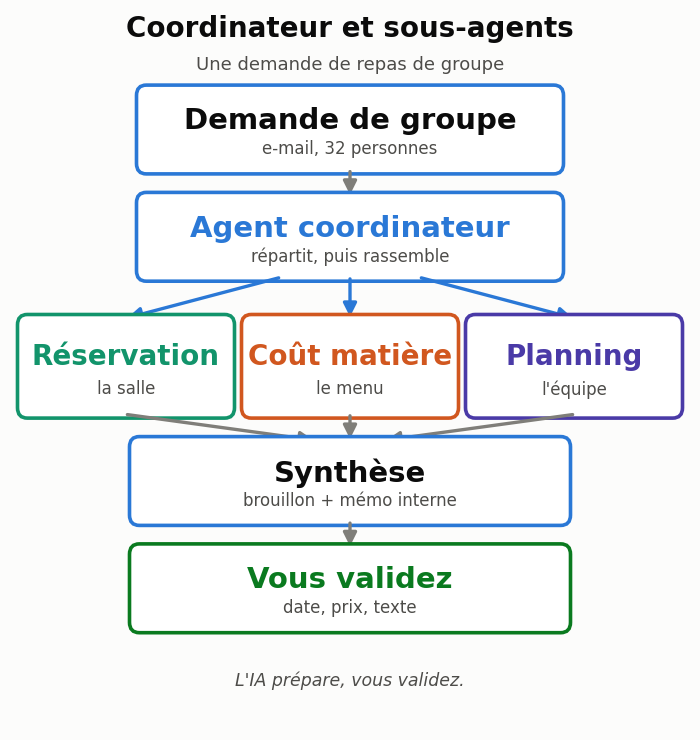
You’ll hear about “agents” and “multi-agent systems”. The idea is simple, and the image of a kitchen brigade makes it clear. The maître d’ doesn’t cook or wash dishes: they understand the request, break it down, hand it to the right station, then pull everything together. A coordinator agent does the same thing with specialized subagents.
Back to the group request. The coordinator reads the message, then calls on three specialists: one for room availability, one for the menu’s food cost, one for Thursday’s staff schedule. It gathers their answers into a draft and a memo, and you keep the final approval.
Two points matter, because they are often misunderstood.
First, a manual exercise any beginner can do. You play the coordinator yourself. Step 1: you check the room in your reservation calendar and note the answer.
Step 2: you ask the assistant to estimate the quantities and the cost from your recipe card. Step 3: you check Thursday’s staff in your scheduling software.
Step 4: you paste these three results into a final conversation and ask for the draft reply and the memo. It’s useful and easy to do, as long as you stick to the exercise’s fictional data.
Second, a reality check. This exercise remains manual delegation: you are the one carrying the information from one step to the next. Writing “play three roles” in a single prompt doesn’t create three independent agents, and copying answers between two conversations isn’t automation.
A real connected system, where the agents read your reservation software, your food cost tool and your staff schedule, requires connectors, granted permissions, a tool that orchestrates the whole thing, and human approval before anything is sent. It’s a project that needs scoping, and it takes more than checking a box.
Choosing your model and your tool
Four providers come up for a freelancer in Belgium or France: OpenAI (ChatGPT), Anthropic (Claude), Google (Gemini) and Mistral (Le Chat). Microsoft 365 Copilot makes sense if your office work already runs on Word, Excel and Outlook.
To choose, think in terms of task type rather than version number, because model names change often. Each provider offers two useful families:
- A fast, inexpensive model for simple volume work: sorting messages, writing a short email, classifying reviews.
- A reasoning model for dense documents and calculations: analyzing a cost spreadsheet, comparing several invoices, preparing a structured quote.
Check the exact name of the model available to you on the provider’s official page on the day you choose. Our reference article keeps this comparison up to date; start there rather than with a static table: see Choosing an AI model and organizing work with several agents.
Five things often get confused; keep them separate. The model is the engine. The consumer app (ChatGPT, Le Chat) is the interface where you type. The subscription determines your features and usage limits.
The API is for plugging the model into other software. The connector links the assistant to a service (calendar, Drive, an ERP). The automation engine runs a workflow on its own according to rules. The tasks in this guide use only the app and the subscription.
On privacy, two simple guidelines. Consumer plans often process your data outside the European Union and may use it for training unless you change the setting; business plans generally exclude training by default.
If your data must stay in Europe, options exist, including Mistral, which is European, or the business offerings from Microsoft and Google with an EU data boundary, but they require the right plan and the right configuration. None of these offerings becomes “GDPR compliant” by magic: the practical rule remains never to paste customers’ personal data into a consumer assistant.
The rules to know in 2026
AI helps you prepare; it replaces neither your POS system nor your accountant. Three points in the regulatory framework deserve your attention this year.
E-invoicing. In Belgium, the requirement for structured e-invoicing on domestic B2B transactions between VAT-registered businesses has applied since January 1, 2026. A structured invoice follows a standardized format (EN 16931), separate from the Peppol transmission network it usually travels over; a plain PDF is no longer enough. Special cases and exceptions exist depending on the company’s situation.
Check whether this applies to you and confirm your obligations on the official website of FPS Finance (efacture.belgium.be). In France, receiving e-invoices becomes mandatory for VAT-registered businesses established in France from September 1, 2026; the obligation to issue them extends to microbusinesses and small and midsize businesses from September 1, 2027, through an approved platform.
The official timeline is on impots.gouv.fr. An AI can read an invoice and extract the amounts to prepare the work, but the bookkeeping entries and the filing of returns stay with your accountant.
The certified cash register. In the Belgian hospitality sector, many establishments use a registered cash register system (SCE, for système de caisse enregistrée), the regulated tax device often called the “black box”, whose exact scope depends on your situation.
Whatever your system, an AI must never write to the cash register or change a transaction, a closing or a VAT breakdown. It can only read exports to analyze or forecast.
Allergens and transparency. Never let an AI draw up the allergen list for a dish on its own: that statement is your legal responsibility. Separately, if you post a dish image entirely generated by AI that could pass for a real photo, the cleanest approach is to say so.
The EU AI Act regulates transparency for content likely to mislead, but its precise scope and exceptions depend on the case; treat this disclosure as good editorial practice rather than definitive legal advice. A text that was simply proofread with the help of AI isn’t covered.
Your next work session
A short list to get started, without spending the whole day on it:
- Choose an assistant and check, in your account, that file analysis and projects are available.
- Create a “Review replies” project if your plan allows it, and paste in the instruction block from this guide; otherwise, keep the reference sheet at hand.
- Redo the tasks on the examples provided until you feel comfortable. Only move to real data after the assessment mentioned above: removing a name isn’t enough.
- Export a small file of fictional prices, do task 2, then check one calculation again by hand.
- Write down the rule: no non-public customer personal data in a consumer assistant.
If you want to go further, the logical next step concerns your invoices and the link with your accountant: see AI in an accounting firm: preparing documents and checking the results. For the overall picture and a first guided workshop, start with Using AI in your profession: start with a concrete task.
Would you rather have it set up for you than build it on your own? MACCUS configures an assistant that works through Telegram with text, voice messages and documents, in French, English and Dutch. It works with your own Claude subscription, with an initial setup followed by a monthly service.
Connections to your tools (calendar, Drive or management software) are assessed case by case based on feasibility and your permissions, and anything sent goes through the approval step you choose. It is neither an all-European solution nor a compliance guarantee, and the assistant replaces neither your accountant nor your food safety obligations. To talk about it based on how you actually work, tell us about your workflow.