

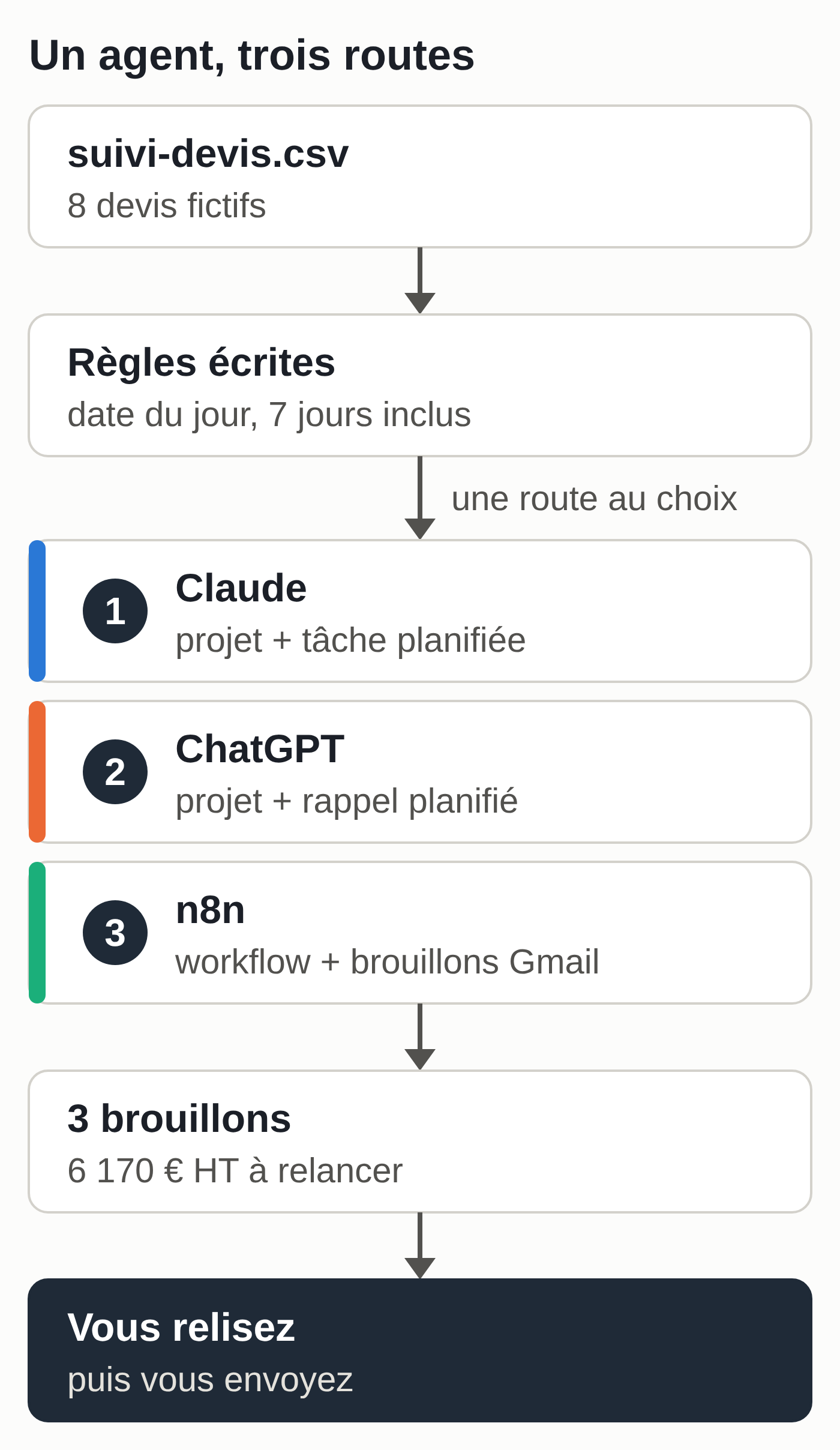
To build an AI agent without coding, you need a specific task, written rules, a tool that applies those rules at the right time and a human review before anything is sent. The tool can be a Claude or ChatGPT project, or an automation tool like n8n.
This guide builds the same small agent in three ways. It reads a quote tracking file, spots the quotes that need a follow-up and writes the follow-up emails as drafts. If you don’t use Claude or ChatGPT yet, our Claude vs. ChatGPT comparison for small businesses helps you choose. And if you only need a small tool with no automation, such as a quote calculator or a dashboard, a Claude artifact is often enough.
How to build an AI agent in four steps
- Pick a repetitive task whose result can be checked: here, following up on quotes with no reply.
- Write the rules as you would for a colleague: which file, which criteria, which result, what is off limits.
- Hand them to a tool: a project if you start the work yourself, a scheduled task or a workflow if it has to run on its own.
- Stay in control: the agent prepares drafts, and you review and send them.
The agent to build follows up on pending quotes
The example follows a fictional company, Lefèvre Techniques, which installs heating and air conditioning. Its tracking file holds eight made-up quotes, with .example addresses. Learn on this file before you touch your real customer file.
Sample files (column names and values in French): suivi-devis.csv (the eight quotes), instructions-projet.txt (the rules to paste), prompt-n8n.txt and verifier_tri.py (zip), a script that recalculates the expected sorting.
The rules, applied on Monday, September 21, 2026: an accepted or declined quote needs nothing; an expired validity date gives “expired”; two follow-ups already done give “to call”; a last contact 7 or more days old gives a follow-up; everything else is too recent.
The same follow-up logic works for prospecting, with the added rules for commercial email in France and Belgium: see our guide to prospecting follow-ups with Claude.
The correct result: three follow-ups (D-2026-041 and D-2026-049 as first follow-ups, D-2026-043 as a second one), one quote to call (D-2026-045), one expired (D-2026-046), three with no action and €6,170 excl. VAT in quotes followed up. D-2026-049 lands exactly on 7 days, so it tests the limit.
The three methods at a glance
- Claude: a project you start by hand, on every plan; a scheduled task every Monday on a paid plan.
- ChatGPT: a project you start by hand, plus a scheduled reminder, because a task created in a project can’t read its files; the paid agent mode can also run on a schedule.
- n8n: a workflow that reads a Google Sheets sheet every Monday and creates Gmail drafts. You manage the accounts, the access keys and, if you self-host, the server.
What was checked: a script replays the rules on the fictional file. The instructions were also run through the OpenAI API, on two models including a small, fast one: sorting and total were correct. These tests validate the rules and the output format. The menus mentioned follow the official documentation consulted on September 28, 2026; the interfaces were neither tested nor timed, so no duration is given.
Build the agent with Claude (route 1)
Requirements: a Claude account. Projects exist on every plan, including the free one (five projects at most). Scheduled tasks require a paid plan (Pro, Max, Team or Enterprise).
- In the sidebar (or at claude.ai/projects), open Projects, then click “+ New Project” at the top right and name it “Quote follow-ups.”
- Click “Set project instructions,” paste the instructions below, then click “Save instructions.”
- Open a conversation in the project, attach
suivi-devis.csvand send the weekly prompt. - Compare the table with the correct result before you read a single email.
Project instructions (adapt the name and signature; the column names match the French sample file):
You prepare the quote follow-ups for Lefèvre Techniques (heating and
air conditioning). You write drafts: you send nothing.

Input: a quote tracking CSV, columns numero, client, contact,
email, objet, montant_ht, date_envoi, dernier_contact, nb_relances,
valable_jusqu_au, statut. Dates in YYYY-MM-DD format.

Sorting, rules in order, using the date I give you:
1. Status other than "envoyé" (sent): "nothing".
2. valable_jusqu_au earlier than today's date: "expired".
3. nb_relances equal to 2 or more: "to call".
4. dernier_contact 7 or more days ago (7 included): "follow-up 1" if
   nb_relances is 0, "follow-up 2" if it is 1.
5. Otherwise: "nothing" (too recent).

Answer:
A. A table of all the quotes: number | client | decision | reason.
B. For each follow-up, an email. Subject: "Quote [numero]: [objet]".
   100 words maximum, formal, starts with "Hello" followed by the
   contact's first and last name (don't guess Ms. or Mr.), restates the
   number, the subject, the amount excl. VAT and the validity date. Dates
   written out (September 30, 2026), amounts with a thousands separator
   (€1,250 excl. VAT).
   Follow-up 1: short and friendly, offers to answer a question.
   Follow-up 2: says it is the last follow-up, offers a short call,
   no pressure.
   Signature: Thomas Lefèvre, Lefèvre Techniques.
C. The total excl. VAT of the quotes followed up.

Off limits: no discount, no deadline, no promise, no fact missing
from the file. Missing column or unreadable date: flag it, don't guess.
Weekly prompt:
Today's date: Monday, September 21, 2026.
Here is the quote tracking file (suivi-devis.csv attached). Prepare the follow-ups.
Excerpt of the expected result:
D-2026-043 | Cabinet Moreau Architectes | follow-up 2 | last contact 14 days ago
D-2026-045 | Hôtel Les Tilleuls | to call | already followed up 2 times

Subject: Quote D-2026-043: Annual air conditioning maintenance contract
Hello Julien Moreau,
I'm following up one last time about quote D-2026-043, an annual
air conditioning maintenance contract (€1,250 excl. VAT), valid until
September 30, 2026. If it would help, I'd be glad to have a short call
to discuss it.
Thomas Lefèvre, Lefèvre Techniques

Total excl. VAT of quotes followed up: €6,170
To have it run on its own every Monday (paid plan): click “Scheduled” in the sidebar, then “New task” and “Set up manually.” Give it a name, paste the instructions into the prompt and add “Use the date of the run as today’s date,” choose manual approval mode and a weekly frequency, then click “Save.” With the new Claude experience (rolling out on Pro and Max), describe the task and its frequency in a conversation, then click “Schedule.”
These tasks run in the cloud, even with your computer off, with your connectors and the files saved in your Claude account; they don’t read a folder on your computer. For an up-to-date tracking file, keep it in Google Sheets and add to the prompt: “Read the Suivi devis sheet in my Google Drive.” The Gmail connector can prepare drafts and, by default, asks for your approval before any send. Ask it for drafts only. In manual mode, Claude may stop to ask for your approval before using a connector, so open the task on Monday.
Human check: check the sorting, then every amount and every date in the emails. After sending, update dernier_contact and nb_relances, or the same quotes will come back.
What breaks:
- The exact limit: in one test, the quote at exactly 7 days was first classified as “too recent.” Write “7 included” and check the edge cases with the script.
- Dates written 21/09/2026 instead of 2026-09-21: the AI can swap day and month. Stick to a single format.
- A “Ms.” or “Mr.” guessed from the first name: one test produced it before the “don’t guess” rule was added.
- Emails with “2026-09-30” or “1250 €”: a small model did this as long as the format rule was missing.
- The mode where Claude acts without asking: keep it for actions with no consequences. An email to a customer always has consequences.
Build the agent with ChatGPT (route 2)
Requirements: a ChatGPT account. Projects are open to free accounts (five files per project, 25 on Plus). So are scheduled tasks: three active tasks on the free plan, at most once a day, in a flexible time slot; an exact time requires a paid plan.
- In the sidebar, click “New project” and name it “Quote follow-ups.”
- In the project’s “•••” menu, open “Project settings” and paste the same instructions.
- In a conversation in the project, attach
suivi-devis.csvand send the same weekly prompt. - Compare the table with the correct result, then review the three emails.
The expected result is the same as in route 1: same sorting, three drafts, €6,170 excl. VAT.
To make it a weekly routine, ask in a conversation: “Every Monday at 8:30 a.m., remind me to prepare the quote follow-ups in the Quote follow-ups project.” On the free plan, the time becomes a time slot, such as the morning. Confirm, then turn on notifications in Settings > Notifications. Your tasks are listed under “Scheduled.”
Why a reminder: according to OpenAI’s help center, a task created in a project can’t access that project’s files. Agent mode (paid plans, 40 messages per month on Plus) can run on a recurring schedule and use connected apps; that setup isn’t covered here, so test it on the fictional file first.
What breaks: the same points as for Claude, plus notifications turned off (the reminder goes unnoticed) and the file limit if you upload a new version to the project every week.
Build the agent with n8n (route 3)
n8n is a visual automation tool: you connect blocks, called nodes. Some fields require short expressions in curly braces, which you can copy from this guide. It’s the route that runs on its own without a Claude or ChatGPT subscription, and the one that needs the most configuration.
Requirements:
- n8n Cloud (free trial with no card, then the Starter plan at €24 per month, or €20 per month billed annually, for 2,500 executions, prices as of September 28, 2026), or self-hosted n8n, free in the Community edition, on a server you manage;
- a Google Sheets sheet named “Suivi devis” into which you import
suivi-devis.csv(File > Import). If the dates show as 21/09/2026, select the three date columns, then Format > Number > Custom date and time, choose a format like 2026-09-21 and click “Apply”: n8n reads dates exactly as they are displayed; - an OpenAI, Anthropic or Mistral API key. The API is billed by usage, separately from your ChatGPT or Claude subscriptions. Since October 2026, however, the Claude Max and Team plans include a monthly API credit, and the small Claude Haiku 5.5 model costs up to 90% less than Haiku 4.5.
Steps:
- Create a workflow. In its Settings, set “Timezone” to Europe/Brussels or Europe/Paris.
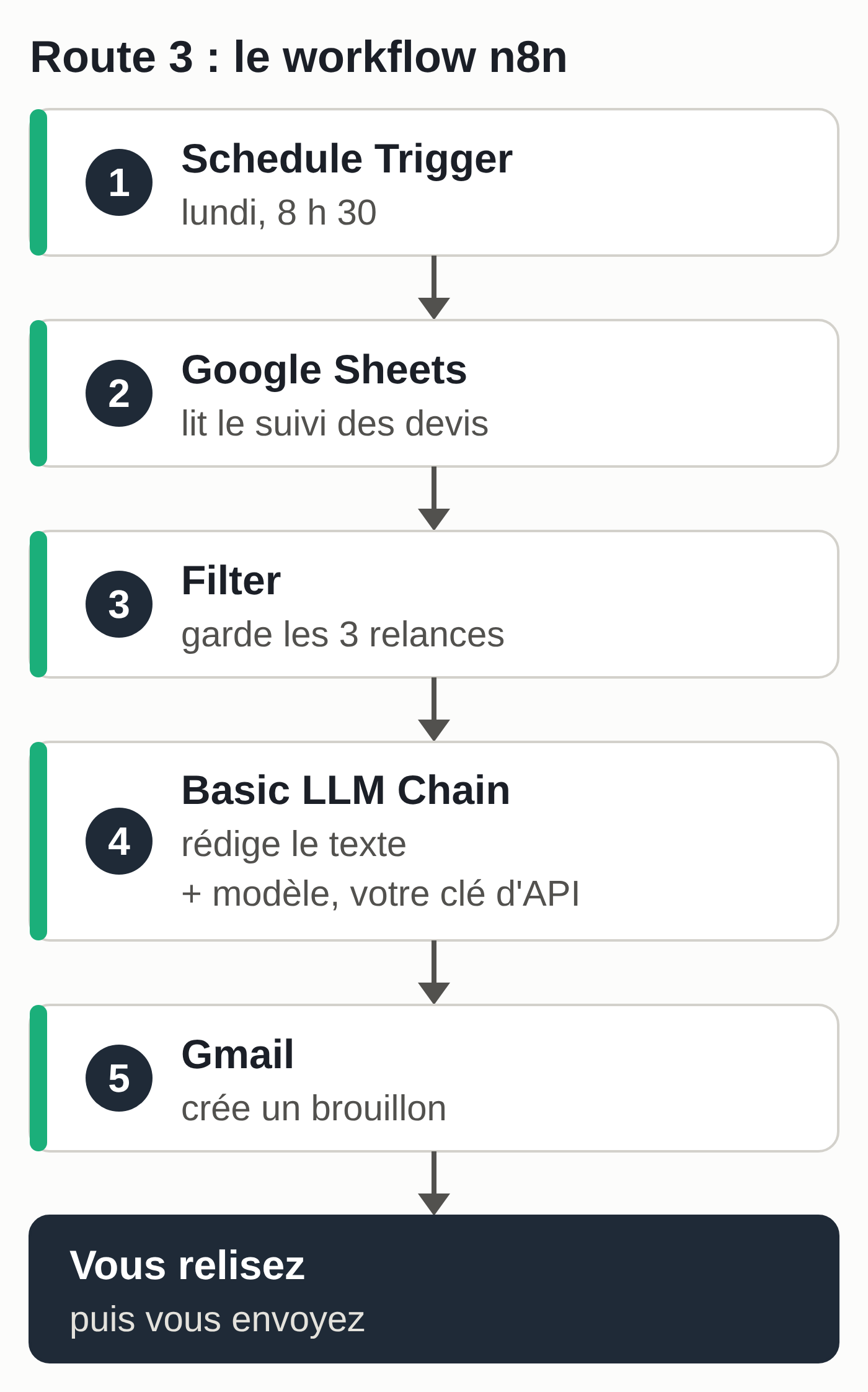
- Add “Schedule Trigger”: Trigger Interval “Weeks,” Weeks Between Triggers 1, Trigger on Weekdays “Monday,” Trigger at Hour 8am, Trigger at Minute 30.
- Add “Google Sheets,” operation “Get Row(s),” connect your Google account and choose the sheet.
-
Add “Filter,” with four conditions joined by AND (field, comparison, value):
{{ $json.statut }}, String > is equal to,envoyé;{{ $json.nb_relances }}, Number > is less than,2;{{ $json.dernier_contact }}, Date & Time > is before or equal to,{{ $today.minus({days: 7}).toISODate() }};{{ $json.valable_jusqu_au }}, Date & Time > is after or equal to,{{ $today.toISODate() }}.
Keep
.toISODate(): both sides become dates with no time, and the quote at exactly 7 days stays in the filter. If n8n reports “wrong type,” turn on the “Less Strict Type Validation” option. -
Add “Basic LLM Chain,” prompt “Define below,” paste the prompt below and connect a model (for example “OpenAI Chat Model”) with your key. A small, fast model is enough for short emails: test it on the fictional file.
- Add “Gmail,” resource “Draft,” operation “Create,” type “Text.” Subject:
Quote {{ $('Filter').item.json.numero }}: {{ $('Filter').item.json.objet }}. Message:{{ $json.text }}, the field where the previous node returns the text. “To Email” option:{{ $('Filter').item.json.email }}. - To test on the fictional file, temporarily replace the filter’s two date values with 2026-09-14 and 2026-09-21, run the workflow from the editor, then put the expressions back. The test drafts go to
.exampleaddresses, which don’t exist: delete them afterward. - Publish the workflow: a scheduled trigger doesn’t run unless the workflow is published.
Prompt for the Basic LLM Chain node:
Write a follow-up email in English for a quote. Formal tone,
100 words maximum, no subject line. Start with "Hello" followed by the
contact's first and last name (don't guess Ms. or Mr.). Signature:
Thomas Lefèvre, Lefèvre Techniques. Date written out (September 30,
2026), amount with a thousands separator (€1,250 excl. VAT). Don't invent
any discount, deadline or promise.

Contact: {{ $json.contact }}
Client: {{ $json.client }}
Quote: {{ $json.numero }}, {{ $json.objet }}
Amount: €{{ $json.montant_ht }} excl. VAT
Valid until: {{ $json.valable_jusqu_au }}
Follow-ups already done: {{ $json.nb_relances }}

If "Follow-ups already done" is 0: a short, friendly follow-up that offers to
answer a question. If it is 1: say this is the last follow-up
and offer a short call, no pressure.
Expected result: the filter keeps D-2026-041, D-2026-043 and D-2026-049, and three drafts land in Gmail, addressed to lucie@verhaegen.example, j.moreau@moreau-archi.example and nadia@salon-nadia.example. Here, the date-based sorting is done by the filter; the model only writes the text, from the relevant fields alone.
What was checked: the logic of the four conditions was replayed outside n8n on the fictional file (filtre-n8n-logique.js (zip)), with the same three quotes, and the prompt was run through the OpenAI API on a small model for D-2026-043 (second follow-up). The workflow was not built in n8n for this article; the settings follow n8n’s documentation.
Human check: on Monday, open the drafts, check the recipient, amount and date, send them yourself, then update the sheet. Don’t leave that update to the workflow: it would mark a quote as followed up even if the message never went out.
What breaks:
- The time zone: without this setting, a self-hosted n8n follows New York time, and your Monday 8:30 a.m. becomes 2:30 p.m. where you are.
- Dates displayed as 21/09/2026 in Google Sheets: n8n receives them that way and the date comparisons go wrong. Apply the 2026-09-21 format.
- An unpublished workflow, revoked Google access, used-up API credit: nothing goes out, and there’s no alert. Look at the list of executions on Monday or set an error workflow in the settings.
- The “to call” and “expired” quotes don’t come out: this filter only keeps follow-ups. A second branch (another Filter, then an email to you alone) can flag them for you.
After launch, who handles hosting, access, upkeep and liability
With Claude and ChatGPT, the provider handles hosting. You manage your account, the connectors you turn on, the files you upload and keeping the instructions up to date.
With n8n Cloud, n8n handles hosting; you manage the Google credentials, the API key and its budget. If you self-host, you also handle the server, its updates, its security and its backups, with your Gmail access stored on it. It’s the same tradeoff as for an open-source AI assistant installed on your own server.
If a message goes out with a mistake, your business sent it, whatever the tool. Hence the rule in this guide: drafts, reviewed and sent by a named person. The new Claude usage policy, which takes effect on November 12, 2026, also asks you to make sure your agents comply with it, including in the actions they take through connected tools.
Give the agent as little access as possible: an agent that reads a mailbox can come across a message written to hijack it, a risk that the ChatGPT agent documentation itself describes.
Your tracking file contains names and addresses: that’s personal data, even between businesses. Read the provider’s data processing terms and send the model as few columns as possible. On a personal ChatGPT or Claude account, also check the setting that allows model training on your conversations; turning it off isn’t enough to make a use compliant. The competent authority is the Data Protection Authority in Belgium and the CNIL in France. To get everything ready, see what to sort out before installing an AI agent in a small business.
A prompt with roles, relayed chats and a connected agent
The route 1 instructions ask the model to sort, write and total. A single model then plays three roles in a single answer: writing three roles into a prompt doesn’t create three agents.
You can add a reviewer by hand. In a new conversation, paste the file and the drafts, then:
For each draft, check against the file: number, amount excl. VAT,
validity date and contact name. List the discrepancies. Don't rewrite anything.
This is manual delegation: you carry the text from one chat to the other. Tried through the OpenAI API on three drafts containing two deliberate errors (an amount and a date), this reviewer caught both, without rewriting anything.
The route 1 scheduled task, with its connectors, and the route 3 workflow are connected chains: reading, sorting, writing and drafting run with no copy and paste and without you starting them; only the approvals you asked for wait for you. They need access to your software, set account by account, and someone who configures them, monitors them and answers for them. Our guide to choosing your AI model and organizing work across several agents explains this difference in detail.
Which parts of a free AI agent are actually free
- Free Claude: the project you start by hand, yes; the scheduled task, no.
- Free ChatGPT: the project and a weekly reminder, yes, within the plan’s limits.
- n8n: the Community edition is free, but the server, its upkeep and the API cost money.
For this agent, the free version is the one where you start the sorting yourself. Having it run without you takes a Claude scheduled task or ChatGPT agent mode (paid plans), or n8n (a subscription or a server, plus the API).
Your next session
- Open your quote tracking file and check the columns and the date format.
- Rerun the example with the date of September 21, 2026: three follow-ups, €6,170 excl. VAT.
- Adapt the name, signature, 7-day threshold and number of follow-ups.
- Choose the route: by hand, scheduled task or n8n workflow.
- Name who reviews the drafts and updates the file after sending.
- Before using real data, read the provider’s terms.
Other tutorials start from a profession rather than a task: they are collected in our guide Using AI in your profession. If your project is a website rather than an agent, see how to go from a Claude mockup to WordPress.
If you’d rather not handle the server, access and upkeep of route 3 yourself, that’s the job of the MACCUS AI assistant: an assistant installed and hosted for you, in Telegram, that you can write to or send voice notes to. It comes with no connection to your tools; access to your quote tracking file or your email is decided with you, case by case.