

Anthropic, the company that makes the AI assistant Claude, started rolling out a new feature on Tuesday, November 24, 2026. It turns the tools, pages and tables that Claude builds in a chat into desktop apps for Mac or Windows. If the user allows it, an installed app can run programs and read, change or delete the user’s files.
Each of these tools, pages and tables is called an artifact, and Claude builds it next to the conversation. The feature is in beta, meaning it is still being tested.
An installed app gets its own icon and its own window. It can use Claude and the user’s connectors, the links that give Claude access to email, a calendar or documents.
Access to programs and files is limited to apps the user built. On business plans, apps built by a colleague can get it too. Anthropic warns that it does not review these apps before they are installed.
Until now, an artifact opened inside Claude or in a web browser. The five tools in our guide to Claude artifacts work that way. The announcement comes five days after Google let its assistant Gemini operate a Mac on the user’s behalf.
How an artifact becomes an app
The announcement lays out three steps. The user describes the tool to Claude, tries it out as an artifact, then chooses “Install as app” from the Share menu. Claude’s Help Center, Anthropic’s support site, lists other ways in, including the artifact’s title menu and a right-click. Claude asks for confirmation every time.
There is nothing to package and nothing to sign digitally, two steps that usually come with shipping software. The user also needs no API key, the access code developers use to call Anthropic’s services. There is no separate login: the app runs on the user’s Claude account.
On a Mac, the apps go into a “Claude Apps” folder inside the user’s Applications folder. On Windows, they show up in the Start menu and as a shortcut on the desktop. Some apps put an icon in the Mac menu bar or the Windows system tray. Those keep running after their window is closed.
The app stays tied to the original artifact and changes whenever the user or another editor changes the artifact. The app can also be shared with other people.
Anthropic writes that people already use artifacts as everyday work tools. It gives two examples. One is a meeting prep page that pulls from the user’s calendar and email. The other tracks the orders that need to ship that day.
The announcement also lists five sample apps built by people at Anthropic, including these three. Linnet is an image editor that works in layers. Sift sets up folder rules and uses Claude to keep files organized. Vitals shows the computer’s performance in the menu bar.
Three levels of permission
The first level is the default: an installed app can do nothing more than a web page can do in a browser. The second level, app permissions, lets the app ask for “common features that Claude can tightly control,” in Anthropic’s words.
Those features are notifications, an icon in the menu bar and keyboard shortcuts that work while other apps are in use. The fourth is a window that stays on top of the others. The Help Center adds that such a floating window can also read where the cursor is on the user’s screens.
The third level is full computer access. The app can then “run programs and read, change, or delete your files without asking each time,” Anthropic writes. The user answers each permission request with “Allow” or “Don’t allow.”
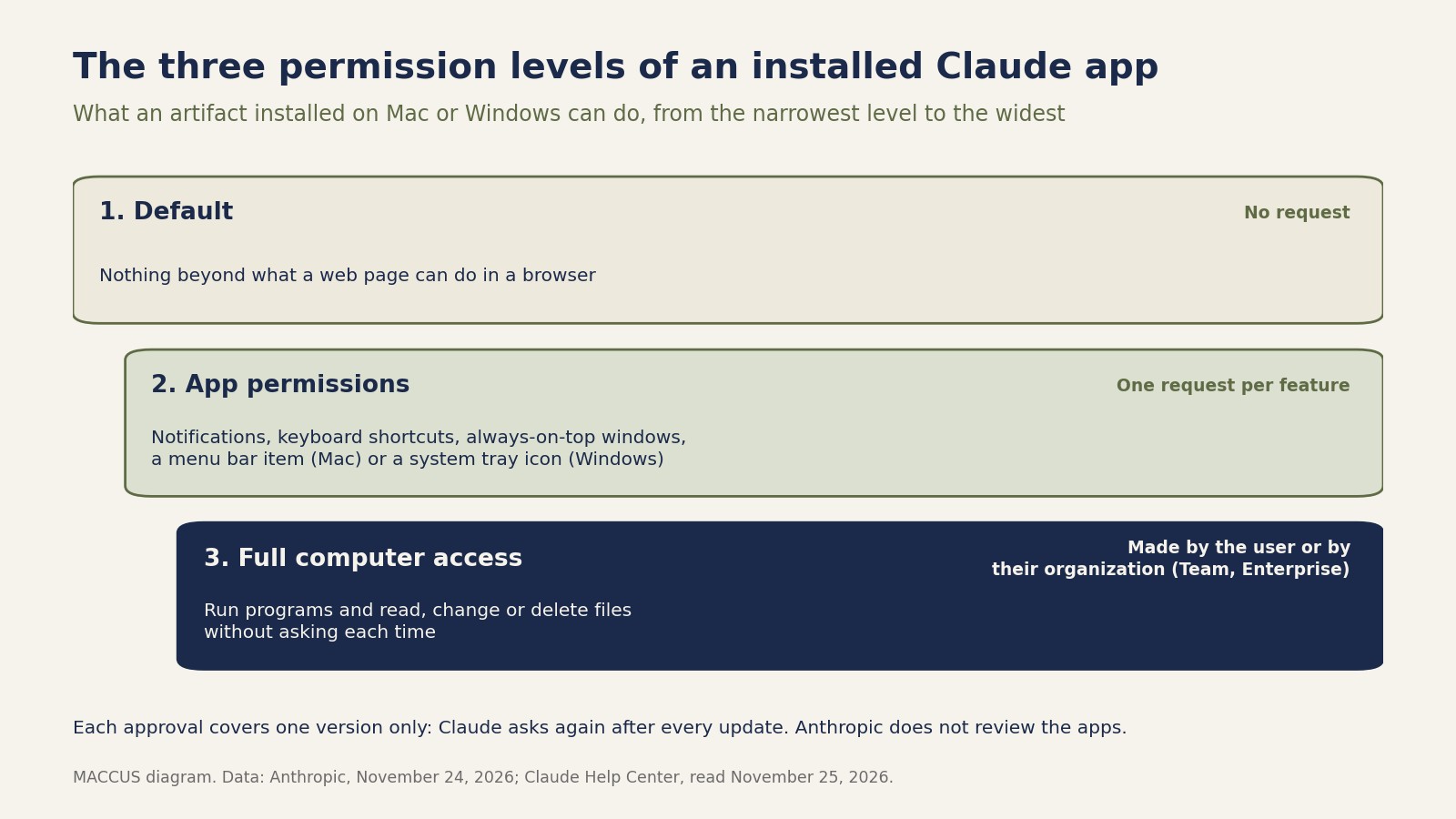
An approval covers only one version of the app. After every update, including the user’s own edits, Claude asks again. A refusal stays in place until the user changes it. Anthropic flags one exception: if part of an app comes from another website, that part can change without a new request.
Full access stays in-house
Only apps the user built can get full access. On the Team and Enterprise plans, which are sold to businesses, apps built by colleagues in the same organization can get it too. On the individual Free, Pro, Max and Ultra plans, anyone other than the user counts as an outsider.
The Help Center says Claude “generally doesn’t allow” an app to request full access when someone outside the organization wrote part of it. The same goes when Claude can’t confirm who made the app.
An app from outside the organization shows a warning when it asks for a permission. So does an app whose author Claude can’t identify. Where a “Report Artifact” option is available, the user can report the app.
“Anthropic doesn’t review apps before you install them, so only give full access to apps you trust,” the company writes.
When the user takes back full access, the app’s programs stop, except any that split off to run on their own. Changes the app already made are not undone.
The programs an app started also stop if the user loses access to it, for example because its owner stops sharing it. According to the Help Center, they can take up to about 20 minutes to stop, sometimes longer when Claude is offline or signed out.
Rolling out on every plan, with no timetable
According to the announcement, the feature “is rolling out in beta on all plans.” The Help Center lists them: Free, Pro, Max, Ultra, Team and Enterprise. Users need version 6.28899.0 or later of the desktop app, Claude for Mac or Claude for Windows. Anthropic gives no timeline per account and no list of countries.
On the Team plan, the feature is on by default, but full access stays off until an admin turns it on. On Enterprise, the whole feature stays off until an owner of the organization turns it on. On both plans, admins can turn app permissions and full access on or off for the whole organization.
Users must be online and signed in to Claude to open an app. Building an app counts toward the plan’s usage limits, and so does every request the app sends to Claude. Those limits vary by plan, as our breakdown of Claude subscription plans explains.
Linux, mobile and some accounts are left out
Apps are not available on Linux computers, on the web or on mobile. According to the Help Center, Claude can see an installed app when it operates a Mac on the user’s behalf. It can’t click or type in that app.
Documents, slide decks and spreadsheets made with Claude Docs, Slides and Sheets can’t be installed. Neither can legacy artifacts or the live artifacts of Claude Cowork, Anthropic’s tool that carries out office tasks.
Organizations set up for HIPAA, the U.S. health data privacy law, can’t use the feature. Neither can so-called hybrid deployments. Full access is not available in Claude for Teachers or to K-12 schools.
One privacy option has its own rule: zero data retention, Anthropic’s commitment not to store an organization’s conversations. According to the Help Center, organizations that have it for Claude Code, Anthropic’s coding tool, can install apps once an owner turns the feature on. The apps themselves are not covered by zero data retention.
Open questions about the safeguards
Anthropic describes three safeguards, and only one works without a decision from the user. It is the rule that limits full access to apps from the user or their organization. The other two are the approval of each version and the warning on outside or unknown apps. For those, Claude asks and the user or the admin decides.
Neither the announcement nor the Help Center explains how a user can tell whether an app loads part of its code from another website. The word “generally,” which the Help Center uses about full access, leaves room for cases Anthropic does not spell out.
The five sample apps were built at Anthropic. As of the morning of November 25, we had found no independent test and no usage figures. The Apple news site 9to5Mac notes that this is the second Claude update of the week made for people who build things.
What it means
With this feature, an artifact goes from something a chat produces to software installed on the computer. For people who already use artifacts at work, an order tracker no longer has to be dug out of an old conversation.
Security rests mostly with the user and, at a company, the admin. On the Team plan, the admin decides whether to turn on full access, the most sensitive setting.
Anthropic is giving Claude more ways to act directly. On November 24, it also started rolling out another beta that lets Claude send files to connected apps and save files from them. Both betas follow Claude Ship, launched the day before to review and approve code.
How much usage an app burns through is still unclear. Anthropic does not say how much an app left open all day uses up. An app that queries Claude at regular intervals could eat into a plan’s limits faster than a chat would.
Anthropic has not said when the feature will reach each account, in Europe or elsewhere. Nor is it clear whether a Linux version or a public catalog of these apps will follow. The end of the beta will show whether Anthropic adds a review of apps before they are installed.
Sources
- Turn artifacts into Mac and Windows apps, Anthropic, November 24, 2026
- Install an artifact as an app, Claude Help Center, accessed November 25, 2026
- Release notes, Claude Help Center, November 24, 2026
- ClaudeDevs announcement on X, Anthropic, November 24, 2026
- Anthropic just gave Claude users a new way to make Mac apps, 9to5Mac, November 24, 2026