

GTM engineering is the work of building a company’s sales machine with data, automation and AI: finding the right accounts, enriching them, spotting the right moment to contact them, preparing the message and storing it all in the CRM. A GTM engineer is the person who builds and maintains these workflows.
This guide takes the role as Clay describes it, then adapts it to a French or Belgian small business: European public data sources, the real cost of waterfall enrichment, four step-by-step recipes and the CNIL and APD rules that govern B2B prospecting. The dated facts were checked on October 10, 2026.
GTM engineering in one definition
GTM stands for go-to-market, all the means that bring a product to its customers. Clay, which makes a data enrichment tool, defines GTM engineering as the practice of building automated revenue systems with AI, data enrichment and task automation. In an April 21, 2026, article, the company says it created the job title in 2023.
Clay splits the work into three layers. The first is a clean database in the CRM. The second collects the data that signals a purchase, a contract expansion or a departure. The third connects that data to sales routines. Among its examples, Clay lists scoring and routing inbound requests, filling in the CRM from call recordings and analyzing support tickets to spot customers who are about to leave.
According to Clay, the GTM engineer works across sales operations (RevOps), growth marketing and customer success, with a profile that is both commercial and technical. Clay describes its own GTM engineers as an in-house product team serving sales: they spot a problem, write up a requirement, ship a prototype, measure the result in meetings booked and hours saved, then scale what works.
A GTM engineer in a ten-person business
In a business of ten or twenty people, the role may fall to someone who already has another job, such as the owner or the first salesperson, who spends a few hours a week building and maintaining the lists, the rules and the message templates.
Three questions are enough to tell whether this concerns you. Do your salespeople spend more time looking for contacts than talking to them? Does your CRM have empty or duplicate records? Do you miss visible opportunities, like a company in your area that has just opened a second site? If you answer yes twice, the recipes below will save you time.
The logic of these workflows applies on both sides of the Atlantic. The data sources and the law are different, and those are what this guide adapts.
The typical stack, piece by piece
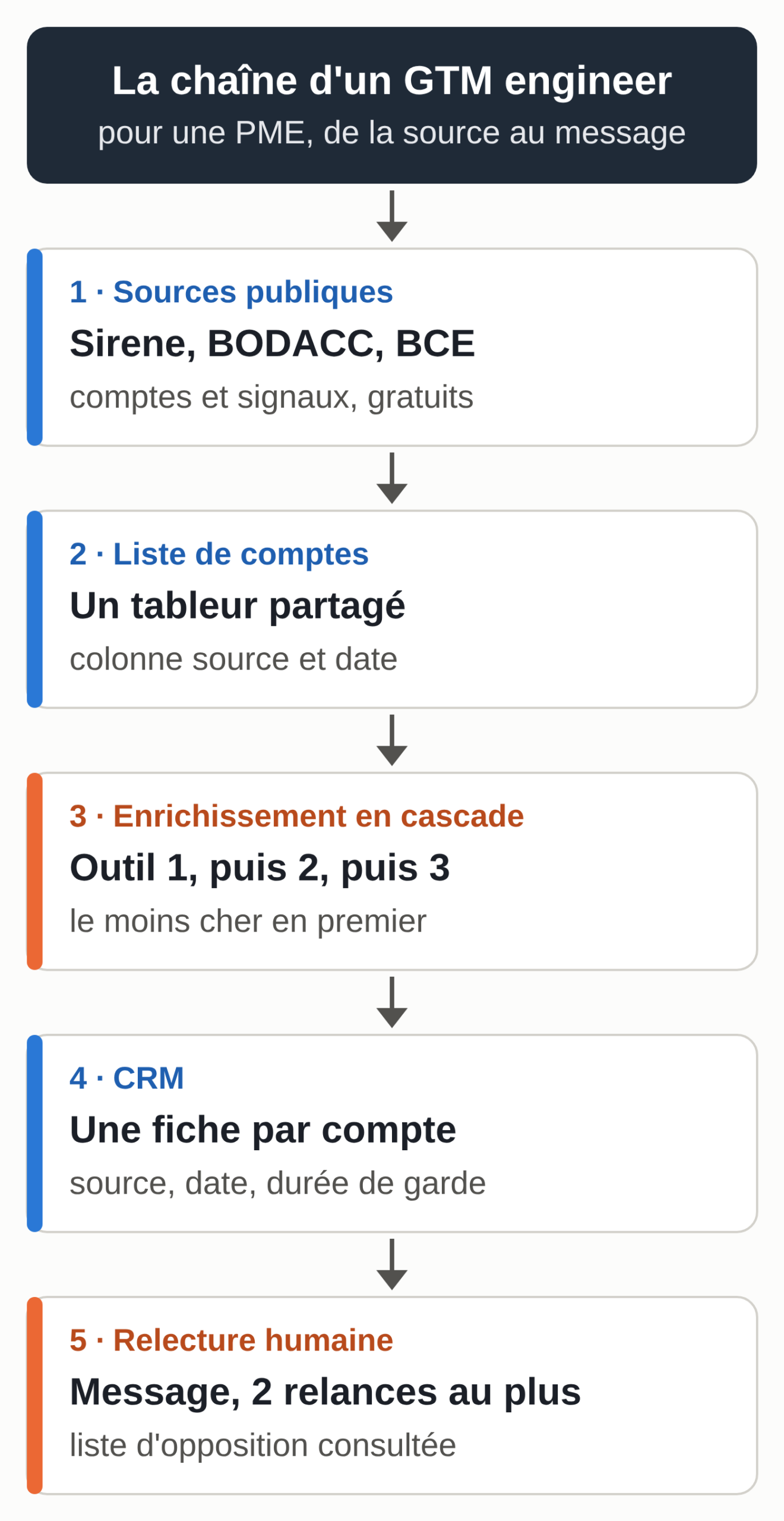
A GTM engineering chain has five pieces. You don’t need all five on day one.
The CRM is the system of record: every account, every contact, every exchange and the source of every piece of data. HubSpot, Pipedrive, Salesforce, Axonaut or folk will do; the best one is the one your team actually fills in. To connect an AI assistant to HubSpot or Pipedrive, see our directory of MCP connectors for small businesses.
Data sources provide the accounts to target and the signals. In France and Belgium, the public company registers already provide a lot of this, for free (see the table below).
Enrichment completes a record: website, headcount, work email address, phone. Some tools, such as Clay or FullEnrich, query several providers one after another until they find the data. This is called waterfall enrichment.
The sending tool manages sequences: a first email, spaced follow-ups, and an automatic stop when the person replies or opts out.
Orchestration ties it all together. Clay presents itself as this central layer; Make, n8n or Zapier can play that role in a small business, with a shared spreadsheet in the middle. AI comes in at several layers: summarizing a company’s website, classifying an account, writing a first draft of a message that you review.
European data sources
Public company registers cover registered companies, are updated by the government and publish their terms of use. For a small business targeting French or Belgian accounts, they are the best starting point. The table below lists the ones used in the recipes.
Checked on October 10, 2026, on each source’s official pages.
| Source | Country | Useful content | Access and cost | Watch out for |
|---|---|---|---|---|
| API Recherche d’entreprises | France | Companies, headquarters and establishments, NAF code, headcount band, officers | Free, no account or key; 7 requests per second at most, 25 results per page | Companies that have opted out of publication are excluded; an officer who is a natural person is still personal data |
| Annuaire des Entreprises | France | The same data, viewed one record at a time | Free, no account | Handy for checking an account before contacting it |
| BODACC, commercial notices | France | Company creations, sales, changes and deregistrations published in the official bulletin | Free, can be queried without a key | People named in a notice are still personal data |
| BCE Public Search | Belgium | Entities and establishment units, search by number, name, address or Nacebel 2025 activity code | Free online lookup | Royal decree of July 18, 2008: BCE personal data may not be reused for direct marketing |
| BCE Open Data | Belgium | Files describing all registered active entities | Free after registration; the Public Search web services are paid as of October 10, 2026 | The same ban applies to personal data |
Method: each row was checked on the source’s official page on October 10, 2026, and the two French application programming interfaces (APIs) were called that day with the queries from the recipes. The table will be reviewed whenever the relevant administration publishes a change in terms, and at least once a quarter.
Remember one simple rule: these registers describe companies. When a row concerns a natural person (a sole proprietor, an officer’s name), it is still personal data subject to the GDPR, even if it’s public. In Belgium, the royal decree of July 18, 2008, on the reuse of BCE data also prohibits third parties from using or redistributing BCE personal data for direct marketing.
How much does waterfall enrichment cost?
A waterfall queries a first provider. If it finds nothing, the record moves on to the second, then the third. Providers don’t have the same databases, so some of what the first one misses, the next one finds. Chaining several providers therefore increases the number of complete records.
The cost depends on the billing method and the order. Put the tool that is cheapest per data point found first: it takes its share at the best price, and the next ones only work on what’s left. When a tool charges for every search, even with no result, the gap widens, because every record it receives costs money.
Three tools and how they count credits
Checked on October 10, 2026, on the public pricing pages.
| Tool | Billing unit | Listed price | When nothing is found |
|---|---|---|---|
| Clay | Data credits for the providers in its marketplace, plus “actions” for platform usage; multi-provider waterfalls from the free plan | Free: 100 data credits and 500 actions per month. Launch plan: $185 per month billed monthly (about €165). Data credits from $0.05 (about €0.045) | No credit or action charged |
| FullEnrich | Credits, with a waterfall across several sources included; a work email costs 1 credit, a mobile number 10 credits | €55 per month for 1,000 credits, or €0.055 per credit (prices shown in euros on the pricing page; the text version published by FullEnrich, pricing.md, gives the same amounts in dollars) | No credit spent: only data found and verified is charged |
| Dropcontact | Credits, one credit per email found | Starter plan, 500 credits per month: €29 per month with no commitment, €24 per month billed annually | An email that isn’t found is credited back |
Method: prices taken from the public pricing pages on October 10, 2026, without a customer account. Dollar amounts are converted at the European Central Bank reference rate of October 9, 2026 (1 euro = 1.1206 dollars) and rounded. These offers change often, so the table will be reviewed every quarter.
Estimate the cost of your waterfall
The calculator below applies the waterfall logic to your own numbers. The prefilled values are just examples: replace the result rates with the ones you’ve measured on a sample (recipe 3) and the prices with those of your tools.
Calculator for the cost of an enrichment waterfall
Example values to replace with your own numbers. The calculation runs in your browser: nothing is sent or saved.
The calculator needs JavaScript. The formula is explained just below.
Result rate: the share of the records a step receives for which the tool finds the data. To skip a step, set its rate and price to 0. Record counts are rounded to the nearest whole number.
The calculation follows a simple formula. Each step receives the records that the previous steps didn’t find. The records found at a step equal that number multiplied by the result rate. The cost equals the records found multiplied by the price if the tool charges per result, and the records received multiplied by the price if it charges per search.
Four step-by-step recipes
The four recipes build on each other: a list of accounts, a weekly signal, an email waterfall, then the message. Each one also works on its own.
Recipe 1, a list of accounts from the Sirene directory
The French government’s Recherche d’entreprises API queries data on French companies with no account or key. It accepts at most 7 requests per second per IP address and returns at most 25 results per page.
- Choose your target with three criteria: the NAF activity code (for example 62.01Z for computer programming), the département and the headcount band.
- Open this address in your browser, adjusting the values. Band codes 11 and 12 correspond to 10 to 19 and 20 to 49 employees.
https://recherche-entreprises.api.gouv.fr/search?activite_principale=62.01Z&departement=59&etat_administratif=A&tranche_effectif_salarie=11,12&est_entrepreneur_individuel=false&per_page=25&page=1
- The browser shows a response in JSON format. At the top, total_results gives the number of companies and total_pages the number of pages; change page=1 to page=2 to see more.
- For each result, record in your spreadsheet the siren, nom_complet, the headquarters address, activite_principale and tranche_effectif_salarie. Add a “source” column with the name of the API and today’s date.
- The département filter applies to establishments. A company headquartered in Paris with a site in the Nord département will therefore come up in a search on 59: check the establishment’s address in matching_etablissements.
The est_entrepreneur_individuel=false parameter excludes sole proprietorships, whose data is that of a person. You get a list of companies. The response also contains the name and month of birth of officers who are natural persons: that is personal data, so don’t copy it into your spreadsheet if you don’t need it.
Recipe 2, companies created this week in your département
BODACC publishes companies’ legal notices: creations, sales, changes and deregistrations. Its “annonces commerciales” dataset can be queried for free, with no key, on the DILA platform.
- Open this address, replacing 59 with your département:
https://bodacc-datadila.opendatasoft.com/api/explore/v2.1/catalog/datasets/annonces-commerciales/records?where=familleavis%3D%22creation%22%20and%20numerodepartement%3D%2259%22&order_by=dateparution%20desc&limit=20
- Each result gives the publication date, the city, the register and the details of the notice. On October 10, 2026, the most recent creation notice in the Nord département was from the day before.
- Once a week, copy the creations that match your offer: an accounting firm picks the new companies, a restaurant equipment supplier the new restaurants. Leave aside notices that concern a sole proprietor, whose name is personal data.
- Find each company in the recipe 1 API by its number, then look up its website and its generic contact address.
A company that has just been created hasn’t chosen all its suppliers yet. For a small business, this is the easiest signal to use.
Recipe 3, a work email waterfall from cheapest to most expensive
This recipe applies to France. In Belgium, an address like firstname.lastname@company.be requires the person’s prior consent before any advertising email (see the legal section): stop at the domain and the generic address.
- Start from the recipe 1 list. For each company, find the domain of its website.
- Define the target role, only one per campaign: the IT manager for software, the owner for a management service. The offer has to relate to the person’s profession, which is the CNIL’s condition.
- Test on a sample of 50 records. Run them through the first tool, note the result rate, then run the remaining records through the second. These rates replace the examples in the calculator.
- Rank the tools from cheapest to most expensive per data point found, and keep the address verification the tool offers.
- For each contact, record in the CRM the tool that provided the address and the date. You’ll use this column to inform the person and to answer if they ask where their data came from.
- Only run the rest of the list if the cost per record found stays within your budget.
A prompt to qualify an account from its website, to paste into Claude, ChatGPT or Le Chat along with the company’s home page:
Here is the text of a French company's home page.
My offer: [describe your offer in one sentence].
1. Summarize the company's business in two sentences, using only the text provided.
2. Say whether it matches my target (yes, no, to check) and quote the sentence from the text that supports your answer.
3. Suggest the role to contact there for my offer.
Don't invent any fact that isn't in the text. If a piece of information is missing, write "not stated."
Recipe 4, the first message and its two follow-ups
- Write the first message based on a verified fact about the account: a recent creation, a new site, a published job opening.
- Add a footer with your company’s identity, where the data came from (“your work address comes from [tool], on [date]”), a link to your privacy policy and a simple way to opt out of future messages.
- Schedule two follow-ups at most, a week apart, with an automatic stop at the first reply.
- Every opt-out request goes into an opt-out list that the sending tool checks before each campaign.
- Review every message the AI produces before sending: a made-up fact in a first email costs more than a bland message.
The detailed method for the message, the follow-ups and the weekly tracking is described in our guide to B2B prospecting with Claude without a LinkedIn connector. To write this message in your customers’ own words, first run a few Jobs To Be Done interviews.
B2B prospecting rules from the CNIL and the APD
This summary is based on the official texts and pages read on October 10, 2026. It doesn’t replace legal advice.
In France
The CNIL page on prospecting by email (June 10, 2026) allows prospecting a professional on the basis of legitimate interest “when the subject of the solicitation is related to the profession of the person contacted.” The person must be informed and be able to object simply and free of charge. When the data comes from a third party, the CNIL asks you to make sure the person was informed of this possible use and can object to it.
When you didn’t collect the data from the person, Article 14 of the GDPR requires you to inform them, including of the source of their data, within one month at most after obtaining it, and at the latest with the first message if you use it to contact them. The CNIL points this out on its page of April 30, 2020, on the reuse of publicly accessible data: “This data, although publicly accessible, is personal data.” It also notes there that some software extracts this information from sites whose terms of use prohibit scraping and reuse for commercial purposes.
For the retention period, the CNIL’s reference framework on managing commercial activities sets, for a prospect who isn’t a customer, three years from collection or from the prospect’s last contact. A click on a link in the email that leads to the promoted product restarts that clock; simply opening an email doesn’t.
The rules for telephone prospecting changed on August 11, 2026: a consumer must now have given consent before being called for prospecting, with exceptions such as a call related to an existing contract. For a professional, the rule is still information and a simple, free way to object, according to the CNIL page on telephone prospecting.
In Belgium
Article XII.13 of the Code of Economic Law prohibits advertising email without the recipient’s prior consent. The royal decree of April 4, 2003, provides an exception for legal entities, when the electronic contact details used are “impersonal.” The report to the King published with the decree distinguishes the addresses of the legal entity itself (its departments, its locations), which the exception covers, from the addresses of its employees, which it doesn’t.
The Data Protection Authority’s updated recommendation on direct marketing adds a note of caution: a functional address such as info@ can be personal data, for example when a single person manages it and signs with their own name. It also cites its so-called “Black Tiger” decision (January 16, 2024): supplying files drawn from the BCE for direct marketing failed the purpose test, because the license for that data prohibited such use. The royal decree of July 18, 2008, which governs the reuse of BCE data, says it in so many words: “Third parties may not, however, use and/or redistribute personal data for direct marketing purposes.”
In practice, a waterfall of named work addresses for a first cold email doesn’t suit the Belgian market. Target companies, write to their generic address or use another channel, and ask for the person’s consent from the first exchange.
The Kaspr fine, a textbook case
On December 5, 2024, the CNIL fined Kaspr 240,000 euros. The company makes a Chrome extension that showed the professional contact details of people whose LinkedIn profile you were visiting. Its database held about 160 million contacts. The CNIL found four violations: contact details collected even though people had limited their visibility on LinkedIn, a retention period renewed with every update, information given late (and in English), and incomplete answers to access requests.
On March 4, 2026, the CNIL closed the injunction: Kaspr deleted its database, stopped all collection on LinkedIn and now informs people in all the official languages of the European Union. For a GTM engineer, the lesson comes down to three habits: know where every piece of data comes from, set a retention period that doesn’t renew itself, and be able to answer the question “where did you find my address?” precisely.
The light version for a very small business with no tool budget
A very small business can apply the same logic with free tools and two hours a week.
- On Monday, pull 25 accounts with recipe 1 or the week’s creations with recipe 2.
- Put them in a shared spreadsheet: company, number, website, generic address, source, date, status.
- For each account, open the website and have the home page summarized with the recipe 3 prompt.
- Write to the generic address or through the contact form, with a message that cites a verified fact and suggests a conversation.
- On Friday, record the replies and move the interested accounts into your CRM, even a free one.
You buy no personal data and you keep a record of every source. When the volume goes beyond what one person can review, it’s time to move to a paid waterfall and a sending tool.
Your next tool-assisted prospecting session
Before your next campaign, check these points:
- a target written in one sentence, with its NAF or NACE code and its area;
- a “source and date” column filled in for every account and every contact;
- a waterfall test on 50 records and a calculated cost per record found;
- a message footer with your identity, where the data came from and how to opt out;
- an opt-out list checked before every send;
- a set retention period and a purge date in the CRM;
- for Belgium, no named work address used without consent.
If you want an assistant that looks for companies in your target, brings back their websites with sources, prepares the messages you’ll review and reminds you every Monday to take stock, all in Telegram, check out the MACCUS AI assistant.