

Bing Webmaster Tools is Microsoft’s free console for website owners, Bing’s counterpart to Google Search Console. It shows the queries that bring visitors from Bing, the indexed pages, crawl errors and, since February 2026, the pages of your site cited in Copilot’s answers. This guide follows the setup order: create the account, add the site (importing it from Search Console if you already use it), submit the sitemap, turn on IndexNow, then read the reports that matter.
Each step relies on Microsoft’s official documentation and on the IndexNow protocol’s documentation, reviewed on October 10, 2026. Menu names are given exactly as they appear in that documentation.
Bing in France has a modest share and a broader role
According to StatCounter, in September 2026 Bing accounted for 5.47% of the visits sent by search engines in France, across all devices, and 15.79% on desktop. Google stayed far ahead, with 88.16% overall. The more your audience visits your site from a computer, the closer Bing’s share gets to that second number.
Bing’s index also feeds other services. DuckDuckGo says in its help pages that its traditional links and images come largely from Bing. Microsoft’s webmaster guidelines state that Bing search and Copilot rely on the same crawling, indexing and ranking foundation, and that failing to follow these guidelines can reduce a site’s eligibility for AI-generated answers. Microsoft states that its AI citation report only covers content that is eligible for indexing. At Google, a breach of the spam policies can lead to a manual action: see our guide to Google manual actions.
Does Bing feed ChatGPT?
OpenAI’s page on its crawlers, written for website publishers and checked on October 10, 2026, does not mention Bing. It describes OAI-SearchBot, the crawler used to surface websites in ChatGPT search, and states that a site that blocks it does not appear in ChatGPT’s search answers, except as a plain navigation link. For ChatGPT, the deciding setting is therefore in your robots.txt file, which we cover in our note on AI crawlers and the robots.txt file.
Bing Webmaster Tools measures nothing on the ChatGPT side. Its AI Performance report covers Microsoft Copilot, AI-generated summaries in Bing and “some partner integrations” that Microsoft does not name. For ChatGPT, Perplexity or Gemini, you need another tool: see our comparison of AI visibility tools.
The access you need before you start
Plan for three things. The first is a Microsoft, Google or Facebook account to sign in with: Bing Webmaster Tools accepts all three. The second is either access to a Google Search Console account where your site is already verified, or a way to prove the site is yours: access to the domain’s DNS zone, to the site’s root folder, or to the home page’s head section. The third is your sitemap’s address, often found at the root of the site or in your SEO plugin’s settings.
Register the site right away. Microsoft’s documentation warns that data collection starts on the day the site is added: the performance reports do not go back before that date.
Registering the site, step by step
1. Create your account
Go to bing.com/webmasters and sign in with a Microsoft, Google or Facebook account. If you have none, Microsoft offers to create one from the same page. Registration is free.
2. Import the site from Search Console
If your site is already verified in Search Console, importing it is the shortest route. The procedure Microsoft describes has four parts:
- Open the My Sites page and click Import.
- Sign in with the Google account that manages Search Console and click Allow to grant access to the list of your sites and sitemaps.
- Bing Webmaster Tools then shows your verified sites, with the number of sitemaps and your role for each one.
- Check the sites to add and click Import.
Imported sites are verified automatically, with no file or tag to add. Sitemaps submitted in Search Console are carried over along the way. You can import up to 100 sites at a time, and an account accepts 1,000 in total. Allow up to 48 hours before you see the first data.
One point to keep in mind: Bing Webmaster Tools rechecks site ownership from time to time by querying your Google account, and imports any new sitemaps at the same time. If you cut that access (Profile section, Disconnect button), you will have to verify the site another way, with a meta tag or a DNS record.
3. Or add it by hand and prove that you own it
Without Search Console, enter the site’s address and click Add. You can register a whole domain or a single branch, for example a /boutique/ section. Microsoft then offers four verification methods:
- Automatic DNS verification, through the Domain Connect standard: you sign in at your DNS provider and the record is added for you. It only appears if your DNS provider has adopted this standard.
- The XML file: you download the BingSiteAuth.xml file and upload it to the root of the site.
- The meta tag: you copy the tag provided and paste it at the end of the head section of the home page.
- The CNAME record: you add the verification code provided to the domain’s DNS zone.
A green check mark confirms verification. A red cross comes with a message that states the problem: fix it and run the verification again.
4. Submit the sitemap
In the Sitemaps menu, the Submit sitemaps button lets you add your sitemap’s address. Bing accepts XML sitemaps and sitemap index files, RSS 2.0 and Atom feeds (versions 0.3 and 1.0), and text files with one URL per line. The list also shows the sitemaps imported from Search Console and the ones Bing found on its own, with their processing date, their status and the number of URLs found. Clicking a sitemap opens the details of its errors.
You can also point to the sitemap in your robots.txt file, with a line such as Sitemap: https://www.exemple.fr/sitemap.xml. Microsoft’s guidelines call for a sitemap that lists only canonical URLs, quickly removes deleted or redirected pages and fills in the modification date (lastmod) when possible. Our complete guide to sitemaps covers these rules in detail.
According to Microsoft’s FAQ on content submission, Bing generally reads a sitemap once a day. To get a new page known faster, you need IndexNow.
IndexNow tells Bing each time you publish
IndexNow is an open protocol: whenever a page is added, changed or deleted, your site sends its URL to a participating engine, which shares it with all the others. As of October 10, 2026, the list published by indexnow.org includes Bing, Yandex, Seznam, Naver, Yep, the Internet Archive and Amazon (for its Amazonbot crawler). Google is not on it: for Google, the sitemap and Search Console remain the normal route.
Microsoft recommends IndexNow. Its help page on URL submission calls IndexNow a strongly recommended method and warns that the Submit URLs tool and Bing’s own submission APIs could eventually go away. The manual tool remains available in the meantime, with a quota of 10,000 URLs per day per domain, reset every night at midnight UTC.
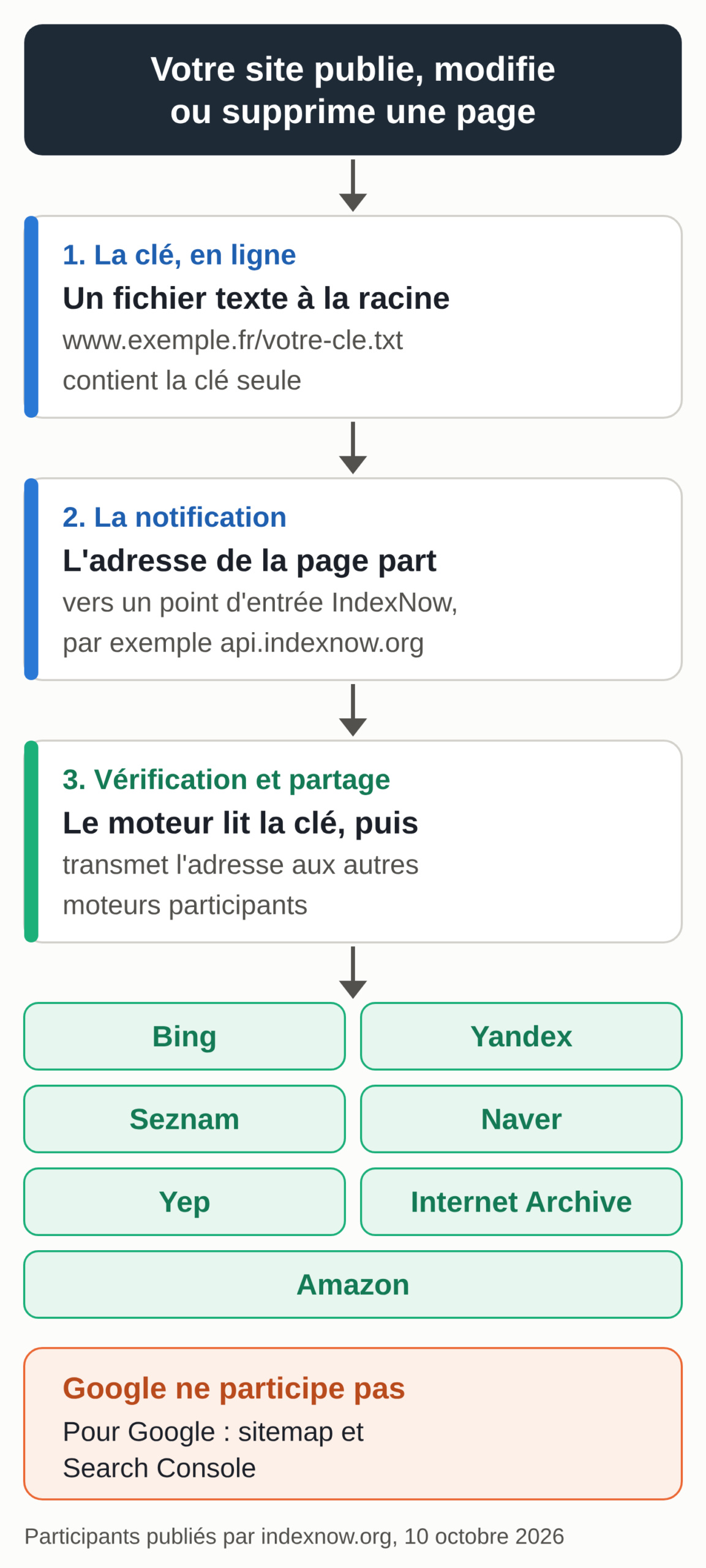
How it works: one key, one file, one request
The protocol rests on three elements. The key is a string of 8 to 128 characters, made up only of unaccented letters, digits and hyphens. The file is named after the key followed by .txt, is encoded in UTF-8, contains the key and sits at the root of the site: it is what proves the submission really comes from you. The request sends the URL of one page, or a list of at most 10,000 URLs in a bulk JSON submission.
The engine’s response is easy to read. A 200 code confirms receipt. A 202 code means the key is being verified, which can happen on the first submission.
A 403 code means the key could not be found or the file does not contain it, a 422 code means URLs that do not belong to the declared site, and a 429 code means submissions that are too frequent. Even a 200 code does not mean indexing: each engine then decides whether to crawl the page and whether to keep it.
The IndexNow FAQ gives a few usage rules. Also submit deleted pages (404 or 410 codes) and redirects, so that engines update their index. Wait at least five minutes before resubmitting the same URL, and only resubmit it if its content has really changed: each URL you send counts against your site’s crawl budget. Microsoft’s guidelines point the same way and advise sending URLs as you publish rather than in large batches.
Turning on IndexNow in WordPress
In WordPress, a plugin is enough. Three options are documented by their publishers.
Microsoft’s IndexNow plugin, built by the Bing Webmaster team, creates the key, hosts it on your site, detects page creations, updates and deletions and sends the URLs in the background to api.indexnow.org. It does not send pages marked noindex, lets you exclude paths and shows the last 20 successful submissions and the last 20 failures. On October 10, 2026, it was at version 1.0.4, had more than 100,000 active installations and was tested up to WordPress 7.0.7.
If you use Rank Math, the Instant Indexing module in the free version does the same job. Turn it on from the Rank Math dashboard, choose the content types in its settings and check that a key has been generated. New posts and updates are then sent automatically, except noindex pages, and a Submit URLs page lets you send URLs by hand.
If your site runs through Cloudflare, the Crawler Hints option supports IndexNow. Cloudflare relies on its cache signals to spot content that has probably changed and report it to the engines. The setting applies to the whole site.
Choose only one of these sources. Two plugins sending the same URLs double the submissions; the IndexNow FAQ warns that unnecessary submissions use up crawl budget without improving visibility.
Without a plugin, the key and the request by hand
On a site without a compatible plugin, or to submit a batch of pages in one go, the generator below prepares the key, the file name and contents, then the requests, ready to copy. It runs entirely in your browser.
IndexNow generator: key, file and requests
Everything is computed in your browser. Nothing is sent, to Bing or to us: you copy the result and use it yourself.
A random key is suggested. You can also paste your own: 8 to 128 characters, unaccented letters, digits and hyphens. Keep the same key for as long as you use it.
Pages added, changed or deleted, all on the same site. 10,000 URLs at most per submission.
Once the file is online, open the address shown in step 3 of the generator: it must display the key alone, without asking you to sign in. Then send the simple request or the bulk request. If you get a 403 code, the file cannot be read at that address or does not contain exactly the key.
Checking submissions in Bing Webmaster Tools
The IndexNow menu in Bing Webmaster Tools shows the number of URLs received and their source: direct submission, WordPress plugin, Cloudflare or another CMS. A sample of the latest URLs received appears in near real time, each with its crawl and indexing status and its first indexing date.
The Important URLs Missed section is the most useful. It lists important pages indexed in the last seven days that did not go through IndexNow: if it fills up, some of your publications are slipping past your plugin. The report also sorts non-indexed pages by reason (content quality, different canonical URL, redirect, noindex tag, blocked by robots.txt, page not crawled, broken link) and suggests a fix for each. On the Google side, the Page indexing report does the same sorting: see our guide to Search Console indexing statuses.
Reports to monitor and optional reports
Microsoft’s official help describes about twenty tools. Not all of them deserve a monthly visit. The table below sorts the main ones by how useful they are to a small business.
| Report | What it is for | For a small business |
|---|---|---|
| Search Performance | Clicks, impressions, click-through rate and average position over six months at most, by query and by page; traffic split by source (web and chat grouped together, news, images, videos, Knowledge Panel). | Check every month |
| AI Performance | Citations of your pages in Copilot, in AI-generated summaries in Bing and in partner integrations; grounding queries; sampled data. | Check every month |
| IndexNow | URLs received and their source, crawl and indexing status, pages indexed without going through IndexNow. | Check every month |
| Recommendations | Issues found on your indexed pages, sorted by severity (high, moderate, low), with the list of affected pages as a CSV export. | Check every month |
| Sitemaps | Submitted, imported or discovered sitemaps, processing date, number of URLs and errors. | After a structural change |
| URL Inspection | Indexing status of a URL, SEO errors, structured markup recognized, the page as Bingbot receives it, indexing request. | When a page has a problem |
| Site Explorer | The site folder by folder, with indexed pages, errors, warnings and exclusions. | When there is a problem |
| robots.txt tester | The robots.txt line that blocks a URL, for Bingbot or AdIdxbot. | When there is a problem |
| Block URLs | Hides a URL from Bing and Copilot results for 90 days, which can be extended. | In an emergency |
| Site Scan | Technical audit run on demand, within a monthly quota set by Bing. | Optional, useful before a redesign |
| Backlinks | A representative sample of the links pointing to your site, with an optional comparison against two other sites. | Optional |
| Keyword Research | Search volumes on Bing and related queries, filterable by country, language and device, over the last six months. | Optional |
| Crawl Control | Bingbot crawl rate set hour by hour; a crawl-delay directive in robots.txt takes precedence over this setting. | Optional, for a busy server |
| Microsoft Clarity | Free tool for analyzing visitor behavior (heatmaps, session recordings), which requires installing a script. | Optional |
Method: each row sums up the matching page of Microsoft’s official help (bing.com/webmasters/help), reviewed on October 10, 2026. The right-hand column is our recommendation for a small business website. We review this table when Microsoft announces a new report on its Bing Webmaster blog, and at least once a quarter.
Three reports are enough for monthly tracking. Search Performance gives clicks, impressions, click-through rate and average position over six months at most, page by page and query by query; it also splits traffic by source: web and chat (grouped into a single source), news, images, videos and Knowledge Panel. IndexNow checks that your publications are going out. Recommendations lists the issues detected on your indexed pages, sorted by severity.
URL Inspection is for the day a specific page has a problem. It shows whether the page is indexed, the SEO errors found, the structured markup recognized (Microdata, Microformats, Open Graph and JSON-LD), and its Live URL tab shows the page as Bingbot receives it. It also lets you request indexing, within the day’s quota. To understand why a page is missing from Google, the equivalent check is described in our guide to indexing for SEO.
Reading the AI Performance report correctly
Microsoft opened the AI Performance report in public preview on February 10, 2026. It shows when pages from your site are cited as sources in Microsoft Copilot’s answers, in AI-generated summaries in Bing and in some partner integrations. In Google Analytics 4, some of the visits sent by Copilot land in the AI Assistant channel: see our guide to AI traffic in GA4.
The dashboard gives the total number of citations over the period, the average number of pages cited per day, citations page by page and a chart over time. The grounding queries tab lists the phrases the AI used to find your content. Microsoft states that these are grouped phrases, distinct from users’ exact questions. The data can be exported as CSV or Excel.
Three precautions apply when you read it. The data is a sample of citation activity: rare citations may not appear, and totals sometimes differ from one view to another. The report counts citations; Microsoft states that it measures neither the ranking, nor the authority, nor the importance of a page. Changes over time can come from your content, from the questions asked or from a model update, with no way to attribute them to a specific cause.
On June 16, 2026, Microsoft began rolling out four additions in preview. Intents sorts grounding queries by intent (informational, commercial, navigational, learn and solve, research, creation, local, among others). Topics groups queries into themes.
Citation Share calculates your site’s share of all the citations shown for the same query, without revealing competing domains. Compare overlays a previous period on the period shown.
One last pointer avoids double counting. Clicks from the “learn more” links in Bing chat answers appear in Search Performance, under the Web and Chat source. AI Performance only gives citations. Google Search Console, for its part, counts impressions in generated answers: see our guide to AI Mode and AI Overviews.
Six setup mistakes and how to fix them
Microsoft’s help describes several blocking issues that come down to a setting.
The robots.txt file blocks Bingbot. One overly broad Disallow line is enough to close off whole sections. The robots.txt tester tool shows which line blocks a given URL and for which crawler.
The IndexNow key file cannot be reached. If the file does not display at its address (login page, 404 error) or does not contain exactly the key, the engine responds with a 403 code. Open the file’s address in a private browsing window to check.
Site verification drops after a disconnection. A site imported from Search Console loses its verification if you remove access to the Google account. Add a meta tag or a DNS record as a backup.
The crawl rate setting is ignored. The Crawl Control tool sets Bingbot’s pace hour by hour. A crawl-delay directive in robots.txt always takes precedence over this setting.
The hidden page does not go away. The Block URLs tool hides a URL from Bing and Copilot results for only 90 days: for permanent removal, Microsoft asks for the page to return a 404 or 410 code, carry a noindex tag or redirect to its new address, and for Bingbot to be able to crawl it to see the change.
Duplicate pages compete with each other. Microsoft’s guidelines call for one canonical URL per piece of content and 301 redirects for permanent changes. A translated site adds a difficulty: each language needs its own URLs, as our guide to SEO for a multilingual site explains.
Bing Places listings for local businesses
A shop or a practice that receives customers also needs a business listing. In its announcement of the AI Performance report, Microsoft recommends that local businesses sign up for Bing Places for Business (bingplaces.com) so that their address, hours and contact details stay up to date and can be used in AI-generated answers. Bing Places is a separate service from Bing Webmaster Tools. Our step-by-step Bing Places guide covers creating the listing, verifying it and importing it from Google.
One visit a month to Bing Webmaster Tools
Once these four steps are done, tracking comes down to one visit a month: Search Performance for traffic, IndexNow for submissions, Recommendations for fixes, AI Performance for citations. If your site exists in several languages, each version must be declared, crawled and tracked language by language, on Bing as on Google: that is the work of our multilingual SEO service.