

An MCP server is the plug that lets Claude, ChatGPT or Le Chat read your data in a piece of software, and sometimes act on it: search for an email, list unpaid invoices, create a quote. Claude’s public connector directory listed 934 of them on October 10, 2026.
This directory covers 32 of them: the ones for the office, banking, accounting, sales and online store software a small business uses every day. For each tool, you will find who publishes the server, what actions it allows, where to turn it on and the setting to change before your first try. Each entry was checked against its source on October 10, 2026.
MCP servers explained in two minutes
MCP (Model Context Protocol) is an open standard that connects an AI application to outside systems: files, databases, software. Its official documentation names Claude and ChatGPT among the applications that support it.
A compatible piece of software publishes an MCP server, meaning a list of specific actions called tools. The Gmail server has 29 of them as of October 10, 2026, for example search_threads to search, create_draft to prepare a draft and send_message to send. Office software is starting to do the same: WordCraft, a Word alternative written with Claude, exposes all of its commands through an MCP server. The assistant picks the tool your request needs and calls it with the account that authorized the connection, usually yours: it then sees what your account sees. A website can also point agents to its MCP server with a discovery file, still at the draft stage: see our guide to an agent-ready website.
The vocabulary changes from one assistant to the next. Claude talks about connectors, ChatGPT about apps, Mistral about connectors in Le Chat. All three accept remote MCP servers. Ad platforms are following suit: on October 6, 2026, Meta expanded the Meta Ads MCP server built for large advertisers and agencies, as our article on Meta Ads AI tools explains.
There are two kinds of servers. A remote server has an address on the internet, like https://mcp.pennylane.com/mcp: nothing to install, you sign in with your account. A local server runs on your computer and goes through a desktop app or a command-line tool. The servers in this directory are remote, except Axonaut, which does not publish that detail. For Odoo, n8n and WooCommerce, the address is that of your own database, instance or site; Odoo and WooCommerce also describe a small relay to install on your computer to connect from a local client.
The connector gives access. How you use it (your instructions, your format, your steps) lives somewhere else, in a project or a skill: see how to organize skills, projects and files in Claude.
The MCP connector directory by business tool
Entries are grouped by line of work. The colored badge shows the highest level among the server’s tools: read only, read and write, or write with sending or money (a message that goes out, an invoice sent, a payment, a transfer prepared). “Claude directory” means you add the connector from Claude’s connectors menu, with no address to type in (except n8n, which connects to your own instance). The others need an address, a module or a setting in the software.
Email, calendar and files
Gmail
Write and send or money
Server published by: Google
Where to turn it on: Claude directory
Actions: Search and read threads, create and edit drafts, manage labels and filters, move to trash, reply, forward and send.
Setting: Block sending (send_message, reply, forward) if you only want drafts.
Checked on October 10, 2026 against the source.
Google Calendar
Read and write
Server published by: Google
Where to turn it on: Claude directory
Actions: Read and search events, suggest a time slot, create, edit or delete an event, respond to an invitation.
Setting: Set event deletion to Needs approval, or block it.
Checked on October 10, 2026 against the source.
Google Drive
Read and write
Server published by: Google
Where to turn it on: Claude directory
Actions: Search, read and download files, create, copy or update them, share them or move them to trash.
Setting: Sharing (share_file) opens a file to other people: block it at first.
Checked on October 10, 2026 against the source.
Microsoft 365 (Outlook, OneDrive, SharePoint, Teams)
Read only
Server published by: Anthropic
Where to turn it on: Claude directory
Actions: Search email, calendar, SharePoint, OneDrive and Teams chats, read a document. Read only by default.
Setting: A Microsoft Entra administrator has to consent for the tenant; personal accounts (@outlook.com, @hotmail.com) are refused. The write tools (sending email, files, Teams messages) are turned on separately.
Checked on October 10, 2026 against the source.
Dropbox
Read and write
Server published by: Dropbox
Where to turn it on: Claude directory
Actions: Search, read and preview, create files and folders, copy, move, delete, create share links and file requests.
Setting: Block deletion and share links while you test.
Checked on October 10, 2026 against the source.
Notion
Read and write
Server published by: Notion
Where to turn it on: Claude directory
Actions: Search and read pages, create, edit, move or duplicate pages, create and edit databases, comment.
Setting: It acts with the permissions of your Notion account: start with a test workspace.
Checked on October 10, 2026 against the source.
Customer relations and marketing
Slack
Write and send or money
Server published by: Slack
Where to turn it on: Claude directory
Actions: Search public and private channels, read a channel or thread, read and create canvases, send a message.
Setting: Sending a message (slack_send_message) speaks in your name to your colleagues or customers.
Checked on October 10, 2026 against the source.
HubSpot
Read and write
Server published by: HubSpot
Where to turn it on: Claude directory
Actions: Search and read contacts, companies and deals, create and edit them, manage marketing emails, pages, blog posts and reports.
Setting: The “manage” tools write to the CRM and the website: test on a sandbox account if you have one.
Checked on October 10, 2026 against the source.
Pipedrive
Read and write
Server published by: Pipedrive
Where to turn it on: Claude directory
Actions: Search and read deals, leads, people and organizations, create and edit them, add activities and notes.
Setting: The tool list contains no delete action as of October 10, 2026.
Checked on October 10, 2026 against the source.
Brevo
Read and write
Server published by: Brevo
Where to turn it on: Claude directory
Actions: Read contacts, lists, segments and statistics, create email and SMS campaigns and templates, send a test email.
Setting: No campaign-sending tool in the list as of October 10, 2026: the final send stays in Brevo.
Checked on October 10, 2026 against the source.
Mailchimp
Read and write
Server published by: Intuit Mailchimp
Where to turn it on: Claude directory
Actions: Prepare a campaign, edit copy, images and theme, save the result in Mailchimp.
Setting: No sending tool in the list as of October 10, 2026: you send from Mailchimp.
Checked on October 10, 2026 against the source.
Calendly
Read and write
Server published by: Calendly
Where to turn it on: Claude directory
Actions: Read availability, meetings and forms, create or edit event types, create booking links, register an invitee, cancel a meeting.
Setting: Canceling (cancel_event) notifies your customer: keep it behind approval.
Checked on October 10, 2026 against the source.
Banking, payments and accounting
Qonto
Write and send or money
Server published by: Qonto
Where to turn it on: Claude directory
Actions: Read transactions, statements, invoices and customers, create quotes, invoices and credit notes, send quotes and invoices, prepare transfer requests, approve or decline requests, manage cards.
Setting: Block sending, approvals, transfers and cards at first; open them one at a time.
Checked on October 10, 2026 against the source.
Pennylane
Read only
Server published by: Pennylane
Where to turn it on: Custom connector, address https://mcp.pennylane.com/mcp
Actions: Search, list and read the data in your Pennylane workspace, then turn it into tables or presentations in the conversation.
Setting: Open to accounting firms at no extra cost and to businesses from the Essentiel plan up; Starter, Collaboratif and Basique are excluded.
Checked on October 10, 2026 against the source.
Odoo
Read only
Server published by: Odoo
Where to turn it on: Server built into your Odoo database (the database address followed by /mcp)
Actions: By default, five read tools (fields, models, context, search, grouping). The other actions stay hidden until an administrator exposes them.
Setting: Documented for Odoo 20 and Odoo Online (saas-19.4), missing from the 19.0 documentation. API key with MCP scope; connection described for Claude Desktop, Claude Code, Codex and Antigravity.
Checked on October 10, 2026 against the source.
Axonaut
Varies or not published
Server published by: Axonaut
Where to turn it on: “MCP IA” feature included in the subscription (pricing page)
Actions: The pricing page lists “MCP IA” among the included features. The tool list is not published.
Setting: Ask the publisher for the tool list, and whether the tools write, before you connect it.
Checked on October 10, 2026 against the source.
Stripe
Write and send or money
Server published by: Stripe
Where to turn it on: Claude directory
Actions: Read the balance and statistics, search the documentation, read and write through the Stripe API (stripe_api_read, stripe_api_write).
Setting: stripe_api_write accepts any write in the Stripe API, refunds included; Stripe asks for confirmation by link for some actions, such as refunds and payouts. Block it at first. From October 31, 2026, the server only accepts OAuth or an Agent-type key.
Checked on October 10, 2026 against the source.
PayPal
Write and send or money
Server published by: PayPal
Where to turn it on: Claude directory
Actions: Read transactions, orders and disputes, create products and invoices, send invoices and reminders, refund, manage subscriptions.
Setting: Sending invoices, refunds and paying for orders: approval every time, or a block.
Checked on October 10, 2026 against the source.
Mollie
Write and send or money
Server published by: Mollie
Where to turn it on: Claude directory
Actions: Read payments, balances, settlements and customers, create payments, payment links, customers, subscriptions and sales invoices.
Setting: A payment link created by mistake is a real link, payable by anyone who gets it: keep creation behind approval.
Checked on October 10, 2026 against the source.
Online store and website
Shopify
Read and write
Server published by: Shopify
Where to turn it on: Claude directory
Actions: Read the store, products, orders, customers and inventory, create and edit products and collections, set inventory, create a discount, run GraphQL queries.
Setting: graphql_mutation and set-inventory change the live store: approval every time.
Checked on October 10, 2026 against the source.
WooCommerce
Read and write
Server published by: WooCommerce
Where to turn it on: Built-in feature in developer preview, which you turn on yourself
Actions: Products: search, create, edit, delete. Orders: search, change the status, add a note.
Setting: “Developer preview” status. A dedicated WordPress user with limited permissions and an application password; to connect from a client on your computer, the documentation uses a small local relay.
Checked on October 10, 2026 against the source.
PrestaShop
Read and write
Server published by: PrestaShop
Where to turn it on: Free “PrestaShop MCP Server” module (Addons)
Actions: Manage products, analyze orders and automate tasks from a compatible assistant (the publisher names Claude, ChatGPT, Gemini and Le Chat).
Setting: Requires PrestaShop 8.2 or later and PHP 8.1, with the ps_mbo, ps_accounts and ps_eventbus modules. Version 1.0.3, updated in June 2026.
Checked on October 10, 2026 against the source.
WordPress.com
Read and write
Server published by: Automattic
Where to turn it on: Claude directory
Actions: Read profile, sites, posts, comments, plugins, settings and stats. The publisher says there are more than 60 actions, including creating and editing content.
Setting: Paid WordPress.com plans, or a WordPress site connected through Jetpack with Jetpack AI or Complete. The publisher says every change asks for confirmation; Claude’s directory lists 16 read tools as of October 10, 2026.
Checked on October 10, 2026 against the source.
Wix
Read and write
Server published by: Wix
Where to turn it on: Claude directory
Actions: List your sites, search the Wix documentation, call your site’s API and manage it.
Setting: CallWixSiteAPI and ManageWixSite can change the site: approval every time.
Checked on October 10, 2026 against the source.
Organization, signatures and design
Trello
Read and write
Server published by: Trello
Where to turn it on: Claude directory
Actions: Read and search boards, lists, cards and checklists, create and edit them.
Setting: The write tools also cover entire boards and lists (trelloWriteBoard, trelloWriteList).
Checked on October 10, 2026 against the source.
Asana
Read and write
Server published by: Asana
Where to turn it on: Claude directory
Actions: Read projects, tasks and portfolios, create a project or a task, edit a task.
Setting: Several tools carry the word “preview” in their name as of October 10, 2026.
Checked on October 10, 2026 against the source.
monday.com
Read and write
Server published by: monday.com
Where to turn it on: Claude directory
Actions: Read boards, items and updates, create items, boards, docs and forms, change statuses and owners.
Setting: all_api_write gives broad write access: block it if you do not need it.
Checked on October 10, 2026 against the source.
Canva
Read and write
Server published by: Canva
Where to turn it on: Claude directory
Actions: Search and read your designs, generate, import and export them, file them in folders, comment.
Setting: Run your tests in a dedicated folder and review each design before you use it.
Checked on October 10, 2026 against the source.
Docusign
Write and send or money
Server published by: Docusign
Where to turn it on: Claude directory
Actions: Read agreements, envelopes, templates and recipients, create and edit envelopes, trigger or cancel a workflow.
Setting: createEnvelope and triggerWorkflow act on real agreements: approval every time.
Checked on October 10, 2026 against the source.
Automation platforms
Zapier
Varies or not published
Server published by: Zapier
Where to turn it on: Claude directory
Actions: Gives access to the app actions you set up yourself in Zapier.
Setting: Permissions depend on the actions you choose in Zapier: add only the ones you need.
Checked on October 10, 2026 against the source.
Make
Read and write
Server published by: Make
Where to turn it on: Claude directory
Actions: List, create, edit, activate, run or delete scenarios, manage data stores and webhooks.
Setting: Running a scenario carries out everything in it, sends included.
Checked on October 10, 2026 against the source.
n8n
Read and write
Server published by: n8n
Where to turn it on: Claude directory, connected to your own n8n instance
Actions: Search, run and test workflows, create them, publish or archive them, manage data tables.
Setting: First turn on MCP access in the instance settings (owner or admin), then each workflow you want to expose; the instance must be reachable from the internet. A workflow that runs does everything in it: review its steps first.
Checked on October 10, 2026 against the source.
No entry for this combination of filters. Choose “All levels” or another line of work.
“Write and send or money” level: at least one tool sends a message or a document, creates a payment request, pays, refunds or prepares a transfer.
Three access levels, three levels of risk
Read only. The risk is about data: what the connector reads goes into the conversation, and so to the AI provider. According to OpenAI’s help center, information read by apps can be used to train its models on the Free, Plus, Go and Pro plans when the “Improve the model for everyone” setting is on; that is not the default on Business, Enterprise and Edu. For Claude, the rules for the Google connectors are covered in our guide to the Gmail, Drive and Calendar connectors. If sensitive files must not go to any provider, the other route is AI installed locally.
The content it reads carries a second risk. An email or a document can contain instructions written to hijack the assistant: this is prompt injection, which OpenAI lists among the risks of untrusted MCP servers in its help article on developer mode.
Read and write. A customer record changed, a Trello card moved, an inventory count corrected: you can fix the mistake if you catch it. Keep these tools behind approval until you have watched the assistant work for several weeks.
Write with sending or money. An email that went out, an invoice sent, a refund or a payment link passed to a customer cannot be taken back. Seven entries in the directory carry this badge as of October 10, 2026: Gmail, Slack, Qonto, Stripe, PayPal, Mollie and Docusign. Microsoft 365 joins them if you turn on its write tools. Block these tools at first, then open them one at a time, with an approval request on every call.
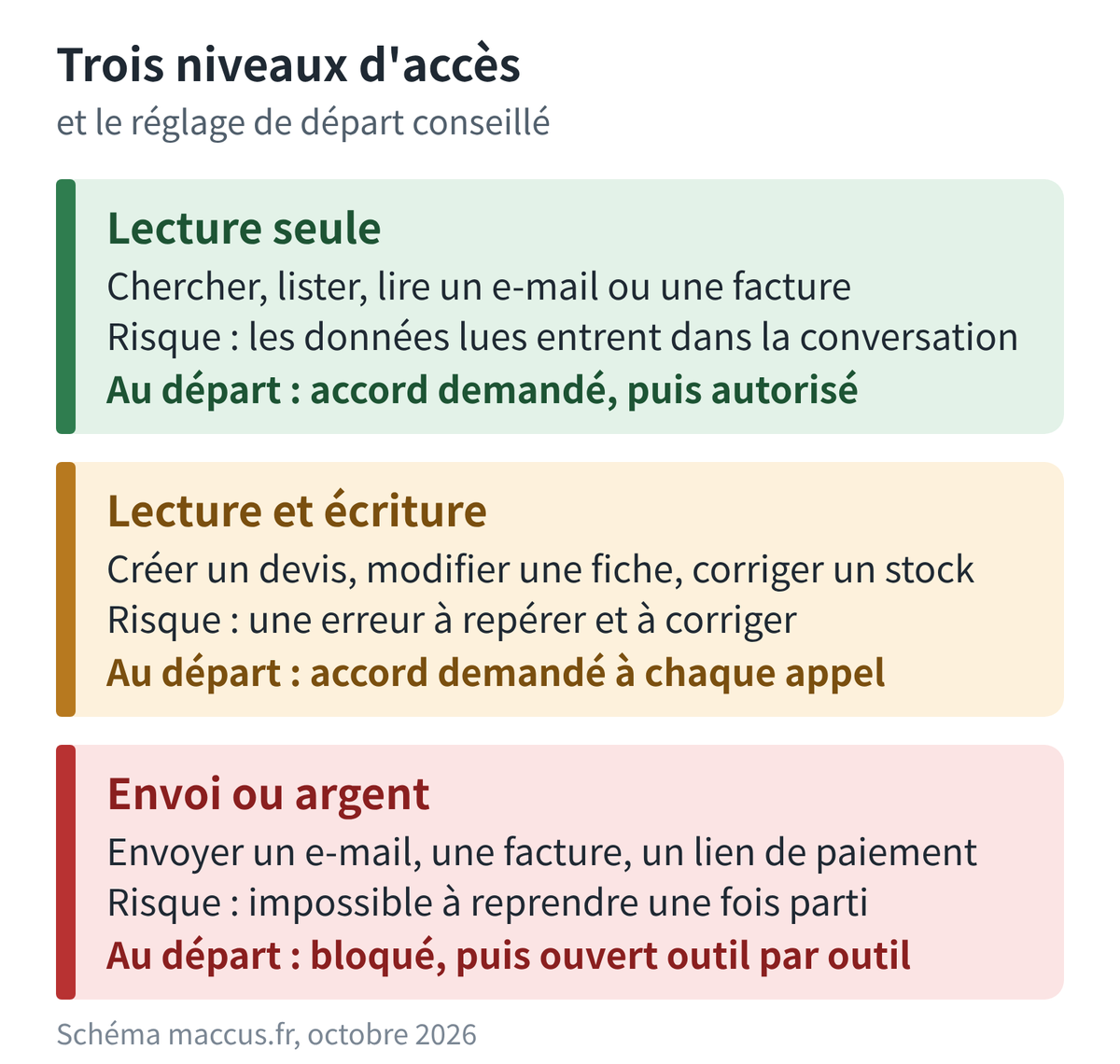
Settings to check before you add a connector
An assistant’s permission settings never grant more access than the software itself allows: Anthropic and OpenAI both say so in their help pages. The connector acts with the account or key that authorized it. So the job is to cut those permissions down to what is strictly needed.
- Use a dedicated account when the tool allows it. The WooCommerce documentation recommends a dedicated WordPress user with minimal permissions; Odoo has you choose an expiration date for each API key. The fewer permissions the account has, the fewer the connector has.
- Set permissions tool by tool. In Claude, each tool can be set to Always allow, Needs approval or Blocked; on Team and Enterprise, an owner can enforce these limits across the whole organization, with no individual exceptions. In ChatGPT, the options range from Always ask to Allow all actions, with Allow read actions and Allow low-risk actions in between; OpenAI warns that the Allow all actions option carries a high risk.
- In the conversation, turn on only the connectors the task needs.
- Run the first test on dummy data: a test customer in the CRM, a draft invoice, an empty folder in Drive.
- Treat personal data as personal data. If the software holds customer data, the GDPR applies: it is up to you to decide whether the AI provider can read it, and to set a framework for that processing. The supervisory authority is the APD in Belgium and the CNIL in France. Write your decision into an AI policy, so the whole team applies the same rule.
- Disconnect what you no longer use. Anthropic’s help center recommends disconnecting unused services; also revoke API keys created for a test.
Claude, ChatGPT or Le Chat: where do you connect an MCP server?
Claude. According to Anthropic’s help center, directory connectors are open to every plan, the free one included, on the web, the desktop app and mobile (adding one from mobile is in beta). A custom connector, meaning the address of a server you type in yourself, is also open to every plan, with a limit of one on the free plan. Claude reaches that server from Anthropic’s servers, so it must be accessible from the internet. On Team and Enterprise, an owner first turns on connectors for the organization, then each person signs in with their own account. Every directory entry notes that Anthropic does not control the tools the publisher makes available, or changes to them. To compare plans, see which Claude subscription to choose.
ChatGPT. Apps are managed from Settings, then Plugins. According to OpenAI’s help center, checked on October 10, 2026, the apps OpenAI builds itself only search and read. Custom MCP apps, write access included, are in beta for the Business, Enterprise and Edu plans: an administrator adds them in developer mode, on the web only. On the Pro plan, developer mode connects an MCP server in read-only mode.
Le Chat. On September 2, 2025, Mistral opened a directory of more than twenty connectors (Brevo, PayPal, Stripe, Notion, Asana and others) and support for custom remote MCP servers, on every plan at the time, the free one included.
A server listed in Claude’s directory is not always offered elsewhere. Pennylane and PrestaShop say their server works with several assistants; for the others, check the publisher’s page.
Three sample setups
The three examples below combine entries from the directory with a cautious starting setting. Adapt the instructions: replace the brackets with your own names. For other lines of work, see AI by profession.
An accounting or consulting firm
The firm works with Microsoft 365 and Pennylane. Both connectors stay read only: Microsoft 365 is by default, Pennylane is by design as of October 10, 2026. The assistant finds the emails exchanged with a client and matches them with the client’s invoices; the reply goes out from your own mailbox, written or reviewed by you.
Search Outlook for my emails with [client name] from the last thirty days.
In Pennylane, list their unpaid invoices.
Give me a table: invoice number, amount, due date, last email exchanged about it.
Do not send anything and do not change anything.
On Microsoft 365, the firm’s Entra administrator has to consent first. To go further on the accounting side, see supplier invoices read by Claude and where Claude fits next to your accountant.
An online store
The store runs on Shopify, takes payments with Mollie and sends its newsletters with Brevo. Shopify is set to read and write, with set-inventory, create-discount and graphql_mutation behind approval. Mollie is used to read payments; creating payments and links stays blocked. Brevo creates the campaigns, which you send yourself from Brevo: its tool list contains no campaign send as of October 10, 2026.
In Shopify, list the products with fewer than 5 units in stock.
In Mollie, give me the total of payments received since Monday.
Then prepare a draft campaign in Brevo for the two most ordered products this month.
Do not change any inventory and do not send any campaign.
On WooCommerce or PrestaShop, the same setup goes through the publisher’s feature or module, using a dedicated account with limited permissions.
A tradesperson who invoices from Qonto
The tradesperson gets requests through Gmail, logs site visits in Google Calendar and does quotes and invoices in Qonto. On the Qonto side, creating quotes is behind approval; send_quote, send_client_invoice, transfer requests and cards stay blocked. Gmail is limited to drafts, with sending blocked. Google Calendar reads and creates events, with deletion blocked.
Read the quote request from [client] that came in through Gmail this week.
Create a quote in Qonto with the items it lists, without sending it.
Suggest two free slots in my calendar to go see the job site.
Prepare a draft reply in Gmail with those two slots.
You review the quote in Qonto and the draft in Gmail, then send them yourself.
Is your tool missing from the list?
Four checks, in this order. Search for its name in Claude’s connector directory or your assistant’s. Search for “MCP” in its developer documentation and on its pricing page: that is where Axonaut announces it. Then look at the automation platforms: Zapier, Make and n8n each have a connector in Claude’s directory, and your tool may have modules there. A community server published on GitHub is still an option: check who publishes it, its license, its last update and whether it writes by default, and give it a read-only key when the software offers one.
As of October 10, 2026, the Sellsy API documentation (version 2.304.0) mentions no MCP server, and Sellsy does not appear in Claude’s directory.
For an ERP, plan on a technical project: see how to connect Claude to Odoo in read-only mode. To link tools that have no MCP server, an automation workflow often does the job: see how to build an AI agent without coding.
How this directory is kept up to date
Each entry comes from its source as read on October 10, 2026: the connector’s page in Claude’s public directory (publisher, server address, tool list) when it is listed there, otherwise the publisher’s documentation or page. The access level is inferred from the tool list and, when that list is incomplete, from the publisher’s description. A tool that creates, edits or deletes puts the entry in the read and write level; a tool that sends a message or a document, creates a payment request, pays, refunds or prepares a transfer puts it in the sending or money level. A notification sent by the software itself (canceling a Calendly meeting, a Brevo test email) and file sharing do not change the classification: the entry says so.
Tool lists change without warning. OpenAI’s help center points this out for ChatGPT: once an app is approved, ChatGPT keeps a frozen copy of its tools, and a change on the publisher’s side can make calls fail until an administrator refreshes the app. The check date appears at the top of the directory and on every entry. If an entry no longer matches what you see, the tool list shown in your assistant is the one to trust.
An assistant connected to your tools
Adding a connector from the directory takes a few clicks. Choosing the permissions, keeping track of the tools the publisher adds and reviewing what the assistant has done all take ongoing follow-up. If you would rather have an assistant set up for you, the MACCUS AI assistant works from Telegram, in French, English or Dutch, and connects to your tools case by case, with the access you give it.