

Since February 2, 2025, every company that uses an AI tool in its business has had to take steps to build its team’s AI literacy. That is Article 4 of the EU AI Act, rewritten in July 2026. The European Commission says no certificate is needed: an internal record of training sessions and other actions is enough to document them.
This page gives you that register as a free Word template in three parts (tool inventory, actions, attendance sheet), plus a 45-minute session plan with three exercises, ready to copy. The texts quoted here were checked on October 10, 2026 against EUR-Lex, the European Commission’s website, the website of the CNIL (France’s data protection authority) and the official French and Belgian labor law websites.
Jump to: the register template or the session plan.
Article 4 of the AI Act since July 2026
The text in force
Regulation (EU) 2026/1744 of July 8, 2026, published in the Official Journal on July 24 and in force since July 27, 2026, replaced Article 4 of Regulation (EU) 2024/1689, known as the AI Act. Its first paragraph now says, in our translation of the French text, that providers and deployers of AI systems take measures to promote the development of AI literacy among their staff and the other people who deal with the operation and use of AI systems on their behalf.
The text adds that these measures take into account the technical knowledge, experience, education and training of the people involved, as well as the context in which the systems are used. It ends with a new sentence: this obligation does not require providers or deployers to guarantee a specific level of AI literacy for any individual.
The previous version required a “sufficient level” of AI literacy. Recital 8 of the July 2026 regulation explains the change: imposing that level created an additional compliance burden, especially for small companies. The obligation to take measures still applies in full. The second paragraph asks the Commission and the member states to help companies, especially SMEs, and asks the Commission to publish practical examples on the single information platform set up by the regulation.
“AI literacy” has a legal definition (Article 3, point 56, unchanged): the skills, knowledge and understanding that allow people to make an “informed deployment” of AI systems and to gain awareness of the opportunities and risks of AI and the possible harm it can cause.
Which companies and people are covered
The regulation calls a “deployer” any person or organization that uses an AI system under its own authority, except for a personal, non-professional activity. A bakery whose manager writes her social media posts with a chat assistant is a deployer, just like an accounting firm that has contracts summarized.
The European Commission’s FAQ on AI literacy, updated on July 27, 2026, answers the question most SMEs ask. A company whose employees use ChatGPT to write ad copy or to translate is covered: those employees should be informed of the risks specific to these tools, such as hallucinations.
The “other persons” in the text are not employees. The Commission mentions a service provider, a subcontractor or even a client, as long as they use AI within your organization. The register therefore has a “status” column for temp workers, interns and freelancers.
Enforcement and penalties
Enforcement of Article 4 falls to the national market surveillance authorities, which have carried it out since early August 2026 according to the FAQ; the European AI Office is not in charge of it. Any penalties come under national law and must remain proportionate to the case.
The Commission adds a detail that helps you decide whether to keep a register. A penalty would be more likely if it is shown that an incident came from a lack of training and guidance. The day an AI-generated mistake reaches a client, an up-to-date register shows what the company had done beforehand.
An internal register, no certificate
Asked how to document the actions taken to comply with Article 4, and whether certificates are required, the Commission answers in two sentences: no certificate is needed, and organizations can keep an internal record of training and other guidance initiatives. In another answer, it says no governance structure is required, neither an AI officer nor a committee.
So be wary of any offer that presents a certification or an accredited body as mandatory under Article 4. The FAQ also says Article 4 does not require you to measure employees’ level of knowledge: a graded test is not required.
Other actions can include handing out the company’s AI use policy, sharing prompt templates, a team debrief after a mistake, or briefing a service provider on your rules: record them in the register. The Commission sets one limit: in many cases, relying only on the tools’ user instructions, or asking staff to read them, is likely to be ineffective.
On an English-language AI forum, practitioners advise small businesses to link each AI use to its risks, to the people who use it and to the measures taken. A short generic video watched once is called compliance theater there. The register on this page follows that logic.
The Commission’s four questions
The FAQ lists the minimum steps of an AI literacy program. For an SME, they come down to four questions.
The first is about the team’s general understanding of AI: how it works, which tools the company uses, what they can do and where the dangers lie. The second is about the company’s role: does it develop AI systems or use another vendor’s? Most SMEs are in the second case.
The third covers the risks of the tools in use and what the people using them need to know to avoid those risks. The fourth asks whether the actions fit each person’s knowledge, the industry, and the people the tool is used on. The Commission accepts different levels of training for different profiles and sets no industry-specific requirement.
Part 1 of the register answers questions 2 and 3, and part 2 answers questions 1 and 4. The Commission also maintains a repository of AI literacy practices, which describes more than 40 initiatives from companies and public bodies. Copying them does not, as of now, automatically give you a presumption of compliance.
The register template to download
The A4 template has a one-page user guide, three landscape tables and the session plan as an appendix. The gray rows are examples to replace. The passages in square brackets are to be filled in.
Download the AI training register template (Word, .docx, in French). Word format (.docx), version of October 10, 2026.
This template is a starting point. It does not replace advice from a lawyer or an employment law adviser, especially if you use a high-risk system.
Prefer a spreadsheet? Copy the headers below: each line starts with the name of a part of the register, followed by its columns separated by tabs. Paste each line into the first row of a separate tab.
Tool inventory	Tool and plan	Uses in the company	Company's role	Users	Risks to know	Data level allowed	Added on / reviewed on
Action log	No.	Date	Type of action	Duration	Led by or source	Audience (profile, level)	Tools covered	Content and risks covered	Materials handed out	Planned follow-up
Attendance sheet	Full name	Job title	Status	Attended or document received	Date	Signature or acknowledgment of receipt
Part 1, the tool inventory
You can’t train people on a tool you don’t know exists. The inventory lists every AI tool used in the company, with the plan you subscribe to, the uses, the users, the risks to know and the data level your AI policy allows. One example row covers AI built into software you already have, such as automatic summaries in your email client: those features count too. For the risks column, our table of AI privacy settings shows, tool by tool, whether your conversations are used to train the models.
The “company’s role” column answers the Commission’s second question. If you build an AI tool yourself and offer it to your clients under your own name, you are also a provider, and Article 4 applies to you in that capacity as well.
Part 2, one row per action
Each action gets a number, a date, a type, a duration, the name of the person who leads it or the source used, the audience, the tools covered, the content covered, the materials handed out and the planned follow-up. The “audience” column shows that you took each person’s knowledge into account, as the text requires: “beginners,” “accounting team,” “developers” is enough.
The “content and risks covered” column matters most. “AI awareness” is vague. “Hallucinations, source checking, the policy’s data levels, review before sending” shows the session dealt with the real risks of your tools.
Part 3, the attendance sheet
One sheet per action, with each person’s name, job title, status and signature. For an online module, attach the export of the people who completed it. For a written instruction or a new version of the AI policy, keep the read receipt, by email or by signature.
Personal data in the register
The register holds your employees’ names and job titles: that is processing of personal data. Article 5 of the GDPR requires you to limit this data to what is necessary (data minimization) and not to keep it longer than necessary. So the template has no column for a grade or a test score, which Article 4 does not require. Set a retention period and decide who has access, and write both at the top of the register.
The 45-minute session, ready to run
The session plan follows the CNIL’s recommendations on training users of generative AI, published on July 18, 2024. The CNIL advises making everyone familiar with how these tools work and where their limits are, how answers are produced, any data transfers, and which uses are allowed or prohibited. As an example, it cites “mandatory training before using these systems” required by the organization for its users.
The session needs a screen, the approved tool open with a business account, and your AI use policy. If you don’t have one yet, the policy template and its five-question generator are on our dedicated page: exercise 2 relies on its three data levels.
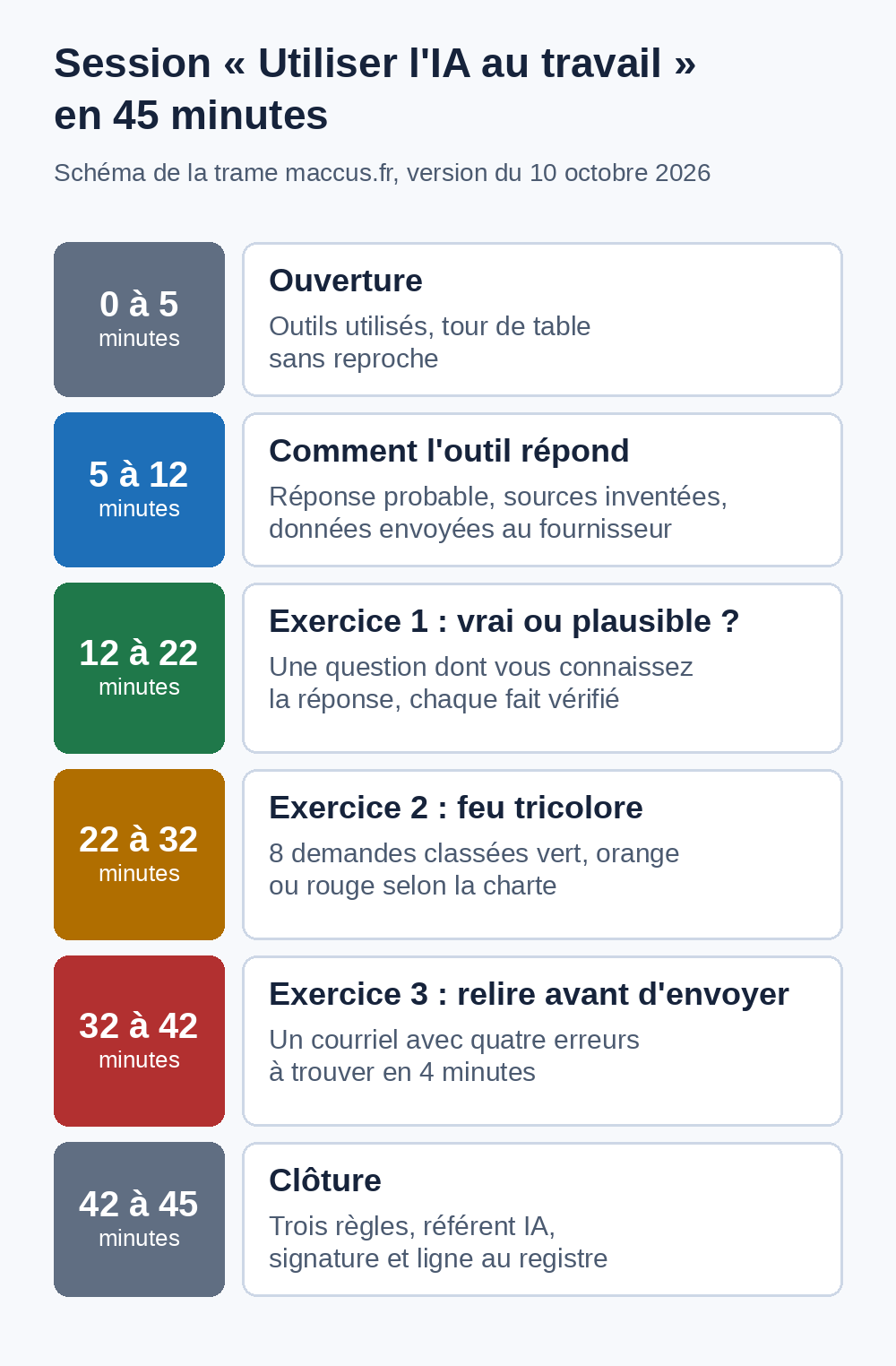
"USING AI AT WORK" SESSION: 45-MINUTE PLAN
maccus.fr template, version of October 10, 2026. This template is a starting point to adapt to your company; it does not replace legal advice.

Audience: [team or department], 4 to 12 people. Led by: [AI lead].
Materials: a screen, the approved AI tool open with a business account, the company's AI policy, the 8 requests for exercise 2, the email for exercise 3, the attendance sheet.
Goal: by the end, everyone knows where the tool gets things wrong, what data they can enter into it and what they check before sending.

Minutes 0 to 5. Opening
- The company uses [tools] for [uses]. The EU AI Act requires it to take steps to build its team's AI literacy. This session is one of those steps and will be recorded in the register.
- Quick round, no blame: who uses which tool, for which tasks, with which account.

Minutes 5 to 12. How the tool produces its answers
- A generative model is not a knowledge base. It produces the most likely answer given its training data. So it can write a wrong answer that looks right, especially on recent or rare facts.
- It can cite a source that doesn't exist, or a real source that doesn't say what it claims.
- With an online tool, what you type goes to the provider. Depending on the plan, the conversation may be kept or reused: that is why the policy has data levels.
- Heavy use of the tool makes people lose the habit of checking. The CNIL calls this automation bias: always review.

Minutes 12 to 22. Exercise 1: true or plausible?
- In pairs. Each pair asks the approved tool a question from their own job whose exact answer they know: a specific article of law, a standard, the date of an event in your industry, the list price of a product you sell. Add: "Give me your sources."
- Check every figure, date, name and reference against the original source.
- Group debrief: how many mistakes? Do the cited sources exist, and do they really say that? If everything is right, ask the group how they would have checked it without knowing the answer.
- Rule to keep: a figure, a date, a quote or a legal reference gets checked against its source before any use.

Minutes 22 to 32. Exercise 2: the data traffic light
For each request, the group picks: green (level 1, allowed in every tool in the policy), orange (level 2, business tool only, with only the data needed) or red (level 3, prohibited without written approval from the AI lead). Then rewrite one red request to make it acceptable.
1. "Fix the typos in this text that's already published on our website."
2. "Summarize these internal meeting notes, which don't mention any client."
3. "Write a reply to Mr. Martin, who is complaining about a late delivery on his order no. 4471."
4. "Here is Julie's sick note: help me write the email to the payroll department."
5. "Analyze this file of our 3,000 clients with their addresses and their revenue."
6. "Translate our public product sheet into Dutch."
7. "Here is the password for our online banking: explain how to make a bulk transfer."
8. "Compare these two résumés and tell me who to hire."
Answer key for the facilitator, based on the maccus.fr AI policy template (adapt it to your policy): 1 green. 2 orange, internal document. 3 orange, in a business tool, with only the name and the order number. 4 red, health data. 5 red, full client file and trade secret. 6 green. 7 red, password. 8 red, applicant data; the policy also forbids basing a hiring decision on an AI output alone.
Possible rewrite of request 4: "Help me write a neutral email to the payroll department reporting that an employee is absent from [date] to [date]; the supporting document is sent separately."

Minutes 32 to 42. Exercise 3: review before sending
Request made to the tool (fictional case): "Reply to our client Mr. Dupuis, who is asking when his quote will be ready. Quote no. 2026-118, agreed price 1,450 euros excluding VAT." Here is the answer it produced, printed or on screen. Everyone looks for the problems alone for 4 minutes, then group debrief.
    Dear Mr. Dupuis,
    Thank you for your message. Your quote no. 2026-181 will be ready on Monday, October 15. As agreed, the total comes to 1,540 euros including VAT, with free installation.
    Please let me know if you have any questions.
    Best regards,
    [First name Last name]
Answer key for the facilitator, four problems: the quote number is transposed (2026-181 instead of 2026-118); the amount is wrong and switches from excluding VAT to including VAT (1,540 instead of 1,450 euros excluding VAT); "free installation" is a sales promise nobody made; the date is made up, and October 15, 2026 is a Thursday. Whoever sends this email is accountable for it, as if they had written it alone.

Minutes 42 to 45. Wrap-up
- The three rules: check every fact against its source; enter only the data the policy allows; review and take responsibility for everything that goes out.
- A question, a mistake that went out, data entered by mistake: tell [AI lead] the same day.
- Sign the attendance sheet. The facilitator fills in the register row: date, duration, audience, tools, content, materials handed out.

Sample row for the register
Internal 45-minute session, [number] participants, tools [names]. Content: how the tools work and their limits, checking facts and sources, the policy's data levels, review before sending. Materials handed out: AI policy v[ ], prompt template sheet. Follow-up: team check-in on [date].
Exercise 1, true or plausible
The CNIL makes the point: a generative model is not a knowledge base. It produces the most likely output given its training data, and that output can be wrong while looking plausible, especially on facts that postdate its development.
The exercise makes this risk concrete with a question the pair already knows the answer to. If the tool gets it wrong or cites a source that doesn't exist, the team sees it with their own eyes. If it answers correctly, the discussion turns to checking: how would you have known without knowing the answer? Either way, the rule you keep is the same.
Exercise 2, the data traffic light
The eight requests cover the cases a small business runs into: public text, an internal document, a client complaint, a sick note, a full client file, a password, job applications. The answer key follows the maccus.fr AI policy template. If your policy classifies some data differently, correct the key before the session.
Rewriting a red request is the most useful moment. It shows that you can often get help from the tool without handing it the sensitive data: the email to the payroll department works fine without the sick note.
Exercise 3, review before sending
The email contains four mistakes: a quote number with transposed digits, a wrong amount that switched from excluding VAT to including VAT, a made-up sales promise and a made-up date with the wrong day of the week. This kind of mistake easily slips past a quick read.
The CNIL warns about "automation bias," a "risk of loss of trust or skills" linked to overusing the tool. It recommends never reusing the tool's output as is. The closing line of the exercise sets the responsibility: the person who sends the email is accountable for it as if they had written it alone. The same rule applies to a reply to a customer review drafted with AI: our Google reviews kit has templates you can adapt.
Adapting the session to different profiles
For a new hire, run the same plan one-on-one: keep the three exercises and shorten the opening. For a service provider, plan a short conversation about the policy and the data levels; the Commission says whether you need a contract clause depends on the type of tool and the risk.
According to the Commission, people with a degree or experience in AI development are normally considered competent, depending on the tool and their qualifications, provided you check that they know your tools, your rules and the legal aspects. For them, replace exercise 1 with a review of the data rules and the vendor contracts.
A high-risk AI system, such as a tool that screens job applications, requires more. Article 26 of the AI Act requires human oversight of these systems to be assigned to people who have "the necessary competence, training and authority." Since the July 2026 regulation, these obligations apply from December 2, 2027 for Annex III systems. A 45-minute session does not replace specific training on a tool like that.
Training and labor law in France and Belgium
The AI Act does not replace labor law, which already governs training.
In France, Article L6321-1 of the Labor Code (text checked on October 10, 2026 on the Code du travail numérique, the government's labor law website) states that the employer "ensures the adaptation of employees to their job" and makes sure they remain able to hold a job, "in light in particular of changes in jobs, technologies and organizations." Bringing AI tools into a job falls within this framework. The related actions go, where applicable, into the skills development plan: file the AI register with your other training records.
In Belgium, the law of October 3, 2022 gives every full-time worker an individual right to training of five days a year since 2024, averaged over a five-year period, according to the FPS Employment (page in French). Employers with 10 to fewer than 20 workers fall under a special one-day scheme, and those with fewer than 10 workers are exempt. Informal training directly related to the job counts: an internal session on AI tools can be included in that total.
Since January 1, 2026 and the end of the Federal Learning Account, there is no longer a legal obligation to record the training completed, unless an industry-wide collective agreement says otherwise. A worker can still ask for the balance of their training credit, though: the register helps you answer.
Keeping the register up to date through the year
A register filled in once and then forgotten only documents the year it was opened. Add a row to the inventory for each new tool or new use, and an action row for each new hire, each new version of the policy and after each incident. A review every six months, in step with the review of the policy's tool list, works for a small team.
The CNIL recommends regularly gathering users' feedback during the first months of use, and naming a point of contact to report problems. Record this feedback in the "planned follow-up" column: it gives you the topic of the next session.
If you prefer external training, the Commission points to the European Digital Innovation Hubs (EDIHs): more than 200 hubs across Europe, nine out of ten of which offer AI-related services, training included. They can also be a first source of information on the AI Act. You'll find them in the EDIH catalog. External training goes into the register like any other action, with the certificate from the training provider if you have one.
To go further in choosing which tasks to hand over to AI, our guide to AI use cases by profession gives concrete examples, and the page on running AI locally in a business shows how to process some data without sending it to a provider.
Frequently asked questions
Is AI training mandatory?
Article 4 requires you to take measures without setting their form. The Commission says no strict requirement or mandatory training is imposed and that everything depends on the context, the tools and the people. It also warns that relying only on user instructions is likely to be ineffective. A short session recorded in the register is still the simplest measure for an SME.
Do I need a certificate or an accredited provider?
No. The Commission's FAQ says no certificate is needed and that an organization can keep an internal record of training and other actions. A certificate from a training provider can be attached to the register; it is not required.
Do my service providers need to be in the register?
If they use AI on your behalf, they fall within the scope of Article 4, whose "other persons" include service providers and subcontractors. Record the information you gave them, for example handing over the policy, with the date and the person's name.
How long should I keep the register?
The regulation sets no period, since it does not require a register. The GDPR says data must not be kept longer than necessary. Choose a period, for example as long as the person uses the tools plus a period you set, and write it at the top of the register.
An assistant that works inside the rules you set
A trained team and written rules let you hand specific tasks to an assistant. If you're considering an assistant on Telegram, in French, English or Dutch, connected to your tools according to your needs, tell us about your business.