

On consumer plans, most AI assistants can use your conversations to train their next models unless you opt out in the settings. On most business plans it works the other way around: the vendor commits not to do it by default. In a company, everything depends on which account each person uses the tool with.
The table below covers eleven tools common in small businesses: ChatGPT, Claude, Gemini, Microsoft Copilot, Perplexity, Mistral, Notion AI, DeepL, LinkedIn, GitHub Copilot and Grammarly. Every row was checked on October 10, 2026 against the vendor’s official pages. After the table come the limits of an opt-out, the problem of personal accounts used for work (shadow AI) and a checklist you can copy. For the public pages of your website, you opt out of training in robots.txt, with the Content Signals line described in our guide to a website ready for AI agents.
Personal or business account: the basic rule
The price you pay doesn’t change the category. At OpenAI, ChatGPT Plus and Pro belong to the services for individuals, just like the free version. At Anthropic, Claude Pro and Max are consumer plans. Gemini used with a personal Google account falls under the Gemini Apps Privacy Notice, Google AI subscription included.
Business plans rest on different commitments. OpenAI says it does not use data from ChatGPT Business, Enterprise and Edu, or from its API, to train its models by default. Anthropic says the same of Claude for Work (Team and Enterprise) and its API. Google puts Gemini in Workspace under its Cloud Data Processing Addendum, and Microsoft excludes Entra work accounts from training.
OpenAI also offers a data processing agreement (DPA) for Business, Enterprise and the API. That is the contract the GDPR requires as soon as a provider processes personal data on your behalf.
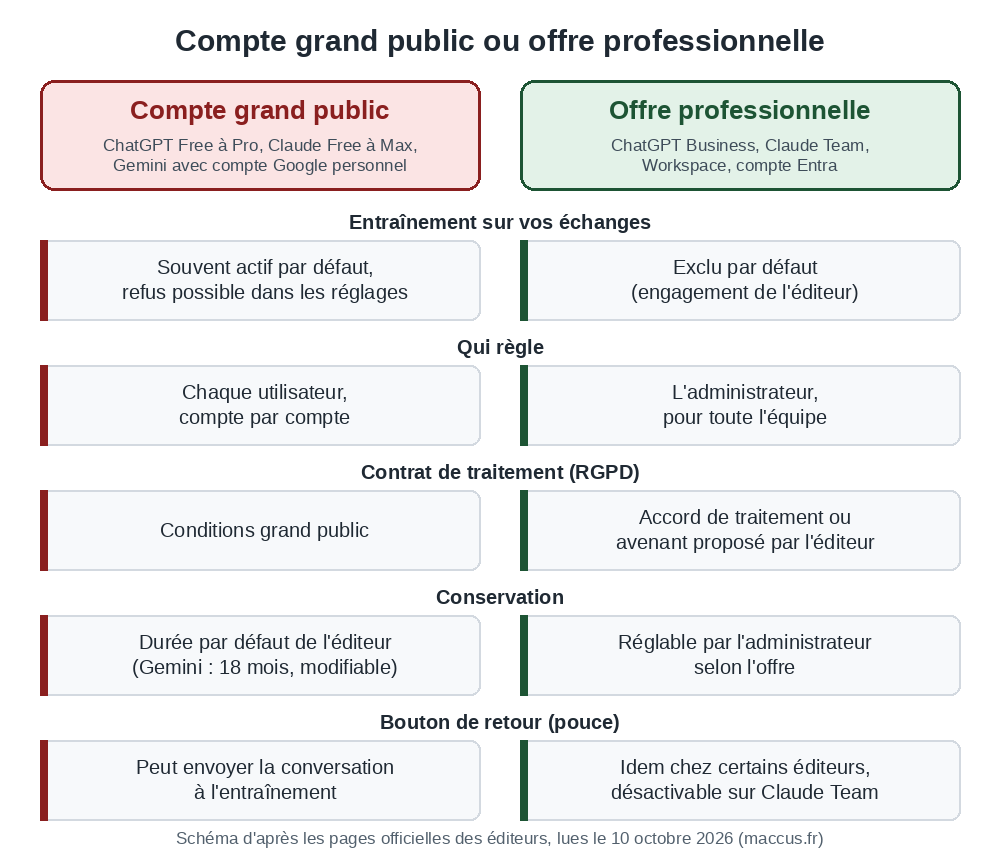
France’s data protection authority, the CNIL, draws the same line in its Q&A on generative AI. For non-confidential uses, a consumer service “may be considered” with dedicated work email addresses, avoiding accounts opened with personal addresses and turning off the provider’s reuse of usage data where possible. Once client or employee data, or strategic documents, are involved, it generally considers an on-premises deployment “more appropriate and more secure.” Our guide to local AI for businesses covers that option, hardware and costs included.
The settings table, tool by tool
Method: each row comes from the vendor’s help, privacy or documentation page, read on October 10, 2026. Menu names are the ones used on those pages; your interface may label them differently, and we didn’t click through every interface. If a menu doesn’t match, search for the setting by name. The table is reviewed every quarter and whenever a vendor announces a rule change; the verification date shown is the reference.
Checked on October 10, 2026 against each vendor’s official pages (list below the table).
| Tool and plan | Training on your data | How to opt out | Retention and notes |
|---|---|---|---|
| ChatGPTFree, Go, Plus, Pro | On by default Yes, unless you opt out. | Settings > Data controls: turn off “Improve the model for everyone,” or choose “Do not train on my content” at privacy.openai.com. | Deleted chats erased within 30 days, except for security reasons or legal obligations. Temporary chats: up to 30 days. |
| ChatGPTBusiness, Enterprise, Edu, API | Off by default No, by default. | Nothing to change for training. The admin sets retention. | Business, Enterprise, Edu: retention set by the admin, deleted conversations erased within 30 days unless the law requires otherwise. API: inputs and outputs kept 30 days at most. |
| ClaudeFree, Pro, Max | Your choice Only if you accept (you’re asked at sign-up), apart from feedback (thumbs) and conversations flagged by the safety filters. | Settings > Privacy: “Help improve our AI models” (also called “Model Improvement”). Incognito chats are never used. | Deleted conversation: removed from your history right away, erased from the servers within 30 days. Training accepted: up to 5 years in de-identified form. |
| ClaudeTeam, Enterprise, API | Off by default No, by default, except feedback you send (thumbs, bug reports). | Owners can remove the rating button: “Rate chats,” in Organization settings > Data and Privacy. | API: deleted within 30 days. Team and Enterprise: deleted conversation erased within 30 days; custom retention on Enterprise. |
| GeminiPersonal Google account, with or without a Google AI subscription | On by default Yes: “Keep Activity” is on by default from age 18, and human reviewers read some of the chats. | gemini.google.com > Activity > Turn off. Temporary chats are not used for training. | 18 months by default (3 months, 36 months or no limit if you choose). Setting turned off: 72 hours. Chats read by human reviewers: up to 3 years, disconnected from the account. |
| GeminiGoogle Workspace (work account) | Off by default No: no training outside your domain without permission, no human review. | Nothing to change for training. The Workspace admin manages history. | Gemini app: up to 36 months, set by the admin. Gemini in Gmail or Docs: from 90 days to no limit. |
| Microsoft CopilotPersonal Microsoft account, updated app (since August 18, 2026) | Off by default No: prompts, responses and files are not used to train the foundation models. | Nothing to change for training. Memory: Settings > Personalization. | No published retention period: conversations can be deleted one by one or all at once (privacy dashboard). Old app not yet updated: training possible unless you opt out, history kept 18 months by default. |
| Microsoft 365 CopilotWork account (Entra) | Off by default No: prompts, responses and Microsoft Graph data are excluded from training the foundation models. | Nothing to change. Retention can be set by the admin in Microsoft Purview. | According to the organization’s retention policies. |
| PerplexityFree, Pro, Max | On by default Yes: “AI data retention” is on by default, according to Perplexity’s help center. | Settings > Preferences: turn off “AI data retention.” The opt-out applies to data collected afterward. | No published retention period: “for as long as necessary,” according to the privacy notice. |
| PerplexityEnterprise | Off by default Never, according to Perplexity’s trust center. | Nothing to change. | As set in the contract. |
| Mistral Vibe (formerly Le Chat)Free and Pro | On by default Yes, unless you opt out. | Admin > Vibe > Privacy: turn off “Allow your interactions to be used to train our models.” Mobile: Settings > Data & Account Controls, uncheck “Enable data sharing.” | Deleted conversation: removed after a short grace period, with no published duration. No “zero retention” on Vibe. |
| Mistral VibeTeam, Enterprise | Your choice Team: the admin can turn off training for the whole organization. Enterprise: off by default. | Admin > Vibe > Privacy. The API (Mistral Studio) has its own setting: “Anonymous improvement data.” | Same as above. “Zero retention” is only available on the pay-as-you-go API, on an approved request. |
| Notion AIAll plans | Off by default No: Notion’s contracts forbid its AI subprocessors from training their models on your data. | Nothing to change. | At the model providers: no retention (Enterprise), 30 days at most (other plans). Deleted page: recoverable for 30 days, then erased. |
| DeepLFree Translator and Write | On by default Yes: texts are used to train DeepL’s networks, and its terms forbid entering personal data. | No setting: switch to a DeepL Pro plan. | DeepL Pro: texts deleted once the translation is delivered, never used to improve the service. |
| LinkedInMember accounts | On by default Yes, unless you object: profile, content and inputs to the AI features. Private messages excluded. | “Data for Generative AI Improvement” preference. Feedback you send to LinkedIn can still be used. | Inputs to the AI features kept until you delete them. |
| GitHub CopilotFree, Pro, Pro+, Max | On by default Yes since April 24, 2026, unless you opt out: inputs, outputs, code snippets and context. | Profile picture > Copilot settings: set “Allow GitHub to use my data for AI model training” to Disabled. | Copilot Business and Enterprise: never used for training (data protection agreement), and the setting doesn’t appear. |
| GrammarlyFree, Premium, single-user Pro | On by default Yes, unless you opt out, including text processed by the generative AI features. | Free and Premium: account.grammarly.com/security/privacy. Single-user Pro: account.grammarly.com/admin/data_settings. Setting: “Product Improvement and Training.” | Team accounts bought online: on at first, and the admin can turn it off for the whole organization. Business, Education, Pro and Enterprise accounts bought through the sales team: off by default. Writing statistics can be used in every case. |
On by default: your exchanges can be used to train the models until you opt out. Off by default: the vendor commits not to do it without your consent. Your choice: the decision belongs to the user or the admin.
Sources checked on October 10, 2026: OpenAI, ChatGPT data controls, how data is used to improve model performance and enterprise privacy; Anthropic, privacy center (consumer plans, commercial plans, retention); Google, Gemini Apps Privacy Notice and Workspace privacy guide; Microsoft, Copilot for individuals and Microsoft 365 Copilot; Perplexity, privacy notice and trust center; Mistral, training opt-out; Notion; DeepL; LinkedIn; GitHub; Grammarly. On shadow AI: CNIL (in French), Ipsos and Greenworking (in French), Netskope (2026 global report, 2026 Europe report); for Mistral Vibe, the May 28, 2026 announcement.
Two rows changed this year. On August 18, 2026, Microsoft released a new Copilot app whose conversations are not used to train the foundation models; the old version, until it’s updated, keeps training on by default with an option to opt out. GitHub went the other way: since April 24, 2026, it has used conversations from Copilot Free, Pro, Pro+ and Max to train its models unless you opt out. Mistral renamed Le Chat to Vibe on May 28, 2026, keeping subscriptions, histories and settings, so the options now sit under the new name.
Is opting out enough?
The feedback button overrides it. OpenAI says that a thumbs up or thumbs down, sent after you opt out, can bring the entire conversation into training. Anthropic keeps a conversation linked to feedback for up to five years, detached from your user ID, and can use it to train its models, business plans included.
Mistral applies the same feedback rule to all its subscriptions, and LinkedIn excludes the feedback you send it from its preference. On Claude Team and Enterprise, organization owners can remove that button.
An opt-out removes nothing from models already trained; Anthropic, LinkedIn and Perplexity say so explicitly. At OpenAI and Perplexity, it applies to future conversations. Anthropic and LinkedIn also stop drawing on your older data for future training runs. Anthropic has asked for this choice at sign-up since its August 28, 2025 announcement, and you can change it at any time in the settings.
After an opt-out, some of your conversations are still kept. OpenAI keeps temporary chats for up to 30 days for safety reasons. Google keeps Gemini chats for 72 hours when “Keep Activity” is off, and its page states that human reviewers may read them for safety. Anthropic keeps conversations its systems flag as violating its usage policy for up to two years.
Some settings come in pairs. At OpenAI, Codex has its own setting (“Include environments”) for the context of code environments, and ChatGPT’s memory is set separately: OpenAI presents it as a setting distinct from training.
Mistral’s settings come in pairs too: the Vibe switch and the API switch are independent. Anthropic excludes from training the raw content read by connectors, such as a Google Drive file; the conversation itself is still covered if you accepted training. Before you connect an assistant to your email or calendar, our guide to MCP connectors for small businesses helps you tell read-only access from write access.
On a consumer plan, finally, the setting is personal. Nothing guarantees that every employee has turned it off, or that they did so in every browser where they use ChatGPT without logging in (the choice is then stored in that browser only). Only a plan managed by an admin sets the rule for the whole team.
Shadow AI, or personal accounts at work
Shadow AI describes employees using AI tools outside the framework set by the company, most often with a personal account. The security vendor Netskope defines it as AI use that happens out of the organization’s sight and control.
In France, the Greenworking x Ipsos bva Observatory, run from May 12 to 25, 2026 with 1,100 private-sector employees, measured the gap: 73% of employees use AI at work, 45% say it is officially deployed in their company, and only 37% of users consistently go through approved tools. More than six users in ten therefore step outside the intended framework at least occasionally, as Ipsos points out.
Netskope’s figures, drawn from aggregated usage data from some of its European customers between March 2025 and March 2026, show the same trend. In its report published on May 25, 2026, the share of AI users going through a personal app fell from 79% to 43% in a year, while the share using tools managed by the organization rose from 28% to 72%. Data protection policy violations on personal AI and storage apps involve regulated data first (59%), then source code (15%), intellectual property (13%) and passwords or API keys (12%). Worldwide, its January 2026 report counts an average of 223 incidents per month per organization, caused by 3% of AI users.
Every personal account brings back the defaults of the consumer rows in the table: training often on, no contract between the company and the provider, no one to set the retention period. When an employee pastes a client’s file into that account, the company is still liable to that client and, for personal data, under the GDPR.
Measures within reach of a small business
Netskope finds that blocking unwanted apps works well for its customers, but it requires a filtering tool that few small businesses have. Greenworking and Ipsos bva find that usage moves faster than the frameworks organizations offer. The simplest answer is to open a business plan for the tool the team already uses, then ask that personal accounts no longer be used for work.
Next, put the rules in writing. The CNIL recommends governing generative AI with internal policies or charters that define authorized and prohibited uses and, depending on how the tool is deployed, ban entering certain confidential or personal data. Our AI policy template for small businesses sorts data into three levels and says which can go into which tool; the table above helps you pick the right account for each level.
To find out where you stand, ask the question openly, without looking for someone to blame: which tools, with which account, for which tasks. Record the answers in the tool inventory of our AI training register template. For the most sensitive data (medical records, professional secrecy, proprietary code), the choice remains between a business plan under contract and a model installed locally.
The checklist to copy
This list takes the points from the table in the order a small team can handle them. Copy it into your task tracker or print it.
CHECKLIST: AI AND COMPANY DATA
(maccus.fr, version of October 10, 2026)

ACCOUNTS
[ ] List the AI tools used in the team, including the ones employees pay for themselves.
[ ] For each tool, note the account type: personal or managed by the company.
[ ] Open a business plan for the most-used tools (Business, Team, Enterprise, Workspace, Entra account).
[ ] Request or sign each provider's data processing agreement (DPA).
[ ] Ban the use of accounts opened with a personal email address for work.

SETTINGS (consumer accounts still in use)
[ ] Turn off training on every account: ChatGPT, Gemini, Perplexity, Mistral Vibe, GitHub Copilot, Grammarly, LinkedIn, and the old Microsoft Copilot app (or update it).
[ ] On Claude, check the choice made at sign-up in Settings > Privacy.
[ ] Check the separate settings: Codex at OpenAI, the API at Mistral.
[ ] Turn off or set rules for the feedback buttons (thumbs): one piece of feedback can send the entire conversation to training.
[ ] Use temporary or Incognito chats for one-off requests.

DATA
[ ] Sort data into three levels: public, internal, confidential.
[ ] No confidential data in a consumer tool, even with training turned off.
[ ] No personal data about clients or employees in free DeepL (forbidden by its terms).
[ ] Data covered by professional secrecy: a business tool under contract, or AI installed locally.
[ ] Check what connectors read (email, Drive, calendar) before you turn them on.

RULES AND FOLLOW-UP
[ ] Write the rules into an AI use policy and make sure everyone knows it.
[ ] Name a point person for questions and requests for new tools.
[ ] Review this settings table every quarter: vendors change their rules.
[ ] Keep a record of the settings you checked (date, tool, person).
Before you roll out a new tool to the team
Vendors’ rules change: in 2026, Microsoft and GitHub changed theirs, and Mistral renamed its assistant. Before each new subscription, reread the vendor’s privacy page, look for what it says about training and retention, and note the date you checked.
If you want to give your team an assistant on Telegram, in French, English or Dutch, with access to your tools decided case by case, tell us about your business.