

A general-purpose AI can prepare some of a law firm’s deliverables in a few minutes: a payment reminder letter, a contract summary table, a case chronology. It prepares the raw material. The legal analysis, the verification and the decision stay with you.
This article has you produce those three deliverables on made-up documents, by copy and paste, without installing anything. Each task ends with a human check, because verifying sources remains your obligation.
Expected results and what you need
By the end, you’ll have three reusable drafts and a set of instructions to keep for your next cases.
What you need:
- An account on a general-purpose AI: ChatGPT (OpenAI), Claude (Anthropic), Gemini (Google), Le Chat (Mistral) or Microsoft 365 Copilot. For the exercises in this article, a free account is enough, because the data is made up.
- The three sample files, made up and in French, to copy as is: brief-relance-honoraires.txt, contrat-bail-extrait.txt and notes-dossier-fictif.txt.
Before you ever use real data, even modified, check your account’s privacy setting. Business plans (ChatGPT Business or Enterprise, Claude Team or Enterprise, Google Workspace, Copilot for business) exclude training on what you type by default.
Personal plans, free and paid alike (ChatGPT Plus, Claude Pro), may reuse your content until you turn that option off, and that setting alone doesn’t make a client file compliant. Check the exact availability of each feature in your account.
A word on vocabulary, because it drives the choices that follow. The model is the engine (the GPT, Claude, Gemini and Mistral families).
The consumer app is the window where you type (ChatGPT, Claude, Le Chat, Gemini, Copilot). The subscription sets your usage limits. The API is for developers. A connector links the AI to a piece of software.
An automation tool triggers actions. Connectors to a calendar or practice management software exist, but they’re set up separately, with permissions. In the exercises that follow, none is turned on: you work by copy and paste, and the AI touches neither your calendar nor your software.
Working on made-up data
The exercises below only use invented documents. Keep this as your default rule: as long as you’re practicing, no real client data goes to a third-party tool.
A lawyer’s professional secrecy is protected by criminal law. In France, it rests on Article 226-13 of the Criminal Code (official text on Légifrance, in French), spelled out for the profession by Article 66-5 of the law of December 31, 1971 (official text, in French).
In Belgium, a lawyer’s professional secrecy is also protected by criminal law. Check the text in force and your bar’s rules before using real documents. To make sure those documents never leave the firm, there’s another route: local AI, installed on a machine you control.
Replacing names with labels, such as [CLIENT] or [OPPOSING PARTY], while keeping a key to match them, is pseudonymization, which falls short of robust anonymization. Dates and facts can still identify a person.
A real deployment on real documents is decided at the firm level, after a risk assessment: data minimization, a processing agreement with the provider within the meaning of the GDPR, appropriate permissions and human approval.
A data protection impact assessment (DPIA) is required when the processing presents a high risk within the meaning of the GDPR. The ethics guide on artificial intelligence that the CNB (France’s National Bar Council) adopted in March 2026 restates these requirements (official CNB page, in French).
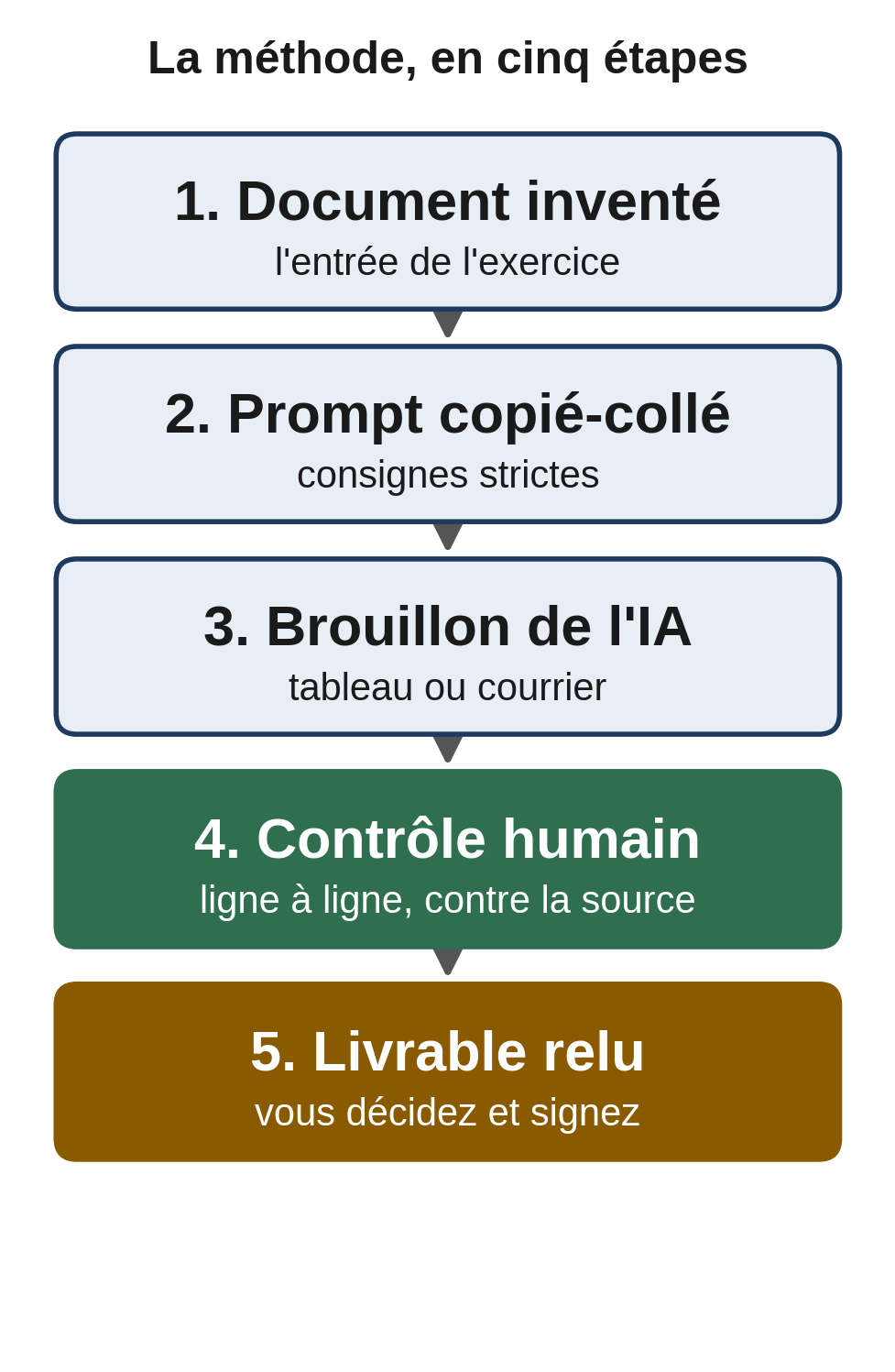
The three tasks follow the same method: a made-up document as input, a precise prompt, a draft, then a human check before any use.
Task 1, drafting a fee reminder letter
This is the simplest task, with no integration at all. A short brief, a prompt, a reviewed draft.
App: ChatGPT or Claude, web version. No special settings.
Sample input, made up (file brief-relance-honoraires.txt):
Case reference: REF-2026-014
Recipient: a small client company
Invoice: no. F-2026-041 of March 12, 2026
Amount due: EUR 1,815 incl. VAT
Due date passed: April 11, 2026
First reminder, no previous follow-up
Steps:
- Open a new conversation.
- Paste the prompt below, already filled in with the made-up example.
- Read the draft, adjust the tone, fill in the items in square brackets.
- Check that the amount and date exactly match the real invoice before sending anything.
Prompt to copy:
You are the drafting assistant of a law firm. Write an out-of-court fee
reminder letter, in English, courteous but firm.

Context (made-up data):
- Case reference: REF-2026-014
- Recipient: a small client company
- Invoice concerned: no. F-2026-041 of March 12, 2026
- Amount due: EUR 1,815 incl. VAT
- Due date passed: April 11, 2026
- First reminder, no previous follow-up

Instructions:
- Restate the invoice, its date, its amount and the missed due date, without
  recalculating them and without inventing any other amount.
- Offer the option of a payment plan in two monthly installments.
- Don't mention any legal proceedings, late interest or
  threats at this stage.
- Don't invent any fact, date or reference not given above.
- Leave the items to fill in between square brackets: [Name], [Address],
  [Signatory].
- One page maximum.
Example of expected output:
Subject: Invoice no. F-2026-041 of March 12, 2026 (case REF-2026-014)

[Name]
[Address]

Dear Sir or Madam,

Unless we are mistaken, or your payment has not yet been recorded,
our invoice no. F-2026-041 of March 12, 2026, for an amount of
EUR 1,815 incl. VAT, remains unpaid. It was due on April 11, 2026.

We would be grateful if you could settle it. If paying it in one
installment is difficult, we can agree on a payment plan in two
monthly installments; just let us know.

Please let us know if you have any questions.

[Signatory]
Human check: compare the invoice number, date and amount with your billing software. Don’t ask the model to calculate the total due. A total is calculated and checked in a deterministic tool, your billing software or a spreadsheet.
Common failure and fix: the model adds late interest or a threat of proceedings. Restate in the prompt that no new amount and no proceedings may appear, and regenerate.
Task 2, extracting key data from a contract
Here, the AI reads a document and turns it into a table you can verify. It’s useful for a first read of a lease, a service agreement or another contract, before your own analysis.
App: Claude or ChatGPT with file upload, or Gemini if your documents are in Google Drive. In practice, such a document is exported as a PDF from your practice management software (Kleos, SECIB, Diapaz, LegalProd) or scanned.
In this exercise, no link is turned on between your practice management software and the AI: the handoff happens through an export or a copy and paste you control. For this exercise, use the file provided, contrat-bail-extrait.txt, entirely invented. Processing a real document is a separate decision, to be handled under the rules in the “Working on made-up data” section.
Steps:
- Open a conversation and attach the file, or paste its text.
- Send the prompt below.
- Check each row of the table against the document.
Prompt to copy:
You are preparing a summary sheet for a lawyer. Using only the document
provided, extract the key information into a table.

Columns:
1. Item (signing date, effective date, term, rent, rent review, security
   deposit, service charges, three-year break dates, notice period, renewal
   request, signatories)
2. Exact value, as written in the document
3. Article or passage the information comes from

Strict rules:
- Copy amounts and dates exactly. Don't calculate anything, don't convert
  anything.
- For each row, give the source article. If the information isn't in
  the document, write "not found." Never invent a value.
- Don't add any legal interpretation. You list facts from the document,
  not their legal effect.
Example of expected output, from the file provided:
| Item | Exact value | Source |
|---|---|---|
| Signing date | January 15, 2026 | Article 1 |
| Effective date | February 1, 2026 | Article 1 |
| Term | nine full consecutive years, until January 31, 2035 | Article 3 |
| Monthly rent | EUR 2,400 excluding service charges | Article 4 |
| Rent review | every February 1, based on the specified index | Article 5 |
| Security deposit | EUR 7,200 | Article 6 |
| Service charges | EUR 300 per month | Article 7 |
| Three-year break dates | January 31, 2029 and January 31, 2032 | Article 8 |
| Termination notice | 6 months | Article 8 |
| Renewal request | before July 31, 2034 | Article 9 |
| Signatories | [LANDLORD] and [TENANT] | signatures |
Human check: compare each value with the contract line by line. This is the part that counts. Derived dates, such as the renewal deadline or the end of the lease, are yours to recalculate from the text.
The model often copies the contract’s exact wording, for example “nine full consecutive years,” without working out the end date; that part is up to you.
Common failure and fix: the AI “fills” an empty cell with a value that sounds plausible but isn’t in the document. The “not found” rule in the prompt sharply reduces this risk; if a row looks too good, ask for the exact quote of the passage and cut the row if the passage doesn’t exist.
Task 3, preparing a factual case chronology
A clean chronology saves time on the summary memo and on the outline of the facts. The AI formats it, and you keep the legal characterization and the argument.
App: ChatGPT’s Projects feature (main path below). Claude offers an equivalent Projects feature. A project brings fixed instructions and reference documents together in a separate space. The file notes-dossier-fictif.txt is provided and entirely made up.
Steps, in ChatGPT:
- In the left panel, hover over “Projects” and click the “+” button. Give the project a neutral name, for example “Case_A_2026,” then confirm with “Create project.”
- On the project page, click “Add instructions” and paste the project instructions (next section).
- Still on the project page, add the made-up notes file with the add files button.
- Open a conversation in the project and run the prompt below.
- Check each row against the documents.
In Claude, the path is similar: “Projects,” “+ New Project,” a name, then “Add instructions” for the instructions and “Add content” for the files. These features also exist on free accounts, with a limit on the number of projects.
Prompt to copy:
From the documents and notes in this project, prepare a factual chronology.

Four-column table:
1. Date
2. Event, described neutrally
3. Document that establishes it (number), or "client's statement, not confirmed by
   a document"
4. Status: "established by a document" or "to check"

Rules:
- One row per dated event, in chronological order.
- Don't invent any date or fact. If a date is uncertain, write "date
  to be confirmed."
- No legal analysis, no characterization, no strategy. You prepare
  the factual material; the lawyer handles the legal analysis.
- End with a short list of "documents missing or to request."
Example of expected output:
| Date | Event | Document | Status |
|---|---|---|---|
| February 3, 2026 | Purchase order signed, EUR 9,500 excl. VAT | P1 | established by a document |
| February 4, 2026 | Supplier’s confirmation | P2 | established by a document |
| February 20, 2026 | Delivery, delivery note signed with a reservation | P3 | established by a document |
| February 21, 2026 | Photographs of the equipment | P4 | established by a document |
| February 22, 2026 | Phone call to the supplier | client’s statement, not confirmed by a document | to check |
| February 24, 2026 | Client’s written complaint | P5 | established by a document |
| March 2, 2026 | Offer of partial replacement | P6 | established by a document |
| March 10, 2026 | Repair quote from a third party, EUR 2,100 excl. VAT | P7 | established by a document |
| March 18, 2026 | Formal notice sent with acknowledgment of receipt | P8 | established by a document |
Documents missing or to request: proof of the call on February 22, 2026; details of the reservation noted on delivery note P3.
Human check: open each document cited and confirm the date. The February 22 row must stay marked “to check,” because no document establishes it. If the AI classifies it as “established,” correct it and point out the rule.
Common failure and fix: the model promotes a client’s statement to an established fact. Require the “document” column for every row and reject any row without a source.
Reusing your instructions in a project
You’ve just written useful rules. Don’t retype them every time. The Projects features in ChatGPT and Claude, or Gems in Gemini, keep a set of instructions and reference documents in a dedicated space. You open the project, and the instructions already apply.
Keep this project private to your firm. It gathers your instructions and reference documents so you can reuse them without retyping. Connecting it to your software so it acts on your behalf is a separate step, described below.
Reusable project instructions, to paste into the instructions field:
Role: you are the preparation assistant of a law firm. You prepare the
factual and administrative material. You never give legal advice,
you don't characterize the facts in law, you don't write arguments.

Data: in this exercise, all documents are made up. You never ask for
identifying data. If a document contains a name, a national ID
number or an address, flag it instead of using it.

Sources: you only cite what appears in the project's documents. You
don't invent any case law, article, date or amount.
When information is missing, you write "not found" or "to check."

Output: clear tables, neutral language, items to fill in between square brackets.
At the end of each answer, you remind the lawyer to check everything before use.
Choosing a model for the task
Sorting tasks into two families is enough to decide, without knowing every model version.
For quick, simple work, such as a short letter, sorting emails or rephrasing, a light, inexpensive model does the job. For heavy work, such as reading a long contract or summarizing a case file, pick a reasoning model with a large context window.
Don’t choose on reputation; test. Take a made-up document whose values you already know, have two models process it, then compare each row with your reference. The model that copies amounts and dates without inventing any, and writes “not found” when information is missing, is the one that fits the task.
On the provider side, four come up for a law firm. OpenAI with ChatGPT and Google with Gemini, built into Workspace, cover office work and file analysis. Anthropic with Claude handles long documents and following instructions.
Mistral, with Le Chat, is a French company that emphasizes hosting in Europe. A provider’s home country alone proves neither where the computing happens nor GDPR compliance: where data is stored and inference runs depends on the plan, the region and the contract, to be checked case by case.
Claude’s web interface, for example, offers no guarantee of European hosting by default. If you already work in Word and Outlook, Microsoft 365 Copilot acts where you are.
Having access to a model proves neither professional secrecy nor compliance: what counts is the plan, the contract and your settings. Model names and prices change fast.
Check the model available in your account and the official pricing page before you commit. For a selection method and an up-to-date comparison, see our reference article on choosing your AI model and organizing work across several agents.
What a coordinator and sub-agents really are
You’ll read everywhere that an AI can “coordinate agents.” The principle is real, but two misconceptions are going around.
First clarification: assigning three roles in a single message does not make three agents. Writing “act as a reader, then as a checker, then as a writer” is still a single conversation. Copying a result from one chat into another is delegation by hand, done by you.
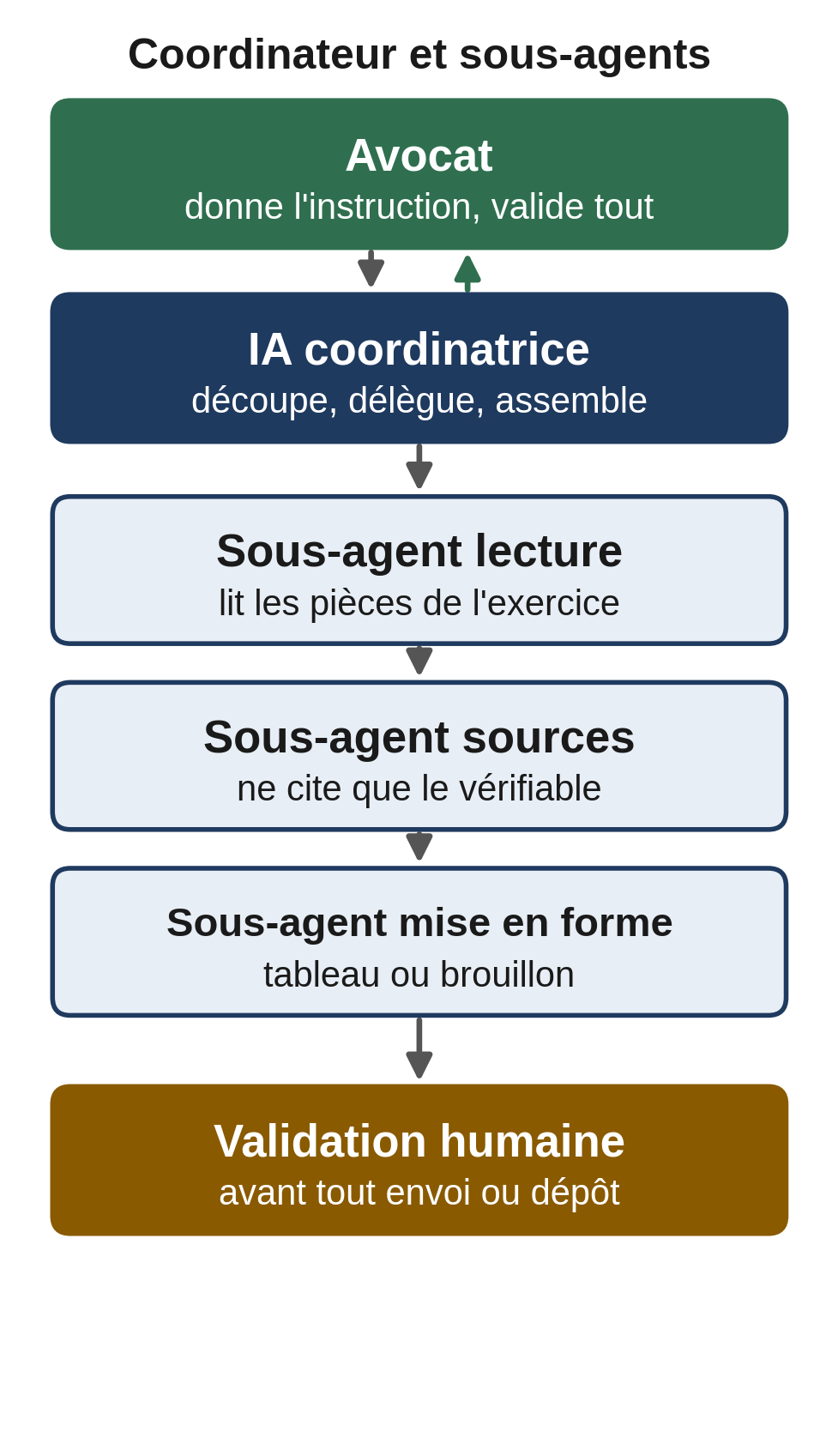
The coordinator-plus-sub-agents setup splits a task into steps, hands each to a specialized worker, then puts the pieces together. It’s worth it when the task touches several pieces of software, cross-references data and carries a real risk of error.
A manual exercise you can do today, with nothing to install: open two conversations. In the first, a “preparer” builds the chronology from Task 3. In the second, a “checker” receives the same list of documents and checks each date, flagging any row without a source. You play the coordinator who passes information along and makes the call. You get the benefit of a second reading, with no automation.
A real connected orchestration is another matter. Such a setup requires connectors to your software, explicitly granted access permissions, a technical setup, a human approval step before any action, and a named person in charge. It can’t simply be plugged into every firm’s software right away. The diagram below sums up the principle.
The limits of AI in a law firm
A few limits keep the responsibility on your side.
- Verifying sources remains your obligation. The risk of “hallucination,” invented but credible case law references, is real. The CNB’s ethics guide on AI documents it with recent examples. Never cite a court decision in a filing unless you’ve read it at its source.
- No calculations handed to the model without verification. Fee notes, retainers, timesheets and client trust accounts stay with deterministic software. A model can get a calculation wrong; check every total in your software or a spreadsheet.
- No automated legal advice to clients. An intake form can point people in the right direction, but it doesn’t give an opinion. The substantive reasoning and the characterization remain your work.
- No sending or filing without review. In the tutorials above, human approval is the safeguard. In an automation, build in an explicit approval step before any outgoing action.
Rely on your bar’s guidance. In France, the CNB adopted an ethics guide on generative artificial intelligence in March 2026, published on cnb.avocat.fr. In Belgium, avocats.be and the Orde van Vlaamse Balies also publish guidance on the subject. Always keep Belgian and French rules separate: they don’t overlap.
Your checklist for the next session
- Check your account’s privacy setting.
- Create a private project with the reusable instructions above.
- Draft the reminder letter from the made-up brief.
- Extract the made-up contract into a table and match each value against the text.
- Build the chronology of the made-up case and reject any row without a document.
- Read your bar’s guide, and agree on ground rules within the firm, before any use on real documents.
Going further
A general-purpose AI already saves you time on these three tasks. Moving to a configured assistant, connected to your tools with precise permissions and an approval step, requires a setup adapted to your firm and your obligations.
MACCUS installs a personal assistant you reach through Telegram, by text, voice note and documents, on your own Claude subscription. Connectors to your software are assessed case by case, based on your permissions.
It isn’t a turnkey solution. The assistant doesn’t guarantee your firm’s compliance and gives no legal opinions. If you want to scope out your workflow and your connections, let’s talk about how your firm works.
To start with a first guided task, read the main guide, “Using AI in your profession”. If you also handle the firm’s bookkeeping, the article on AI in accounting firms covers preparing documents and checking results.