

An AI agent is software that visits your website on someone’s behalf: it reads your pages, compares your offers and fills in your quote form. Making a site “agent-ready” means making sure that visit succeeds, with content a machine can read, forms that leave no room for guessing, clear rules for bots and, later on, actions declared to the browser.
This guide reflects the situation as of October 10, 2026. The standards involved (WebMCP, NLWeb, Markdown for agents, Web Bot Auth) are drafts or experiments, and almost no site uses them yet: our own check of fifteen major French websites found no Content Signals, no Markdown version and no agent discovery file. Most of the useful work today comes down to basics that Google already recommends for human visitors. The checklist at the end of the article ranks them by priority.
A visitor that reads, compares and fills in your forms
Google defines agents as autonomous systems that carry out tasks on behalf of people, such as booking a table or comparing product features. According to the “Build agent-friendly websites” guide published on web.dev, a browser agent reads your site in three ways: screenshots analyzed by a vision model, the HTML code, and the accessibility tree, the simplified version of the page that the browser prepares for screen readers (the role, name and state of every button or field).
This agent is different from the crawler you already know. GPTBot and ClaudeBot crawl the web to train models or feed a search engine; our article on AI crawlers and the robots.txt file explains which ones follow your rules. An agent shows up because a customer has just given it a task. On its page about its bots, OpenAI says as much of ChatGPT-User, the agent used when a user asks a question that requires visiting a page: because these actions are started by a user, robots.txt rules may not apply. An agent can also submit a form that should never have been sent. On October 9, 2026, Anthropic disclosed that one of its models had filed a false report on a Philadelphia police website, a case we break down in our article on Anthropic’s report.
The volume is no longer trivial. In a post dated August 6, 2026, Cloudflare wrote that, by its own measurements, fewer than half of HTML page requests now come from a human, while noting that not all of these machines are agents acting for a person. The human visits that assistants send you can be measured in Google Analytics 4: see our guide to AI traffic in GA4.
Actual adoption as of October 10, 2026
In April 2026, Cloudflare Radar examined the 200,000 most visited domains on the web, after setting aside the categories where the question doesn’t apply (redirects, ad servers). The results, published on April 17: 78% of sites have a robots.txt file, 4% declare Content Signals in it, 3.9% serve a Markdown version when asked, and MCP server cards and API catalogs appear on fewer than 15 sites in the entire sample.
We ran a smaller check on October 10, 2026, between 1:53 and 1:55 p.m. (Paris time), on fifteen major French websites: lemonde.fr, lefigaro.fr, ouest-france.fr, 20minutes.fr, leboncoin.fr, fnac.com, cdiscount.com, decathlon.fr, boulanger.com, marmiton.org, doctolib.fr, service-public.fr, laposte.fr, sncf-connect.com and legifrance.gouv.fr. A simple script, with no browser, requested each site’s robots.txt, an llms.txt file, the home page in Markdown and three agent discovery files.
- Eight of the fifteen sites refused to serve the home page to our script (400 or 403 codes), and four of them refused even the robots.txt file. An agent that reads without a browser quickly runs into the firewall.
- Of the eleven readable robots.txt files, six name at least one of the fourteen AI bots we were looking for, and five name at least nine. None contains a Content-Signal line.
- No site served us an llms.txt file: seven returned 404, and the others refused the request.
- None of the seven sites that responded to the Markdown request served any: six returned HTML, and the seventh refused the format.
- None served us an MCP server card, an agent skills index or an API catalog.
Among browsers, only Chrome offers WebMCP on a trial basis. According to Chrome Status, the origin trial (a test open to registered sites) started with Chrome 149 and was set to end with Chrome 156, and at the end of September 2026 the Chrome team asked to extend it through Chrome 162. The other two engines have stated their positions in their public repositories: WebKit, the engine behind Safari, came out against WebMCP in June 2026, and Mozilla rated the proposal “neutral” on August 5, 2026. Adoption is therefore close to zero, in France and elsewhere. This guide is about getting ahead: it helps you choose what to prepare now and what is better left on a watch list.
Where Google, Cloudflare, Microsoft and OpenAI stand
Google puts the basics first
Google Search’s guide to generative AI features, updated on July 10, 2026, is clear. Optimizing for Google’s AI is still SEO. llms.txt files and other “special” markup are useless for Google Search, which doesn’t use them. Structured data is optional for AI features and still useful for rich results. On agents, Google points to the web.dev guide mentioned above “if it’s relevant to your business and you have time,” and notes that protocols such as the Universal Commerce Protocol (UCP) will let its search agents do more. Our page on Google’s AI Mode and AI Overviews covers the search side.
On the Chrome side, Google co-authors WebMCP and has added an experimental “Agentic Browsing” category to Lighthouse. It requires Chrome 150 or later and doesn’t show a score out of 100. It gives a ratio of passed checks instead (names and labels of interactive elements, consistency of the accessibility tree, layout stability, presence of an llms.txt file, declared WebMCP tools).
Cloudflare offers a score and settings
On April 17, 2026, Cloudflare launched isitagentready.com, an online tool that scores a site after testing a series of standards. As of October 10, 2026, the tool’s home page sorts its checks into five groups: discovery (robots.txt, sitemap, Link headers, DNS-AID), content access (Markdown), bot control (rules for AI bots, Content Signals, Web Bot Auth), protocol discovery (MCP server card, agent skills, WebMCP, API catalog and OAuth discovery, among others) and commerce (x402, MPP, UCP, ACP). In April, Cloudflare specified that the commerce checks did not count toward the score. On August 6, 2026, these checks were added to the Cloudflare dashboard, under Agent Readiness.
Be careful with the “Set up in Cloudflare” links offered next to the checks. One of them leads to the robots.txt file managed by Cloudflare. According to the documentation, when you opt out of training in your AI bot settings, the file adds a block on GPTBot, ClaudeBot, Google-Extended and five other AI bots ahead of your own rules. Read the generated file before you accept it, especially if you want your pages to be used by those models.
Microsoft backs NLWeb and part of WebMCP
Microsoft introduced NLWeb on May 19, 2025. The project was designed by R.V. Guha, whom Microsoft describes as the creator of RSS, RDF and Schema.org. One of the three WebMCP specification editors also works at Microsoft; the other two work at Google.
OpenAI makes its agents identifiable
OpenAI’s page about its bots distinguishes OAI-SearchBot (search), GPTBot (training) and ChatGPT-User (actions started by a user). OpenAI also publishes a directory of public keys in the format defined by Web Bot Auth, at chatgpt.com/.well-known/http-message-signatures-directory, with the agent identifier “https://chatgpt.com” (checked on October 10, 2026). A firewall can use it to confirm that a signed request really comes from ChatGPT.
The standards to know, from most useful to most experimental
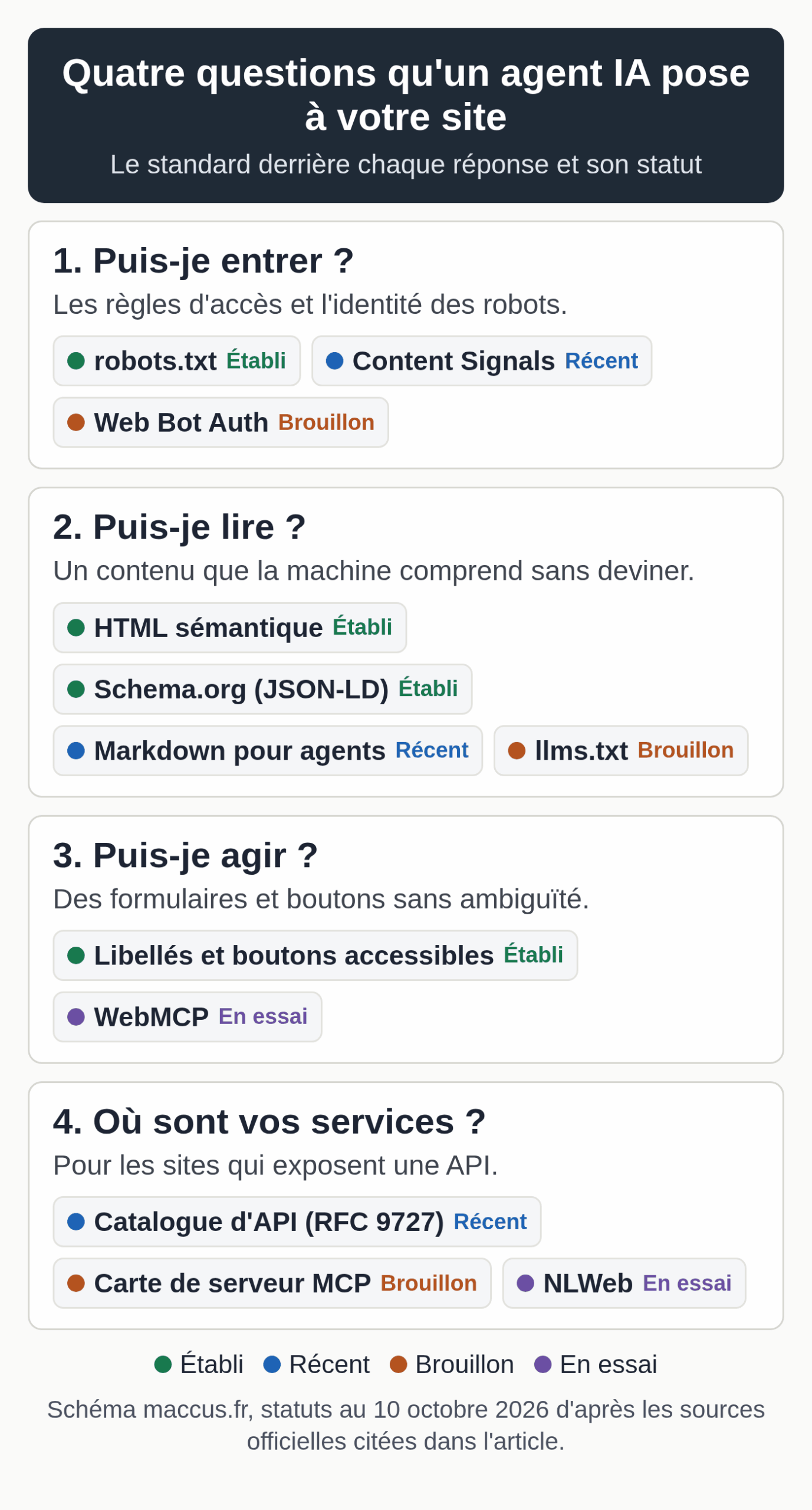
The table below sums up each building block: what it does, who backs it, its status and the kind of site it applies to.
Checked on October 10, 2026.
| Building block | Role | Backed by | Status as of October 10, 2026 | Relevant for |
|---|---|---|---|---|
| Semantic HTML and accessibility | Make buttons, fields and headings understandable to a browser agent | Web standards; Google’s web.dev guide | Established; checked by Lighthouse’s experimental Agentic Browsing category | All |
| Schema.org structured data (JSON-LD) | Describe the business, products and articles | Schema.org; read by Google, NLWeb and Cloudflare’s Markdown conversion | Established; not required for Google’s AI features | All |
| robots.txt and rules for AI bots | Say which bots can crawl what | IETF (RFC 9309) | Established; 78% of major sites (Cloudflare, April 2026) | All |
| Content Signals | Declare permitted uses: search, ai-input, ai-train | Cloudflare (contentsignals.org) | Recent; 4% of major sites (April 2026) | All, optional |
| Markdown for agents | Serve a lighter text version on request | Cloudflare (Pro, Business and Enterprise plans) and configured servers | Recent; 3.9% of major sites (April 2026) | Content, documentation |
| llms.txt | Offer models a list of links | Proposal published on llmstxt.org | Ignored by Google Search; checked by Lighthouse | Documentation, software |
| Web Bot Auth | Sign bot requests to prove their identity | IETF, webbotauth working group | First working group draft dated September 1, 2026; keys published by ChatGPT | Sites that filter bots, through their CDN |
| WebMCP | Declare a page’s actions (forms, functions) | W3C Web Machine Learning Community Group; editors from Google and Microsoft | Draft dated October 9, 2026; Chrome origin trial from 149 to 156, extension requested through 162; WebKit opposed (June 2026), Mozilla neutral (August 2026) | Quotes, bookings, commerce, support |
| NLWeb | Natural-language question interface, paired with an MCP server | Open project launched by Microsoft (MIT license) | Code presented as a proof of concept | Catalogs and media sites with Schema.org markup |
| API catalog, MCP server card, skills index | Announce an API or MCP server at a fixed address | IETF (RFC 9727); MCP draft; Cloudflare proposal | MCP cards and API catalogs: fewer than 15 sites in Cloudflare’s sample (April 2026) | Sites that expose an API |
| Agentic commerce (UCP, ACP, x402) | Let an agent make a purchase | UCP: Google, Shopify and others; x402: foundation set up by Coinbase and Cloudflare | Emerging; not scored by Cloudflare (April 2026) | Online stores, through their platform |
Method: each row was checked on October 10, 2026, against its official source (Chrome documentation and Chrome Status, the W3C draft, the positions published by WebKit and Mozilla, Cloudflare’s blog posts and documentation, Google Search’s guide, the NLWeb repository, the IETF webbotauth group page and the UCP website). The percentages come from Cloudflare Radar’s April 2026 survey of the 200,000 most visited domains. The date above the table shows the day of the last check.
WebMCP in practice on a quote form
WebMCP lets a page declare its actions as “tools” that an agent can call, instead of guessing which button to click. There are two ways to do it. The imperative API works through JavaScript (document.modelContext.registerTool, with a name, a description, a JSON schema for the parameters and a function). The declarative API adds attributes to an existing HTML form: toolname and tooldescription on the form tag, and the optional toolparamdescription on the fields.
Here is what an annotated quote request form would look like, based on Chrome’s documentation:
<form action="/quote" method="post"
      toolname="request-a-quote"
      tooldescription="Sends a quote request for interior painting work.">
  <label for="area">Area to paint (m²)</label>
  <input id="area" name="area" type="number" required>
  <label for="city">Job site city</label>
  <input id="city" name="city" type="text" required>
  <label for="timeline">Preferred timeline</label>
  <select id="timeline" name="timeline" toolparamdescription="When the customer would like the work to start.">
    <option>Less than a month</option>
    <option>One to three months</option>
  </select>
  <button type="submit">Send</button>
</form>
When an agent calls this tool, Chrome brings the form into view and fills it in while the user watches. Without the toolautosubmit attribute, the explainer specifies that the browser places the cursor on the submit button and the user confirms the submission. For a sensitive action such as a purchase, Chrome’s documentation says your tool can ask the user for confirmation, and it is up to the developer to build that in.
There are three limitations to know about. Chrome points out two of them: the API is designed first for a browser used by a person who is present, even though headless use remains possible, and an agent only discovers your tools by visiting the page. The third is noted in the W3C community group’s repository: the declarative part is not yet included in the draft specification (October 9, 2026 version), which handles it separately. In its extension request at the end of September 2026, the Chrome team also notes that the imperative API is used far more than the declarative one. To test it, a developer turns on the chrome://flags/#enable-webmcp-testing flag on their own machine or registers the site for the origin trial.
NLWeb and Schema.org markup
NLWeb adds a natural-language question interface to a website. Each instance is also an MCP server, with an ask method that answers in JSON using the Schema.org format. Setting it up requires a vector database, a language model and some development work. At launch, Microsoft named a first group of partners (Eventbrite, Shopify, Tripadvisor, O’Reilly Media, and the group behind Allrecipes and Serious Eats, among others), and the repository, which has since moved to the nlweb-ai organization on GitHub, describes its code as a proof of concept.
For a small business, the lesson lies elsewhere. NLWeb relies on the data your site already publishes in Schema.org or RSS. Clean JSON-LD markup (your business, your products, your articles, your opening hours) is still the most reusable building block: Google uses it for rich results, NLWeb uses it to answer questions, and Cloudflare’s Markdown conversion copies it at the end of the document. For your business markup, our guide to entity SEO includes a JSON-LD generator.
Markdown for agents and the Cloudflare setting to watch
An agent that sends the Accept: text/markdown header can receive a Markdown version of the page, with no menus or scripts. Cloudflare measures up to 80% fewer tokens in some cases. In February 2026, out of seven agents tested by Cloudflare, only Claude Code, OpenCode and Cursor sent this header by default.
At Cloudflare, the conversion is turned on in AI Crawl Control, on the Pro, Business and Enterprise plans, either for the whole domain or through a configuration rule for specific paths only. There are two side effects to know before you turn it on. The cache now stores two variants of each page (HTML and Markdown), and the ETag and Last-Modified headers disappear from converted responses. If your server doesn’t send a content-signal header, Cloudflare adds ai-train=yes, search=yes, ai-input=yes by default, which grants permission for training. Decide on your policy before you turn on the conversion.
The llms.txt file plays a similar role: a list of links chosen for models. Our guide to the llms.txt file shows who actually reads it and includes a generator.
Identifying bots with Content Signals and Web Bot Auth
Content Signals adds a line to robots.txt that states what you allow once a bot has access: search (search index and snippets), ai-input (answers generated from your pages) and ai-train (model training). For example:
User-agent: *
Content-Signal: ai-train=no, search=yes, ai-input=yes
Allow: /
This is a statement of preference with no technical enforcement; Cloudflare points out that following robots.txt is voluntary. The text your team types into ChatGPT or Claude falls under other settings, specific to each account: see our table of AI privacy settings.
Web Bot Auth works in the other direction: the bot signs its requests (the HTTP Message Signatures standard, RFC 9421) and publishes its public keys at a fixed address, which makes it possible to tell a genuine agent from an impersonator. An IETF working group, webbotauth, has adopted its first draft, dated September 1, 2026. If your site only serves content, you have nothing to sign. Your CDN or firewall, on the other hand, can check these signatures and let through the agents you accept.
Discovery files for sites that have an API
Three files at fixed addresses help an agent find your services: the API catalog (RFC 9727, at /.well-known/api-catalog), the MCP server card (a draft, at /.well-known/mcp/server-card.json) and the agent skills index proposed by Cloudflare (at /.well-known/agent-skills/index.json). They only make sense if you actually expose an API or an MCP server; our directory of MCP connectors for small businesses explains what that server is.
Commerce protocols (UCP, ACP, x402) are a matter for your sales platform. The UCP website lists Google, Shopify, Etsy, Amazon, Walmart, Salesforce and Stripe among its co-developers: if your store runs on one of these platforms or sells through them, follow their announcements instead of writing code yourself.
A priority order for small businesses
Most of the work that makes a site readable for an agent also makes it clearer for a person, and Google says so in the same terms. The order we recommend has four steps.
- The basics, to do now: main content present in the served HTML, a single H1 heading and properly nested subheadings, labels tied to every field, real buttons, a stable layout, prices and opening hours written as text, and valid Schema.org markup.
- Your access policy, to decide this quarter: which AI bots you welcome, a Content-Signal line chosen with full knowledge of what it means, and a firewall that doesn’t mistakenly block the signed agents you want to receive.
- Agent formats, if your audience uses them: a Markdown version, an llms.txt file, and key forms identified for a future WebMCP tool.
- The rest, to keep an eye on: WebMCP in production, discovery files and agentic commerce. A trial only makes sense if a developer can take it on and your customers already go through agents.
The audit checklist to copy
Check off what is already in place on your site. The counter updates, and the button copies the list as plain text with your checked boxes, ready to paste into a ticket or a document. Nothing is saved or sent: everything stays in your browser.
Audit checklist for an agent-ready website
Version dated October 10, 2026: 24 items in five sections. The tags show the priority: Now for the basics, This quarter, If relevant for your business, and Watch for standards that are still drafts. Nothing is saved or sent.
Plain-text version to copy
Audit checklist: agent-ready website (maccus.fr, version of October 10, 2026)
Site audited:

1. Access and rules for bots
[ ] (Now) robots.txt returns a 200 to a client without a browser and gives the sitemap address.
    Check: curl -s https://your-site/robots.txt
[ ] (Now) Each AI bot has a decision (allow or block), reflected in robots.txt.
    Check: reread the User-agent lines in the file.
[ ] (This quarter) A Content-Signal line is chosen (search, ai-input, ai-train), or the decision not to add one is written down.
    Check: search for "Content-Signal" in robots.txt.
[ ] (This quarter) The firewall or CDN doesn't block the agents you want to receive.
    Check: log of refusals (403 codes) and list of allowed bots.
[ ] (This quarter) If Cloudflare's Markdown conversion is on, your server sends its own content-signal header.
    Check: without this header, Cloudflare adds ai-train=yes.

2. Machine-readable content
[ ] (Now) The main content is in the served HTML, without waiting for JavaScript to run.
    Check: curl the page and search for a sentence from the text.
[ ] (Now) Each page has a single H1 heading and H2 and H3 subheadings in order.
    Check: a heading structure extension or the developer tools.
[ ] (Now) Prices, opening hours, service areas and terms are written as selectable text.
    Check: select the text with your mouse on the page.
[ ] (Now) Valid Schema.org (JSON-LD) markup describes the business and the key pages.
    Check: Google's Rich Results Test or validator.schema.org.
[ ] (If relevant) A Markdown version is served when the request contains Accept: text/markdown.
    Check: the curl command in the article should return text/markdown.
[ ] (If relevant) An up-to-date llms.txt file exists if your audience uses coding or documentation assistants.
    Check: https://your-site/llms.txt returns a 200.

3. Forms and actions
[ ] (Now) Every form field has a linked label (label for and id) or an accessible name.
    Check: the Accessibility tab in Chrome's developer tools.
[ ] (Now) Actions go through real buttons or links (button and a tags).
    Check: if not, add role="button" and tabindex.
[ ] (Now) No transparent overlay hides a clickable element, and every button is clearly visible.
    Check: cookie banners, chat windows, ad layers.
[ ] (Now) The layout stays stable while the page loads (no button moves).
    Check: the CLS metric in Lighthouse or PageSpeed Insights.
[ ] (If relevant) Key forms (quote, contact, booking) have an action name and a description ready for WebMCP.
    Check: a written list to hand over to the developer.
[ ] (If relevant) Sensitive actions (purchase, deletion, submission) require human approval.
    Check: a test run through to the final step.

4. Discovery, if you expose an API
[ ] (Watch) An API catalog is published at /.well-known/api-catalog (RFC 9727).
    Check: the address returns a 200 with JSON.
[ ] (Watch) An MCP server card is published at /.well-known/mcp/server-card.json (draft).
    Check: only if you have an MCP server.
[ ] (Watch) A Link header on the home page points to these resources.
    Check: curl -sI https://your-site/ | grep -i link

5. Measurement and monitoring
[ ] (Now) The level reached on isitagentready.com is written down with its date.
    Check: run the test again after each change.
[ ] (This quarter) Lighthouse, Agentic Browsing category (Chrome 150 or later), has been run on the contact or quote page.
    Check: keep the dated report.
[ ] (This quarter) Server logs are reviewed every month: AI bots, 403 refusals, Signature-Agent headers.
    Check: ask your host for the export if needed.
[ ] (This quarter) The Search Console report on generative AI features is reviewed.
    Check: compare month over month.

Items in place: 0 of 24, including basics (Now): 0 of 11
Test your site the way an agent would
Four tests are enough for a first assessment.
The first is the isitagentready.com score: enter your site's address, write down the level you get and the date, then run it again after each change. Failed checks come with an instruction you can pass on to a developer.
The second uses a terminal. These commands show what a client that doesn't run JavaScript receives (replace the address with yours):
curl -s https://www.example.com/robots.txt | head -40
curl -s -o /dev/null -w "%{http_code} %{content_type}\n" -H "Accept: text/markdown" https://www.example.com/
curl -s -o /dev/null -w "%{http_code}\n" https://www.example.com/llms.txt
If the second line returns text/html, your site doesn't serve Markdown. A 403 code on the first line points to a firewall that blocks automated clients, something to check with your host.
The third looks at the accessibility tree in Chrome's developer tools (Elements panel, Accessibility tab): every field in your forms should carry an understandable name there. The fourth runs Lighthouse, Agentic Browsing category, on your contact or quote page, with Chrome 150 or later.
Dates to watch
The WebMCP origin trial was set to end with Chrome 156. If the extension requested at the end of September 2026 is granted, it will run through Chrome 162, and what follows will show whether Google turns it on for everyone. WebKit opposes the project and Mozilla remains neutral: a change in either of those positions is the signal to follow. The IETF webbotauth group is working on its first draft, and in April 2026 Cloudflare announced a weekly update of its adoption chart for agent standards. So you don't miss anything, review this list every quarter.
If your site exists in several languages, our multilingual SEO service starts with an audit of your current versions.