
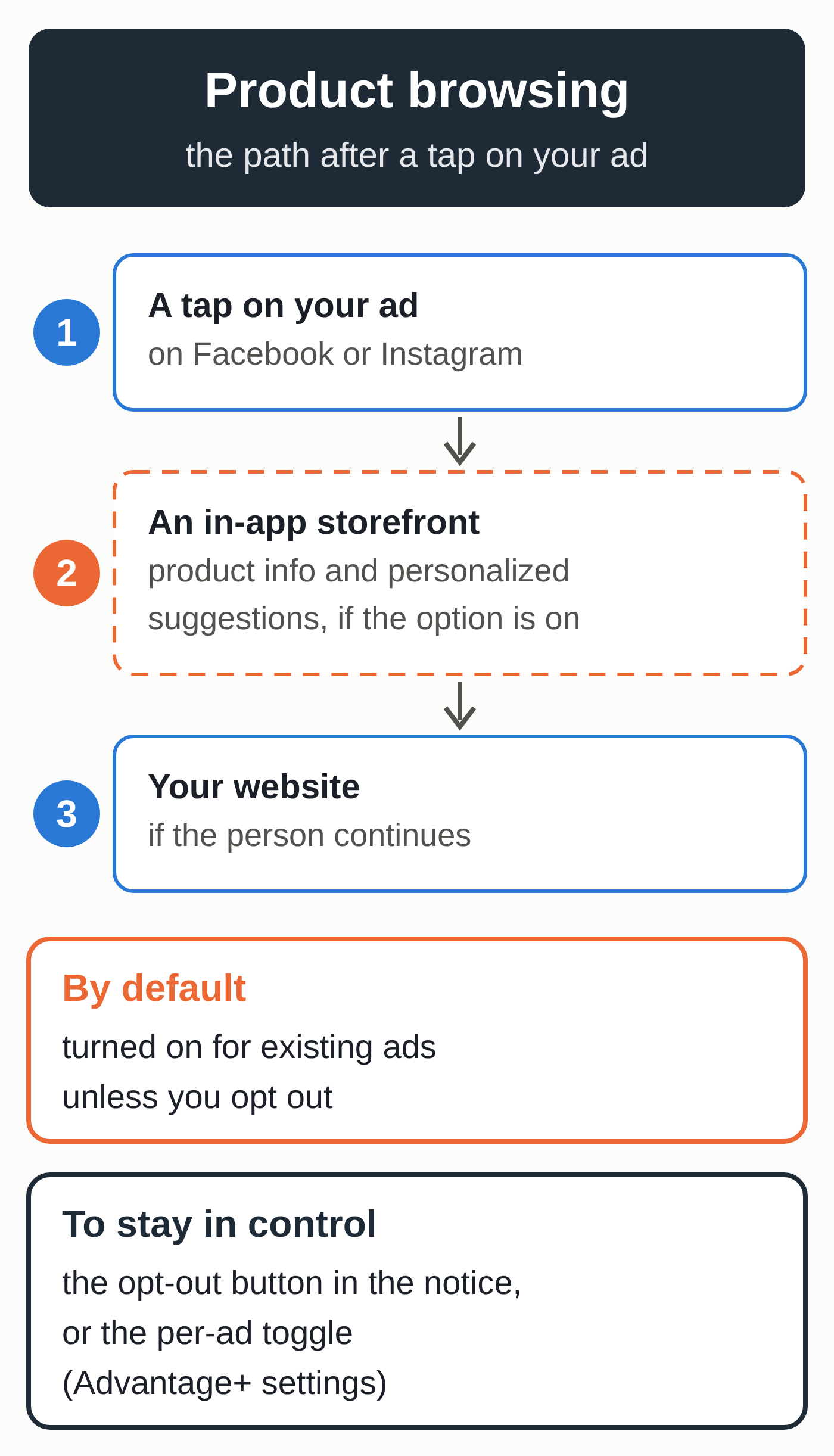
Starting October 28, 2026, Meta will add “product browsing” to advertisers’ existing ads, according to a notice it has been sending them since around October 14. Someone who taps your ad on Facebook or Instagram may then see an in-app page with information about your products and personalized suggestions before they reach your website. The setting turns on automatically. To keep things as they are, you have to opt out before October 28 or turn the option off ad by ad.
Two days later, on October 30, 2026, Meta’s updated advertising terms take effect, and continuing to use its ad tools counts as accepting them. Both deadlines land a month before Black Friday on November 27, just as online stores are locking in their holiday campaigns.
The trade publication PPC Land published the English text of the notice on October 15 and found no help article, release note or press release from Meta about the change. The agency Relevant Audience reached the same finding on October 16. The change comes on top of the AI tools Meta announced on October 6, which we covered in our article on what’s new in Meta ads before Black Friday.
An optional feature becomes the default
Product browsing is one of Meta’s Advantage+ creative enhancements, the automatic adjustments Meta can apply to an ad. Advertisers could already turn it on for a given ad. On October 28, only the default for running ads changes, from off to on.
According to Ads Uploader, an ad tools company that keeps a log of Meta’s changes, the option shows products from your catalog inside the app before your website. Meta’s notice doesn’t say whether a catalog is required, or which placements, formats or objectives are affected. Nor does it say whether ads created after October 28 will have the option on by default.
Meta claims 3% more conversions
To make its case, Meta cites an average 3% lift in conversions with in-app product browsing, compared with campaigns that didn’t use it. According to the notice’s footnote, the test ran from August 6 to August 21, 2026, across about 117,700 advertisers worldwide, in at least three verticals, including e-commerce, consumer packaged goods and retail.
PPC Land lists what the notice leaves out: which conversions count, the attribution window, the effect on costs, and whether the conversion is recorded on the advertiser’s site or in the app. The publication also questions whether a 16-day test in August reflects pre-holiday conditions.
How it affects a store that runs its own ads
You built your ad for a specific page, whether an offer, a collection or a Black Friday landing page. With product browsing, some of the people who tap may go through a storefront inside the Facebook or Instagram app, with suggestions picked by Meta, before they get to your website, and not necessarily to that page.
If some visits start inside the app, the gap between the link clicks Meta reports and the sessions your site records can widen. A landing page test that’s already running could be skewed, since some visitors will no longer see the page you’re testing first.
Then there’s timing: the switch lands just as holiday budgets go up. A consultant quoted by PPC Land has asked Meta to push it back to January and to add a reporting column showing when product browsing is on and what it contributes.
Meta has done this before. According to PPC Land, Dynamic Media became the default for catalog ads between September 1 and October 20, 2025, with an API field to opt out. This year’s notice mentions no equivalent field.
Opt out or test before October 28
- Look for Meta’s notice in your email and in your Meta Business Suite notifications. It doesn’t name the account it applies to: an advertiser quoted by PPC Land found out which account it was by clicking the button, and saw that the choice was still open. If you manage several accounts, check them one by one.
- Decide account by account. Use the notice’s opt-out button before October 28. You can also keep the option on for a test campaign and turn it off everywhere else.
- For a specific ad, the toggle is in the ad’s Advantage+ creative and destination settings. According to the notice, you can flip it at any time. Meta’s help page on turning off Advantage+ creative enhancements describes the general steps.
- Write down what you chose, the date and the account. If your results move in November, you’ll know which setting was on.
- After October 28, open your highest-spending ads, plus any you duplicate or create, and check the setting. Ads Uploader notes that Meta’s Marketing API documentation doesn’t list a field for this option yet.
- Set a baseline: record the ratio of Meta-reported link clicks to Meta sessions in your analytics tool now, then compare after the switch.
If you also run Google campaigns over the same period, check Google Ads automated promotions, which have been on by default for some campaigns since October 12. They need the same review.
New advertising terms on October 30
Meta’s legal pages announce two updates that “will go into effect on October 30, 2026”: the Self-Serve Ad Terms, whose current version took effect on August 22, 2025, and the Commercial Terms, in effect since March 6, 2024. The Ad Creative Generative AI Terms, dated May 6, 2024, will be folded into the Self-Serve Ad Terms on the same date. Both documents say you accept them simply by continuing to use Meta’s tools; there’s nothing to sign.
On October 16, we compared the current version of the Self-Serve Ad Terms with the version that takes effect on October 30. Four points matter directly to a small business:
- Meta’s automated features can now format, select and generate ad creative, on top of choosing the audience, placements and objectives as they already do.
- You remain solely responsible for the order, the creative, the targeting and the placements, including reviewing, approving or removing them, even when you use those automated features.
- AI features “may make mistakes,” you bear the risks of the creative they produce, and you must not alter or remove any watermark or content-authenticating metadata generated by AI, a rule that was already in the 2024 generative AI terms.
- The tests Meta runs on its tools, which can affect campaign performance, now also cover ad creative, on top of formatting, relevance, pricing, reporting, targeting and delivery.
As for your website, the current version already lets Meta access, index and crawl the content of your domains and pages, including for research and training. The new version spells out how: automated software such as crawlers, test credentials to reach pages related to your products or services, and periodic fetching of updates. It also lists the uses: to “provide, develop, improve, research, train, and maintain the integrity of” Meta’s products. On October 30, the same clause enters the Commercial Terms, which also cover managing a Page or a product catalog; we break it down, along with how three legal experts read it, in our article on Meta’s new Commercial Terms.
If you create visuals with AI, as in our guide to preparing your LinkedIn and Instagram posts with Claude, review them before they run and leave their metadata intact.
Read both documents before they take effect: the October 30 version of the Self-Serve Ad Terms and the updated Commercial Terms. If you work in a regulated industry or your site has customer-only pages, have your lawyer review these clauses.
Open questions
As of October 16, no Meta help page describes the October 28 switch, and everything known about it comes from the notice Meta sent to advertisers, whose text PPC Land published. The scope of the opt-out button is still unclear: PPC Land notes that it isn’t stated, while Ads Uploader describes an opt-out that covers the whole business portfolio. The 3% figure comes from Meta, which hasn’t published its method. Meta hasn’t published a list of changes to the terms either, so the comparison above is our own reading of the two versions.
Dates to watch
Product browsing switches on October 28, the new terms apply October 30, Black Friday falls on November 27 and Cyber Monday on November 30. In the meantime, watch for a Meta help page that says whether new ads are included. For your holiday sales, the complete guide to organic marketing covers the channels that don’t go through an ad auction.
Relying less on Meta’s settings
Every setting Meta turns on for you is a reminder that a paid audience plays by the rules of the platform that sells it. If you want more of your customers to find you without ads, take a look at our organic marketing services.