

The llms.txt file is a plain text file written in Markdown and published at yoursite.com/llms.txt. It introduces your site in a few lines and lists the pages an AI assistant should read first to answer a question about you. Jeremy Howard, cofounder of Answer.AI and fast.ai, proposed it on September 3, 2024. It is still a proposal, published on llmstxt.org and open to contributions on GitHub.
As of October 10, 2026, the picture is clear. Google states that its search engine ignores the file. The pages where OpenAI, Anthropic and Perplexity document their crawlers never say that those crawlers read it.
An Ahrefs study of 137,000 sites found that 97% of llms.txt files got no visits at all in May 2026. Among AI bots, the ones that request it are mostly agents, coding tools included, and only when something sends them there.
This guide covers the format, the available data on who reads it, and the cases where publishing one is worth it. It ends with an annotated template for a small business site and a generator that builds yours.
A Markdown file at the root of your site
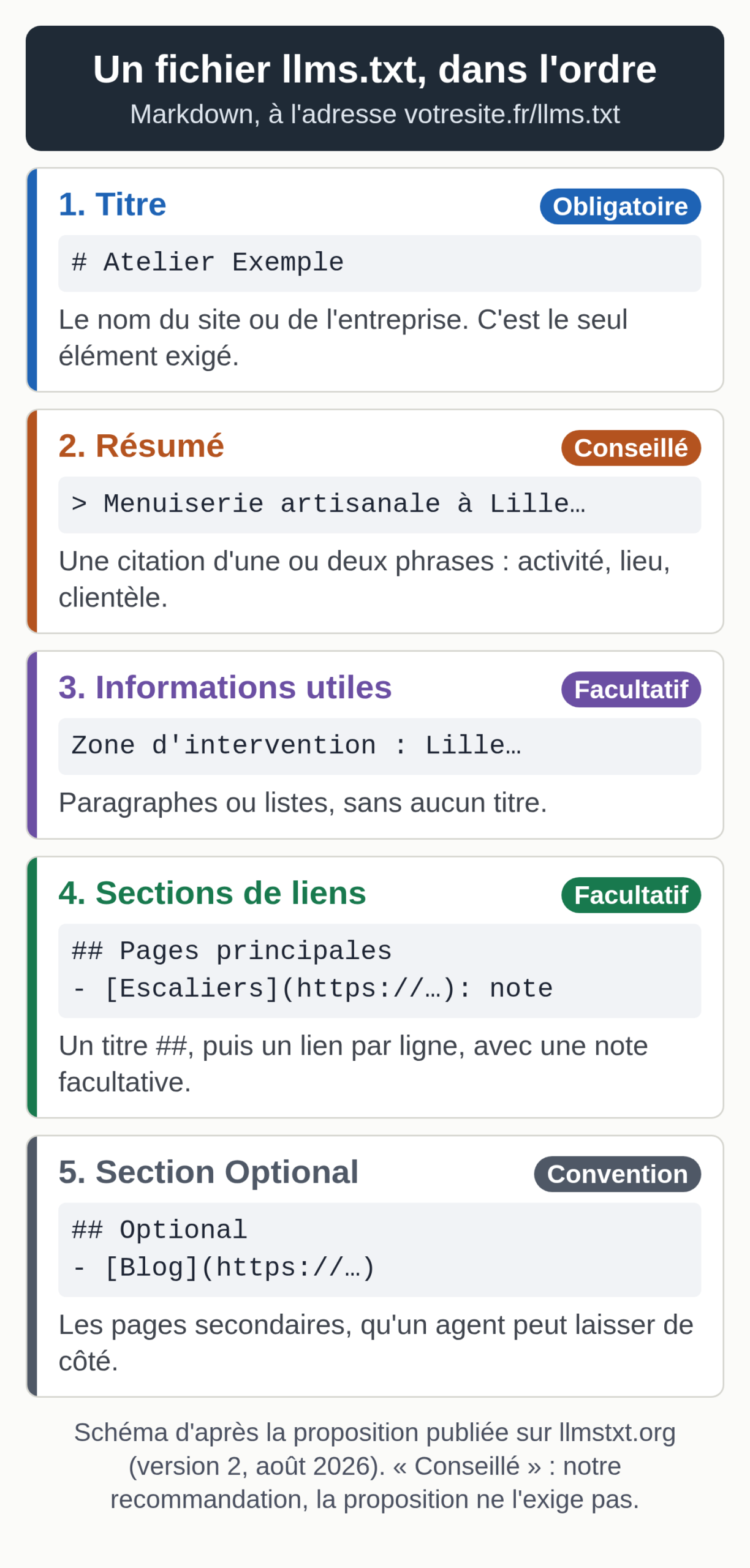
The proposal sets a specific order. The file opens with a level 1 heading, a line that starts with #, holding the name of the site or the business. That is the only required element. Next comes a blockquote, a line that starts with >, which sums up the business in one or two sentences with the information needed to understand the rest.
After that summary, you can add paragraphs or lists without headings: service area, languages, useful details. The rest of the file is made of sections that open with a level 2 heading (##). Each one holds a list of links in the format - [page name](url): note, where the note is optional.
By convention, a section titled “Optional” groups the secondary links, the ones an agent can skip when it runs short on space. The word comes from the proposal, which is written in English.
Version 2 from August 2026
Jeremy Howard published a second version of the proposal in August 2026. It specifies that a file can also live in a subfolder, for example /docs/llms.txt, in which case it covers the pages under that path. When several files apply, the agent uses the most specific one.
It also recommends offering a Markdown version of important pages at the same address, with .md appended or replacing the extension. Each page can point to its Markdown version with a rel="alternate" link of type text/markdown, and to the llms.txt that covers it with a rel="describedby" link, either in the page code or in an HTTP header. Along the way, the “Optional” section loses its technical meaning: it stays a convention, with no processing rule attached.
For a small business, these additions are optional. A root file that points to your regular pages follows the format, even though the proposal prefers links to Markdown versions.
How llms.txt differs from robots.txt and the sitemap
All three files sit at the root of the site and their names look alike. Their jobs differ. The robots.txt file tells crawlers what they are allowed to crawl; its format has been standardized since September 2022 by the IETF’s RFC 9309. The sitemap.xml lists every page you want search engines to index, with no commentary.
The llms.txt file picks a handful of pages and explains them, for a reader with limited space; access rights remain the job of robots.txt. The proposal puts it this way: robots.txt tells crawlers what access is acceptable, while llms.txt is used on demand, when an agent is looking for information to help a user.
If your goal is to block an AI crawler, this file can’t help. That job belongs to robots.txt, with its limits: our article on AI crawlers and robots.txt explains which assistants follow those rules and which ignore them.
Who reads llms.txt today?
Google’s position
Google has made its call for its search engine. Its optimization guide for generative AI features in Search, updated July 10, 2026, lists llms.txt files among the things to ignore: Google Search doesn’t use them, and creating one won’t hurt or help your visibility or rankings. Its page on AI Overviews and AI Mode adds that no special file is needed to appear there.
Another Google team sees the file differently. Lighthouse, Chrome’s auditing tool, checks for llms.txt in its audits for agentic browsing. Its documentation, updated May 5, 2026, explains that without this file an agent may spend more time crawling the site to work out its structure. The audit flags a server error on the file and marks a missing file as not applicable, since the file is optional.
According to Ahrefs’ account of the exchange, Google’s John Mueller, asked about this contradiction by Lily Ray on LinkedIn, replied that llms.txt is not meant for search. He sees it as a stopgap for AI coding tools that read technical documentation.
The crawlers from OpenAI, Anthropic and Perplexity
All three companies describe their crawlers on dedicated pages: GPTBot, OAI-SearchBot and ChatGPT-User at OpenAI, ClaudeBot, Claude-User and Claude-SearchBot at Anthropic, PerplexityBot and Perplexity-User at Perplexity. As of October 10, 2026, none of these pages says the crawlers read or follow an llms.txt file. OpenAI’s and Perplexity’s pages only mention the file in their documentation banner, to point to their own index. The settings they describe for site owners all go through robots.txt.
Yet the same companies publish an llms.txt for their technical documentation. The files on developers.openai.com, platform.claude.com and docs.perplexity.ai all respond, as does the one for Google’s Gemini API documentation. They list the reference pages for their APIs, for developers and their coding tools.
The logs of 137,000 sites
The largest published study we found comes from Ahrefs: it was published on June 15, 2026, by Louise Linehan with Xibeijia Guan. The company analyzed requests received by the 137,210 domains that run its audience analytics tool and were active in May 2026. Of those, 28% published an llms.txt, a figure the authors present as a ceiling, since their customers are more technical than average.
Of these roughly 38,000 files, 97% received no requests at all during the month, from bots or humans. In the remaining 3%, 96% of requests came from bots. SEO audit tools led with 21.7% of requests.
AI bots as a whole accounted for 19.5% of those requests. Agents acting on behalf of a user, and services built for them, made up 10.5%; Claude Code, Anthropic’s coding tool, ranked near the top. Crawlers collecting training data followed with 5.3%, led by GPTBot.
Assistants that open a page to answer a question, such as ChatGPT-User or Claude-User, made up 2.5%. Crawlers that feed answers in AI search engines, such as OAI-SearchBot or PerplexityBot, accounted for only 1.1%. Slack’s link preview bot requested these files more often than PerplexityBot.
Two findings matter for a small business. No AI bot requested an llms.txt on a site that didn’t have one: 98% of requests for missing files came from humans, likely SEOs checking on competitors, according to Ahrefs. Ahrefs concludes that agents request the file when a link, an index or a user instruction leads them to it, without seeking it out on their own. The authors also note that a request does not prove the file was read: all their figures are upper bounds.
Reasons to publish one, and reasons to wait
The file costs little. For a brochure site, you can write it in one work session, and several WordPress plugins and site builders generate it automatically. It has real readers when your customers go through agents: a developer asking a coding tool to integrate your API, or an agent comparing vendors for someone. The exercise also forces you to name the ten or so pages that answer your customers’ questions.
For most small businesses, the arguments against weigh more. The file changes nothing about your visibility in Google, as Google itself says. The crawlers that feed answers in ChatGPT or Perplexity request it very rarely, according to the logs Ahrefs studied. A neglected file goes out of date the day you delete a page or change an offer, and an agent that trusts it will repeat the mistake.
The file also raises a security question. It is public and read by agents designed to rely on it. Ahrefs spotted a research crawler named prompt-injection-survey in its logs; according to Ahrefs, it studies these files as a way to slip instructions to agents. Limit the number of people who can edit it, and never put a private URL in it: a customer portal, a test page, an internal document.
Our recommendation depends on your site. If you publish documentation, an API or a catalog that agents consult for your customers, publish a careful llms.txt and keep it up to date. If you have a brochure site, turn on the feature in your plugin or site builder when it exists, review the output, and spend no more time on it. Either way, be wary of a service sold as “llms.txt optimization” to win citations in AI tools: the published data cited above shows no such effect. To find out whether assistants cite your site, measure it with an AI visibility tool or a manual tracking sheet.
An annotated template for a small business site
Here is a complete file for a fictional business, Atelier Exemple, a woodworking shop in Lille, France. The example.com domain is reserved for examples: replace it with yours. Write the file in your site’s language; the proposal does not require English.
# Atelier Exemple

> Custom woodworking shop in Lille: made-to-measure kitchens, closets and staircases for homeowners in the Lille metro area.

The shop works with oak, walnut and birch plywood. Service area: Lille and a 30 km radius.
Quote requests go through the contact form. The shop does not sell anything online.

## Main pages

- [Custom kitchens](https://www.example.com/kitchens/): completed designs, wood species, project steps
- [Closets and storage](https://www.example.com/closets/): under-eave fittings and alcoves
- [Staircases](https://www.example.com/staircases/): straight and quarter-turn staircases, step renovation
- [Request a quote](https://www.example.com/contact/): form, shop address, opening hours

## Practical information

- [FAQ](https://www.example.com/faq/): lead times, warranties, wood care
- [The shop and the team](https://www.example.com/workshop/): history, craftspeople, machines

## Optional

- [Blog](https://www.example.com/blog/): care tips and recent projects
- [Legal notice](https://www.example.com/legal-notice/)
The heading uses the name as your customers type it into a search engine, with no slogan. The summary gives the business, the location and the customers in one sentence: it is the first thing an agent reads.
The information paragraph spells out what a home page often leaves unsaid: materials, service area, how to request a quote, and what the business doesn’t do. That last line gives the assistant a clear answer when a customer asks whether they can order online.
The link sections follow your customers’ questions. Each note says in a few concrete words what the page contains, so the agent can choose without opening every page. The URLs are complete, with https://. The “Optional” section holds secondary pages, such as the blog and the legal notice.
Keep the file short. The proposal asks that it fit within an agent’s context, with the detail left behind the links. About ten links is enough for a small business site.
A generator for your own file
The generator below follows this template. Fill in the name, the site URL and the summary, then your links, one per line in the form Title | URL | note. Relative paths such as /contact/ are completed with the site URL.
The tool flags lines with no URL, duplicates, http:// addresses and files that run too long. You can then copy the text or download the llms.txt file. Everything happens in your browser: nothing is sent or stored.
llms.txt file generator
The fields are prefilled with the fictional Atelier Exemple example. Replace them with your own information: the file is built in your browser, and nothing is sent or stored.
Publishing it on WordPress, Wix or standard hosting
On standard hosting, save the file as llms.txt, encoded in UTF-8 so accented characters display correctly. Upload it to the root of the site, in the same folder as robots.txt, over FTP or with your host’s file manager. It must respond at https://www.yoursite.com/llms.txt.
As of October 10, 2026, several WordPress SEO plugins can generate the file. Yoast SEO offers it in its free version, with automatic or manual page selection. Rank Math turns it on with a module called “LLMS Txt”; its documentation notes that the file stays empty until you choose the content, and that noindex pages are excluded. In its paid version, AIOSEO also produces an llms-full.txt file that gathers the text of your content; that file name does not appear in the llmstxt.org proposal.
Keep a single source. With the Apache configuration WordPress recommends, a file sitting at the root is served directly, before WordPress runs. A file you upload by hand can therefore hide the one a plugin generates on the fly, or get overwritten by a plugin that writes its own.
As of the same date, Wix generates and updates the file for sites with a paid plan, a custom domain and indexing turned on, in the “SEO & GEO” section of the dashboard. If you edit it by hand, Wix stops updating it; a button lets you switch back to the automatic version.
If your site exists in several languages, version 2 of the proposal lets you place one file per language folder, for example /en/llms.txt for the English pages, each written in its own language. Nothing stops the root file from pointing to the others. Our guide to multilingual site SEO explains how to organize URLs by language.
Check the file, then watch who reads it
Open the file’s URL in your browser. You should see plain text, with accented characters displayed correctly. If a page of your site shows up instead, with your theme’s menu and footer, the file is in the wrong place. Then click each link to check that it responds.
Next, run the test the proposal suggests: give an assistant that can open web pages the URL of your llms.txt, and nothing else, then ask it three questions your customers often ask you. If the answers are wrong or vague, rework the summary and the link notes.
For agents to find the file, point to it. Version 2 recommends a rel="describedby" link to the file, placed in the <head> section of your pages or sent in an HTTP Link header; you can also mention it in your documentation. That matches the Ahrefs conclusion: an agent requests the file when something directs it there.
To find out who reads it, check your hosting access logs, if your host provides them. For an Apache or nginx log in the “combined” format, this command counts requests for the file by bot or browser:
grep "GET /llms.txt" access.log | awk -F'"' '{print $6}' | sort | uniq -c | sort -rn
Look in the output for the crawler names listed above: GPTBot, ClaudeBot, Claude-User, ChatGPT-User, OAI-SearchBot, PerplexityBot. Run the count again after a few months. If nobody reads the file, leave it as it is and spend no more time on it. The visits assistants send to your pages can be counted in Google Analytics 4: see our guide to AI traffic in GA4.
Update it whenever a page it lists changes URL or disappears. For a site that rarely changes, a review once a quarter is enough.
Where the file fits in an AI visibility strategy
The llms.txt file is an accessory. Google points out that standard SEO best practices apply to its AI features, and other assistants’ access to your pages is set in robots.txt. The file adds to that work, for the agents that read it. The other ways to prepare for these agents (Markdown versions, WebMCP, Content Signals) are covered in our guide to an agent-ready website.
If your site exists in several languages, our multilingual SEO service starts with an audit of your current languages: indexed pages, rankings, duplicates.