

AI traffic in Google Analytics 4 now has its own row. Since the update announced on May 13, 2026, GA4 puts some of the visits coming from ChatGPT, Gemini, Copilot, Perplexity or Claude into a separate channel, called “AI Assistant” in the English interface and “Assistant IA” in the French one. The question “how many visitors does ChatGPT send me?” therefore has a first answer with no setup at all: Reports, Acquisition, Traffic acquisition, AI Assistant row.
That row does not count everything. In the two GA4 properties we manage, visits from assistants still land in Unassigned, Referral or Organic Search. Google’s AI Overviews and AI Mode are excluded by design.
This guide shows where to look, gives a regular expression (regex) tested on October 10, 2026 against our GA4 data, walks through creating a custom channel that groups all these visits, and offers a generator to adapt the regex to the assistants that matter for your site.
The AI Assistant channel Google added in May 2026
The Google Analytics release notes date the announcement to May 13, 2026. When the address a visit comes from, the referrer, matches an assistant on Google’s list, GA4 assigns it the medium ai-assistant, the campaign name (ai-assistant) and the AI Assistant channel. The help page on the default channel group names ChatGPT, Gemini, DeepSeek, Copilot and Grok; the release note also names Claude.
Google does not publish the full list. The table of sources by category, which you can download from the same help page, covers search engines, social networks, video sites and shopping sites, with no category for assistants (checked October 10, 2026).
Two limits follow from the rule. The classification does not apply to the past: in our properties, the first ai-assistant sessions date from June 2026, and older visits from chatgpt.com stay in Referral or Unassigned. Google’s AI Overviews and AI Mode are left out of the channel: the same help page files them under Organic Search.
To see the row, open Reports, then Acquisition, then Traffic acquisition. The table is split by channel, and AI Assistant shows up as soon as one visit has been classified that way in the chosen date range. Add Session source as a secondary dimension to see which assistant sent each visit.
Visits the built-in channel misses
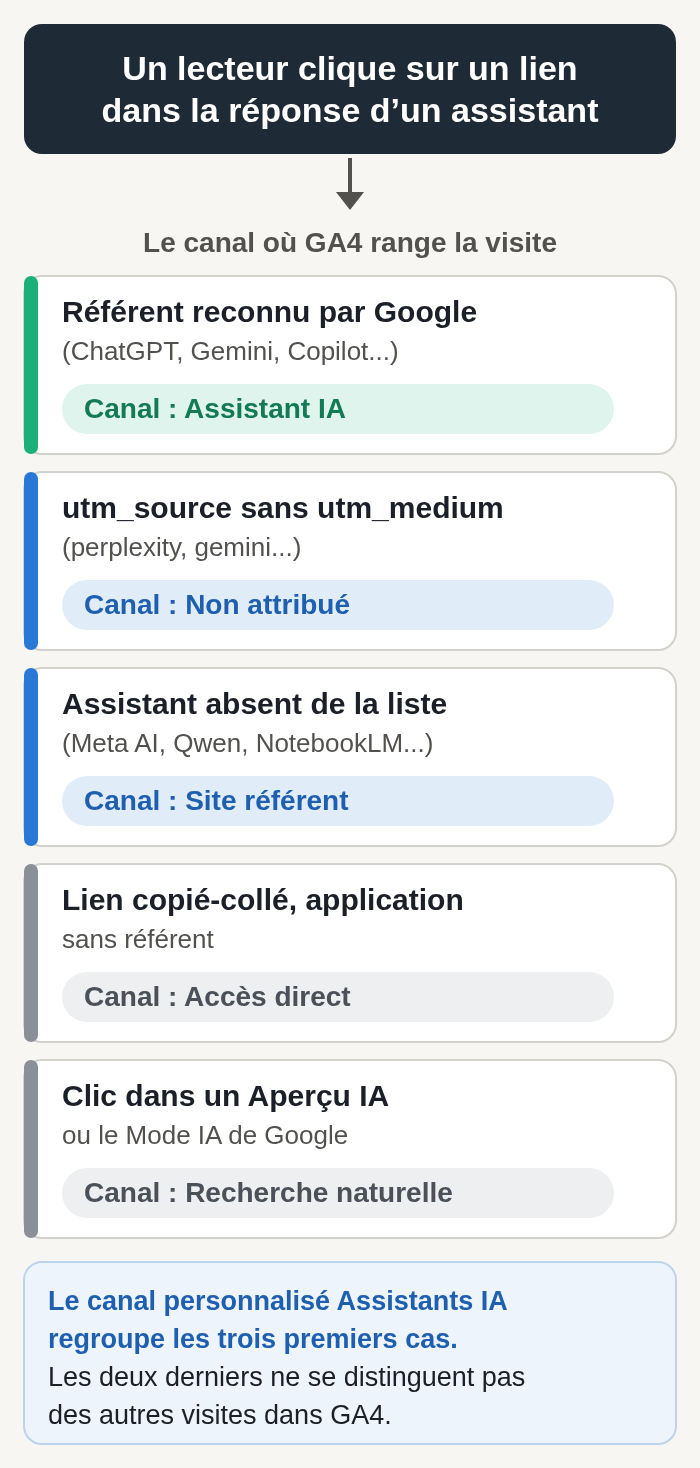
The table below lists the source and medium pairs we found in GA4 for visits coming from assistants, with the channel Google puts them in.
Where GA4 files visits from assistants, checked October 10, 2026.
| Source / medium in GA4 | Default channel | Where the visit comes from |
|---|---|---|
| chatgpt.com / ai-assistant | AI Assistant | Click in ChatGPT, referrer recognized by Google |
| gemini.google.com / ai-assistant | AI Assistant | Click in Gemini |
| copilot.com / ai-assistant | AI Assistant | Click in Copilot, consumer version |
| perplexity.ai / ai-assistant | AI Assistant | Click in Perplexity |
| claude.ai / ai-assistant | AI Assistant | Click in Claude |
| perplexity / (not set) | Unassigned | Link tagged utm_source=perplexity, with no utm_medium and no recognized referrer |
| gemini / (not set) | Unassigned | Same case with utm_source=gemini |
| copilot.com / (not set) | Unassigned | Same case with utm_source=copilot.com |
| openai / organic | Organic Search | Link tagged utm_source=openai and utm_medium=organic |
| l.meta.ai / referral | Referral | Meta AI, not on Google’s list |
| chat.qwen.ai / referral | Referral | Qwen, not on Google’s list |
| notebooklm.google.com / referral | Referral | NotebookLM, not on Google’s list |
| (direct) / (none) | Direct | Address copied from an answer, or an app that passes neither a referrer nor a parameter |
| google / organic | Organic Search | Click in a Google AI Overview or in AI Mode, mixed in with regular results |
Method: the first twelve rows are source / medium pairs we recorded between June and October 2026 in two GA4 properties we manage, using the Google Analytics Data API, reviewed on October 10, 2026. The last two rows apply rules Google documents (help pages on (direct) / (none) traffic and on the default channel group). We repeat this check every quarter and whenever the Google Analytics release notes announce a change.
A source with no domain name, such as perplexity or gemini, comes from a utm_source parameter added to the link. With no utm_medium and no recognized referrer, GA4 finds no channel rule that applies and files the visit under Unassigned. This is the main gap we have seen since June 2026.
OpenAI’s FAQ for publishers says ChatGPT adds utm_source=chatgpt.com to the links it sends to websites. Before May 2026, that parameter alone pushed some of these visits into Unassigned. Since July 2026, in our properties, nearly all visits with chatgpt.com as the source are classified as AI Assistant.
The source openai with the medium organic comes from links tagged utm_source=openai and utm_medium=organic. The organic medium is enough to send the visit to Organic Search, mixed in with traffic from Google and Bing.
Assistants missing from Google’s list stay in Referral. We see this for Meta AI (l.meta.ai), Qwen (chat.qwen.ai) and NotebookLM (notebooklm.google.com, and notebook.google.com, where that address redirects as of October 10, 2026).
Then there is direct traffic. An address copied from an answer and pasted into the browser arrives with no referrer, just like a link opened from an app that does not pass one. Google’s help page on (direct) / (none) traffic files these visits under Direct, and nothing lets you tie them to an assistant.
The regex to paste into GA4
Paste this regular expression into a condition on the Source dimension (custom channel) or Session source (exploration). It covers ChatGPT, Gemini, Copilot, Perplexity, Claude, Mistral’s Le Chat, DeepSeek, Grok, Meta AI, Qwen and NotebookLM, Copilot’s old address (copilot.microsoft.com) and the three domain-less utm_source values we found.
^(.*\.)?(chatgpt\.com|gemini\.google\.com|copilot\.com|copilot\.microsoft\.com|perplexity\.ai|claude\.ai|chat\.mistral\.ai|deepseek\.com|grok\.com|meta\.ai|qwen\.ai|notebooklm\.google\.com|notebook\.google\.com)$|^(openai|gemini|perplexity)$By default, GA4 matches a regex against the whole value and is case sensitive, according to Google’s help page on regular expressions. The ^ and $ anchors on each part give the same result with a full or a partial match. The (.*\.)? part accepts subdomains, for example www.perplexity.ai or l.meta.ai.
Channel group conditions ignore case. In an exploration, a source written with capital letters, ChatGPT for example, would slip past this lowercase regex; the sources we found are all lowercase. In Search Console, matching is partial and case is ignored by default: our regex filters for Search Console are written for that engine.
The regex is 241 characters long. Analytics Mania, a site that specializes in GA4, mentions a 250-character limit for the filter in the Traffic acquisition report (article updated May 12, 2026); we did not find it in Google’s documentation. The generator below warns you past that length.
We tested this regex on October 10, 2026 with the Google Analytics Data API, against the real sources of our two properties since June 2025. With either a full or a partial match, it keeps the same sources, all of them from assistants, and nothing else.
The Google help example and its false positives
The help page on custom channel groups offers its own regex for an AI assistants channel:
^.*ai|.*\.openai.*|.*chatgpt.*|.*gemini.*|.*gpt.*|.*copilot.*|.*perplexity.*|.*google.*bard.*|.*bard.*google.*|.*bard.*|.*.*gemini.*google.*$Its first part, ^.*ai, keeps any source that ends in “ai”. On our data, with a full match, it also classified SEO tools and search engines whose domain ends in .ai as assistants. With a partial match, the kind used by Looker Studio’s REGEXP_CONTAINS function for example, the same pattern keeps any source that contains “ai”: our tests turned up dozens of webmail services (mail.google.com, mail.yahoo.com, Orange’s mail services) and sites like airbnb.fr.
Use a list of named domains instead. It needs a little upkeep, and every visit it counts really comes from an assistant.
Creating the “AI assistants” custom channel step by step
A custom channel group takes Google’s channels and adds your own. According to Google’s help, it also applies to past data, so you will see assistant visits from before June 2026 that the built-in channel does not reclassify. A standard property can have two custom groups of fifty channels each, on top of the default group.
You need the Editor role, or a higher one, on the property. The labels below are the ones in Google’s English help as of October 10, 2026.
- In Admin, under Data display, click Channel groups.
- Click Create new channel group. GA4 starts from a copy of the default group. Give it a name, for example “Channels with AI assistants”.
- Click Add new channel and name it “AI assistants”.
- Click Add condition group, choose the Source dimension and the “matches regex” operator, then paste the regex above or the one from the generator.
- Optional: if the editor lets you link a second condition with OR, add Medium “exactly matches” ai-assistant, so you also pick up the assistants Google adds to its list later. If not, keep Google’s AI Assistant channel right below yours: it collects the visits your regex does not know about.
- Click Save channel.
- Click Reorder, move AI assistants to the position described below, then click Apply.
- Click Save group.
Where the channel goes in the list
GA4 assigns each visit to the first channel whose condition it meets, in list order. Put AI assistants below the paid channels and above Organic Search, Referral and, if your copy includes it, Google’s AI Assistant channel.
Placed above Organic Search, the channel picks up the openai source tagged organic. Placed below the paid channels, it leaves any ads you run in ChatGPT where they belong, as long as you tag those links with a paid utm_medium (cpc, for example). Our article on advertising in ChatGPT describes that ad format.
Seeing the result in your reports
Open Traffic acquisition, then swap the channel group shown in the first column of the table for your new group. The AI assistants row appears next to the other channels, with sessions, engagement and key events. Add Landing page as a secondary dimension to see which pages these visits land on.
Google’s help also lets you make this group the property’s primary channel group, from the Channel groups page. That change only applies to future data: keep the custom group for historical data.
An exploration for read-only accounts
Without the Editor role, you cannot create a channel group. An exploration gives you a comparable number, and the Viewer role is enough to create one, according to Google’s help page on roles.
In Explore, create a free-form exploration. Add the dimensions Session source, Session medium and Landing page, then the metrics Sessions, Engaged sessions and Key events. Add a filter on Session source with the “matches regex” operator and the same regex.
The exploration stays tied to your account. Sharing it with the property’s other users requires the Analyst role.
Regex generator by assistant
Check the assistants you want to track. The generator writes the regex in the format GA4 expects, counts its characters and tests it on a list of sources you can edit. The right-hand column shows what the Google help example does with the same values. Nothing is sent anywhere: it all runs in your browser.
Regex generator for AI assistant traffic
Check the assistants, copy the regex and paste it into GA4 with the “matches regex” operator, on the Source dimension (custom channel) or Session source (exploration).
The generator needs JavaScript. Here is the default regex, tested on October 10, 2026 against our GA4 data:
^(.*\.)?(chatgpt\.com|gemini\.google\.com|copilot\.com|copilot\.microsoft\.com|perplexity\.ai|claude\.ai|chat\.mistral\.ai|deepseek\.com|grok\.com|meta\.ai|qwen\.ai|notebooklm\.google\.com|notebook\.google\.com)$|^(openai|gemini|perplexity)$1. Assistants to include
2. Options
One domain per line, or separated by commas. Subdomains are included automatically.
One source per line, exactly as it appears in the Session source column in GA4.
| Source | Your regex | Google help example |
|---|
Full match, ignoring case, like a GA4 channel condition, computed by your browser. No data is sent or stored.
The tester uses your browser’s regex engine, with a full match and ignoring case. For these patterns (domains, groups, alternatives and anchors), it gives the same result as a GA4 channel condition. The default regex was tested on October 10, 2026 against our GA4 data, with the Google Analytics Data API.
Blind spots in the measurement
Clicks from Google’s AI Overviews and AI Mode stay in GA4’s Organic Search. Google Search Central documentation says they are counted in the Search Console performance report, under the “Web” search type. Our guide to AI Mode and AI Overviews explains what you can measure there.
A citation with no click leaves no trace in GA4. To find out whether an assistant cites your pages, you have to ask it or use a tracking tool: our comparison of AI visibility tools reviews them. On the Microsoft side, the AI Performance report in Bing Webmaster Tools counts how often Copilot cites your pages.
Most of the bots that collect your pages for assistants do not run the GA4 tag’s JavaScript, and Google Analytics excludes traffic from known bots automatically. Their visits show up in your server logs, and you control their access in robots.txt, as our page on AI crawlers and robots.txt explains. For agents that browse your site on a customer’s behalf, see our guide to an agent-ready website.
That leaves visits that arrive with no referrer, in Direct. One indirect signal is to track direct visits that land on deep pages, articles people rarely bookmark, and compare their curve with the AI assistants channel. This signal hints at a trend and proves nothing.
Reading the numbers every month
Compare the AI assistants channel with the others on the same metrics: sessions, engaged sessions, engagement time and key events. A small volume with a high key event rate is a good reason to work on the pages assistants cite.
Then look at the channel’s landing pages. They show which topics assistants send you visitors for, and so which pages to keep accurate and up to date.
Review the regex every quarter. Assistants change addresses: in our data, consumer Copilot moved from copilot.microsoft.com to copilot.com in December 2025. Add any new domains that show up in Referral, and note the date of each change in the channel description.
Tracking by language for translated sites
A translated site can get visits from assistants in every language. The same channel group, crossed with the language folder of the landing page, gives you that tracking language by language. If your site runs in several languages and you want this tracking alongside the rest of your SEO, see our multilingual SEO service.