

As of September 28, 2026, the individual plans of Claude and ChatGPT cost almost the same (€22.00 and €22.99 a month on the App Store, VAT included), their team plans have the same price, and both offer memory, projects, Gmail and Google Drive connections and scheduled tasks. On paper, the difference is slim. For a small business, the ChatGPT vs Claude contest therefore comes down to one question: which one handles your own tasks better?
This guide gives you a ready-to-use test. Five office tasks, the same fictional files, the same instructions, a scoring grid and the answer keys. Plan on one hour, on the free versions. You finish with a score for each tool and a subscription choice you can justify.
The short answer on Claude vs ChatGPT
What is equal on September 28, 2026, according to the official pages:
- The price of the individual plan, to within one euro (see the table).
- Team prices, published in dollars: 25 dollars per seat per month, 20 dollars billed annually (ChatGPT Business, Claude Team), 2 seats minimum.
- The core features: memory across conversations, projects, file uploads, voice mode, mobile apps, Gmail and Google Drive connections, scheduled tasks. Their availability and limits vary by plan: at Claude, for example, scheduled tasks start with Pro.
- The status of the individual plans: OpenAI aims Free, Go and Plus at individuals, and Anthropic lists Free, Pro and Max among its consumer products.
What really differs:
- ChatGPT has an entry plan, Go (€7.99 a month on the App Store, VAT included), which can show ads. Claude has no equivalent. On the advertiser side, see what ChatGPT ads change in October 2026.
- ChatGPT generates images. Claude draws diagrams and charts, and goes through Canva or another tool for the rest: see how to prepare your LinkedIn and Instagram posts with Claude.
- Claude Pro can also be paid yearly (€180 before tax on claude.ai, or €15 a month). ChatGPT Plus is monthly only.
- The top tier of ChatGPT Pro (20 times the usage of Plus) has been closed to new subscribers since September 10, 2026, a pause OpenAI calls temporary. Its counterpart at Claude, Max 20x, is still open.
- The results on your tasks, which this test measures.
The verdict depends on your profile (see the end of this guide). For the difference between a model, an app and a subscription, first read our guide to choosing an AI model. Here, we compare two apps and their plans.
ChatGPT and Claude prices as of September 28, 2026
Prices recorded on September 28, 2026: for Claude, on claude.ai/upgrade with a Belgian account, before tax; for ChatGPT, on the French and Belgian App Stores, VAT included, because we could not read its web price in euros. Team plans stay in dollars, as on ChatGPT’s pricing page, Claude’s pricing page and both companies’ online help:
| Plan | ChatGPT | Claude |
|---|---|---|
| Free | Free, €0 | Free, €0 |
| Low budget | Go, €7.99 a month (App Store, incl. VAT) | no equivalent |
| Individual | Plus, €22.99 a month (App Store, incl. VAT) | Pro, €18 a month or €180 a year (claude.ai, before tax); €22.00 a month on the App Store (incl. VAT) |
| Heavy use | Pro 5x, €102.99 a month (App Store, incl. VAT); 20x tier closed to new subscribers | Max 5x, €90 or Max 20x, €180 a month (claude.ai, before tax) |
| Team, standard seat, in dollars | Business, $25 a month or $20 billed annually | Team, $25 a month or $20 billed annually |
| Team, Premium seat, in dollars | Business, $125 a month or $100 billed annually | Team, $125 a month or $100 billed annually |
On the same basis, on the App Store with VAT included, ChatGPT Plus costs €22.99 a month and Claude Pro €22.00. On claude.ai, Claude Pro costs €18 before tax, or €21.78 with Belgium’s 21% VAT (20% in France); a VAT-registered business that enters its VAT number is billed without VAT. On the App Store, Claude Max 5x costs €149.99 a month, against €90 before tax (€108.90 with Belgian VAT) on claude.ai.
Team prices are in dollars at both companies: $25 per seat per month ($20 billed annually) for both ChatGPT Business and Claude Team. Anthropic only shows the Team price in euros after the team is created. Check the amount and the VAT at checkout.
Usage limits cannot be compared in numbers of messages: both companies express their tiers as multiples (5 times, 20 times). ChatGPT advertises unlimited text conversations on every plan, subject to guardrails; its limits apply to files, images, voice and reasoning. For the details of Claude’s plans, see our guide to Claude subscriptions. If you hit the limit too fast, see the settings that push it back on Claude Pro.
Three data settings to change before your first try
On individual plans, both companies can use your conversations to train their models, and both let you turn that off. Our table of AI privacy settings covers the same ground for Gemini, Copilot, Mistral and six other tools.
- ChatGPT: in Settings, under Data controls, turn off model improvement (“Improve the model for everyone”, the label in OpenAI’s help center).
- Claude: open the privacy settings (claude.ai/settings/data-privacy-controls) and turn off model improvement (“Model Improvement” in Anthropic’s help center). The pricing page says it can be turned off for Free, Pro and Max.
- For this test, use a temporary chat in ChatGPT (“Temporary”, then “Unpersonalized”, the labels in OpenAI’s help center) and an incognito chat in Claude (the ghost icon). Neither one uses your memory, and neither is used for training. Your old conversations do not skew the comparison. One caveat: Claude’s incognito mode still applies your profile preferences; clear them for the duration of the test.
For teams, ChatGPT Business and Claude Team do not use your content for training by default and fall under the companies’ commercial terms.
None of the plans in the table offers hosting in Europe. At OpenAI, data residency in Europe applies to eligible new Enterprise and Edu customers and to the API. At Anthropic, the pricing page shows no European option, and the page on commercial products says data is stored in the United States.
No subscription makes your use “GDPR compliant” on its own. As soon as you process your customers’ personal data, you need a legal basis, a contract that governs the provider and an analysis of your case. The reference authorities are the APD in Belgium and the CNIL in France. Hence the rule for this test: fictional files only.
The test uses five tasks, the same files and the same grid
You need a free account on ChatGPT, one on Claude, and an hour. The free plans are enough for these copy-and-paste tasks. If you are aiming for a paid plan, then redo the two tasks that matter most to you with that plan’s model.
The files are in the examples folder, in French, with the full answer key (corriges.txt). Everything is made up.
For each task:
- Open a temporary chat (ChatGPT) and an incognito chat (Claude).
- Paste the same instructions, then the contents of the file, into both.
- Do not retry and do not correct: score the first answer.
- Compare each answer with the answer key and score it with the grid.
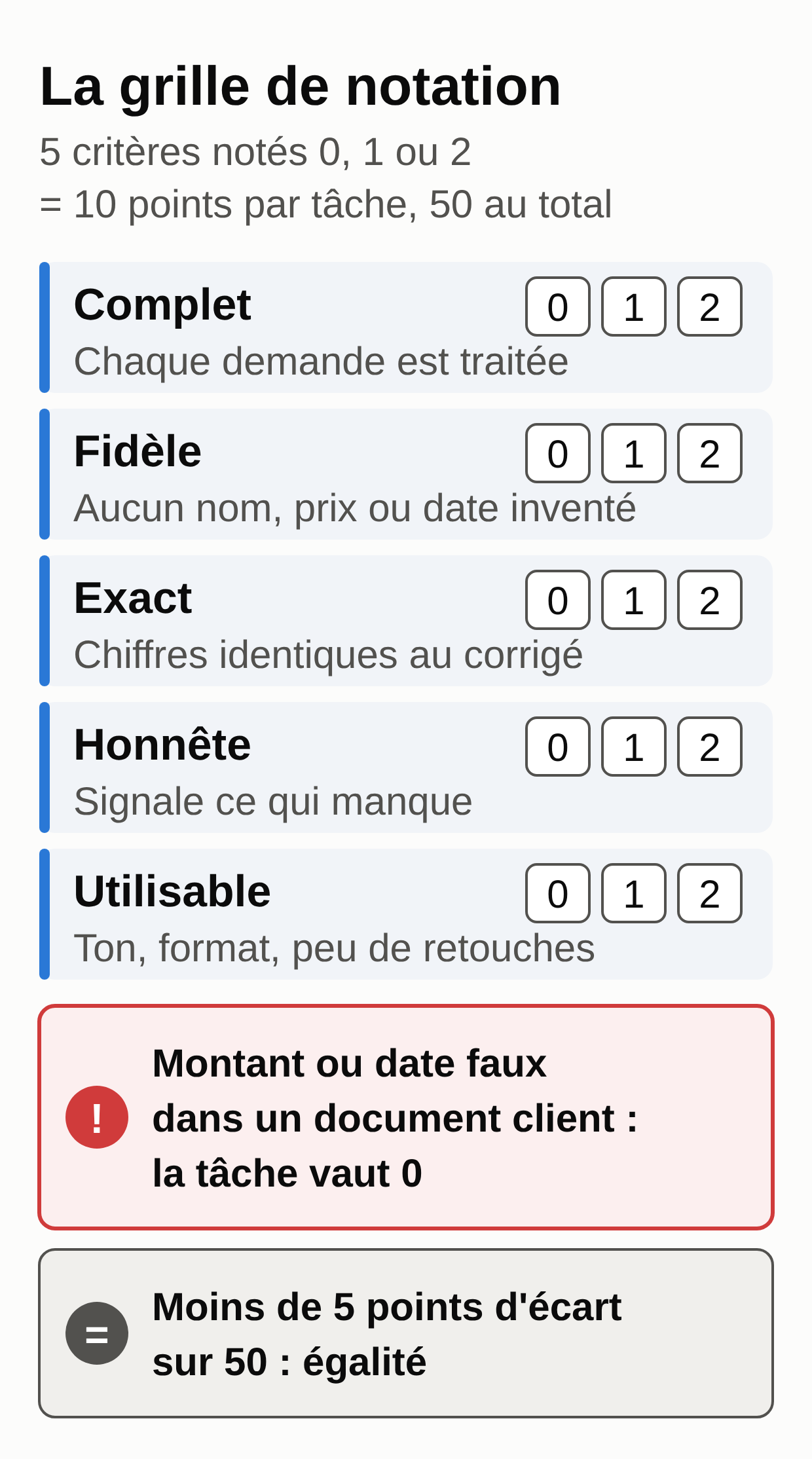
The scoring grid
Each criterion is worth 0, 1 or 2 points, so 10 points per task and 50 in total.
- Complete: every request or item in the file is handled.
- Faithful: no date, price or name that is not in the file.
- Accurate: numbers, dates and calculations match the answer key.
- Honest about gaps: flags what is missing or what you have to decide.
- Usable: formal register, tone, requested format, few edits needed.
One extra rule: a wrong amount or date in a document meant for the customer sets the task to 0. That is the expensive mistake. Our decision rule: a gap of less than 5 points out of 50 is a tie; in that case, decide on price, your tools and the data settings.
Replying to a customer email (task 1)
File: 1-mail-client.txt. A customer approves a flyer proof and slips four requests into the same email.
Help me reply to a customer. Here is their email.

1. List each separate request from the customer, one per line.
2. Write my reply: short, polite, formal, handling each request in order.

Rules:
- Do not promise any delivery date or any price. Write [to be completed] wherever I need to decide.
- If any information needed to act is missing, ask for it in the reply.
- Sign it "The Atelier Marelle team".

Customer's email:
[paste the contents of 1-mail-client.txt here]
Answer key: four requests (Sunday hours from 7 a.m. to noon, delivery before Friday, October 16, 500 more flyers with their price, invoice in the name of Delcour & Fils SRL). The reply promises neither the date nor the price and asks for the VAT number.
What to check: the customer mentions “three things” but asks for four. Stopping at three costs a completeness point, and adding a middleman who is not in the email (“after checking with the printer”) costs a faithfulness point. And “we can add 500 flyers” already commits your capacity.
Meeting minutes from notes (task 2)
File: 2-notes-reunion.txt. Rough notes from a call with a hotel that is redoing its restaurant menus.
Turn my call notes into minutes to send to the client. In my notes, "me" means Atelier Marelle.

Return four blocks:
1. Decisions made
2. Actions, as a table: action | owner | deadline
3. Open questions
4. Next meeting

Rules:
- A deadline only appears if it is written in my notes. Otherwise, write "to be confirmed".
- An amount that was mentioned but not agreed goes into open questions.
- Do not invent any participant or any decision.

My notes:
[paste the contents of 2-notes-reunion.txt here]
Answer key: two decisions (two menu formats, the old green and gold brand guidelines). Three actions: Julie sends three options on Friday, October 9; Mr. Piret sends the logo, date to be confirmed; the studio sends the quote, date to be confirmed. Still open: the paper, the 1,500 budget mentioned without agreement and the All Saints’ Day date. Next meeting: Thursday, October 15 at 10 a.m.
The trap: “next week” expresses an intention; nobody agreed to a deadline. In our runs, one model dated it “week of October 5, 2026” twice: the math was right, but it broke the instruction and created a commitment Mr. Piret never made. Score 0 for faithfulness. Making the paper an action for Mr. Piret, with no date, is still correct.
A quote from a brief (task 3)
Files: 3-brief-devis.txt and your price list 3-tarifs.csv. A physical therapy practice orders business cards, flyers, posters and a roll-up banner.
Prepare a draft quote from the brief and my price list below.

Return a table: item | quantity | unit price before VAT | total before VAT. Then the total before VAT, 21% VAT and the total including VAT.

Rules:
- Use only the prices in my price list. An item missing from the list stays out of the table, marked "to be priced".
- Do not give any discount. Flag the question so I can decide.
- Under the table, list every assumption you made (for example the number of batches).
- Check each multiplication and the sum before you answer.

Brief:
[paste the contents of 3-brief-devis.txt here]

Price list:
[paste the contents of 3-tarifs.csv here]
In France, replace 21% with 20%.
Answer key:
Business cards, 4 batches of 250 x 38.00 = 152.00
A5 flyers, 2 batches of 500 x 89.00      = 178.00
A2 posters, 3 x 14.50                    =  43.50
Graphic design, 3 h x 55.00              = 165.00
Delivery Liège, flat fee                 =  15.00
Total before VAT                           553.50
VAT 21%: 116.24   Total incl. VAT: 669.74
(France, VAT 20%: 110.70   Total incl. VAT: 664.20)
Roll-up banner: to be priced. Discount: to be decided.
What to check: the price of the roll-up banner. A tool that invents one gets 0 for the task, since that amount would go to the customer.
A clean table from messy data (task 4)
File: 4-paiements-bruts.txt. Seven payments copied from the bank and from emails, each written down in its own way.
Here are payments copied in no particular format. Turn them into a table: date (YYYY-MM-DD) | customer | invoice no. | amount in euros (format 1,234.50) | note.

Rules:
- One row per payment, in chronological order. The year is 2026.
- Do not delete any row. If a row seems to repeat an earlier row (same customer, same invoice, same amount), keep it and write "to check" on that second row only.
- Under the table, give the total of the confirmed payments (every row except those marked "to check") and show the sum, row by row.

Data:
[paste the contents of 4-paiements-bruts.txt here]
Answer key: seven rows dated from September 3 to 29, 2026. The one from September 15 (Boulangerie Delcour, invoice 2026-118, €245.00) is “to check”: a duplicate entry or a double payment, which is for you to decide. Total of confirmed payments: €3,298.00.
What to check: the sum. In our runs, one model announced €3,053.00 in bold, then found €3,298.00 when it redid the calculation row by row. Always read the breakdown, never just the total.
To keep this kind of table at hand, Claude can also turn it into an interactive dashboard: that is a Claude artifact.
A sequence of payment reminders (task 5)
File: 5-factures-ouvertes.csv. Four open invoices, two of them not yet due.
Today is October 5, 2026. Here are my open invoices.

My reminder rule:
- step 1, a polite message, from 7 days overdue;
- step 2, a firm message, from 21 days overdue;
- from 45 days overdue, no message: I call.

1. Make a table: invoice | customer | due date | balance due (amount incl. VAT minus amount already paid) | days overdue | step.
2. Write one email per customer who needs a reminder, mentioning only their overdue invoices.

Rules:
- Do not send a reminder for any invoice that is not yet due.
- Do not mention any late fee, interest or compensation: my terms and conditions are not attached.
- Keep the tone formal. Sign it "Atelier Marelle, billing department".

Invoices:
[paste the contents of 5-factures-ouvertes.csv here]
Answer key: invoice 2026-112 from Garage Mertens, 22 days overdue, step 2 (€420.00). Invoice 2026-122 from Brasserie du Pont, 7 days, step 1 (€186.00). Garage Mertens’ invoice 2026-127 (balance €240.00) and the Hôtel du Parc invoice are not yet due: no reminder, and the email to the garage must not mention them.
Late fees and compensation: this test leaves them out on purpose. In France, between businesses, the law provides for late payment penalties and a flat €40 compensation fee, to be stated in your terms and conditions and on your invoices (Entreprendre Service Public). In Belgium, have the Belgian rules checked. In both cases, have your accountant approve the wording.
How we prepared this test
A script provided with the examples (corriges.py (zip)) recalculates the answer keys: multiplications, VAT, the payment total, days overdue.
On September 28, 2026, we ran the five instructions through the OpenAI API with GPT-5.6 Sol and GPT-5.6 Luna. According to OpenAI, these are the models behind ChatGPT’s Instant mode: Sol on the paid plans, Luna on Free and Go. The API works without the app’s memory or tools. These runs therefore check the instructions and the answer keys; they do not score the app.
These runs helped us fix an ambiguous instruction (task 4 first said to mark “both rows”). They also produced the two errors mentioned above (tasks 2 and 4). An independent review reran tasks 1, 2 and 5 the same day: 1 and 5 correct, the same trap in task 2.
We did not run Claude for this article. So we publish no Claude vs ChatGPT score: your test, on your accounts, will settle it.
Which subscription to choose for your profile
You work alone and are new to these tools: run the test on both free versions, then take the individual plan of the winner, around €22 a month with VAT included. If you are sure you will stay a year, Claude Pro billed annually comes to €15 a month before tax.
Your budget is very tight: ChatGPT Go, at €7.99 a month on the App Store, gives more usage than the free version, with possible ads. According to OpenAI, Free and Go use the same default model (GPT-5.6 Luna), so your test on the free version gives you a good idea of what Go will write.
You spend your days on it: ChatGPT Pro 5x (€102.99 a month with VAT on the App Store) and Claude Max 5x (€90 before tax on claude.ai) give 5 times the usage of the individual plan. For 20 times, only Claude Max 20x (€180 before tax) is still taking new subscribers as of September 28, 2026.
You are a team of two or more and you handle customer data: ChatGPT Business or Claude Team, at the same price in dollars, with central billing, administration and content excluded from training by default. Choose based on the test results and your team’s tools.
You need to host your data in Europe: none of these plans allows it (see above). At OpenAI, that requires Enterprise. Our guide to models, mentioned above, notes that Mistral documents European hosting.
Your share of the work, whatever the tool
Both apps already do a lot. In its new version, rolling out on Pro and Max, Claude keeps working on a task in the cloud with your computer closed and runs scheduled tasks (see our Claude Cowork tutorial). ChatGPT also schedules tasks and connects to Gmail or Google Drive. Its custom GPTs, however, are set to be retired on December 11, 2026: see how to prepare their migration to plugins.
What is left to do is the setup. Someone chooses the connections, sets the permissions, keeps an eye on what the tool does and remains responsible for it. These features are set up account by account, and some only work on the computer where the app is open (local files and the browser, in Claude’s case). You are the one who manages them.
Linking a voice note to an action in your business software, an invoice in your ERP for example, also takes a connector that someone installs, configures and monitors.
Your next session
- Create a free account on each tool and turn off model improvement.
- Download the five sample files and the answer key.
- Run the five tasks in a temporary chat and an incognito chat, first answer only.
- Score each answer with the grid, and recalculate every total yourself.
- Redo your two most important tasks on the plan you are considering before you pay.
- Then replace our examples with your own email and quote templates, with no real customer data.
If you would rather hand off this setup, MACCUS installs and manages a personal assistant in Telegram. You write to it or send it a voice message, it drafts, and it remembers your habits and your rules. Connections to your tools are decided with you, case by case, and it only has the access you give it. See how the MACCUS AI assistant works and let’s talk about your tasks.