

You come back from a site visit with photos, two voice notes and a scribbled notebook. In the evening, you have to turn that into a clean quote, answer a client who has changed their mind, and pin down a date. That’s where AI saves you time, as long as you keep control of the prices and the required legal details.
This guide shows three admin tasks you can do starting today, without installing software and without connecting anything. You work by copying and pasting into a consumer assistant, you proofread, you approve. More advanced automation comes later, and only if it’s worth it.
This tutorial is for electricians, plumbing and heating contractors, carpenters and small general contractors with 1 to 8 people, in Belgium and France.
Three deliverables and a reusable workspace
By the end, you’ll have three deliverables and a reusable workspace:
- a structured draft quote based on site visit notes,
- a clarification email for a change request, with the list of impacts on the quote,
- an email proposing a time slot and a follow-up email for a quote with no response.
Prerequisites:
- an account on a consumer AI assistant: ChatGPT (OpenAI), Claude (Anthropic), Gemini in Google Workspace, or Le Chat (Mistral). A free account is enough to redo the exercises in this guide, which use only fictitious data. For regular use with your real documents, a paid plan is often preferable, but check the product terms case by case: exclusion from training, reusable workspaces and hosting location depend on the provider, the plan and the region, and paying alone never guarantees them.
- your own documents: your current price list, a quote template, and the exact text of your required legal details.
- nothing to install for the three tasks. The work is done at the keyboard.
One point before you start. All the exercises in this guide use fictitious files: you can redo them as they are, even on a free account, without exposing anyone. Processing real job site or client data (plans, full addresses, account numbers, financial data) is a different matter.
Removing a name doesn’t make data anonymous, and paying for a plan doesn’t on its own make the processing compliant: real use requires a legal basis, data minimization, a contract with the provider and a defined retention period. When in doubt, keep that data out of the tool, or get proper advice first.
Task 1. Turn site visit notes into a draft quote
This is the classic bottleneck: going back over field notes to produce a clean quote takes time, often at the end of the day. The AI doesn’t set your prices; it formats your notes and applies your price list.
App: any consumer assistant. The approach is the same in ChatGPT, Claude, Gemini or Le Chat; the exact output, however, varies from one product and version to another, hence the proofreading.
Sample input (fictitious site visit notes and price list, unit prices excluding VAT):
Client: Ms. Example, 1 rue de la Demo, Tournai. Visit on September 9.
Bathroom.
- Remove the old vanity unit.
- Install the new vanity unit, supplied by the client.
- Replace the shower mixer with a thermostatic model that we supply.
- Redo the silicone seal all around the shower tray, about 5 meters.
- Tile the wall behind the vanity unit, about 6 m².
Home built before 2000, occupied as a primary residence. Half a day.
Remove vanity unit; flat fee; €60 excl. VAT
Install vanity unit (supplied by the client); flat fee; €90 excl. VAT
Install thermostatic mixer (supply not included); unit; €70 excl. VAT
Redo silicone seal around shower; meter; €12 excl. VAT
Supply and install standard wall tile; m²; €55 excl. VATSteps:
- Open a new conversation in your assistant.
- Paste your price list first, then your site visit notes.
- Paste the prompt below.
- Proofread every line, fill in what the AI flagged as missing, add your required legal details.
Prompt to copy:
You are the admin assistant for a plumbing and tiling business.
Using the SITE VISIT NOTES and the PRICE LIST below, prepare a
DRAFT quote, not a final quote.

Rules:
- Use only the prices in the price list. Never make up a price.
- If a necessary item has no price in the list, add it with the
  note "to be completed" and explain what is missing.
- Separate labor from supplies when the information is available.
- Calculate the totals excluding VAT line by line, then a subtotal excluding VAT.
- Don't add VAT or the total including VAT: just write "to finalize:
  VAT rate to confirm + missing item(s)".
- Don't add any required legal details yourself: at the end, list the notices I
  need to check and paste in myself.
- Stick to admin. Don't give any technical, electrical or
  safety advice.

Present the result as a table: description, quantity, unit,
unit price excl. VAT, total excl. VAT.

SITE VISIT NOTES:
[paste here]

PRICE LIST:
[paste here]
Sample expected output:
| Description | Qty | Unit | Unit price excl. VAT | Total excl. VAT |
|---|---|---|---|---|
| Remove vanity unit | 1 | flat fee | €60.00 | €60.00 |
| Install vanity unit (supplied by the client) | 1 | flat fee | €90.00 | €90.00 |
| Install thermostatic mixer (supply not included) | 1 | unit | €70.00 | €70.00 |
| Redo silicone seal around shower | 5 | meter | €12.00 | €60.00 |
| Supply and install standard wall tile | 6 | m² | €55.00 | €330.00 |
| Supply thermostatic mixer | 1 | unit | to be completed | to be completed |
Subtotal excluding VAT (priced lines): €610.00.
To finalize: the selling price of the supplied mixer (missing from the list) is yours to decide; it includes your margin on top of the supplier’s purchase price. Then confirm the VAT rate, then the total including VAT. Required legal details to check and insert yourself.
Human check: verify that each quantity matches the reality of the job, that each price really is your selling price (margin included, not a copied purchase cost), and that the margin works for you. To keep your purchase prices up to date from your supplier invoices, follow our guide to having Claude read your invoices.
Redo the addition yourself, because a model can make a calculation error: here the five priced lines give 60 + 90 + 70 + 60 + 330 = €610 excluding VAT, and the mixer supply stays “to be completed.” The AI knows nothing about difficult access, hidden wear or your markup coefficient. The final selling price remains your decision.
Common mistake and fix: the AI “invents” a plausible price for the missing item. Correct it by keeping the instruction “never make up a price” and requiring the note “to be completed.” If a model keeps filling the gaps, a reasoning model (see below) often helps, though that isn’t guaranteed: always proofread the output and ask again if needed.
Task 2. Clarify a change request
A client replies to the quote by adding a service and pushing back the date. Before you reprice, you need to ask the right questions. The AI writes a clear reply and prepares your internal list of impacts.
App: the same assistant. Input: the client’s message (fictitious):
Hello, actually I'd also like you to install an electric towel
warmer in the bathroom. And can we move the work to
the week of the 28th? Thank you. Ms. Example
Steps:
- Paste the client’s message.
- Paste the prompt below.
- Proofread, adjust the tone, and send it yourself from your email.
Prompt to copy:
You are the admin assistant for a construction business. A client
replied to a quote asking for a change.

Produce two things:
1. A reply email in English, polite and formal, that: acknowledges receipt,
   confirms what you understood, and asks the questions needed to
   price it without assuming anything (desired location, who supplies the
   equipment, access and date constraints). Don't give any technical
   or safety advice: ask questions, decide nothing.
2. An internal "impacts on the quote" list: what will need to be added or
   revised (new line, amendment, possible effect on the schedule), without
   pricing anything until I have replied.

Client's message:
[paste here]
Sample expected output, the email:
Dear Ms. Example,
Thank you for getting back to me. You’d like to add the installation of an electric towel warmer in the bathroom, and to move the work to the week of the 28th. I’ve made a note of it.
So I can prepare an accurate addition to the quote, could you tell me: where you’d like the unit installed, who supplies it (you or us), and if you have a model in mind? I’ll then get back to you with the updated quote and a confirmed date.
Best regards,
And the internal list: add a “towel warmer installation” line (to be priced after the reply), plan an amendment to the original quote, check the impact on the length of the job and on the week of the 28th, without assuming what is already booked.
Human check: feasibility is something you can’t delegate. Check on site what the request involves before you price it. The AI words the question; you judge the answer.
Common mistake and fix: the AI immediately suggests a price or a technical solution. Cut it short with the instruction “ask questions, decide nothing,” and remove any priced line from its output.
Task 3. Propose a time slot and follow up on a quote
Two short emails, often put off for lack of time. The AI prepares them, and you send them after checking your calendar.
App: the same assistant. Input (file contexte-planning.txt, fictitious):
Scheduling and follow-up context (fictitious example)

Quote sent: the bathroom quote (ref. DEV-2026-014) was sent
to Ms. Example 10 days ago, with no response so far.

My availability for the job (half a day):
- Tuesday, September 29, morning
- Thursday, October 1, morning
- Friday, October 2, afternoon

Goal: propose a time slot to the client and politely follow up on the quote
that has had no response. Don't confirm anything firmly until I have checked
my actual calendar.
Steps:
- Paste your context (the quote in question, the date it was sent, your actual time slots).
- Paste the prompt.
- Check the time slots in your real calendar, then send them yourself.
Prompt to copy:
You are the admin assistant for a construction business. Write two
short emails in English, polite and formal.

1. A courteous follow-up for a quote sent 10 days ago that has had no
   response: mention the reference, offer to answer any questions, without
   being pushy.
2. An appointment proposal that lists the time slots below as
   suggestions to be confirmed, never as firm dates.

Don't confirm any date definitively. Don't invent any time slot other
than the ones I give you.

Context and time slots:
[paste here]
Sample expected output, the follow-up:
Subject: Your bathroom quote (ref. DEV-2026-014)
Dear Ms. Example,
I’m following up on the quote I sent you ten days ago for your bathroom. Do you have any questions, or would you like to discuss it? I’m happy to help.
Best regards,
And the time slot proposal, which lists your three available slots and presents them as “to be confirmed based on your preference.”
Human check: open your real calendar before you send. Don’t let the AI send the emails for you until you have set up a dedicated approval step.
Common mistake and fix: the AI turns a proposed slot into a confirmed appointment, or invents a new one. Keep the instruction “suggestions to be confirmed, don’t invent any time slot,” and check the date before sending.
Create a reusable workspace for your business
Pasting your prices and instructions every time wastes time. Several assistants offer reusable workspaces: Projects in Claude and ChatGPT, Gems in Google Gemini.
Their availability and limits depend on your account, free or paid. You add your documents and instructions once, and every conversation starts with that context.
In practice, create a “Quotes and jobs” workspace and add:
- your price list,
- your quote template,
- the exact text of your required legal details,
- two or three sample quotes typical of your style, fictitious for the testing phase (no real client files at this stage).
Then set the workspace’s standing instructions:
You are the admin assistant for my construction business.
- Use only the prices in the file provided. Never make up a price;
  flag missing items as "to be completed".
- Always produce drafts to approve, never final documents.
- Don't add required legal details yourself: remind me to check them and
  paste them in from the reference document.
- Don't give any technical, electrical or safety advice.
- Write in English, in a professional and direct tone.
A workspace like this supports your own conversations, with no programming: you reuse it from one visit to the next instead of pasting everything again. While you’re testing, keep fictitious examples in it; only add real documents after checking the framework (provider terms, legal basis, retention period). Also note that the content you add is a frozen copy: if your prices change, update the file in the workspace.
Choose the right model for each task
You don’t need to know the code names. Remember two families.
For a simple, fast, repetitive task (sorting incoming emails, rewording a short message, pulling information out of pasted text), a lightweight model is enough. At most providers, these models have names like “mini,” “flash” or “small.”
For a task that requires reasoning or reading a dense document (structuring a quote from notes, reading a long specification, comparing line items), use a long-context reasoning model, the provider’s top-tier range.
A few pointers by provider: OpenAI (ChatGPT), Anthropic (Claude), Google (Gemini, built into Google Workspace) and Mistral (Le Chat) all offer these two levels. If data residency in Europe matters to you, don’t rely on the provider’s nationality alone: where data is processed and stored depends on the product, the plan and the region, and it’s spelled out in the plan’s terms and documentation.
Mistral, a French developer, highlights European hosting on some of its plans; the other providers also offer EU residency options, often through an enterprise plan.
In every case, hosting in Europe doesn’t on its own prove GDPR compliance: it reduces a risk without removing it. Microsoft 365 Copilot makes sense if you already live in Excel, Outlook and Teams, for example to analyze a timesheet file or produce minutes of a supplier meeting.
Don’t mix up the building blocks: the model is the engine; the consumer app (ChatGPT, Claude, Gemini, Le Chat, Copilot) is what you open; the subscription gives you access; the API is for developers; the connector links the AI to a piece of software; the automation tool (Zapier, Make, n8n) triggers and runs sequences.
Model names change fast. Check which model is active in your account or on the provider’s pricing page, and keep the official pages handy: openai.com/api/pricing, anthropic.com/pricing, ai.google.dev/pricing, mistral.ai/pricing. Models are covered in detail in our reference article on models and agents.
One assistant or a team of agents?
You’ll read everywhere that you can set up a “team of agents” with a coordinator and specialists. That’s true, but you need to understand where the line is, or you’ll think you’ve automated a process that is still manual.
Giving an assistant three “roles” in a single prompt doesn’t create three independent agents. You have one assistant that switches between several roles. Copying its answer from one conversation to another means doing the delegation yourself, by hand. A reusable workspace doesn’t become an autonomous system either.
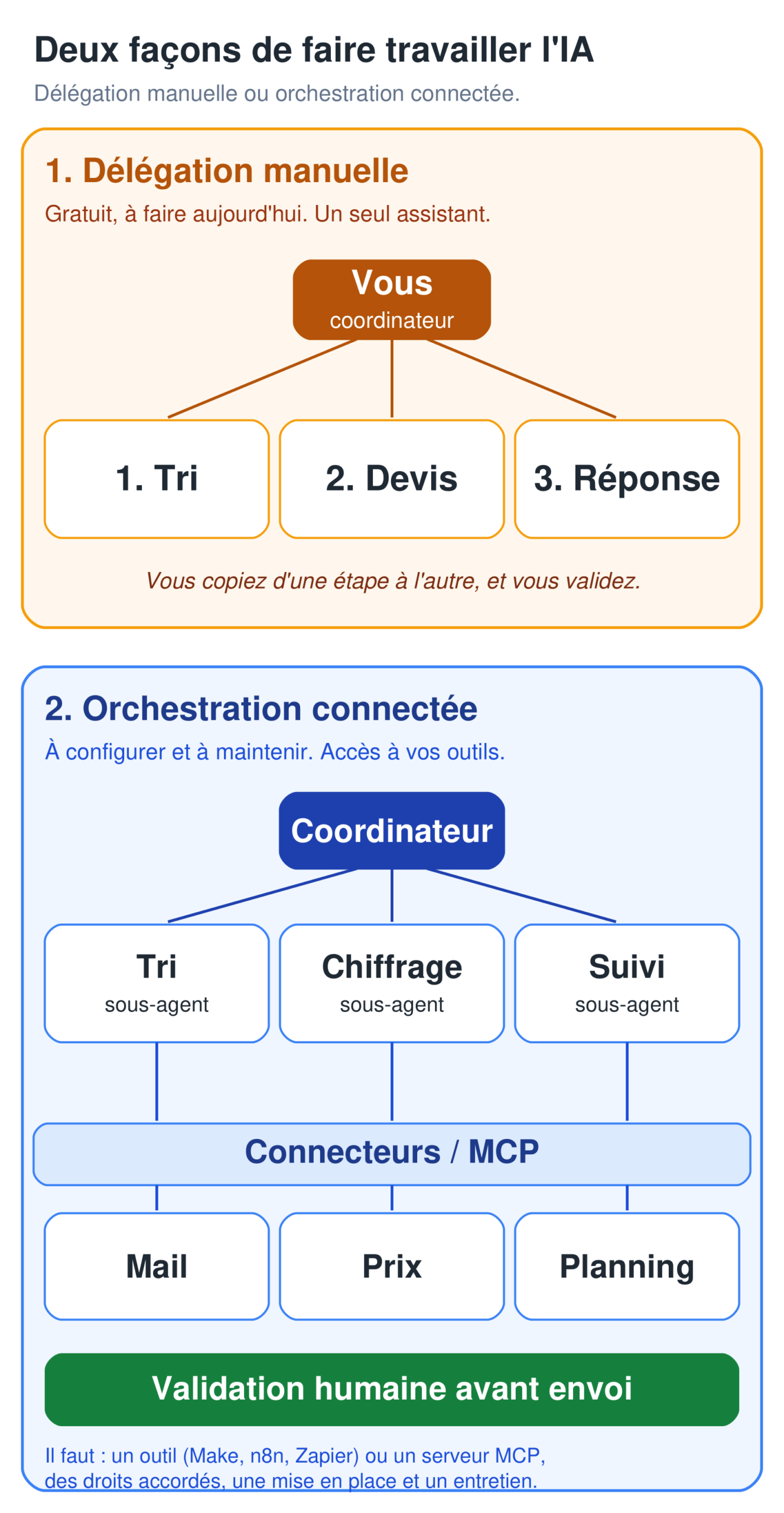
A manual exercise to try today. Take a fictitious email from a property manager reporting a breakdown, with photos. Do it in three stages, with you in the middle:
- “Sorting” conversation: paste the fictitious email and ask it to pull out what is being requested and the missing information. You judge the urgency and the type of job: don’t let the AI decide them.
- “Pricing” conversation: paste the original email and your notes, with your price list, and ask for a draft quote, as in task 1. Carry the full source from one step to the next, rather than only a summary.
- “Reply” conversation: paste the original fictitious email, your approved notes and the draft quote, then ask for an email proposing a visit. Keep any unconfirmed availability in brackets.
You carry the result from one step to the next and approve it each time. Nothing is connected or sent without you, and here you work only on fictitious data: the protection comes from that control, not from the tool. You’re the coordinator.
Real orchestration is a different job. For a coordinator to actually read your inbox, your price library and your schedule on its own, you need: connectors (through a tool such as Make, n8n or Zapier, or through an MCP server, the open protocol that links an AI to software), access and permissions granted for each piece of software, a setup that someone configures and maintains, and above all a human approval step before anything is sent or written.
Using a workspace doesn’t give you any of that. And when you set it up, limit the permissions: allow “create a draft,” block “send” and “delete.”
Your legal obligations remain yours
The AI prepares, you approve, and legal responsibility can’t be delegated. The rules differ between Belgium and France; here are the points that affect your quotes and invoices. Always check the details with your accountant.
In Belgium:
- Access to the profession. In Wallonia and Brussels, some regulated activities still require proof of competence (access to the profession); in Flanders, this requirement has been abolished. No tool gets around this condition. Working without the required access can expose you to penalties and weaken your contracts: check your situation with your business one-stop shop.
- B2B e-invoicing. Since January 1, 2026, domestic B2B invoices between VAT-registered businesses established in Belgium must be issued and received in a structured electronic format (EN 16931 standard), in principle through the Peppol network (law of February 6, 2024, royal decree of July 8, 2025). Some cases remain outside the obligation (B2C, non-established taxable persons, certain exempt transactions), and another format is still allowed if both parties accept it, provided it stays compliant and the Peppol route remains available. For the transactions concerned, a simple PDF by email is no longer enough. Under the decree, fines start at €1,500 and can reach €5,000. AI doesn’t replace this channel: it can write a draft, but compliant issuing goes through your software connected to Peppol.
- 6% VAT on renovation. The reduced rate isn’t automatic: it requires several conditions to be met (a private home at least ten years old, occupied as a home, eligible work and client). Age alone isn’t enough. Since 2022, the certificate signed by the client has been replaced by a standardized statement to put on the invoice, which the client can dispute within the set time limit. Insert the exact, current text of this statement yourself. Don’t have an AI write it “word for word” without checking: a wording error, or an unmet condition, can cost you the reduced rate.
In France:
- Quote details. Since the order of January 24, 2017, a quote is mandatory for troubleshooting, repair and maintenance services, whatever the amount. Two details assistants often forget: when your work falls under mandatory ten-year liability insurance (structural work and works subject to that guarantee, not every service), your insurer’s or guarantor’s contact details and the geographic coverage of the policy; and, for a contract with a private individual, the consumer mediator. A missing mandatory detail can get a contract canceled and expose you to penalties: list the ones that apply to you and check them on your own template, rather than relying on an AI.
- E-invoicing. From September 1, 2026, all VAT-registered businesses established in France must be able to receive e-invoices through an approved platform. The obligation to issue them applies to small and midsize businesses and microbusinesses from September 1, 2027 (earlier for large and intermediate-sized companies). Plan to choose a platform; AI doesn’t replace one.
On both sides of the border, the same GDPR reflex applies: don’t hand plans, client addresses or financial data to a consumer tool without checking the framework, whatever price you pay.
Some plans exclude your data from training and allow hosting in the EU, but check the product terms; it isn’t a given by default. Don’t treat any chatbot as “GDPR compliant” on principle: regulated use requires a legal basis, data minimization, a proper data processing agreement and a defined retention period.
Your checklist for the next session
- Gather your current price list, your quote template, the exact text of your required legal details (Belgium or France), and two or three typical sample quotes (fictitious for the testing phase).
- Create a “Quotes and jobs” workspace and add these documents plus the standing instructions.
- Check in the product terms what your plan covers (exclusion from training, hosting, workspaces) before you add real documents; a free account is enough for fictitious tests.
- Test task 1 first with the fictitious files, then, only once the framework is checked, on a real visit, checking every price.
- Decide what the AI is allowed to do: write drafts yes, send or invoice no.
- Keep the Peppol channel or the approved platform, and the legal notice check, outside the AI’s scope.
Going further
If you’re just starting out, begin with the pillar guide “Using AI in your profession”. For details on models and agent architectures, see the reference article on models and agents. And if your bookkeeping goes through an accounting firm, the article for accounting firms shows how to prepare the same documents on the numbers side. What you can prepare yourself before sending the file to your accountant (sorting documents, questions, VAT checks) is covered in Can Claude replace your accountant? To have the task 3 quote follow-up run every week, see building an AI agent without code.
When copy and paste is no longer enough and you want to connect your inbox, your calendar or your quoting software cleanly to an assistant, with an approval step before each send, that’s the kind of setup MACCUS puts in place case by case.
The assistant works through Telegram (text, voice notes, documents), in French, Dutch or English, on your own subscription. Connections to your software are assessed and set up one by one, not turned on by default. Let’s talk about your workflow: maccus.fr/en/ai-assistant.