

Five supplier invoices a day, purchase prices that change without warning, and quotes still calculated on spring prices: your margin shrinks and nobody notices. In a Facebook group for business owners, a tradesman asked for exactly this: have Claude pull his invoices from Pennylane, update his purchase prices and recalculate his margins.
This guide does it in two stages. First by hand, with three prompts and sample files to download: extract the lines from a PDF invoice, update a purchase price table, recalculate the margin on a quote. Then the connected version: the read-only Pennylane MCP, Odoo, and Peppol invoices that arrive already structured.
Official pages from Anthropic, Pennylane, Odoo and the Belgian and French authorities read on October 6, 2026.
The tools and files you need
- A Claude account. You attach a file with the “+” button at the bottom left of the message box, then “Add files or photos.” According to Anthropic’s help center, Claude reads the text and visual elements of a PDF of 100 pages or fewer.
- Your purchase price table, kept in Excel or Google Sheets, exported as CSV. An Excel file (.xlsx) works too, as long as you have turned on code execution and file creation in your account.
- The exercise files, all fictitious and in French: the invoices from Couleurs du Nord, Outillage Vasseur and Négoce Dumoulin, the purchase price table, quote D-2026-118 and the three prompts.
Do the exercise with these files before you use your real invoices. A supplier invoice contains names, an IBAN and your purchasing terms, so check your account’s privacy settings first. Pro and Max fall under Anthropic’s consumer terms, whose European version is written for consumers: if you pay for them for your business, read them before you subscribe. Choosing a plan is covered in our guide on which Claude plan to choose.
Step 1. Extract the lines from a PDF invoice with Claude
- Open a new conversation. If you plan to repeat the exercise every week, create a “Purchasing” project instead and paste the prompt into its instructions. A file attached in one conversation doesn’t carry over to the next on its own: see what Claude’s memory really keeps.
- Attach the Outillage Vasseur invoice with “+”, then “Add files or photos.”
- Paste the prompt below and send it.
You are helping me enter my purchases. I'm attaching a supplier invoice as a PDF.
1. Copy every line of the invoice into a table with these columns, in this order:
supplier; invoice_number; invoice_date; reference; description; quantity; unit; unit_price_excl_vat; discount_pct; net_unit_price_excl_vat; amount_excl_vat
2. net_unit_price_excl_vat = unit price excluding VAT after the line discount, rounded to the cent. With no discount, discount_pct = 0.
3. Below the table, copy the printed totals: total excluding VAT, VAT (rate and amount), total including VAT.
4. Run three checks and write "OK" or the difference in euros:
   - for each line, quantity x unit price x (1 - discount) = amount excluding VAT, to within €0.01;
   - sum of the line amounts excluding VAT = printed total excluding VAT;
   - total excluding VAT + VAT = total including VAT.
5. Don't make anything up. A number that is illegible or missing is written ILLEGIBLE, never an estimate.
6. End with the same table in CSV format (comma separator, decimal point, dates YYYY-MM-DD) in a code block, so I can paste it into my spreadsheet.
The output, a real extract from the test described further down, on the Outillage Vasseur invoice (item names stay in French, as printed on the sample invoices):
reference,description,quantity,unit,unit_price_excl_vat,discount_pct,net_unit_price_excl_vat,amount_excl_vat
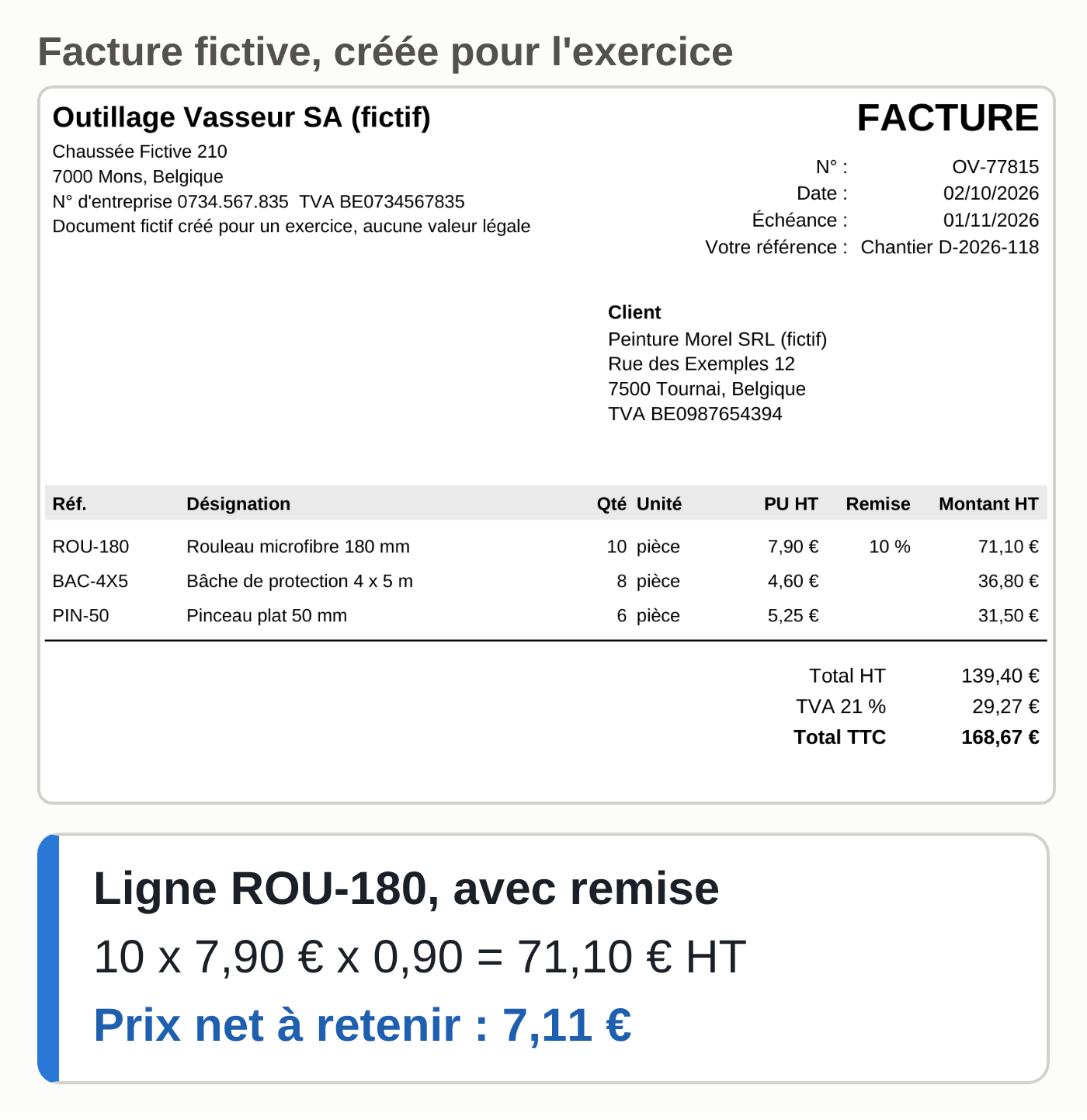
ROU-180,Rouleau microfibre 180 mm,10,pièce,7.90,10,7.11,71.10
BAC-4X5,Bâche de protection 4 x 5 m,8,pièce,4.60,0,4.60,36.80
PIN-50,Pinceau plat 50 mm,6,pièce,5.25,0,5.25,31.50
The supplier, number and date columns (OV-77815, 2026-10-02) are cut here for readability. All three checks show “OK”: €139.40 excluding VAT, €29.27 in VAT, €168.67 including VAT.
Human check: compare the three totals with the PDF, then redo one discounted line yourself. Here, 10 x 7.90 x 0.90 = €71.10, which is €7.11 per unit. That net price is what goes into your table.
What can go wrong:
- A printed total that is wrong, or misread. We deliberately changed the Négoce Dumoulin invoice to show €241.60 excluding VAT instead of €219.60, and the check flagged the €22.00 difference. Without point 4 of the prompt, nothing would have warned you.
- A blurry invoice photo or a crooked scan. The ILLEGIBLE rule prevents a silent estimate; take the number from the original instead.
- Credit notes, pallet deposits or shipping fees. They come out as ordinary lines, and it’s up to you to decide whether they belong in a purchase price.
Step 2. Update your purchase price table
The exercise table has eight items, each with its purchase price excluding VAT and the date of that price. Keep a dated copy of the previous version before each update.
- In the same conversation, attach prix-achat-fictifs.csv.
- Paste the three CSV blocks you got in step 1, one per invoice.
- Send the following prompt.
Here is my purchase price table (prix-achat-fictifs.csv) and the lines extracted from today's invoices (CSV below).
For each reference in my table:
- if it appears on an invoice, new price = net_unit_price_excl_vat from the most recent invoice, new date = date of that invoice;
- otherwise, keep the old price and the old date.
Difference in % = (new - old) / old x 100, two decimals.
Return:
1. the updated table, with my columns plus old_price and difference_pct, in CSV format (comma separator, decimal point);
2. the list of differences of 5% or more, up or down, with the number of the source invoice;
3. separately, the invoice lines missing from my table (fees, new items): don't add them.
Don't change any reference or description.
The output on the sample files, four differences of 5% or more:
- ACR-MAT-10, matte paint 10 L: from €62.50 to €68.40, up 9.44% (invoice CDN-2026-0412).
- END-LIS-25, smoothing plaster 25 kg: from €34.80 to €39.60, up 13.79% (ND-26-03321).
- PIN-50, flat brush: from €4.95 to €5.25, up 6.06% (OV-77815).
- ROU-180, microfiber roller: from €7.90 to €7.11, down 10.00% because of the discount (OV-77815).
Négoce Dumoulin’s €25.00 delivery fee comes out separately, without being added to the table.
Human check: decide line by line. A one-off discount doesn’t make a new purchase price: if the 10% on the rollers was a promotion, keep €7.90. Delivery fees are spread over the whole job. Then paste the approved column into your file yourself: Claude doesn’t touch your master file.
Step 3. Recalculate a quote’s margin and markup
Two rates often get mixed up. The margin rate divides the profit by the selling price excluding VAT. The markup divides the same profit by the cost price excluding VAT. The sample quote therefore shows about 40% on one and 68% on the other. The margin calculator in our guide to Claude artifacts shows both.
The sample quote D-2026-118 covers seven items and 30 hours of labor at a loaded cost of €38.00 an hour, for €2,480.00 excluding VAT. The tradesman is aiming for a 40% margin.
- Attach devis-fictif-D-2026-118.csv and paste the table you approved in step 2.
- Send the following prompt.
Here is quote D-2026-118 (devis-fictif-D-2026-118.csv: material quantities and hours) and my updated purchase price table.
Quote selling price excluding VAT: €2,480.00. Loaded hourly cost: €38.00. Target margin: 40%.
Calculate twice, with the old price and then with the new price of each item:
- material cost excluding VAT (quantity x purchase price, line by line);
- labor cost excluding VAT;
- cost price excluding VAT = material + labor;
- profit excluding VAT = selling price excluding VAT - cost price excluding VAT;
- margin = profit / selling price x 100;
- markup = profit / cost price x 100;
- selling price excluding VAT that restores the target margin = cost price / (1 - 0.40).
Show a before / after table, show the calculation for each line, then say in one sentence whether the quote stays at a 40% margin or more.
The output:
| Quote D-2026-118 | Old prices | New prices |
|---|---|---|
| Material excl. VAT | €338.35 | €359.27 |
| Cost price excl. VAT | €1,478.35 | €1,499.27 |
| Profit excl. VAT | €1,001.65 | €980.73 |
| Margin | 40.39% | 39.55% |
| Markup | 67.75% | 65.41% |
Material costs go up 6.2% and the quote drops below the 40% target. To get back to it, you would have to bill €2,498.78 excluding VAT instead of €2,480.00. The gap looks small on one quote; repeated across every job in a year, it adds up.
Human check: redo the calculation in your spreadsheet, one formula per line, without starting from Claude’s numbers. A language model can get a multiplication wrong, and a wrong margin ends up in a signed price.
If you track each job from the first call to the invoice, like the painting company in the same group, add the job reference to each extracted line. The three sample invoices carry “Chantier D-2026-118” (job D-2026-118), so the same prompt then gives the job’s actual margin, to compare with the signed quote.
The October 6 test and its limits
On October 6, 2026, the three prompts ran on the sample files, with an OpenAI model called through its API: Claude itself did not process these invoices for this guide. Result: the nine lines and the three sets of totals copied without error, the four differences found, the delivery fee kept separate, and margin figures identical to an independent recalculation done by a small script. The invoice with the wrong total triggered the alert. The test’s sample files are the ones offered for download above.
This test validates the prompts and the files. Before you rely on the result in your account, run it again on a real invoice whose figures you know.
Connecting Claude to Pennylane, Odoo and Peppol
Dropping each PDF into a conversation is enough to understand the method. To track your purchases, Claude has to read the invoices where they are already filed: your accounting or business management software.
The Pennylane MCP for your supplier invoices
Pennylane publishes its own MCP server (MCP is the protocol that connects an AI assistant to a piece of software). According to Pennylane’s help center, read on October 6, 2026:
- it is open to accounting firms and to companies from the Essentiel plan up;
- it is read-only, and Pennylane says it is working on write access;
- the connection uses your Pennylane login: the assistant has the same access rights as you, limited to the tools you authorize;
- an executive or an in-house accountant can suspend all connections in Settings, then Artificial Intelligence.
Its technical documentation lists, among others, a tool that returns a supplier invoice with its lines, VAT and payments, and another for the product catalog with unit prices excluding VAT.
To add it in Claude, follow Anthropic’s help center. With Pro or Max: Customize, then Connectors, “+ Add” and “Add custom connector.” Name it Pennylane, enter the address https://mcp.pennylane.com/mcp and keep the suggested authentication settings (Pennylane advises leaving the advanced settings empty). Then log in to Pennylane, choose the authorized tools and confirm.
The free account is limited to one custom connector. On Team and Enterprise, organization owners add it (on Enterprise, so can roles with that permission). You then turn it on conversation by conversation, with “+” then Connectors. If connectors are new to you, start with our guide to connecting Claude to Gmail, Drive and Calendar.
We did not test this connector on a real Pennylane account for this guide: these steps come from the two help pages. Once the connector is active, the request becomes:
Using the Pennylane connector, read-only: list the supplier invoices dated October 1 to 3, 2026. For each one, give its lines with the usual columns (supplier; invoice_number; invoice_date; reference; description; quantity; unit; unit_price_excl_vat; discount_pct; net_unit_price_excl_vat; amount_excl_vat), then run the three checks. Don't write anything in Pennylane.
Steps 2 and 3 stay the same. Spot-check every second or third invoice in Pennylane: Claude reads the data stored in the software, and a PDF that was entered badly stays wrong there. Pennylane also points out that the AI assistant’s compliance (data reuse, contract, hosting) remains your responsibility.
For automated processing, a developer goes through the Pennylane API: its version 2 exposes the lines of each supplier invoice, with read-only authorization. For Qonto, Stripe or Mollie, see the entries in our directory of MCP connectors for small businesses.
Odoo works the same way, from your database
On Odoo, our guide to Claude and Odoo over MCP sets up a read-only connection on a test database. According to the Odoo 19 documentation, an invoice received through Peppol automatically becomes, depending on the setting you choose, a draft vendor bill or a document to process in the Documents app. The questions from steps 2 and 3 can then cover your vendor bills in Odoo.
Peppol e-invoices arrive already structured
A structured e-invoice carries each line in tags: reference, quantity, price, amount. There is nothing to decipher, so no number gets misread.
- In Belgium, since January 1, 2026, invoices between Belgian VAT-registered businesses must, with a few exceptions, be electronic and structured, sent over the Peppol network in the Peppol BIS format (unless both parties agree on another format that complies with the European standard). A PDF sent by email is no longer enough between these businesses.
- In France, since September 1, 2026, all VAT-registered businesses must be able to receive e-invoices, through an approved platform. Large companies and mid-size companies must already issue them; small businesses and microbusinesses have until September 1, 2027. The planned formats are UBL, CII or a mixed format that attaches a structured data file to the image of the invoice.
Here is one line of the Négoce Dumoulin invoice in a fictitious, minimal UBL file (zip), based on Peppol BIS Billing 3.0 and not validated with the official Peppol tools (VAT category left out of the extract):
<cac:InvoiceLine>
  <cbc:ID>2</cbc:ID>
  <cbc:InvoicedQuantity unitCode="H87">3</cbc:InvoicedQuantity>
  <cbc:LineExtensionAmount currencyID="EUR">118.80</cbc:LineExtensionAmount>
  <cac:Item>
    <cbc:Name>Enduit de lissage 25 kg</cbc:Name>
    <cac:SellersItemIdentification><cbc:ID>END-LIS-25</cbc:ID></cac:SellersItemIdentification>
  </cac:Item>
  <cac:Price><cbc:PriceAmount currencyID="EUR">39.60</cbc:PriceAmount></cac:Price>
</cac:InvoiceLine>
A short script pulled the same three lines and the same totals from it as from the PDF, with no text recognition at all. XML isn’t on the list of documents Claude accepts on Anthropic’s help page: in practice, your software receives the structured invoice, and Claude reads your software through its connector. For VAT and splitting roles with your accountant, see what Claude can do for your accounting.
Five invoices a day, three hundred days a year
Five invoices a day for three hundred days makes 1,500 invoices a year. Nobody drops them into a conversation one by one. What holds up over time is a scheduled flow: every day, new invoices are read in the software and compared with the price table, and only the anomalies reach a person who approves them. A difference of 5% or more, an unknown reference, a total that doesn’t add up.
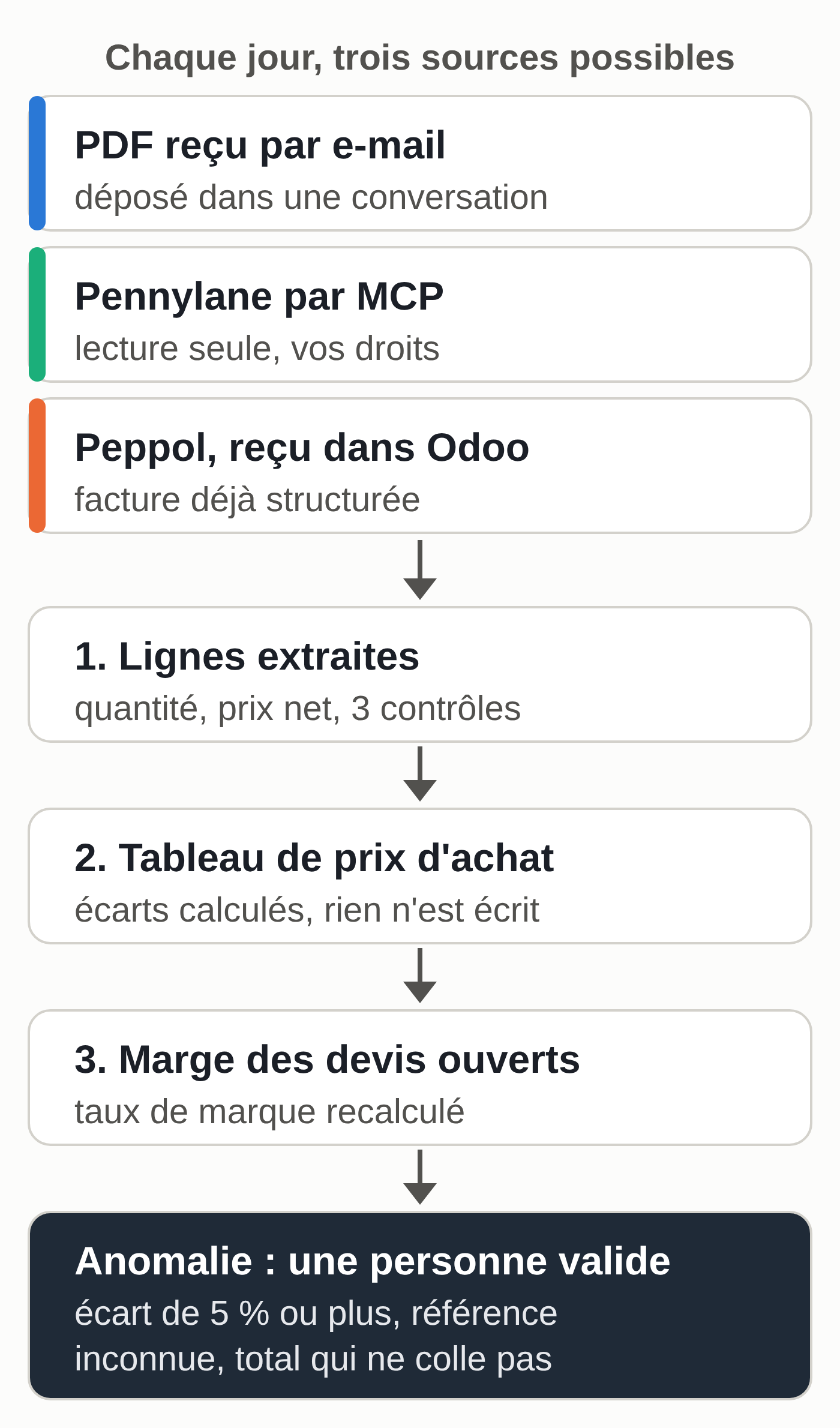
Someone has to choose the thresholds, open read access, check every morning that the flow ran and own the corrections. To store the prompts without pasting them again every day, see Claude skills; to schedule a flow without coding, building an AI agent without code compares the tools.
If you’d rather hand off this part, the MACCUS AI assistant works in Telegram: you forward it a PDF invoice or ask your question in a voice note, and it compares the invoice with the price table you gave it. Connecting it to Pennylane, Odoo or your email is decided with you, case by case, with the access you grant it.
Your next session
- Download the sample files and run prompt 1 on the Outillage Vasseur invoice.
- Redo the discounted line by hand: 10 x 7.90 x 0.90 = €71.10.
- Export your real purchase price table as CSV, with the date of each price.
- Set your alert threshold (5% in the example) and your target margin.
- Recalculate a current quote with prompt 3, then check it in your spreadsheet.
- On Pennylane Essentiel or higher, add the connector and ask a first read-only question.
- In Belgium, check which suppliers already send you their invoices through Peppol; in France, check the approved platform that receives yours.