

No. Claude doesn’t keep your statutory books, doesn’t file any return and doesn’t sign anything. It can do the groundwork: sort the month’s receipts and invoices, spot what’s missing, write up your questions and recalculate a VAT return before it goes out.
This guide is for freelancers, sole traders and owners of very small businesses in Belgium and France. It walks through three tasks step by step with prompts to copy and sample files with made-up data, then the 2026 rules you need to know: e-invoicing, who files what, professional secrecy and data. Are you an accountant yourself? Our guide to AI in accounting firms is written for you.
The short answer: Claude prepares, your accountant signs off
Claude reads PDFs, photos of receipts, CSV files and Excel files. It can add things up, compare two lists and write a clear email. It doesn’t know your tax situation, it can misread an amount on a blurry photo and it takes no responsibility for anything.
The right split of work comes down to four steps.
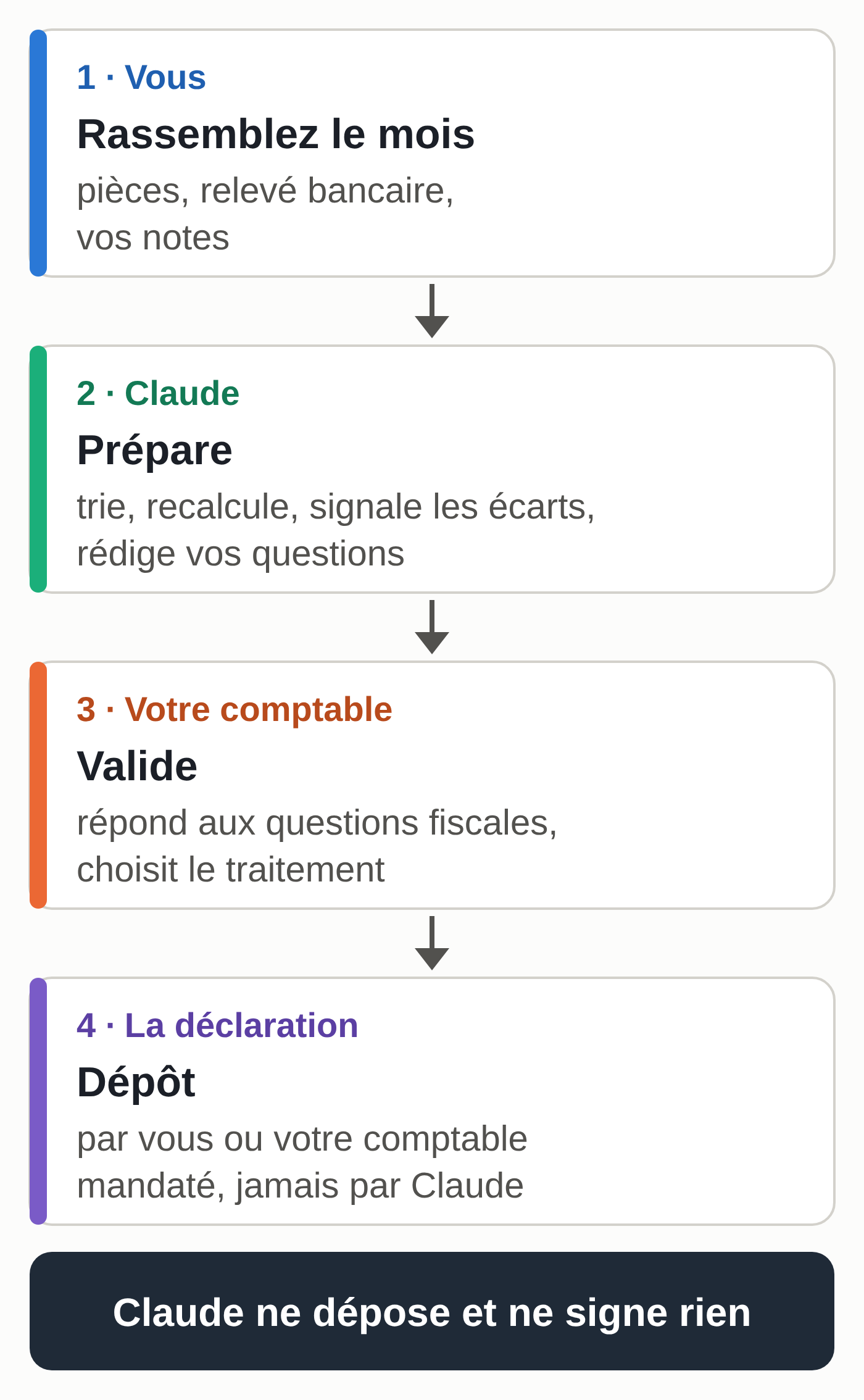
Anything that involves a tax decision stays with your accountant: deciding whether to deduct an expense, depreciating a purchase, changing your VAT scheme, replying to a letter from the tax authorities.
Before you start
You need a Claude account. A free account lets you open a project and attach files: enough to try the three tasks on the sample files, within the free plan’s usage limit. For regular use, the Pro plan costs €18 excluding VAT a month on monthly billing (price checked on September 28, 2026 on claude.ai from a Belgian account). The plans are detailed in our comparison of Claude subscriptions.
Create a project, for example “Accounting 2026.” Projects are available on every account, including free ones (five projects at most on the free plan, according to Anthropic’s help center as of October 6, 2026). Paste these instructions into the project’s instructions field:
You are helping a freelancer prepare her bookkeeping. Country: Belgium. VAT: quarterly return.
You prepare, you don't decide: no firm tax answers, never a statement that a document is ready to file.
You copy amounts exactly as they appear on the documents. If a piece of data is missing or illegible, you write "to check."
If code execution is turned on, you do the calculations with code and show the details.
Every question that touches on tax goes into a "Questions for the accountant" list.
Adjust the first line: your country, how often you file VAT, or “VAT-exempt small business” if you don’t charge VAT.
A few useful limits, according to Anthropic’s help center as updated on July 23, 2026: up to 20 files per conversation; PDF, CSV, TXT and DOCX accepted; for an Excel file (XLSX), code execution and file creation must be turned on in your account. A photo of a receipt is easier for Claude to read when it’s over 1,000 pixels on each side.
Run your tests with this guide’s made-up files before you add your real documents. The section on data, further down, tells you what to mask.
Task 1, sort and summarize the month’s documents
The result: a table of all your documents, four totals and a list of what doesn’t match between your documents and your bank statement.
Sample files (a made-up freelance graphic designer in Namur, September 2026, files in French): the month’s documents and bank statement.
- Export the month’s statement from your online banking, in CSV format.
- Gather the sales invoices, purchase invoices and photos of receipts for the same month.
- Open a conversation in your “Accounting 2026” project and attach everything (the “+” button at the bottom left of the input box, then “Add files or photos,” according to Anthropic’s help center, or drag and drop).
- Paste the prompt below.
I'm attaching my documents for September 2026 and my bank statement for the month.
1. Make a table of the documents: number, date, client or supplier, sale or purchase, description, net amount, VAT rate, VAT amount, total including VAT.
2. Give four totals: net sales, VAT on sales, net purchases, VAT on purchases.
3. Match each statement line with a document. Then list separately:
   a. bank transactions with no document;
   b. documents paid for a different amount, with the difference;
   c. sales invoices not yet paid.
4. End with three lines at most: what I need to find or ask for before sending the file to my accountant.
What you should get with the sample files:
- net sales €2,350.00 and VAT on sales €493.50;
- net purchases €1,740.00 and VAT on purchases €360.90;
- a €62.40 card payment at a gas station on September 24, with no document;
- the nonprofit Les Jardins paid €1,200.00 on a €1,452.00 invoice, a €252.00 difference;
- invoice V-2026-031 for €363.00 hasn’t been paid yet.
The human check: redo the four totals in a spreadsheet, then compare three amounts picked at random with the documents themselves. On a photo of a receipt, a 1 and a 7 are easy to confuse.
If it goes wrong: Claude guessed a VAT rate that isn’t on the receipt. Reply “Replace any guessed amount or rate with ‘to check’,” then ask the supplier for a sharper photo or retake yours.
Task 2, prepare the questions for your accountant
The result: a short email with your numbered questions and the documents they relate to. Your accountant can answer everything in one go.
Sample files: the table you got in task 1 and the month’s notes.
- Stay in the same conversation as task 1, or paste the table into a new conversation in the project. A new conversation doesn’t pick up the content of the previous one by itself: see what Claude remembers from one conversation to the next.
- Attach your notes for the month: what you bought, what for, what surprised you.
- Paste the prompt.
Here is the table of my documents for the month and my notes. Prepare a short email to my accountant.
Rules:
- Don't answer any tax question yourself: no "it's deductible," no rates, no schemes. You ask the questions, my accountant answers.
- One question per point, numbered, with the context in one sentence and the document concerned (number, date, amount including VAT).
- Order the questions from most to least urgent.
- End with the list of documents to attach to the email.
- Polite, plain tone, 200 words maximum not counting the list of documents.
With the sample files, the email should ask five or six questions: the nonprofit’s partial payment, the clients asking for invoices “via Peppol,” the fill-up with no receipt, the meal with a client (A-0412, €68.10), the computer that’s also used on weekends (A-0413, €1,754.50), and possibly the invoice not yet paid. In our test (described below), one question came out like this: “Laptop A-0413 of 09/22/2026, €1,754.50 including VAT, is also used on weekends for my personal photos: what accounting/VAT treatment should I use?”
The human check: make sure no sentence already gives the answer (something like “this meal is deductible”). If one does, delete it: it’s a tax claim nobody has checked.
If it goes wrong: the email runs a full page. Reply “Cut it to 150 words, keep the questions and the document numbers.”
Task 3, check a VAT return before filing
The result: your draft return recalculated line by line, each discrepancy explained, and the list of purchases whose deduction needs to be confirmed. Sign-off stays with your accountant. For a professional who prepares returns for clients, the Claude usage policy that applies from November 12, 2026 requires review by a qualified person and informing the client.
Sample files (third quarter of 2026): draft return, sales ledger and purchase ledger.
- Export the quarter’s sales ledger and purchase ledger from your invoicing software, as CSV or Excel.
- Copy the draft return’s amounts into a text file: sales base, VAT due, purchases base, deductible VAT, balance.
- Attach the three files to a new conversation in the project and paste the prompt.
I'm about to file my VAT return for Q3 2026. First check the draft against my ledgers (draft, sales ledger and purchase ledger attached).
1. Recalculate from the ledgers: sales base, VAT due, purchases base, deductible VAT, balance. Show the calculation.
2. Compare each amount with the draft. For each discrepancy, find the line or lines that explain it: missing line, line counted twice, different amount.
3. Check that the sales invoice numbers run in sequence, with no gaps or duplicates.
4. List separately, without deciding, the purchases whose VAT deduction my accountant needs to confirm (meals, vehicle, mixed-use equipment, gifts), with the reason in one sentence.
5. Never say the return is correct or ready to file. End with: "To be approved by your accountant before filing."
What you should get with the sample files. The draft shows €217.65 of VAT to pay. Recalculated from the ledgers, the balance is €753.15 (€1,186.50 of VAT due minus €433.35 of deductible VAT), before the points to confirm. The €535.50 discrepancy comes from two lines:
- sales invoice V-2026-027 of August 21 (€1,100.00 net, €231.00 VAT) is missing from the draft;
- purchase invoice A-0413 for the computer (€1,450.00 net, €304.50 VAT) is counted twice.
The sales numbers run in sequence from V-2026-024 to V-2026-031. The meal (A-0412) and the mixed-use computer (A-0413) should come out in the “to confirm” list.
The human check: redo the balance in a spreadsheet from the two ledgers. If your figure differs from Claude’s, the spreadsheet wins, and the question goes to your accountant.
If it goes wrong: Claude writes “the return is correct” anyway. Delete the sentence and remind it of rule 5. A return should be approved by someone who knows your file.
The box numbers on the Belgian and French forms differ. This check covers the amounts; putting them in the right boxes remains the job of your software or your accountant. The sample files apply the Belgian rate of 21%; in France, the standard rate is 20%.
Results of our tests
The three prompts were tested on October 6, 2026 on these made-up files, through the API, with a language model other than Claude. The four totals in task 1, the three anomalies, the €753.15 balance and the two faulty lines in task 3 were all found. In task 2, no question gave a tax answer.
A second run of task 3, this time on a draft with no errors, invented no discrepancy and correctly ended with the approval sentence. The test in your own Claude account is still to be done, with these same files.
Whatever model you pick in Claude, what makes the result safe is recalculating in a spreadsheet. To go further on choosing a model, see our guide to choosing your AI model.
Your invoices in Belgium and France in 2026
E-invoicing changes what you give Claude. A structured invoice arrives in your invoicing software, which sends and receives it on the designated network. Claude isn’t connected to that network: you then give it a PDF or a CSV export from that software.
If you work in Odoo, Claude can also be connected to it in read-only mode: see our guide to Claude on Odoo. To pull in invoices received by email or stored in a shared folder, read our guide to the Gmail, Drive and Calendar connectors. To track prices on your supplier invoices and the margin on your quotes, see having Claude read your supplier invoices.
Peppol in Belgium since January 1, 2026
According to the official website efacture.belgium.be (FPS Policy and Support, checked on October 6, 2026), all Belgian VAT-registered businesses have had to use structured e-invoices with each other since January 1, 2026. They travel over the Peppol network, from one piece of software to another. A PDF sent by email is no longer enough.
- You only invoice private individuals? You still need to be able to receive structured invoices from your Belgian suppliers.
- The clarification of April 7, 2026 says businesses under the small business VAT exemption are, in principle, covered too.
- The general grace period for the first three months of 2026 is over.
The periodic VAT return is filed electronically on Intervat, the FPS Finance application. According to the Intervat FAQ (FPS Finance), a third party such as your accountant can file it on your behalf if they hold a mandate.
In our example, the graphic designer still sends PDFs to business clients: that is exactly the Peppol question task 2 passes on to her accountant.
Mandatory e-invoice reception in France since September 1, 2026
According to the impots.gouv.fr FAQ (updated on January 16, 2026, checked on October 6, 2026), all businesses have had to be able to receive their invoices electronically since September 1, 2026. Large and mid-sized companies have been issuing them since that date. Small and micro businesses will issue them from September 1, 2027.
- A business-to-business e-invoice goes through an approved platform. A PDF sent by email is not an e-invoice.
- Micro-entrepreneurs and businesses under the basic VAT exemption fall within the scope of the reform, at least for receiving (answer updated on September 28, 2026).
- VAT returns continue, at the same frequency as before the reform.
Under the basic VAT exemption, you don’t file a VAT return and you don’t recover VAT on your purchases (Service-Public Entreprendre page verified on January 1, 2026, checked on October 6, 2026). Task 3 then doesn’t apply to you; tasks 1 and 2 are still useful.
Professional secrecy and the documents you give Claude
A chartered accountant is bound by professional secrecy. In Belgium, the law of March 17, 2019 on the accountancy and tax advisory professions (Article 120) applies Article 458 of the Criminal Code to these professionals. In France, Article 21 of the ordinance of September 19, 1945 places chartered accountants under it, subject to the penalties in Article 226-13 of the Criminal Code.
That secrecy binds your accountant. At an AI provider, what happens to your files depends on its terms of use and your settings. At Anthropic, according to its privacy center as checked on October 6, 2026:
- Free, Pro and Max plans: you choose whether your conversations are used to improve the models, and you can change that choice at any time in your privacy settings. If you opt in, your data may be kept in de-identified form for up to five years. A deleted conversation leaves your history immediately and the servers within 30 days, unless retention is required by law or the conversation was flagged for breaking the usage rules. Giving a thumbs up or thumbs down keeps the whole conversation for up to five years. Conversations in incognito mode are not used for training.
- Team, Enterprise and API plans: by default, your content is not used for training, and a data processing agreement (DPA) is part of the commercial terms.
Free, Pro and Max fall under Anthropic’s consumer terms; Team, Enterprise and the API fall under its commercial terms. Read them before you pay for a subscription for your business.
The GDPR adds a simple rule: only process the data needed for the purpose (the data minimization principle, Article 5). For bookkeeping, that means three habits:
- Mask anything that identifies a private individual: a private client’s name, a national register or social security number, a person’s IBAN.
- Keep payslips and health records out of Claude; they stay with your accountant or your payroll provider.
- Replacing a name with “Client A” is pseudonymization: the person remains identifiable by whoever keeps the key. It limits exposure without making the document anonymous.
When to call your accountant instead of Claude
- An expense when you don’t know whether it’s deductible, or to what extent.
- A major purchase: computer, vehicle, renovation work.
- A change of status, VAT scheme or company type.
- A letter, reminder or fine from the authorities.
- Anything that gets filed, signed or sent to the authorities.
In all these cases, task 2 helps you ask the question properly. The answer comes from your accountant.
Getting started this month
- Create the “Accounting 2026” project with the instructions above.
- Try the three prompts on the sample files and compare with the expected results.
- Choose your privacy setting before you add a real document.
- Next month, run task 1 on your real documents, masked if needed, and send the result of task 2 to your accountant.
- Once the prompt is stable, turn it into a Claude skill so you don’t have to paste it again.
Claude files nothing and signs nothing
Claude files nothing, signs nothing and answers for nothing before the authorities. It prepares, your accountant signs off. The preparation only happens if someone remembers to do it: open the project, gather the documents, paste the prompt, every month.
That recurring work is what the MACCUS AI assistant takes on. You forward your invoices and receipts to it on Telegram over the course of the week: text, voice note, document or photo, in French, English or Dutch.
It prepares the sorting, the discrepancies and the questions on the schedule agreed with you; your accountant keeps the sign-off. Access to your tools (mailbox, shared folder, accounting software) is decided with you, case by case. Other professions are covered in our guide to AI by profession.