

Bing Places for Business is Microsoft’s free service that lets a business claim the listing Bing already shows about it, or create one, and then control its content: name, address, phone, opening hours, categories and photos. The listing appears in Bing results and on Bing Maps. It is Microsoft’s equivalent of a Google Business Profile.
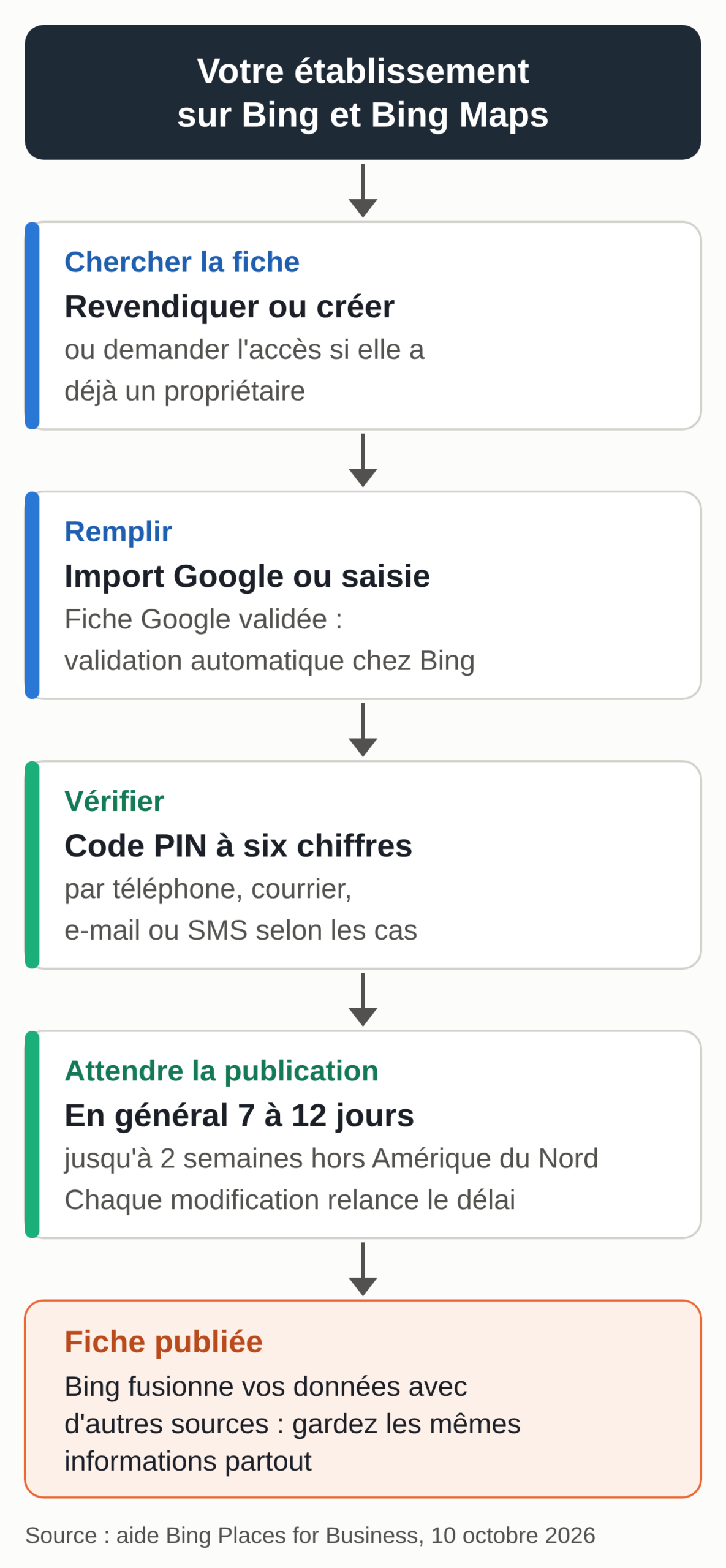
This guide follows the actual setup order: find the existing listing, import it from Google or create it by hand, verify it, complete it, then wait for it to be published. It ends with a table of the other local listings that matter in France and Belgium outside Google, checked on October 10, 2026, and a tool that prepares a master listing to copy identically everywhere.
Each step is based on the official Bing Places help center, reread on October 10, 2026; button names are quoted as they appear in that documentation. The website itself falls under another service, covered in our Bing Webmaster Tools guide.
Where Bing Places stands in France and Belgium on October 10, 2026
For years, French businesses couldn’t create a listing. As late as October 2025, when the new version of the service launched, Abondance wrote that Bing Places for Business wasn’t available in France.
As of October 10, 2026, France and Belgium both appear on the official list of supported countries, alongside Luxembourg, Switzerland and Monaco. Some glitches were reported during the rollout: in November 2025, a shop owner based in France explained on the Microsoft Q&A support forum that the country didn’t appear in the address form and that a postcard was the only verification option offered. If you run into this, the two ways out described below still apply: importing from Google Business Profile, or contacting support.
The service has also moved. On October 3, 2025, Microsoft announced a complete overhaul: the portal moved from bingplaces.com to bing.com/forbusiness, accounts were migrated automatically, the Google import was rebuilt and a recommendations tool was added.
How far a Bing listing reaches in 2026
Bing matters most on desktop. According to StatCounter, in September 2026 Bing accounted for 15.79% of visits sent by search engines in France on desktop, and 5.47% across all devices. In Belgium, the figures for the same month are 18.78% on desktop and 8.61% overall. The more your customers search from a computer, the more Bing’s share counts.
The listing can also feed AI-generated answers. In its February 2026 announcement of the AI Performance report, Microsoft recommends that local businesses sign up for Bing Places so that their address, opening hours and contact details stay up to date and can be used in these answers. The October 2025 announcement also promised deeper integrations with Bing Maps and Copilot. The Google side of these answers is covered in our page on AI Mode and AI Overviews.
Information to gather before you start
Bing compares what you declare with the information it finds on search engines, websites and social networks. The name, address, phone, website, opening hours, category and status are only applied if they match external data it considers reliable; otherwise, the change may never be published or may be overwritten. The first job is therefore to settle on a single version of this information, then copy it identically everywhere. On your website, the Organization markup uses that same version: see our guide to entity SEO.
Bing Places accepts a Microsoft account, a work account, a Google account or a Facebook account, and ties your listings to that account’s email address. Use a generic company address rather than an employee’s, so you don’t lose access when that person leaves.
Bing’s quality guidelines set the content of each field. The name is the one your customers know, with no descriptor such as “best” or “cheap” unless it’s part of the legal name. The address is the location’s address, with the building or floor; a post office box is rejected, as is a mailing address where you don’t operate.
The phone number must be a line where you can be reached, never a reseller’s or a platform’s. The website is your own: no social media page as the main site, no partner site, and the field stays empty if you don’t have a website. Bing accepts two time ranges per day at most.
Here is a template to copy; the tool further down fills it in for you and flags common mistakes.
MASTER LISTING (copy it exactly everywhere)
Name:
Address:
Postal code and city:
Country:
Address visible: yes (customers visit in person) / no (service area)
Phone:
Website:
Primary category:
Secondary categories (9 at most on Bing):
Opening hours (2 time ranges per day at most on Bing):
  Monday:
  Tuesday:
  Wednesday:
  Thursday:
  Friday:
  Saturday:
  Sunday:
Listing finalized on:
Search for the business before creating a listing (step 1)
Sign in at bing.com/forbusiness, choose the country, then search for your business by name and town. There are three possible cases.
If the listing exists and has no owner, you claim it, which starts verification. If someone has already claimed it, such as a former agency or a partner, you need to request access to that account. If nothing exists, you create a new listing.
If several results appear, choose the one whose address matches and report the duplicates. A shortcut from the help center: on Bing Maps, search for the business by name and full address, open the “…” menu next to the name, then “Manage business.” After a move, Microsoft asks you to create a new listing instead of claiming the old one.
Import your Google Business Profile listing (step 2)
If your Google listing is verified, importing it is the shortest route. In your Bing Places account, choose “Import from your Google Business Profile,” set the sync frequency (weekly, every two weeks or monthly), sign in to the Google account, then import the listings it detects. According to the help page on syncing, a listing already verified on Google is verified automatically on Bing. It then enters the usual publication cycle of 7 to 12 days.
Four limitations are documented. Bing takes all the listings it detects in the Google account, with no way to choose.
The import can create duplicates. Some fields don’t carry over identically, including categories and UTM parameters. The last limitation: a listing linked to Google has to be corrected on Google and then synced, because the Bing dashboard doesn’t let you edit it directly (as of October 10, 2026).
So before you start the import, clean up the Google account: a client’s listing left in your account, or a listing for an old address, would also be sent to Bing. To stop syncing later, open the menu at the top right, choose “Google Business Profile sync” and uncheck the option. The link with Google remains; only the automatic updates stop.
Create the listing by hand (step 3)
If you have no Google listing, or if you’d rather keep control, choose “Create a new business” after the search. If you’re claiming an existing listing, most fields are already filled in: reread them one by one.
Fields that are published and fields that stay internal
The required fields are the name, address, phone, website, opening hours, category and status (open or closed). You can choose up to 10 categories: one primary category, which describes your core business, and up to 9 secondary ones. Restaurants can add a link to their menu, a price range and an online ordering link; hotels can add their rating and amenities. Then place the pin on the map: the help center asks you to zoom in as far as possible and drop it in the middle of the store.
Some fields are never published: the store code, which is useful for managing several locations, and the contact details section (email, Facebook, Twitter, Yelp, Tripadvisor), which helps Bing match your listing with other data sources. Fill it in anyway, for that matching.
Hiding the address for businesses without premises
A plumber, a locksmith or a home tutor can hide their address. The full address is still required for verification, and Bing keeps it internally. In “Basic details,” the question “Are customers expected to visit your address?” lets you show only the city and postal code. The option only becomes available with a full address, a category and at least one service area: cities, regions or postal codes, 20 at most.
Verify the listing (step 4)
Verification protects the listing against changes by third parties, and no change is published before it. Bing sends a six-digit PIN by phone, mail, email or text message, and notes that not every option is offered to everyone. A call is only possible if the listing already contains the business’s phone number and that number hasn’t been changed. For email, make sure you have access to the account’s address, which you can change in “Basic details.”
The postcard usually arrives within 5 to 6 business days in the United States, more slowly elsewhere. The FAQ mentions up to 12 business days depending on the country and the postal service, and advises waiting that long before contacting support. If the code doesn’t work, someone else may have started verification from another account, your agency for example: the code only works in the account that requested it.
Chains group their listings, then run a bulk verification (“bulk verify”) reviewed by support within 5 to 7 business days. An agency account can manage up to 10,000 locations per bulk upload; the code is then sent to the client, by email or by mail.
When the postcard doesn’t arrive
Postcards that never arrive or codes that have expired on arrival are reported on the Microsoft Q&A forum, for example in March 2026 by a user based in Ireland. The answer they received advises checking that the address entered matches the postal address exactly, then writing to support through its contact form rather than the chat. The other way out is the one given to the French shop owner mentioned above: import a Google listing that’s already verified. For a card that has been lost for a month, the FAQ also advises contacting your post office.
Complete the listing (step 5)
According to Microsoft, the more detailed the listing, the better the algorithm can match it to people’s searches. Bing accepts up to 100 photos of at least 480 × 360 pixels, with a limit of 10 MB per upload. Microsoft’s photo tips are practical: two views of the storefront so you can be recognized from the street, the interior, the products or dishes, awards and events, but no private photos and no unreadable text. Tag each photo (interior, exterior, logo): according to the help center, this tagging also improves how the images rank on Bing.
Announcements (“Business announcements”) are for dated offers and events, never for permanent information such as opening hours. The “Services offered” section lists what you provide; it fills itself in if the listing is synced with Google. Finally, the recommendations tool flags what’s missing: photos, a website link, opening hours, or a menu for a restaurant.
How long before it goes live?
Once the listing is verified, Bing merges its data with data from other sources. This “Publish Cycle” usually takes 7 to 12 days in North America and up to two weeks elsewhere; the expected date is shown next to the “Verified” status.
Every change restarts that clock. If you fix a comma while the listing is pending, the publication date moves back. Wait until you see the first version online before you change anything. If nothing is published 12 calendar days after verification, the FAQ advises contacting support.
According to the Manage your listing page, other sources can take precedence over Bing Places if they’re more recent (if your data hasn’t changed in more than six months, for example) or if they contradict what you declared. Some of these sources are shown at the bottom of the public listing, under “Data from.” Microsoft also warns that certain changes are rejected when they harm the user experience, such as a name stuffed with keywords.
Moving, changing your name or closing
Microsoft advises against converting the old listing. It stays linked to external sources that know the old address, and changing it creates conflicting signals. The procedure: create a new listing with the new name or the new address, then mark the old one as closed (“Closed”). The “Business Moved” status doesn’t exist on Bing Maps at this time.
A listing marked as closed gradually loses visibility and disappears from Bing after about six months. To delete your account, write to placesfeedback@microsoft.com from its email address; support can first transfer it to a successor.
How Bing ranks local results, according to Microsoft
The Bing ranking page lists three criteria: how relevant the listing is to the search, the distance from the user and prominence. Prominence is estimated from web signals: reviews and ratings on sites like Yelp and Tripadvisor, and the number of mentions of the business online. Microsoft adds that the website’s SEO also affects local ranking. Its three tips: a complete and accurate listing, a website built following best practices, and a presence on trusted sites such as Yelp and Tripadvisor.
Bing’s local ranking therefore also depends on the other directories. For the Google side, see our complete guide to local SEO and our page on local SEO in the age of AI. To ask for reviews on your Google listing, use the templates in our Google reviews kit.
Local listings outside Google, checked on October 10, 2026
The table below lists the listings that matter for a business based in France or Belgium, outside Google. Each row was checked on October 10, 2026, against the service’s official documentation.
| Service | Where the listing appears | Cost | Verification | Who it’s for |
|---|---|---|---|---|
| Bing Places for Business (Microsoft) | Bing results and Bing Maps. Microsoft recommends it so that your contact details can be used in AI-generated answers. | Free | PIN by phone, mail, email or text message, depending on the case. Automatic verification for a listing imported from an already verified Google profile. | Any business with an address; the address can be hidden for a business without premises. France and Belgium are on the country list. |
| Apple Business (formerly Apple Business Connect) | Maps, Safari, Spotlight, Siri. DuckDuckGo uses Apple for its maps. | Free | Organization: two methods of different types, chosen from a business ID (SIREN, SIRET or VAT number in France; BCE or VAT number in Belgium), a DNS record, an app on the App Store, an official document; up to 5 business days. Location already in Maps: a call with a 4-digit code, if offered. | Any location open to the public. Location management is available in France and Belgium. |
| PagesJaunes (Solocal) | pagesjaunes.fr | Free listing, managed from Solocal Manager (web and app) | Solocal account; the public page doesn’t describe a verification procedure. | Businesses based in France. |
| Pages d’Or (FCR Media) | pagesdor.be, and goudengids.be in Dutch | Free registration; paid ads to appear ahead of competitors | Personal code sent by FCR Media, or a separate path for those who don’t have one. | Businesses based in Belgium. |
| Tripadvisor | Tripadvisor business pages | Page and Owner Center free; “Business Advantage” subscription for accommodations | Photo ID and a selfie, or a call to the business’s number. New page: request usually processed within 3 to 5 business days. | Restaurants, accommodations, activities and attractions. |
| Waze (owned by Google) | Map in the Waze app | Free | No claiming: the place is suggested from the app (photo, name, category, number) and approved by volunteer editors, or added with the Waze Map Editor. | Shops and places people drive to. |
| OpenStreetMap | Free map database, reused by thousands of websites, apps and devices | Free | No owner: anyone with an account can edit. Only facts that can be checked on site are allowed (type, name, opening hours, website, contact, accessibility), with no advertising. | Any physical location. State your connection to the business on your profile. |
Method: each row sums up the service’s official documentation, reread on October 10, 2026: the Bing Places for Business help center, the Apple Business guide, the PagesJaunes and Pages d’Or sign-up pages, the Tripadvisor owner help center, Waze help and the OpenStreetMap wiki. Yelp isn’t included: its pages couldn’t be accessed that day and we don’t publish any unverified row, even though Microsoft lists Yelp among the sites that matter for its local ranking. The “Who it’s for” column reflects our own reading. We review this table every quarter and whenever one of these services makes an announcement.
Apple Business, the other listing you shouldn’t forget
Apple Business Connect no longer exists under that name: since April 14, 2026, listings are managed through Apple Business, a free service that replaced Business Connect, Business Manager and Business Essentials. Listings that were already claimed were migrated automatically. The listing, called a “place card,” appears in Maps, Safari, Spotlight and Siri. DuckDuckGo also says it uses Apple for its maps.
At Apple, the main verification is for the organization: once it’s verified, its new locations are added without doing it again. According to the sign-up guide, you have 60 days after signing up to get it verified, with two of the following methods: a business ID, a TXT record in your DNS, an app published on the App Store, or an official document (a lease, a water or energy bill, an operating license). The review takes up to five business days, and an organization not verified within the deadline is deleted along with its data.
As an ID, Apple accepts, among others, the SIREN, SIRET or VAT number for France, and the Crossroads Bank for Enterprises company number or the VAT number for Belgium. If the location already exists in Maps, a call to the number Apple has on file may be enough to verify it, with a four-digit code.
In March 2026, Apple announced ads in Maps for the United States and Canada only. As of October 10, 2026, for France and Belgium, its availability page lists “Brand and Location Management” and doesn’t mention any advertising.
National directories, PagesJaunes and Pages d’Or
In France, the PagesJaunes listing is managed for free from Solocal Manager, on the web or in the app: photos, contact details, opening hours, news, replies to reviews and messaging. In Belgium, Pages d’Or lets you register the business for free; the form first asks for a personal code sent by the publisher, FCR Media, and provides an option for those who don’t have one. Pages d’Or also sells paid ads to appear ahead of competitors in its results. To keep your contact details accurate, the free listing is enough.
Check the master listing before you copy it
The tool below fills in the master listing template and checks the Bing rules that can be checked without an account: descriptors in the name, a post office box, the format of the postal code and phone number, a social media or partner site, the number of categories and the number of time ranges. It then gives you the list of services where you should copy the listing, depending on the country you choose.
Master listing with the same information in every directory
Fill it in once, copy the result and enter it identically on Bing Places, Apple Business and the other directories. The check runs in your browser: nothing is sent, either to Microsoft or to us.
The name your customers know, as it appears on your storefront and your documents.
Leave it empty if you don’t have a website.
Copy it, in this order, to:
It doesn’t judge the category or the name: reread the result, then update it whenever your opening hours or phone number change.
A setup order for a small business
Start by settling your master listing and correcting your Google listing, since Bing can import it as is. Then import it into Bing Places, or create the listing by hand if you don’t want syncing. Claim your Apple Business listing, then your listing in the national directory: PagesJaunes in France, Pages d’Or in Belgium.
If you welcome travelers or restaurant customers, add Tripadvisor. Finish by checking what OpenStreetMap and Waze show, and correct it if needed.
Write down the date of each sign-up and the account used. Once a quarter, compare the master listing with each service: Bing makes consistency of information an explicit criterion.
If your website exists in several languages, in Belgium or elsewhere, each version has to be crawled, indexed and tracked language by language, on Bing just as on Google: that’s the work of our multilingual SEO service.