

Entity SEO means giving Google, and the assistants that answer from the web, a description of your company that they cannot confuse with another one: a name, a website, official identifiers and profiles that corroborate each other. When Google has enough consistent information, it can show a knowledge panel, the box that sums up an entity on the results page.
The work comes down to four jobs: check what Google already knows about you, claim and correct the panel if one exists, decide whether Wikidata applies to you, then publish Organization markup on your site that ties it all together. This guide follows that order, with Google’s and Wikidata’s rules as published on October 10, 2026, the French and Belgian identifiers to use, a JSON-LD markup generator and a checklist.
An entity, as Google sees it
Google launched its Knowledge Graph on May 16, 2012. The announcement used the query [taj mahal] as its example: a monument, a musician, a casino or an Indian restaurant. The graph exists to work out which one you are looking for. At launch, it held more than 500 million objects and 3.5 billion facts and relationships, drawn from sources that included Freebase and Wikipedia.
An entity is an object in that graph: a person, a place, a company, a creative work. It has an internal identifier (in the form /m/0dl567 for entities inherited from Freebase, /g/ followed by characters for the others), a name, a type and facts linked to other entities. Your company only becomes one if Google finds enough consistent information to tell it apart from others with the same name.
For a small business, the concrete problem is often a name shared with a well-known brand or person. Entity SEO is first and foremost a way to clear up that ambiguity.
Entities and AI assistant answers
Google describes the link with AI cautiously. Its optimization guide for generative search, updated July 13, 2026, says that structured data is not required to appear in its generative AI features and that there is no special schema.org markup to add. It advises continuing to use it as part of an overall SEO strategy, because it makes pages eligible for rich results. Our guide to Google’s AI Mode and AI Overviews explains how these answers pick their sources.
As of October 10, 2026, the pages that OpenAI, Anthropic and Perplexity devote to their crawlers cover the robots.txt file and say nothing about structured data. Wikidata, for its part, publishes all its structured data under a CC0 license: any service can reuse it. Our guide to an agent-ready website shows where Schema.org markup is already used, from NLWeb to Cloudflare’s Markdown conversion.
The defensible effect is therefore modest: a company described the same way on its site, in the registers and on its profiles leaves less room for confusion than a company whose name or address changes from one source to the next. Consistency reduces the risk of error; it does not guarantee a citation. To find out what assistants say about you today, see our comparison of AI visibility tracking tools.
Is your company already an entity?
Three checks, in this order.
- Search Google for your company’s exact name, then the name followed by the city. A box separate from the links, with a logo, a description and links to your profiles, is a knowledge panel. A box with opening hours, reviews and directions is a business profile: it is managed in Google Business Profile, a different tool. For the reviews on that profile, see our Google reviews kit.
- Query Google’s Knowledge Graph Search API. It returns the entities that match a name, with their identifier (the @id field, for example kg:/m/0dl567 in the documentation), their type and a description. It requires a Google Cloud API key; Google states that it is not suitable for a critical production service and that it is migrating it to Cloud Enterprise Knowledge Graph. We did not query it for this article.
- Search for your company on wikidata.org. If an item exists (an identifier starting with Q), check its official website and identifiers.
Many small businesses have no panel. The rest of the work, on your own site, applies either way.
The knowledge panel
Google calls these boxes knowledge panels in its help center. They are generated automatically from sources on the web. According to Google’s help center, its current policies allow no one to create or delete a panel manually: its systems decide whether to show it based on relevance to the query. So be wary of any offer that promises to “create” your panel.
Claiming an existing panel
The procedure follows the help page “Get verified on Google,” checked on October 10, 2026:
- Sign in to a Google account, or create one.
- Search for your name or the name of the entity you represent.
- At the bottom of the panel, in the “About” section, click “Claim this knowledge panel.” On mobile, go through the panel’s menu.
- Review the information, then sign in to one of the official sites or profiles Google lists: YouTube, Search Console, Twitter, Facebook.
If Google finds no site associated with the entity, it asks you for more information. Not every panel can be claimed; Google advises checking back to see whether the button appears. Once your identity is verified, you can invite other people, as owners or managers, from google.com/search/contributions/manage. Keep at least two owners, so you do not depend on a single account.
Correcting information
Sign in with the account that verified the identity, check that Web & App Activity is turned on, search for the entity and click “Suggest edits” at the top of the panel (Google’s help center). Make one suggestion per point, explaining the error and giving the addresses of public pages that prove the correction. Google says it reviews feedback from verified users within a few days and replies by email.
Google can directly correct some points, such as links to social profiles. The title only changes with substantial proof, no custom subtitle is accepted, and an image can only be replaced if one already exists. The description comes from a third-party source: get the source corrected, and the panel usually follows. Without a claim, the “Feedback” link under the panel stays open to everyone; Google may prioritize feedback from verified users the panel is about.
Wikidata rules to read before creating an item
Wikidata is the collaborative knowledge base that serves Wikipedia and the other Wikimedia projects. Each item carries a Q identifier, statements (official website, founding date, identifiers) and references. Before you create one for your company, read its rules: they shut the door on most small businesses.
The notability criterion
Wikidata’s notability policy, in its version edited on September 28, 2026, accepts an item if it meets at least one of three criteria: a link to a page on a Wikimedia project, a Wikipedia article for example; a clearly identifiable entity that serious, publicly available references can describe; or a structural need, when the item makes other statements usable.
The second criterion is the one that applies to a small business. The policy deliberately leaves it vague: the community decides.
An essay by Wikidata contributors on self-promotion (an opinion piece, not a policy) states that a listing in a company register can serve as an identifier but does not make a company notable on its own. As a benchmark, it suggests three independent, reliable sources that cover the subject in depth.
The same text lists “I want to fix Google” among newcomers’ frequent misunderstandings: Wikidata does not control Google’s knowledge panels. It strongly advises against creating the item for your own company, which risks being deleted.
Paid contributions must be disclosed
The Wikimedia Foundation’s terms of use require disclosure of any paid contribution. Wikidata’s policy asks you to name every organization or person paying you to contribute, on your user page, in free text or with the PaidContributions template. An administrator can block an account that does not comply. An agency creating a client’s item, or an employee paid to do it for their employer, falls into this category.
If your company already has an item, you can make it more useful by checking that it carries the right properties, each with its reference: official website (P856), SIREN number (P1616) or Belgian company number (P3376), EU VAT number (P3608), LEI (P1278), LinkedIn company ID (P4264), Google Knowledge Graph ID (P2671, or P646 for a /m/ identifier). The self-promotion essay allows you to correct an obvious error; for an addition, make the request on the item’s talk page. If you are paid to contribute, disclose it first.
Wikipedia sets a higher bar
The French-language Wikipedia requires, in its general criteria (in French), that the subject has been the main topic of a book from a traditional publisher, or of at least two articles or broadcasts of sufficient length, at least two years apart, in national or international media. Writing about your own company is “strongly discouraged” there: you propose corrections on the talk page, disclosing your connection, and any paid contribution must be disclosed.
Organization markup on your site
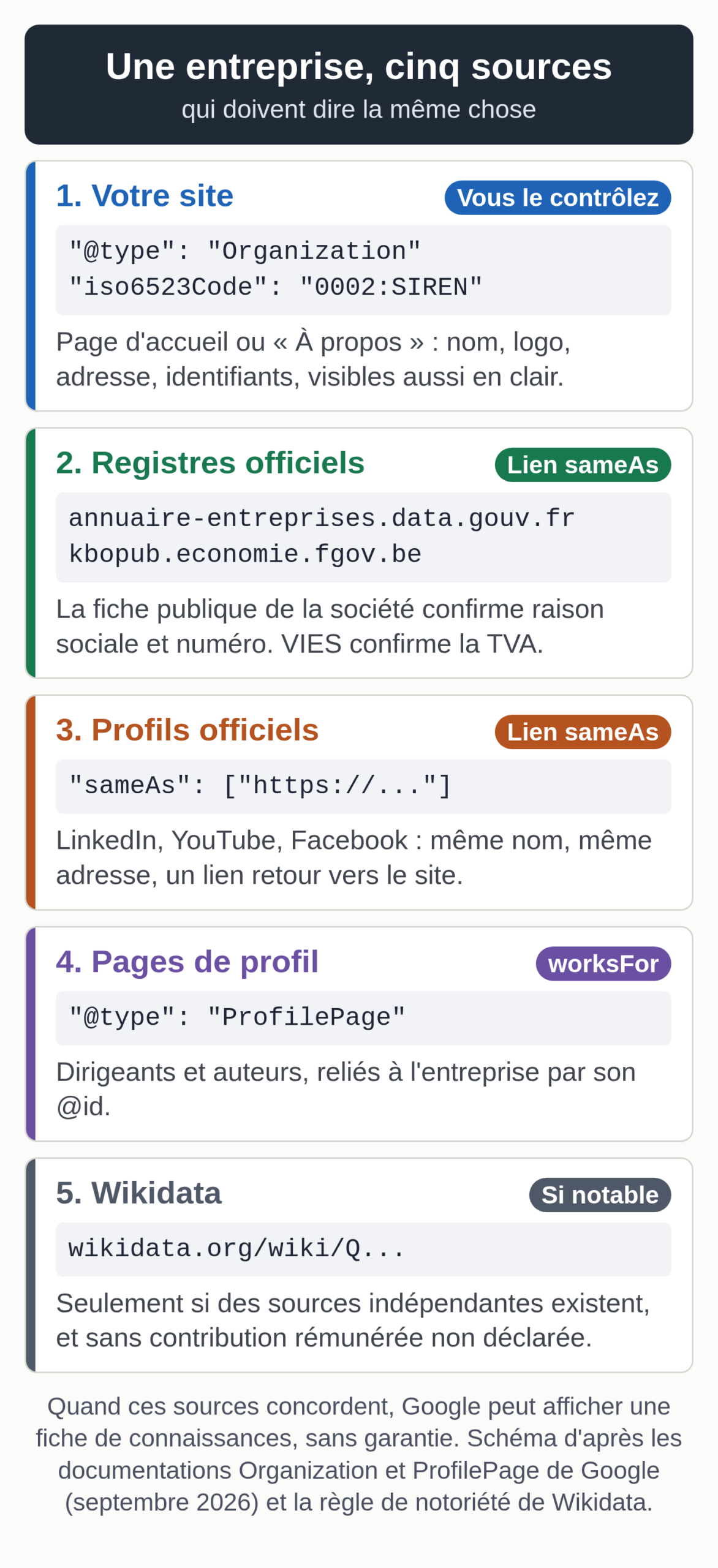
Markup is the only part of the work you fully control. Google’s documentation on Organization structured data, updated September 12, 2026, sets the framework. Google recommends the home page, or a single page that describes the organization, such as the “About” page; there is no need to repeat the markup on every page. No property is required: Google recommends adding every one that applies, starting with the name, a physical presence (address, phone) and an online presence (website, logo).
Google also recommends the most specific subtype: OnlineStore rather than OnlineBusiness for an online store, a subtype of LocalBusiness for a shop or a practice that serves clients in person, with the fields from its Local business documentation. The name must be the one you use as your site name in Google. The logo is at least 112 x 112 pixels, its URL can be crawled and indexed, and it stays legible on a white background.
Google states that some properties are used behind the scenes to tell your organization apart from others (it cites iso6523Code and naics), and that others can influence what is displayed, such as the logo shown in results and in the knowledge panel. For the basics of the JSON-LD format, see our complete guide to schema markup.
French and Belgian identifiers
The right property for a French or Belgian company is iso6523Code: an ICD code, which designates the identification register, then a colon, then the number. Google cites three common codes: 0060 for DUNS, 0088 for GLN, 0199 for LEI. The French and Belgian codes appear in the ICD list published by the Peppol network (version 9.7):
| Country | Identifier | ICD code | Value to enter |
|---|---|---|---|
| France | SIREN, 9 digits, Luhn check digit | 0002 | 0002: followed by the SIREN |
| Belgium | CBE company number, 10 digits, starts with 0 or 1, modulo 97 check | 0208 | 0208: followed by the 10 digits |
| International | LEI, 20 characters | 0199 | 0199: followed by the LEI |
Codes checked on October 10, 2026, in the Peppol 9.7 list and in Google’s Organization documentation.
The SIREN identifies the company, the legal unit according to INSEE; the SIRET, 14 digits, identifies an establishment. For organization markup, use the SIREN.
The vatID property takes the intra-EU VAT number. Google presents it as a trust signal, since anyone can check the number in the public VAT registers. In France, the number is made up of FR, a two-digit key and the SIREN (Service-Public.fr, in French). In Belgium, it is written BE followed by 10 digits starting with 0 or 1 (format published for VIES by the European Commission), the digits of the company number.
If your company also has an LEI, Google prefers it to go through iso6523Code with the 0199 prefix; when you have both a national number and an LEI, our generator puts the national number in iso6523Code and the LEI in leiCode, which Google also recognizes.
Also display these identifiers in plain text on the marked-up page: Google’s general guidelines forbid marking up content the reader cannot see.
sameAs links
For Google, sameAs is the address of a page on another site that gives information about your organization, for example a social media profile or a review site. You can give several. Choose official, up-to-date pages: your LinkedIn company page, your official accounts and channels, your company’s public record on the Annuaire des Entreprises (annuaire-entreprises.data.gouv.fr, run by France’s interministerial digital directorate) or on the CBE Public Search of the Belgian FPS Economy, and your Wikidata item if one exists.
Leave out pages from your own site and profiles that show an old name or an old address: a profile that contradicts your site weakens the corroboration. Also make each profile point to your site. The same name and the same address apply to your local listings: our Bing Places guide prepares a reference listing to copy identically everywhere.
Person markup for an executive or an author
For a person, Google documents the ProfilePage type. It applies to a page whose main subject is a single person or organization connected to the site: an author page, an “About me” page, an employee’s profile on the company website. A store’s home page does not qualify. The mainEntity property is required, as is the person’s name; sameAs can list their profiles on other sites.
Only mark up what the page shows. Google’s general guidelines forbid impersonating another person or organization, and violating the guidelines can lead to a manual action. Google calls fake author profiles “a form of deception,” as our article on Google’s penalty for fake authors points out.
Here is an Organization markup template for a French company, useful if the generator does not load for you. Replace the values in capitals.
<script type="application/ld+json">
{
  "@context": "https://schema.org",
  "@type": "Organization",
  "@id": "https://www.YOURSITE.fr/#organization",
  "name": "COMPANY NAME",
  "legalName": "REGISTERED NAME",
  "url": "https://www.YOURSITE.fr/",
  "logo": "https://www.YOURSITE.fr/LOGO.png",
  "description": "BUSINESS, LOCATION AND CUSTOMERS IN ONE SENTENCE.",
  "telephone": "+33 PHONE",
  "address": {
    "@type": "PostalAddress",
    "streetAddress": "STREET AND NUMBER",
    "postalCode": "POSTAL CODE",
    "addressLocality": "CITY",
    "addressCountry": "FR"
  },
  "vatID": "FRKEYSIREN",
  "iso6523Code": "0002:SIREN",
  "sameAs": [
    "https://www.linkedin.com/company/YOUR-PAGE",
    "https://annuaire-entreprises.data.gouv.fr/entreprise/SIREN"
  ]
}
</script>
The @id line gives the entity a stable address that other blocks on your site, such as an article’s author, can reference.
JSON-LD markup generator
The generator produces the block to paste, for an organization or a person. It validates the check digit of a SIREN (Luhn), a Belgian company number (modulo 97) and an LEI (ISO 7064), compares the VAT number with the SIREN or company number, can add the register’s public record to the sameAs links, and leaves out links to your own site. For a person, it produces a ProfilePage with the person as the main entity. We checked that every property it outputs exists in the schema.org vocabulary (version 30.1) for the type concerned.
JSON-LD markup generator for Organization and Person
The fields are prefilled with the fictional example of Atelier Exemple. Replace them with your information: the code is built in your browser, and nothing is sent or stored.
Legal identity
Contact details
Paste the code into the home page or the “About” page for the organization, or into the profile page for a person; on WordPress, a Custom HTML block is enough. If your SEO plugin already outputs Organization markup, fill in its settings instead of adding a second description of the same company.
Testing the markup before and after it goes live
- Paste the code or the page address into Google’s Rich Results Test and fix the critical errors. Google also suggests addressing the non-blocking warnings, though it is not required.
- Run the same code through the schema.org validator, which checks the whole vocabulary, including the properties Google does not display.
- Once the page is published, open the URL Inspection tool in Search Console: the page must not be blocked by the robots.txt file, a noindex tag or a login. Request a new crawl if needed; Google warns that it can take several days to be picked up.
- Reread the markup next to the page: every value must appear in the visible text.
For Bing, our Bing Webmaster Tools tutorial explains how to register the site and submit your new pages.
The checklist for a well-identified brand
- The company name is written the same way on the site, in the markup, in the site name shown by Google and on every profile.
- The “About” page shows the legal name, the address, the SIREN or company number and the founding date.
- The Organization markup appears only once, on the home page or the “About” page, with the most specific subtype.
- The marked-up logo is at least 112 x 112 pixels and stays legible on a white background.
- iso6523Code and vatID match the registers: Annuaire des Entreprises or the CBE, and VIES for VAT.
- The sameAs links lead to up-to-date official profiles, and those profiles link back to the site.
- The executives and authors you feature have a real profile page, marked up as ProfilePage.
- The Rich Results Test reports no critical errors and URL Inspection shows the page as indexable.
- The knowledge panel, if there is one, is claimed and managed by at least two owners from the company.
- Errors in the panel have been reported one by one, with public pages as proof.
- No Wikidata item has been created by the company itself without independent sources, and any paid contribution is disclosed.
- The Google business profile is up to date if you serve customers in person.
- A check is scheduled every six months, and after every change of name, address or executive.
The same entity in every language
On a translated site, the consistency rule applies to each version: the same name, the same identifiers and the same sameAs links, with a translated description. A version whose markup diverges recreates the ambiguity this work removes. If your site exists in several languages, our multilingual SEO service starts with an audit of your current languages.