

The Search Console “Page indexing” report sorts every URL Google knows into two groups: indexed or not indexed. For each page that isn’t indexed, it gives a reason, as a short label such as “Crawled – currently not indexed” or “Page with redirect”. Some of these labels point to a fault to fix, while others describe normal behavior.
This guide covers every reason that Google’s help page describes as of October 10, 2026, with the English label, the label as Search Console shows it in French, our severity rating and the first action to take. One entry per status follows the table. For the general mechanics (crawling, rendering, indexing), start with our complete guide to indexing.
Where to find the report and how to read it
You open the report from the Search Console menu, or directly at search.google.com/search-console/index. The summary page shows a chart of indexed and non-indexed pages, then a table titled “Why pages aren’t indexed”. Each row in that table is a reason, with the number of URLs affected.
Three columns in this table guide the work. The reason tells you why. The source tells you whether the problem comes from the website or from Google: in general, you can only fix the problems whose source is the website. The validation column tells you whether you’ve already asked Google to check a fix.
Google advises starting with the reasons whose source is the website and whose validation is “Failed” or “Not started”.
Clicking a row opens the list of affected URLs, capped at 1,000 examples. Google notes that this list doesn’t necessarily contain every URL concerned. You can’t filter the report by address: to find out the status of a specific page, you have to use the URL Inspection tool. That tool also shows the date of the last crawl, which tells you whether a change is simply waiting for Google’s next visit (see our benchmarks on Google indexing times). The Performance report, on the other hand, accepts regular expression filters: see our 40 regex filters for Search Console.
Above the chart, a filter lets you show only the URLs submitted in a sitemap, or only those that aren’t in one. It’s the most useful setting in the report. A page that isn’t in the sitemap and isn’t indexed may be perfectly normal, while a page submitted in the sitemap that isn’t indexed calls for an explanation.
Google adds two caveats before you read the numbers. On a site with fewer than 500 pages, the report probably won’t be very useful, and a site:yoursite.com search on the important pages answers faster. A 100% coverage rate isn’t the goal either: duplicates, filtered pages and deleted pages should stay out of the index. The aim is for every important page, in its canonical version, to be indexed.
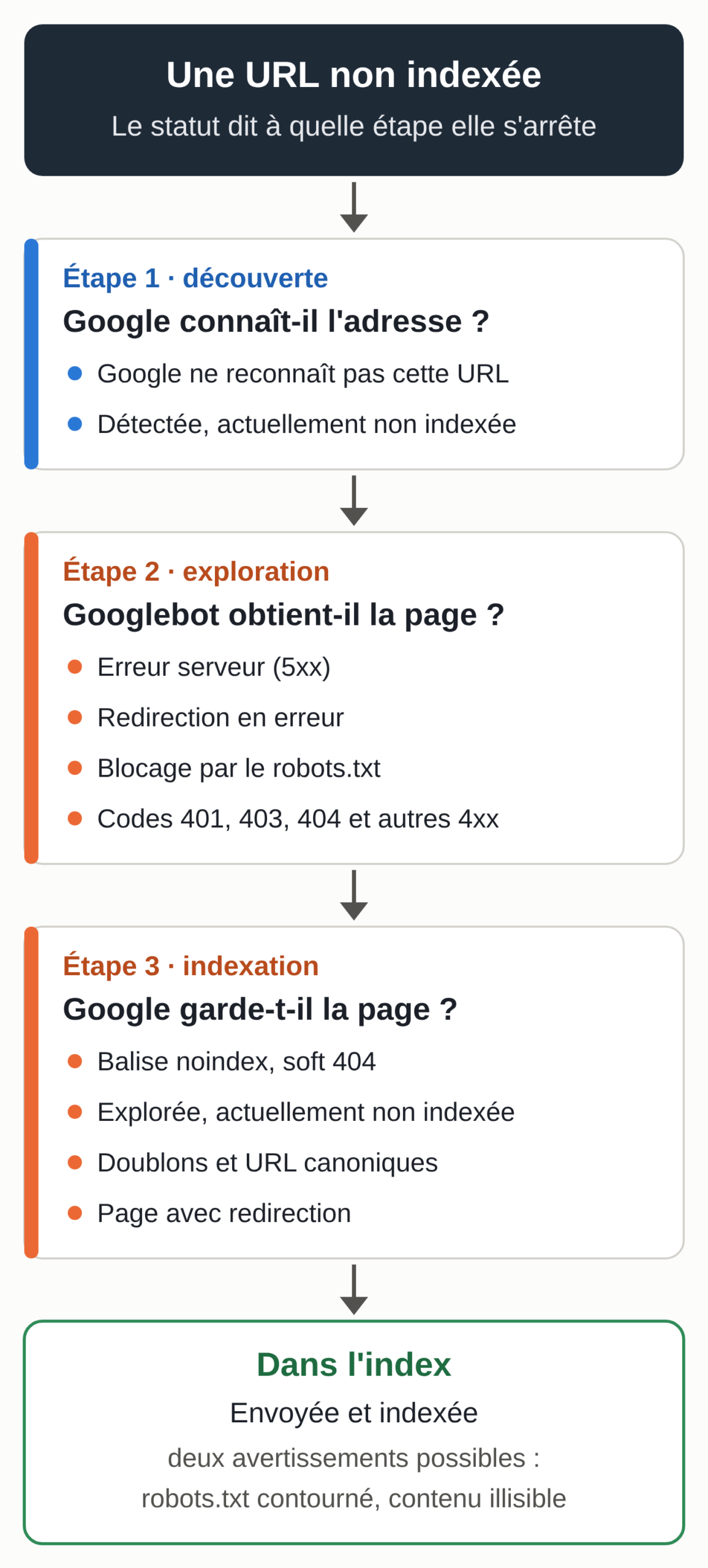
Every status in one table, as of October 10, 2026
The table follows the order of Google’s help page. The severity is our reading, on three levels: “Fix” when a page that should be indexed is blocked by a technical problem, “Check” when the status is normal for some pages and serious for others, “Normal” when Google describes expected behavior.
Checked on October 10, 2026.
| Label in Search Console (French) | English label | What Google found | Severity | First action |
|---|---|---|---|---|
| Erreur serveur (5xx) * | Server error (5xx) | The server returned a 500 error or took too long to respond. | Fix | Check the crawl stats, then the host or the firewall. |
| Erreur liée à des redirections * | Redirect error | Chain too long, loop, URL too long, or an empty URL in the redirect. | Fix | Replace the chain with a single 301 redirect to the final address. |
| URL bloquée par le fichier robots.txt * | URL blocked by robots.txt | A robots.txt rule prevents crawling of the page. | Check | Remove the rule if the page should be indexed. |
| Exclue par la balise "noindex" | Excluded by ‘noindex’ tag | Google found a noindex rule in the page or in the HTTP header. | Check | Remove the noindex if the page should be indexed. |
| Erreur "soft 404" * | Soft 404 | The page returns 200 but looks like an error page or an empty page. | Check | Return a real 404 or flesh out the page. |
| Bloquée en raison d’une demande non autorisée (401) * | Blocked due to unauthorized request (401) | The page requires authentication. | Check | Open the page in a private window, and remove the login if it should be public. |
| Introuvable (404) | Not found (404) | The page returns 404. A URL returning 410 also shows up under this label. | Check | Redirect with a 301 if the page has moved, otherwise leave it. |
| Bloquée en raison d’une interdiction d’accès (403) | Blocked due to access forbidden (403) | The server denies access even though Googlebot never provides credentials. | Fix | Find the firewall or server rule that blocks Googlebot. |
| Bloquée en raison d’un autre problème de type 4xx | Blocked due to other 4xx issue | A 4xx error (400, 405…) other than the cases above. | Check | Inspect the URL; it may be a technical address of no interest. |
| Explorée, actuellement non indexée | Crawled - currently not indexed | Google read the page and chose not to index it for now. | Check | Improve the page and its internal links; don’t keep resubmitting it. |
| Détectée, actuellement non indexée | Discovered - currently not indexed | Google knows the URL but has postponed crawling it. | Check | Check server health and cut down on useless URLs. |
| Autre page avec balise canonique correcte * | Alternate page with proper canonical tag | The page names another page as canonical, and that page is indexed. | Normal | None. |
| Page en double sans URL canonique sélectionnée par l’utilisateur * | Duplicate without user-selected canonical | Google considers the page a duplicate of another, with no canonical tag declared. | Check | Declare the canonical, or make the page distinct if it isn’t a duplicate. |
| Page en double : Google a choisi une autre URL canonique que l’utilisateur * | Duplicate, Google chose different canonical than user | Your canonical tag names one page, and Google picked another. | Check | Align redirects, internal links, sitemap and canonical tag. |
| Page avec redirection | Page with redirect | The URL redirects to another address; the target is what can be indexed. | Normal | None, unless the URL is in your sitemap. |
| Indexée malgré le blocage par le fichier robots.txt * | Indexed, though blocked by robots.txt | The page is blocked by robots.txt but indexed thanks to links. | Check | Replace the block with a noindex, or lift the block. |
| Page indexée sans contenu * | Page indexed without content | The page is in the index, but Google couldn’t read its content. | Fix | Inspect the URL and test the live version. |
* Labels taken from Google’s help page, in French and in English. We did not observe the French label in Search Console on October 10, 2026: the French interface may word it slightly differently.
Method. The reasons, their definitions and the actions come from Google’s help page on the Page indexing report, read in French and in English on October 10, 2026, and from the Google Search Central documentation pages cited in each entry.
The French version of that help page is a machine translation, and several of its headings differ from the interface: for example, it says « URL marquée "noindex" » where Search Console shows « Exclue par la balise "noindex" ». We therefore collected the French labels in the left column through the Search Console URL Inspection API, which returns the tool’s labels, on pages of sites we manage. The labels we couldn’t observe that day are marked with an asterisk.
The names of the tables, filters and buttons cited in this guide (“Why pages aren’t indexed”, “Validate fix”…) come from the same help page and may vary slightly in the interface. The table is reviewed every time Google’s help page changes, and the date above changes with it.
Server and redirect errors
Server error (5xx)
Cause: Googlebot couldn’t get the page. The server returned a 500-type error, the request timed out or the site was overloaded. Google’s documentation on HTTP status codes states that a 5xx or 429 error makes Google slow down its crawling of the site, and that URLs that keep returning a server error eventually drop out of the index.
Severity: fix it as soon as important pages are affected. A one-off error can clear up on its own, since Google notes that these errors can be temporary.
Action: open the “Crawl stats” report, in the Search Console settings, and look at host status. Google lists several causes: a server that is down or underpowered, dynamic pages that are too slow, and above all a firewall or denial-of-service protection that blocks Googlebot because it sends more requests than a visitor. If you don’t manage the firewall, the request goes to your host. The live test in the Inspection tool may succeed even though Google’s crawl failed: a passing error doesn’t necessarily happen again.
Redirect error
Cause: the URL’s redirect doesn’t lead anywhere. Google lists four cases: a redirect chain that is too long, a loop, a redirect URL that ends up exceeding the maximum length, or an empty or incorrect URL in the chain. According to the status code documentation, Googlebot generally follows up to 10 redirects in a row.
Severity: fix it if the address receives links or traffic.
Action: replace the chain with a direct redirect to the final address, using a 301 for a permanent change. A chain forms, for example, after several redesigns, when an old rule (http to https, adding www) stacks on top of a new one (a slug change). Google points to a debugging tool such as Lighthouse to follow the chain.
Blocks, intentional or not
URL blocked by robots.txt
Cause: a Disallow rule in the robots.txt file prevents Googlebot from crawling the URL.
Severity: normal for the site’s admin area, shopping carts or internal search results. Serious if the rule affects pages you want to see in Google, which happens after a migration or when a staging site goes live with its test robots.txt.
Action: if the page should be indexed, remove the rule. If it shouldn’t be, keep in mind a limit Google repeats in its introduction to robots.txt: this file controls crawling and can’t hide a page from the results. A blocked page can still be indexed if other pages link to it.
To exclude it, you need a noindex, and therefore you have to lift the block so Google can read it. Our article on AI crawlers and robots.txt covers the syntax.
Excluded by ‘noindex’ tag
Cause: while reading the page, Google found a noindex rule, either in a <meta name="robots" content="noindex"> tag or in an X-Robots-Tag: noindex HTTP header.
Severity: it’s the intended result for a page you excluded. It’s an incident if the page was supposed to be indexed. Possible causes include a “Discourage search engines from indexing this site” box left checked in WordPress, an SEO plugin setting applied to a whole content type, or a header added on the server side that nobody sees in the page code.
Action: inspect the URL. The indexing section shows whether a noindex is blocking the page. Then run the live test: if the rule is gone, request indexing. If it’s still there, search for “noindex” in the source code and in the response headers. Google points out in its noindex documentation that the rule only works if the page isn’t blocked by robots.txt.
Blocked due to unauthorized request (401)
Cause: the page returns an authentication request (401 code). That’s the case for a customer portal, a password-protected site under construction or an intranet.
Severity: normal for a private area. Serious if a public page is affected, for example when the staging protection was copied over to the live site.
Action: open the page in a private window. If it should be public, remove the login. Google allows another option: let Googlebot in without authentication, provided you verify that it really is Googlebot.
Blocked due to access forbidden (403)
Cause: the server responds with 403, access forbidden. Google notes that this code means a visitor provided credentials but wasn’t granted access, whereas Googlebot never provides any. The server is therefore returning this error wrongly.
Severity: fix it, since the page won’t be indexed. On a WordPress site, look first at a security plugin, a web application firewall or a host rule that turns Googlebot away. A technical address like xmlrpc.php, deliberately closed by a security plugin, can stay at 403.
Action: compare the response served to Googlebot (live test in the Inspection tool) with the one a browser gets. If the 403 is meant to slow bots down, change methods: Google’s documentation asks you not to use 401 and 403 codes to limit the crawl rate, because they have no effect on it.
Blocked due to other 4xx issue
Cause: a 4xx error other than 401, 403, 404 and 410, for example 400 (bad request) or 405 (method not allowed).
Severity: check it. On WordPress, this reason can group technical addresses, such as admin-ajax.php, which returns 400 to a simple visit. They have no business being in the index.
Action: inspect a sample URL. If it’s a content page, find out why the server returns an error. If it’s a technical address, leave it.
Deleted or empty pages
Not found (404)
Cause: the page returned 404. According to Google, the URL may have been found through a link from another page, or the page was deleted. On October 10, 2026, a URL that returned 410 (permanently deleted) showed up under this same label in the Inspection tool. The status code documentation also treats all 4xx errors the same way, except 429.
Severity: normal for a deleted page with no replacement. The report only keeps URLs that returned 404 during the previous month, to avoid an endless list.
Action: Google advises fixing only the 404s you link to yourself or list in a sitemap. A page that has moved gets a 301 redirect to its new address. For a deleted page, a 404 or a 410 is enough.
There is no way to make Googlebot forget a URL, though it comes back less and less often. After a hack that created spam pages, these 404s show that the pages are really gone.
Soft 404
Cause: the page responds with a 200 (success) code, but its content looks like an error. Google cites an empty page or an error message, such as a “Page not found” shown without a 404 code. A product page with no product or an internal search with no results can have the same effect. Google doesn’t index the page.
Severity: check it. If the page really is empty or deleted, the problem is the response code. If the page has real content, Google misread it, for example because that content loads in JavaScript and doesn’t show up at render time.
Action: for a deleted page, return a real 404 or 410, or redirect to an equivalent page. For a legitimate page, run the live test and open “View tested page”: the screenshot shows what Google sees. If it’s empty or shows only an error message, the problem comes from rendering.
Crawled or discovered, but not indexed
These two statuses are the ones you have the least direct control over, and their causes differ.
Crawled – currently not indexed
Cause: Googlebot visited the page and read it, then Google decided not to add it to the index for now. The help page says only this: the page may or may not be indexed in the future, and there’s no need to resubmit it for crawling. Google gives no page-by-page reason.
Severity: check it, page by page. For RSS feeds, archive pages, nearly empty tag pages or machine translations of little use, the status makes sense and has no consequences. For a service page, a product page that sells or an in-depth article, it’s a signal to take seriously.
Action: the page on recrawl requests gives Google’s line: a crawl request doesn’t guarantee indexing, and its systems prioritize the fast inclusion of high-quality, useful content. The levers are therefore on the page side. Check that it offers something your other pages don’t already have, that it isn’t a near-duplicate, that it receives internal links from pages that are themselves indexed, and that it’s in the sitemap. Once the page has really been changed, a single indexing request is enough: Google notes that repeated requests for the same URL won’t speed anything up.
Discovered – currently not indexed
Cause: Google knows the URL, through a link or a sitemap, but hasn’t crawled it yet. The help page explains that, as a rule, Google wanted to crawl the URL and postponed the crawl because it risked overloading the site. That’s why the report shows no last crawl date for these pages.
Severity: check it. For a few recent pages, the status is often temporary: Google says it can take up to a week before it starts crawling and indexing a new page. For a large share of the site, it’s a crawl capacity problem.
Action: Google explicitly lists sites where a large proportion of URLs are “Discovered – currently not indexed” among the intended readers of its crawl budget guide, alongside sites with more than a million pages whose content changes every week. Its suggestions include a server that responds fast, since the crawl capacity limit goes up when response times stay stable or improve; fewer useless URLs, for example sort and filter variants; and a 404 or 410 code for deleted pages, instead of blocking them.
The guide advises against using noindex to save crawling, because the page is still requested before being set aside. On the page side, make sure the ones that matter are linked from pages that are already indexed.
Duplicates, canonical URLs and redirects
When several addresses serve the same content, Google picks one, the canonical URL, and leaves the others out of the index. Its page on canonicalization lists the usual cases: http and https versions, mobile and desktop versions, sorted or filtered category pages, a demo site left accessible. Duplicate content doesn’t violate Google’s spam policies. Three statuses follow from this, plus the one for redirects. Our guide to canonicalization covers the tags in detail.
Alternate page with proper canonical tag
Cause: the page names another page as canonical, that other page is indexed, and Google agrees. Google’s examples are an AMP page, a mobile version or a desktop version of the same page.
Severity: normal. Google writes that there is nothing to do.
Action: none. If the count jumps suddenly, look at where these URLs come from: an address with a tracking parameter (such as utm_source) that names the parameter-free page as canonical ends up under this label. The help page also notes that Search Console doesn’t detect versions in other languages under this status.
Duplicate without user-selected canonical
Cause: Google considers the page a duplicate of another, and the page declares no canonical URL. Google therefore picked the other page as canonical on its own.
Severity: check it. If the page is a true duplicate (a version with a parameter, a print page), Google is working as intended. If the page is different in your eyes, Google doesn’t see it that way.
Action: inspect the URL to see which page Google kept. If Google kept the wrong page, explicitly declare the right canonical. If its choice suits you, add a canonical tag pointing to that page, or a redirect if the duplicate has no reason to exist.
If the page isn’t a duplicate, Google asks that its content differ substantially from the canonical. Product pages that differ only by color, or city pages with identical text, are examples.
Duplicate, Google chose different canonical than user
Cause: the page carries a canonical tag, but Google kept another URL as canonical and indexed that one.
Severity: check it. The status can come from signals that contradict each other.
Action: in the Inspection tool, compare “User-declared canonical” and “Google-selected canonical”, then open the three pages in your browser. Google’s documentation on duplicate URLs ranks the signals by strength: a redirect and a rel="canonical" tag are strong signals, presence in a sitemap a weak one.
It asks you not to give two different canonicals through two methods, to put a canonical tag on the canonical page itself, and not to use robots.txt for this choice. Align everything on the same address: internal links, sitemap, tag and redirects. If the URL you declare doesn’t resemble the page, Google will never pick it.
Page with redirect
Cause: the URL redirects to another address. It won’t be indexed; the target may or may not be, depending on what Google thinks of it.
Severity: normal. An address without a trailing slash that redirects to its version with a slash, an old address redirected after a redesign, the http version of an https page: all of these end up under this label.
Action: none, apart from two checks. Your sitemap should list only final addresses, never URLs that redirect. And the target should itself be indexed: inspect it separately. In the Inspection tool, the index information concerns the URL tested, without following the redirect.
The two warnings on indexed pages
The report has a second table, “Improve page appearance”. Its reasons didn’t prevent indexing. Google still advises fixing them, so it can understand the page better.
Indexed, though blocked by robots.txt
Cause: the page is blocked by robots.txt and Google indexed it anyway, thanks to the links pointing to it. It didn’t crawl it. In the results, the snippet will probably be very limited.
Severity: check it. The status is mainly a problem when the block was supposed to hide the page.
Action: if the page shouldn’t appear in Google, remove the robots.txt block and add a noindex: that’s the only way for Google to read the instruction. If the page should appear, simply remove the block. Since January 2021, a page submitted in a sitemap, blocked by robots.txt and indexed anyway is classified under this status as a warning instead of an error, according to Google’s announcement.
Page indexed without content
Cause: the page is in the index, but Google couldn’t read its content. Google specifies that robots.txt isn’t the cause, and mentions a page Google can’t access or a format it can’t index.
Severity: fix it, because the indexed page can’t rank for content Google can’t read.
Action: inspect the page, run the live test and look at the rendered page. Compare the response served to Googlebot with the one a browser gets. This reason has existed since the same January 2021 update.
Labels specific to the URL Inspection tool
The URL Inspection tool, used to check a specific page, also shows labels the report doesn’t use. We recorded them in the French interface on October 10, 2026.
“Submitted and indexed” means the page is indexed and is listed in a sitemap you submitted. It’s the expected status for all your important pages. An indexed page that isn’t in any sitemap carries a different label; if it’s a page that matters, add it to your sitemap.
“URL is unknown to Google” means Google has never detected the address. The tool’s help page puts it this way: the page isn’t indexed, and Google doesn’t recognize the URL. For a page published that same day, there’s nothing to worry about. For a page that has been live for months, it means no link and no sitemap leads to it.
At the top of the tool, a general sentence sums up the situation, for example “URL is on Google” or “URL is not on Google”. Google points out that “on Google” doesn’t guarantee that the page will appear in the results.
The live test doesn’t check everything the report checks. The help page specifies that duplicates and canonical URL selection aren’t tested live. A successful live test therefore tells you nothing about a duplicate status.
The order of fixes, then validation
Start by separating what should be indexed from what shouldn’t. Filter the report on pages submitted in a sitemap: your sitemap is supposed to list the pages that matter, and any non-indexed reason in this view calls for an explanation.
The following order cuts down on back-and-forth. Server errors come first, because Google slows the crawl of the whole site when they pile up. 403s come next: a single firewall rule can close an entire section of the site to Googlebot.
Next come unintentional blocks, robots.txt and noindex, which sometimes stem from a single setting applied to hundreds of pages. Then redirect errors and soft 404s, and finally duplicates and pages crawled or discovered without indexing, which require page-by-page work on content and links.
Once every instance of a reason is fixed, open the reason and click “Validate fix”. Google first checks a few pages, then puts the URLs known for this problem back in the crawl queue, and only those.
Validation generally takes about two weeks, sometimes much longer, and stops as soon as a remaining instance is found. You have to wait for one cycle to end before starting another. To go faster, Google suggests submitting a sitemap containing only your most important pages, filtering the report on that sitemap, then running the validation on that subset.
Validation is optional. Google updates the counts each time it recrawls the pages concerned, whether you clicked or not. A reason disappears from the table 90 days after its last instance disappears; if it comes back before then, it keeps its original first-detected date.
For a single page, the indexing request in the Inspection tool is enough, within a quota. For many URLs, Google recommends submitting a sitemap. If you also track Bing, our guide to Bing Webmaster Tools shows the Microsoft equivalent of this report and the IndexNow protocol. And if your traffic drops with no change at all in this report, check the manual actions report.
A site translated into several languages
In a property that covers all the languages of a site, the report mixes them in the same reasons, and two points need special attention. For Google, language versions of the same page are only duplicates if their main content is in the same language. If only the menu and the footer are translated, the pages are treated as duplicates.
A translation with little demand, or too close to another version, can also stay “Crawled – currently not indexed”. Our method for multilingual site SEO explains how to link the languages to each other. To then track clicks for each language, our Search Console dashboard in Looker Studio gives them their own page.
If your site exists in several languages and its translated versions stay out of the index, our multilingual SEO service starts with a review of the indexing of each language, the URLs and the hreflang tags.