

A Claude skill is a folder that contains a SKILL.md file: a name, a description, then instructions. Claude only reads those instructions when your request matches the description. It is the place to store a procedure you repeat, for example a quote in your format or a reply to customer reviews in your tone.
This guide gives a simple rule for knowing where each instruction goes, then builds two skills from start to finish: the files to download, installation, testing and fixing. In claude.ai, skills live in the Customize > Skills menu.
Skill, project, CLAUDE.md: where to put each instruction
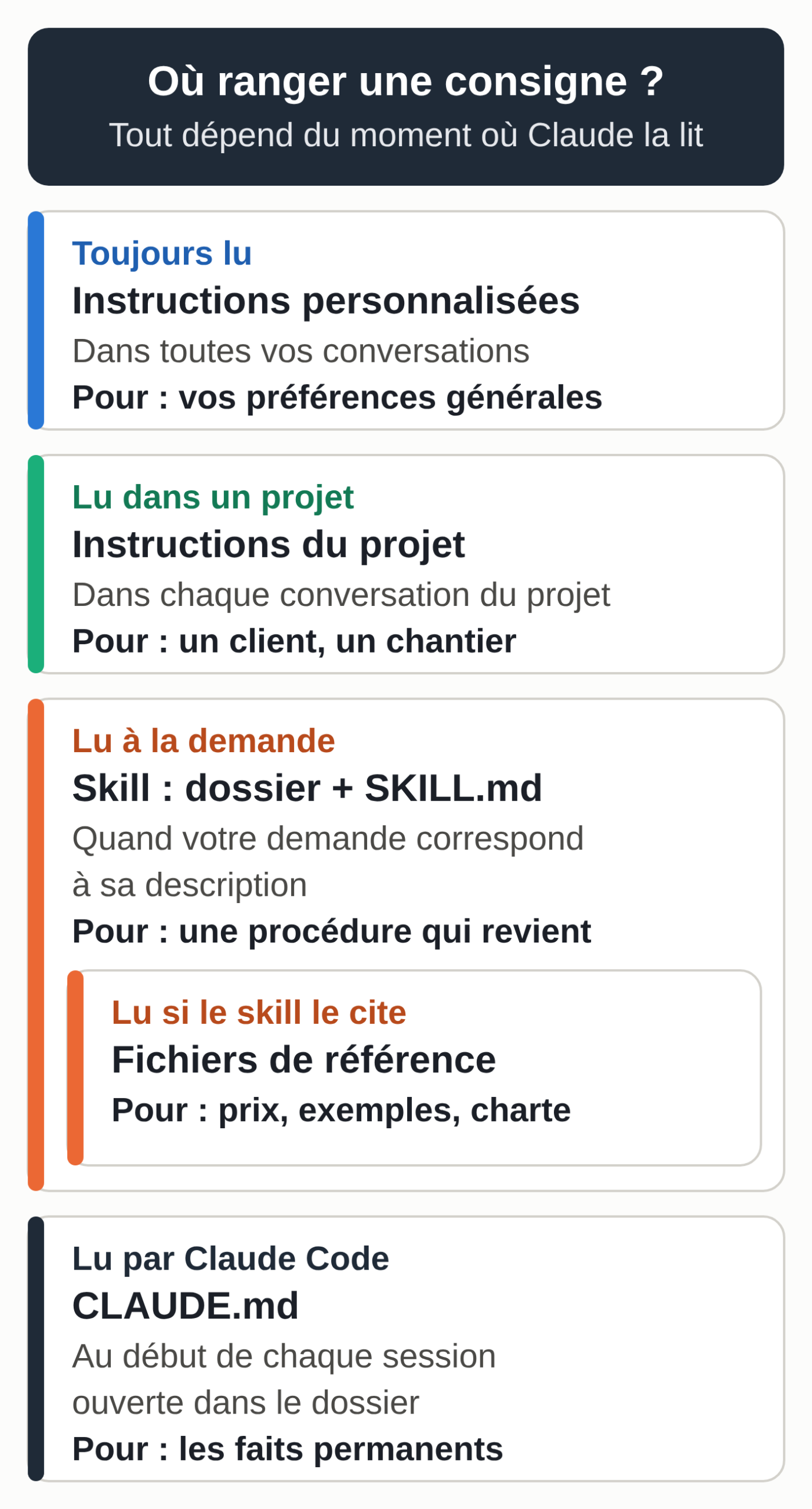
Videos often contradict each other on this point, because everything is written in the same format. A SKILL.md, a CLAUDE.md and a reference file are all .md text files (the Markdown format). What sets them apart is when Claude reads them.
Custom instructions, your general preferences, apply to all your conversations. Rule: anything that holds for everything you ask, such as “always address my clients formally.”
A project’s instructions apply to every conversation opened in that project, along with the documents you uploaded to it. Rule: the context of a specific matter, such as a client, a job or a season. Anthropic sums up the difference this way: a project brings context that is always loaded, a skill brings a procedure that activates when it is useful, in all your conversations. For what Claude keeps on its own from one conversation to the next, see what Claude’s memory keeps.
A skill loads on demand, everywhere. Rule: a task you are explaining for the third time, with the same format and the same requirements.
The CLAUDE.md file belongs to Claude Code, Anthropic’s tool that works in the folders on your computer. Claude reads it at the start of every session opened in that folder. Rule: the permanent facts about that folder, in a few lines. The Claude Code documentation advises moving any multi-step procedure out of it and into a skill.
A reference file is a document Claude consults: a price list, sample replies, brand guidelines. Stored in a skill’s folder, it is only read when the instructions point to it. Rule: data on one side, instructions on the other.
Connectors are one more building block. They give Claude access to a tool, your email or your calendar for example, whereas a skill teaches it a method. The two work together. To set them up, see connecting Claude to Gmail, Drive and Calendar.
How Claude loads a skill
According to Anthropic’s documentation, Claude reads a skill in three stages. At startup, it only sees the name and description of each skill, about a hundred tokens per skill. When a request matches a description, it reads the body of the SKILL.md. It then opens the reference files when the instructions cite them.
In practice, the description decides everything. It must say what the skill does and when to use it, with the words you actually use (“quote,” “price offer,” “estimate”). With a vague description, the skill may not trigger. Only the name and description of each skill stay loaded at all times, which, according to Anthropic, lets you install many of them without cluttering your conversations. For what really eats into your plan, see hitting the limit on Claude Pro.
Where skills work today
Checked on October 6, 2026, in Anthropic’s documentation, help center and pricing page:
- In claude.ai and the Claude apps, skills are open to every plan, including the free one. Code execution and file creation must be turned on in Settings > Capabilities; on Team and Enterprise, that setting is up to the organization owner. You add your own in Customize > Skills, as a ZIP file.
- In Claude Code, a skill is just a folder: in
~/.claude/skills/for all your projects, or in.claude/skills/inside a project. Claude Code is included in every paid plan; to choose yours, see which Claude subscription to get. - In the Claude API, skills go through the code execution tool and are uploaded with the Skills API. This route is mostly for developers.
These locations do not sync with each other: a skill uploaded to claude.ai does not exist in the API, and a folder on your computer does not show up on claude.ai. The one exception, since Claude Code version 2.1.273: skills enabled in your claude.ai account also load in Claude Code when you sign in with the same account, in that direction only. They are also available in the Claude add-ins for Excel, Word, PowerPoint and Outlook.
For business use, read Anthropic’s terms of use before taking an individual plan for your company.
What goes in the SKILL.md file
The file starts with a header placed between two lines of three hyphens, followed by the instructions in free text. The header has two required fields.
- name: lowercase letters, numbers and single hyphens, 64 characters at most, identical to the folder name, without the words “claude” or “anthropic.”
- description: what the skill does and when to use it. The open skills specification allows 1,024 characters, and the help center gives 200 characters for an upload to claude.ai: stay under 200.
The specification provides four optional fields: license, compatibility, metadata and allowed-tools. Together with name and description, these are the only ones an upload to claude.ai accepts. Claude Code accepts other fields, but an upload to claude.ai fails if the header contains any other field. Keep the body of the file under 500 lines and put the rest in reference files, one level below the SKILL.md.
A first skill that writes quotes in your format
The example follows a fictional painting company, Atelier Lenoir in Tournai. Replace its details and prices with yours before enabling it. The complete folder is available to download: quote-format.zip.
Create the folder
Create a folder named quote-format, with this content:
quote-format/
├── SKILL.md
└── references/
    ├── prices.md
    └── company.md
A plain text editor is enough: Notepad on Windows, or TextEdit in plain text mode on a Mac. Save each file with the .md extension.
Write the SKILL.md
Copy this text into quote-format/SKILL.md:
---
name: quote-format
description: Writes a painting job quote in Atelier Lenoir's format from site visit notes. Use when the user asks for a quote, a price offer or a job estimate.
---

# Quotes in Atelier Lenoir's format

## What you need before writing
1. The client's name and the job site address.
2. The areas or quantities for each line item (m², units, flat fees).
3. The VAT rate. It always comes from the user. If it is missing, ask for it
   and do not write the quote. Never pick a reduced rate yourself.

If an area or a quantity is missing, ask for it. Do not estimate anything.

## Prices and company details
- Unit prices: read references/prices.md. Use no other price.
  A line item missing from the price list becomes a "to be priced" line with no amount.
- Company details, terms and notices: read references/company.md and
  copy them word for word.

## Quote format (in this order)
1. Header: company details, then "Quote no." followed by
   today's date and the client's last name in capitals, with no
   title or first name. Example: Quote no. 2026-10-06-FONTAINE.
2. Client: name, job site address.
3. Subject: one sentence describing the work.
4. Table: Item | Quantity | Unit | Unit price excl. VAT | Total excl. VAT.
5. Totals: Total excl. VAT, VAT (rate given), Total incl. VAT, deposit requested.
6. Terms and notices from references/company.md.
7. A line "Approved: date and client signature".

## Calculations
- Calculate every total with the code execution tool, never in your head.
- Amounts in euros, two decimals, decimal comma, space as the thousands
  separator (1 254,00 €).
- Deposit: the percentage from references/company.md applied to the Total incl. VAT.

## After the quote
Add a short "Check before sending" list under the quote: each
assumption you made and each "to be priced" line.
Adapt the description to your trade: it is what triggers the skill. Four choices then matter in this file:
- the VAT rate always comes from you, because in Belgium as in France the reduced rates for work on a home come with conditions;
- a missing quantity triggers a question, and Claude does not estimate it;
- calculations go through code execution, which is more reliable than mental math;
- the “Check before sending” list makes Claude’s assumptions visible.
Add the reference files
Your price list goes in references/prices.md:
# Atelier Lenoir price list (fictional example, prices excl. VAT)

| Item | Unit | Unit price excl. VAT |
|---|---|---|
| Wall painting, two coats, matte finish | m² | 18,50 € |
| Ceiling painting, two coats | m² | 21,00 € |
| Filling and sanding cracks | flat fee per room | 120,00 € |
| Protecting floors and furniture | flat fee per job | 60,00 € |
| Travel | flat fee per job | 35,00 € |
Your company details and terms go in references/company.md:
# Atelier Lenoir (fictional company)

Atelier Lenoir, painting and decorating
Rue des Exemples 12, 7500 Tournai, Belgium
Tel. 0470 00 00 00, contact@atelier-lenoir.example
Company number: 0000.000.000 (fictional)

## Terms
- Quote valid for 30 days from its date.
- Deposit of 30% of the Total incl. VAT on signature, balance at the end of the work.
- Completion date confirmed on signature, depending on the schedule.
- Any change to the work is covered by a written amendment.
Copy the notices from your current quote into this file. The mandatory notices are not the same in France and in Belgium, and the skill does not check that they are complete: have your accountant approve this template once.
Install it
In claude.ai:
- Open Settings > Capabilities and check that code execution and file creation is turned on.
- Compress the quote-format folder itself into a ZIP. When you open the ZIP, you should find the quote-format folder, with the files inside.
- Open Customize > Skills, click “+”, then “+ Create skill” and “Upload a skill.”
- Choose the ZIP. The skill appears in your list: check that it is enabled.
The labels follow Anthropic’s help center as of October 6, 2026; the interface may word them slightly differently.
In Claude Code, copy the folder into ~/.claude/skills/ (all your projects) or into a project’s .claude/skills/. The skill also becomes a command: type /quote-format to call it directly.
Test it
Open a new conversation and ask for the task as usual, without naming the skill:
Can you prepare the quote for Ms. Claire Fontaine (fictional client), job at rue du Parc 8, 7500 Tournai? Living room: walls 38 m² (doors and window deducted), ceiling 16 m², cracks to fill in the room, protection of floors and furniture, travel. VAT 6%, rate confirmed on my side.
Run two checks. First, the reasoning Claude displays should mention reading the quote-format skill; if not, the description does not match the way you ask. Second, the figures should come out right with the sample price list:
- walls €703.00, ceiling €336.00, filling €120.00, protection €60.00, travel €35.00;
- Total excl. VAT €1,254.00, VAT at 6% €75.24, Total incl. VAT €1,329.24;
- a deposit of 30% of the total incl. VAT: €398.77;
- a dated quote number, the signature line and the “Check before sending” list.
Also test an incomplete case, here without a VAT rate:
Prepare a quote for Mr. Hugo Marchal (fictional client), job at avenue des Tilleuls 3, 7500 Tournai: bedroom, walls 32 m², ceiling 12 m², travel.
Expected result: a question about the VAT rate, and no quote.
A third test checks the price list: ask for an item it does not contain, wallpaper hanging for example. It should come out as a “to be priced” line, with no amount, and show up again in the “Check before sending” list.
Fix it
What was checked for this guide, on October 6, 2026: both folders follow the open skills specification and the claude.ai constraints (name, description, cited files present, ZIP in the right format), and Claude Code 2.1.280 detects them at startup, as skills and as slash commands. These checks were run on the original French versions of the two folders.
Claude itself wrote no replies during these trials. The instructions were tested with another language model, reproducing the two-stage loading: the description alone, then the instructions and the files. The amounts were right, the request without VAT produced a question and the wallpaper produced a “to be priced” line. It is no substitute for running your own test in your Claude account.
The test also found a flaw. The first version asked for “YYYY-MM-DD-NAME” for the quote number, and the output gave “2026-10-06-MS CLAIRE FONTAINE.” The rule became: “today’s date and the client’s last name in capitals, with no title or first name. Example: Quote no. 2026-10-06-FONTAINE.” On the next test, the number was correct.
The method works for any skill: one error, one corrected line, one added example, one new test. If Claude does not use the skill, rework the description with the words from your requests, or name the skill explicitly. In claude.ai, you can also ask Claude to edit the skill in the conversation, then save the new version.
A second skill that replies to reviews in your tone
Same fictional company. The complete folder: review-replies.zip.
review-replies/
├── SKILL.md
└── references/
    └── reply-examples.md
The SKILL.md:
---
name: review-replies
description: Writes the public reply to a Google or Facebook customer review in Atelier Lenoir's tone. Use when the user pastes a customer review or asks to reply to a review.
---

# Replying to customer reviews in Atelier Lenoir's tone

## Tone
- Polite and formal, short sentences, warm and understated.
- Thank the person by first name if it appears in the review, otherwise
  "Hello,".
- Pick up one specific detail from the review to show it was read.
- Always sign: "Julien, Atelier Lenoir".
- Reply in the language of the review.
- Between 40 and 90 words.

## Positive review (4 or 5 stars)
Thank them, cite the detail, end with a simple sentence about what comes next
(a next job, a recommendation). No promotion and no promo code.

## Negative or mixed review (1 to 3 stars)
1. Thank them for the feedback.
2. Acknowledge the problem described, without downplaying it or justifying yourself.
3. Do not invent any cause, any fact, any goodwill gesture.
4. Do not admit any legal fault and do not talk about money in public.
5. Invite the person to call 0470 00 00 00 to talk about it.

## Not allowed
- Personal data about the client (address, phone, job details
  they did not write themselves).
- Stock phrases: "Your satisfaction is our priority",
  "We have taken note of your comments".
- Em dashes, emojis, strings of exclamation points.

## Examples
Read references/reply-examples.md before writing: these are replies
already approved by the workshop, the expected standard.

## Delivery
Give the reply ready to paste, then a "Check" line if the review
mentions a fact you cannot confirm.
Examples matter more than the description of the tone. Anthropic advises pasting a successful reply into the skill: it shows your standard better than a list of adjectives. Include at least two, one positive review and one negative review, with your real replies and without the clients’ last names. The references/reply-examples.md file:
# Approved replies (fictional examples)

## 5-star review
Review: "Careful work in our kitchen, punctual and very tidy crew. Thanks!" (Thomas)
Reply: Thank you, Thomas. You repaint a kitchen while living in it, so we
pay attention to tidiness every evening. Glad it showed.
If you ever take on the hallway, you know where to find us.
Julien, Atelier Lenoir

## 2-star review
Review: "Decent result but the job took three days longer than planned." (Nadia)
Reply: Hello Nadia, thank you for taking the time to write. Three extra days
means three extra days at home with an open job site, and
we understand that weighs on you. We would like to talk it over with you to
understand what went wrong. Could you call us at 0470 00 00 00?
Julien, Atelier Lenoir
Install it like the first one, then test with this fictional review:
A Google review just came in, 2 stars, signed Sophie: "Decent paint job, but the crew showed up two hours late on the first day and nobody let me know. Too bad." Can you suggest a reply?
Reply obtained on October 6, 2026 during the test described above, and therefore produced by a language model other than Claude (translated from the French original):
Hello Sophie, thank you for taking the time to write to us. Waiting two hours on the first day without being told is disappointing, even if the paint job is decent. We understand your comment and would like to talk it over with you. Could you call us at 0470 00 00 00?
Julien, Atelier Lenoir
Check five points: the first name, the detail picked up (the delay and the lack of notice), no invented cause, the phone number, the signature. The original reply was 52 words, within the range. It was followed by a “Check” line about the delay, a fact the model cannot confirm.
Always reread before publishing: when a 5-star review was tested, the reply added a remark about the finishes that the client had not written. The skill drafts a text; you are the one who copies it into your Google Business Profile or onto your Facebook page. For your posts themselves, see how to prepare your LinkedIn and Instagram posts with Claude. Keep any client data a skill does not need out of it.
Creating a skill in conversation, without writing a file
Anthropic offers a second route, with no text editor. Open a new conversation, attach a quote or a reply you are happy with, and describe what you want:
I want to create a skill to reply to my company's Google reviews.
The format: 40 to 90 words, the client's first name, one detail from their
review picked up, my signature "Julien, Atelier Lenoir". The tone: formal,
warm and understated, never defensive. Here are two replies I'm
happy with: [paste them]. Ask me your questions before writing the skill.
Claude asks questions about your method, relies on its skill for creating skills (skill-creator), then produces a complete skill that you save and find again in Customize > Skills. Anthropic’s guide sums up what to give it in three points: the format, the tone and a successful example.
Writing the files by hand keeps one advantage: you know exactly what the skill contains.
Which skills to install to build a website
Anthropic publishes example skills in its public anthropics/skills repository, 19 of them as of October 6, 2026. The repository states that they are for demonstration and learning, and that the behavior you get in Claude may differ. For a website, four are worth a try:
- frontend-design guides visual choices, typography and art direction, to avoid the “default template” look people criticize in AI-made sites;
- theme-factory applies one of its ten color and font themes to a page or a document, handy for comparing variants;
- webapp-testing uses Playwright to test a site running on your computer, in Claude Code;
- skill-creator helps you create, test and improve your own skills.
The others can wait. web-artifacts-builder targets complex React artifacts, too heavy for a brochure site; for simple tools, see the Claude artifacts that help freelancers. brand-guidelines applies Anthropic’s brand guidelines and is mostly useful as a model for your own brand skill. algorithmic-art, canvas-design and slack-gif-creator are off topic, and mcp-builder is for people who develop connectors.
To install them in Claude Code, type /plugin marketplace add anthropics/skills, then /plugin install example-skills@anthropic-agent-skills: this command installs all twelve example skills in the bundle at once, these four included. In claude.ai, the example skills are enabled in Customize > Skills.
The most useful skill for a website is still the one you write: your colors, your fonts and your components, in a brand skill applied to every new page. A skill does not handle hosting, backups or going live. To go from a mockup to a site your client edits on their own, see from a Claude mockup to a WordPress site.
Only install skills from a trusted source. A skill can contain scripts and instructions that make Claude act: Anthropic recommends reading all its files before enabling it, especially if it fetches content from the internet. The “skill packs” shared in help groups are no exception.
Before your next session
- Find the task you explained to Claude three times this month.
- Write its description in your own words: what it does, when to use it.
- Put the data (prices, examples, company details) in reference files.
- Test in a fresh conversation, without naming the skill, then with an incomplete case.
- Fix one rule at a time, and test again.
- Reread every output before sending it: the skill approves nothing on your behalf.
To choose the model for each task, the page choosing your AI model and organizing several agents gives a test method, and AI by profession offers examples for your line of work.
A skill does not trigger on its own
A skill is a procedure; it has no trigger of its own. It applies when a conversation or a task calls for it: yours, or a scheduled task you set up in Claude Cowork, which runs at the set time.
For an event (a review posted at 10 p.m. on your Google profile, a voice note recorded as you leave a job site) to start the work, you need a connection: a tool that spots the event and passes on the request, such as an n8n workflow or a Claude Code routine (in research preview) launched by another piece of software. The guide building an AI agent without coding shows an n8n workflow. That connection has to be configured and monitored; without it, the review waits until you open Claude.
If you would rather hand off the intake itself, you need an assistant that receives your messages and knows the way you work. That is the role of the MACCUS AI assistant: an assistant installed and hosted for you, which you use in Telegram. You send it a voice note after a visit, and it prepares the quote in your format for you to review. The connection to your email or your software is decided with you, case by case.