

Claude built you a site, a page or a small app, and everything works on your computer. For your customers to see it at your own address, you need four building blocks: a domain name, hosting that suits what Claude produced, an email address in your name, and backups. For a small business, the total runs from about €3 to €30 a month excluding VAT, depending on the type of project.
This guide follows the order in which you will need each piece. If your mockup is meant to become a WordPress site, converting the pages is covered in importing a Claude mockup into WordPress: this guide picks up where that one stops.
The prices quoted come from the providers’ pricing pages, checked on October 6, 2026, excluding VAT (21% in Belgium, 20% in France). They change often, and first-year promotions change even more: always compare the renewal price.
Find out what Claude built for you
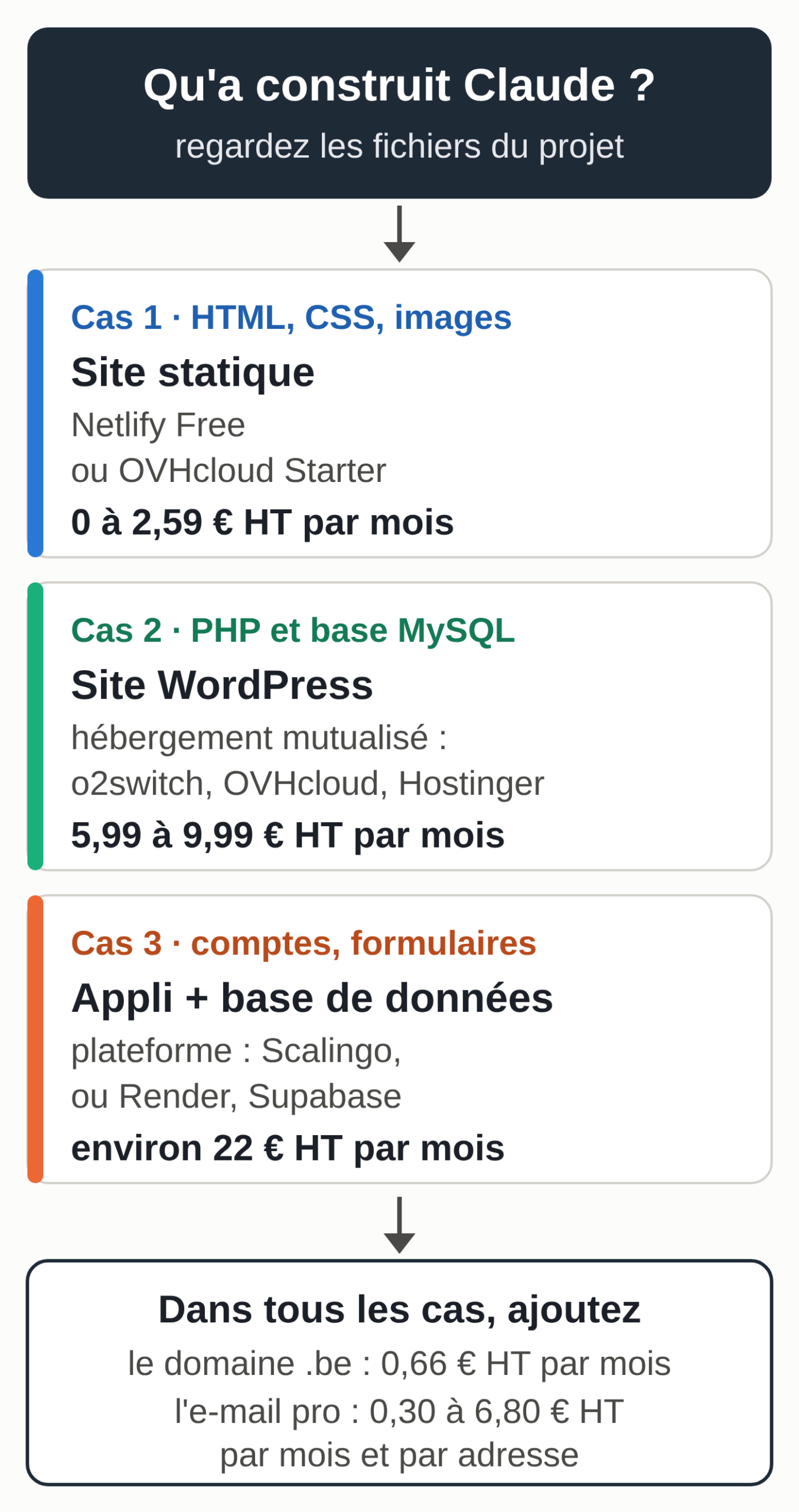
The hosting depends on the kind of project. Three cases cover most projects made with Claude:
- A page or a small static site: HTML and CSS files plus images, nothing running on a server. That is the case for a mockup or a Claude artifact you downloaded. Any hosting will do, even free hosting.
- A WordPress site: you imported the mockup into WordPress so you can edit the pages yourself. It needs PHP and a MySQL database, so you need shared hosting.
- An app with a database: user accounts, a form that saves entries, a dashboard, a folder with a package.json file. It needs a platform that runs code, plus a database.
If in doubt, ask Claude. In Claude Code, open the project folder and paste the prompt by itself: it reads the files on its own. In the Claude app, attach the package.json file and a screenshot of the folder. The three prompts in this guide are also in prompts-mise-en-ligne.txt (in French).
Here is my project's file tree and the content of package.json (if it
exists). Answer in English, without jargon:
1. Is this a static site (HTML files only), a WordPress site,
   or an app that needs a server and a database?
   Name the files that show it.
2. Which environment variables need to be set up with the host?
   Give their names only, never a value.
3. Is there a key, a password or a token written in plain text in the
   code? Give the file and the line, without copying the value.
4. What it takes to put it online: type of hosting, database,
   Node or Python version, build command.
[paste the file tree and package.json here]
On the sample project arborescence-appli-exemple.txt (a fictional job-site scheduler), the right answer is: an app with a server and a database, because of next and @supabase/supabase-js in package.json; the three variables from .env.example to set up, including SUPABASE_SERVICE_ROLE_KEY; and a payment key written in plain text in lib/paiement.ts, line 2.
Check the files it names yourself. If Claude finds a key in the code, never paste it into the conversation: take it out of the code and turn it into an environment variable, then generate a new one with the provider, because a key that has been passed around must be treated as compromised.
Buy the domain name
You buy the domain from a registrar: OVHcloud, Gandi or Infomaniak, for example. Many hosts throw one in for the first year with their plan. Prices checked at OVHcloud on October 6, 2026:
- .be: €6.99 excl. VAT the first year, then €7.89 excl. VAT a year;
- .fr: €4.99 excl. VAT the first year, then €7.79 excl. VAT a year;
- .com: €7.99 excl. VAT the first year, then €13.49 excl. VAT a year.
The .fr extension is reserved for individuals who live, and companies that have their registered office or main place of business, in the European Union, Iceland, Liechtenstein, Norway or Switzerland (Afnic naming charter in force since July 6, 2026, article 5.1). A Belgian company can therefore register the .fr of its brand.
Four habits when you buy:
- Register the domain in your company’s name, even if a contractor makes the purchase for you.
- Keep access to the registrar account yourself.
- Turn on auto-renewal and write down the expiration date.
- Check that the card on file doesn’t expire before that date.
A domain that expires takes down the site and the email at the same time.
Set up a professional email address
An address like firstname@your-domain.be can be set up in three ways. Prices checked on October 6, 2026, excluding tax:
- Google Workspace Business Starter: €6.80 excl. VAT per user per month with a one-year commitment, 30 GB of storage, the Gmail interface. Without a commitment, it goes up to €8.10 excl. VAT.
- Microsoft 365 Business Basic: €6.07 excl. VAT per user per month billed annually, with the web and mobile versions of Word, Excel, PowerPoint and Outlook.
- Your host’s email: often included in the plan (two 5 GB mailboxes in OVHcloud’s Starter plan, unlimited accounts at o2switch), or sold on its own, like OVHcloud’s E-mail Starter at €0.30 excl. VAT per account per month for 15 GB.
The choice follows your habits. If you live in Gmail and Google Docs, pick Workspace. If you work in Word, Excel and Outlook, pick Microsoft 365. If all you need is a clean inbox, your host’s email is enough.
With Workspace or Microsoft 365, you can later connect Claude to Gmail, Drive and Calendar or to Outlook. To prospect from that address, see B2B prospecting with Claude, without a LinkedIn connector, which also covers the email rules in Belgium and France.
The DNS zone in six lines
The DNS zone is your domain’s address book, usually kept at the registrar. It says where to find the site and where to deliver email. For a site with a host and email with Google Workspace, it fits in six lines. The domain is fictional and the address 203.0.113.10 is a sample address: each service gives you its own values.
| Type | Name | Value |
|---|---|---|
| A | @ | 203.0.113.10 (provided by the host) |
| CNAME | www | your-domain.be. |
| MX | @ | smtp.google.com (priority 1) |
| TXT | @ | v=spf1 include:_spf.google.com ~all |
| TXT | google. |
v=DKIM1; k=rsa; p=… (key copied from the Google console) |
| TXT | _dmarc | v=DMARC1; p=none; rua=mailto:dmarc@your-domain.be |
The first two lines send visitors to your host, with or without “www”. The MX line says where to deliver your email. The three TXT lines prove that your email really comes from you: without them, your messages are more likely to land in spam.
- SPF: only one record per domain. If your site also sends email (contact form, invoices), add its “include” to the same line, never to a second one.
- DKIM: the key is generated in the Google Admin console, which gives you the value to copy. Google says you have to wait 24 to 72 hours after turning on Gmail before you can generate it.
- DMARC: start with p=none, which monitors without blocking anything, then tighten it once the reports are clean.
Google warns that a new MX record can take up to 72 hours to take effect. With Microsoft 365, the values change: the admin center gives you the MX line specific to your domain, and the SPF contains include:spf.protection.outlook.com. The full sheet is in fiche-dns-google-workspace.txt (in French).
Claude comes in handy here to reconcile the instructions of two providers:
I'm connecting my domain [your-domain.be] to two services: the site at
[host] and email at [Google Workspace or Microsoft 365].
Here are the instructions from each (copied from their help pages) and
an export of my current DNS zone. Give me a table of the records to
add, change and delete (type, name, priority, value), then:
- flag any duplicate, especially two SPF records;
- never touch the NS records;
- tell me in which order to enter them and what to check afterward.
[paste the instructions from both services and the zone export]
Before changing anything, export the current zone or take a screenshot of it. Then enter the lines one by one and check each value against the provider’s help page: if it differs from Claude’s answer, the help page wins.
Choose hosting based on what Claude built
A static site costs little or nothing
Netlify hosts a static site at no cost: its Free plan costs €0 and its monthly limits can’t be exceeded, so you never get a surprise bill. If the site hits those limits, it is paused until the next month. The simplest method is drag and drop, described in Netlify’s documentation:
- Gather the files in one folder, with the home page named index.html at the root.
- Open app.netlify.com/drop and log in (or create an account).
- Drag the folder into the drop zone.
- The site is published at an address ending in netlify.app. Depending on when your account was created, the project may stay private: in that case, click “Make public” so your customers can see it.
- In “Domain management”, add your domain, then copy the lines Netlify gives you into your DNS zone.
To update the site, drag the new folder into the project’s deploys area. HTTPS is included: Netlify creates and renews the certificate on its own. On the Free plan, a “Powered by Netlify” badge may appear at the bottom right of pages for projects created since August 19, 2026; you can turn it off in the project settings (Project configuration, then General).
Vercel also has a free plan, Hobby, but its usage rules restrict it to personal, non-commercial use. A business site needs the Pro plan, billed in dollars.
If you already pay for hosting for your email, you can also upload the files there: OVHcloud’s Starter plan costs €2.59 excl. VAT a month at renewal (€1.59 excl. VAT a month the first year) for one site and two email addresses.
A WordPress site needs shared hosting
Shared hosting runs WordPress, its database, your email and the HTTPS certificate. Prices checked on October 6, 2026:
- o2switch, Grow plan: €84 excl. VAT a year (€7 excl. VAT a month), unlimited email accounts, daily backups kept for 30 days. The Cloud plan costs €192 excl. VAT a year, and €22.32 excl. VAT the first year at the introductory rate.
- OVHcloud, Perso plan: €5.99 excl. VAT a month at renewal (€2.99 excl. VAT a month the first year), up to 15 sites, 10 email addresses, automatic backups.
- Hostinger, Premium plan: €2.99 excl. VAT a month if you pay 48 months up front (€143.52), then €9.99 excl. VAT a month at renewal.
The gaps come mostly from the commitment length and the promotions. Work out the cost over three years at the renewal price before you compare. Importing the pages, each host’s SSH access and the Claude Code route are covered in our mockup-to-WordPress guide.
An app with a database, or “Claude suggests Scalingo, now what?”
Scalingo is a French platform that runs apps (Node, Python, PHP, Ruby and others) and their databases, billed in euros based on usage. If Claude suggests it, here is what it costs. Checked on October 6, 2026, on its pricing page, estimate excluding tax over 30 days:
- one M container (512 MB): €14.40 excl. VAT a month, or €7.20 excl. VAT for the S size (256 MB) if the app is very light;
- one PostgreSQL Starter 512M database: €7.20 excl. VAT a month, with 10 GB, daily backups and point-in-time recovery;
- custom domains and HTTPS certificates are included.
A small app with its database therefore comes to about €22 excl. VAT a month. Deployment, according to Scalingo’s documentation:
- Put the code on GitHub, in a private repository.
- Create the app on Scalingo and link the repository under “Deploy > Configuration”, with automatic deployment on the main branch.
- Add the PostgreSQL database to the app.
- Enter the environment variables in the “Environment” tab, never in the code.
- Deploy, read the logs, then add your domain and the DNS line the platform gives you.
If you work with Claude Code, have it prepare the folder before the first deployment. Claude Code is included in the Pro plan (€18 excl. VAT a month billed monthly, €15 excl. VAT a month billed annually, prices checked on September 28, 2026, and unchanged in dollars on Anthropic’s pricing page on October 6), covered in which Claude subscription to choose. If you pay for Pro or Max for your business, read the Anthropic terms of use that apply to your account.
In this folder, prepare the deployment to [Scalingo] without publishing anything:
1. check that the .gitignore file excludes .env and node_modules;
2. replace any key written in the code with an environment
   variable and list those variables in .env.example (names only);
3. write a DEPLOYMENT.md file: build command, start
   command, Node version, variables to enter in the
   Environment tab, database to add;
4. show me each change before saving it.
Other names that come up: Render and Vercel for the app, Supabase for the database and user accounts. Their paid plans are billed in dollars. Supabase’s Free plan costs €0 but pauses the project after a week of inactivity and includes no automatic backups; those start with the Pro plan, with 7 days of retention. For an app your customers use, don’t stay on a free plan with no backups.
HTTPS and backups
HTTPS no longer costs anything: OVHcloud, o2switch, Hostinger, Netlify and Scalingo include a free certificate, often from Let’s Encrypt, and both Netlify and Scalingo renew it automatically. After going live, check two things: the padlock shows up, and the http:// address redirects to https://.
Backups need more attention, because each offer does something different:
- o2switch keeps daily backups for 30 days on the Grow plan, and OVHcloud advertises automatic backups on its web hosting;
- Scalingo backs up the database every day and lets you roll back to a specific point in time;
- Supabase’s free plan includes none.
Keep your own copy as well, somewhere other than your host: once a month, export the site (with your host’s backup tool or a WordPress plugin) and the database, and keep the file wherever you usually store your documents. Once a year, restore that copy to a test site. A backup you have never restored is only an assumption.
How much does each building block cost per month?
Prices excluding VAT checked on October 6, 2026, at the renewal rate, for one person:
| Building block | Example | Per month, excl. VAT |
|---|---|---|
| .be domain | OVHcloud, €7.89 a year | €0.66 |
| Professional email | Google Workspace Starter | €6.80 |
| Professional email | Microsoft 365 Business Basic | €6.07 |
| Static site | Netlify Free | €0 |
| Static site + 2 email addresses | OVHcloud Starter | €2.59 |
| WordPress | o2switch Grow | €7.00 |
| App | Scalingo M container | €14.40 |
| Database | Scalingo PostgreSQL Starter | €7.20 |
Three typical combinations:
- a static site with its two email addresses at OVHcloud and a .be domain: €3.25 excl. VAT a month;
- a WordPress site at o2switch, a .be domain and one Google Workspace address: €14.46 excl. VAT a month;
- an app and its database at Scalingo, a .be domain and one Google Workspace address: €29.06 excl. VAT a month.
The breakdown and the sources are in budget-mensuel-ht.csv (in French).
Customer data and the GDPR checklist
As soon as the site collects personal data (a contact form, customer accounts, appointments), the GDPR applies. The supervisory authority is the Data Protection Authority (APD) in Belgium and the CNIL in France. For a small site, the essentials fit in seven points:
- Ask only for what you need: a quote form doesn’t need a date of birth.
- Publish a privacy page: who collects what, why, for how long, and how people can exercise their rights.
- Accept the data processing agreement (the “DPA”) of every provider that handles the data: host, email, database. Article 28 of the GDPR requires this written contract.
- Check in that agreement where the data is stored and what it provides for if the data leaves the European Union.
- Record the processing in your register. The CNIL specifies that even a company with fewer than 250 employees must include its customer and prospect management in it.
- Ask for consent before setting analytics or advertising cookies; some trackers are exempt.
- In case of a breach, notify the authority without undue delay and, where feasible, within 72 hours of becoming aware of it, unless the breach is unlikely to result in a risk to people (article 33 of the GDPR).
This list covers a brochure site or a small internal management app. Health data, children’s data or large-scale monitoring call for an analysis specific to your case.
After launch, someone has to stay on call
Going live is only the start. A site keeps changing: WordPress and its plugins regularly get security updates, an app depends on libraries that age, a domain expires, so does a payment card, a disk fills up, a host has an outage. When that happens, someone needs to notice and know what to do.
There are three ways to cover that risk. You can do it yourself, with a monthly check (updates, backups, domain expiration) and a monitoring service that emails you when the site stops responding. You can rely on your host’s support, which answers for its infrastructure but not for your code or your plugins. Or you can hire a web provider with a maintenance contract, who runs the updates and steps in when something breaks.
Claude helps you understand an error message or a log you paste in, but responsibility for the site stays with you. For a WordPress site, the WordPress maintenance guide covers updates, backups and monitoring.
If what overwhelms you is the admin work around the site (incoming requests, quotes, follow-ups), the MACCUS AI assistant handles it in Telegram: you write to it or send it a voice message, and it connects, case by case, to the tools you choose together. Hosting and site maintenance remain a separate matter.
Your checklist for the next session
- Have Claude diagnose the project with the diagnosis prompt from the first section and check the files it names.
- Buy the domain in the company’s name, with auto-renewal turned on.
- Choose your email based on your tools and create the first address.
- Export the current DNS zone, then enter the lines one by one.
- Choose hosting based on the type of project, comparing the price over three years.
- Check the HTTPS padlock and the redirect from http://.
- Write down who makes the backups and how often, and schedule your own monthly copy.
- Go through the GDPR checklist if the site collects personal data.
If you repeat this exercise for several projects, store your prompts and rules in a Claude skill: you won’t have to paste them again every time. Once the site is live, get the word out with a week of LinkedIn and Instagram posts prepared with Claude.