

Claude Cowork is the agent mode of Claude, Anthropic’s assistant. You describe an outcome (a spreadsheet, meeting minutes, a cleaned-up file), Claude works through the steps on its own and hands you finished files. On a computer, it reads and writes directly in a folder you give it access to.
This tutorial has you install Cowork, set its permissions, then complete three office tasks on the sample files provided, all made up: sorting supplier invoices into a spreadsheet, turning meeting notes into minutes, cleaning up a client file. Each task has its full prompt, the expected result and the check to run.
As of September 28, 2026, the information was verified against Anthropic’s help pages. The product moves fast: since September 16, 2026, Anthropic has been merging Cowork and chat into a single Claude, and some of the screens described here may already look different for you.
What Claude Cowork is as of September 28, 2026
Cowork uses the agent architecture of Claude Code, the developers’ tool, without the terminal. Anthropic introduced it on January 12, 2026, first on Mac and for the Max plan. Claude draws up a plan, splits the work (sometimes across several sub-agents in parallel), then delivers the result.
What’s verified as of that date:
- Subscription: Cowork is limited to paid plans (Pro, Max, Team, Enterprise), not the free plan. To choose yours, see which Claude subscription to choose for your business.
- Computer: the Claude Desktop app for macOS (11 Big Sur or later) and Windows (10 or later) gives you the full experience, with access to your local folders. Cowork also runs on Linux, in beta.
- Web and mobile: Cowork is in beta there for Pro, Max and Team, and for Enterprise if the administrator turns it on.
- Execution: sessions run on Anthropic’s servers (in beta) and keep going if you close your computer. Your local folders require the desktop app to be open.
- Countries: Belgium and France are on the list of countries where Anthropic offers its services.
During the rollout, two screens coexist. If your message box shows “Chat” and “Cowork,” pick “Cowork” before describing the task. If those two options are gone (Pro and Max plans first), you have the new version: describe your task in any conversation, and Claude decides on its own whether to answer or to do the work.
Cowork uses Claude models, and the model picker stays where it was. To choose a model based on the task, our guide to choosing your AI model and organizing work across several agents details the method.
Installing Claude Cowork on Mac or Windows
- Check that your Claude account is on a paid plan.
- Download Claude Desktop from claude.com/download, install it, then sign in. Update the app if it was already installed: Cowork requires the latest version.
- On Windows, install with an administrator account. Without administrator rights, Claude installs but Cowork isn’t available in the desktop app.
- Still on Windows, turn on the “Virtual Machine Platform” feature in “Turn Windows features on or off.” Reboot with “Restart,” not by shutting down and powering back on: with fast startup, a shutdown can leave the virtualization services off.
- Download the sample folder cowork-essais.zip and unzip it into your Documents. You get a
cowork-essaisfolder containing afactures(invoices) subfolder, a notes file and a client file, all made up and in French. - Open a new conversation in Claude Desktop. Select “Cowork” if the option exists, then click “Work in a folder” in the message box and choose
cowork-essais. Grant access when Claude asks, for that folder only.
On Windows, if Cowork shows a “Missing HCS services” error, the feature from step 4 isn’t on: turn it back on and restart the same way.
Settings to adjust before your first task
Give Claude standing instructions. In the classic version, open Settings > Cowork, then “Edit” next to the global instructions. In the new version, they’re in Settings > General, under the instructions for Claude. Paste this block and adjust the first line:
I run a small business in Belgium (or France). Reply in English.
Amounts in Belgian and French format: 1 234,56 €. Dates in DD/MM/YYYY format.
Don't delete, move or rename any file without asking me.
Don't invent any figure, name or date: write "to be confirmed" when information is missing.
End each task with the list of files created and the points to check.
Then check your privacy setting. On the Pro and Max plans, Anthropic uses your conversations to improve its models if you’ve agreed to it in the privacy settings, and in the event of a safety flag. The Team and Enterprise plans fall under the commercial terms; read them before putting company data into them.
The permission model in plain terms
Claude only reads and writes in the folders you connect. What it does next depends on the permission setting in the message box:
- Manual (the default): Claude stops and asks for your approval before acting, and you choose “Allow” or “Deny.”
- Auto: Claude keeps going without asking, while an automatic safety check reviews each action and blocks anything that looks dangerous. This mode uses more of your quota.
- Skip all approvals: nothing checks the actions. Anthropic reserves it for tasks where you fully trust every file and every tool. This third mode doesn’t exist in the new version, which only offers Auto and Manual.
Whatever the mode, Claude asks for your approval before permanently deleting a file. Your files are read on Anthropic’s servers: in a cloud session, the local files Claude opens are processed there instead of staying on your computer.
Anthropic also writes that you remain responsible for all the actions Claude takes on your behalf, including those in scheduled tasks. Its report of October 9, 2026 gives an example: a Claude agent sent a false report to the police through a web form, a case detailed in our article on AI agents going off the rails. For the three exercises below, stay in Manual.
Task 1, sorting a folder of supplier invoices into a spreadsheet
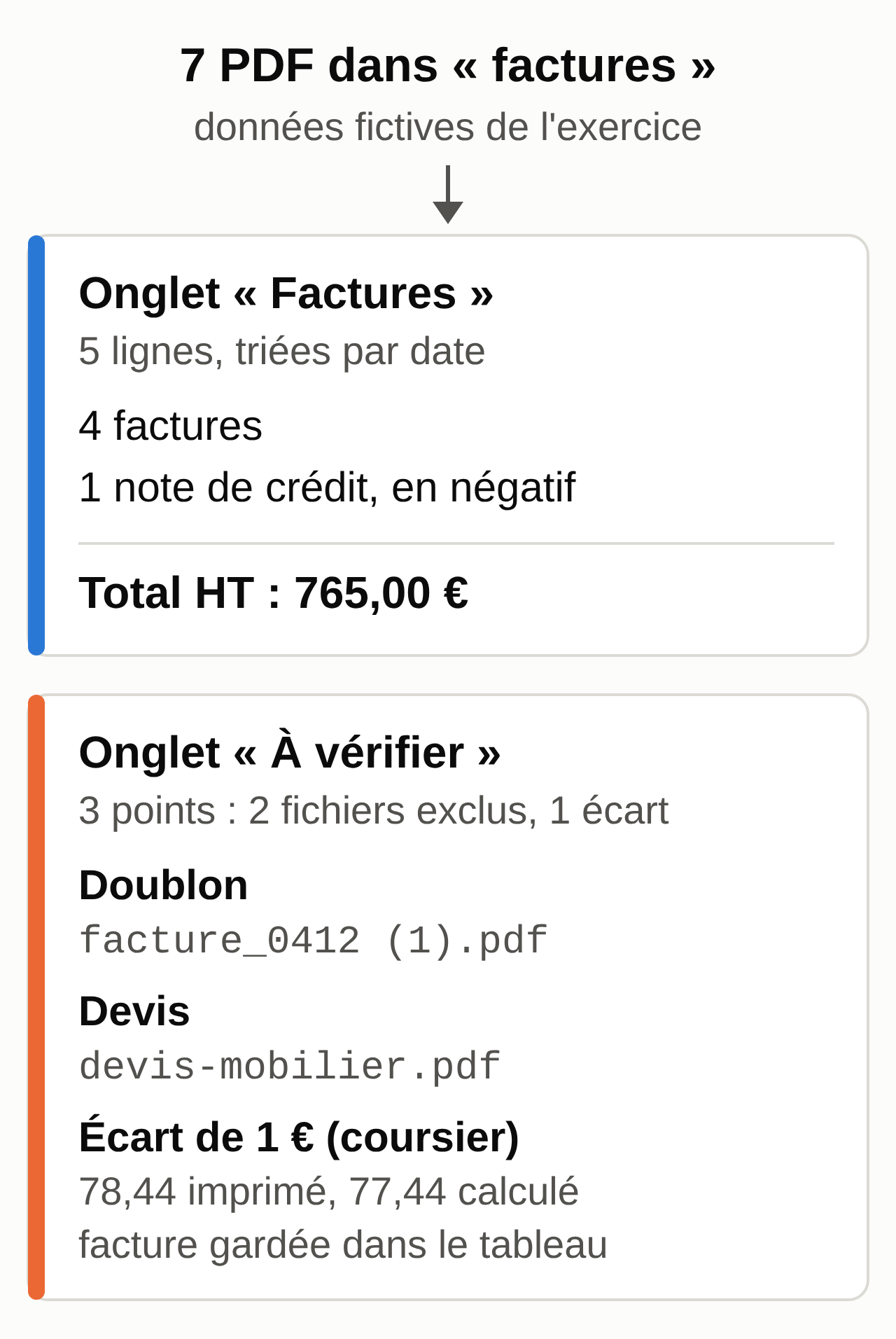
The factures subfolder contains seven made-up PDFs addressed to an imaginary company, Atelier Verbeke, in Namur: four invoices, a credit note, an exact duplicate and a quote. One of the invoices has a wrong total. The goal is a clean Excel spreadsheet and a list of what needs your attention.
- Check that the Cowork conversation is working in
cowork-essais. - Paste the prompt below.
- Read the plan Claude proposes, then allow the file to be created.
- Open
factures-septembre.xlsxonce the task is done.
Prompt to copy:
In the factures folder, read each PDF. Create an Excel file factures-septembre.xlsx in the cowork-essais folder, with two tabs.

"Invoices" tab: one row per invoice or credit note. Columns: File, Type, Supplier, Country, Number, Date, Due date, Net, VAT, Printed total, Recalculated total, Note.
- Recalculated total is an Excel formula: Net + VAT.
- Credit notes keep negative amounts.
- Sort by date. Add a TOTAL row with SUM formulas.

"To check" tab: each file you didn't put in the spreadsheet and each problem found, with the reason.

Rules:
- Copy amounts exactly as printed. Don't correct any amount or VAT rate.
- A quote is not an invoice: don't count it, list it in "To check."
- Two identical files, or the same number from the same supplier: count it only once and flag the duplicate.
- For each row, calculate Net + VAT yourself and compare the result with the printed total. Any discrepancy, even one cent, goes in "To check" with both amounts.
- Don't move, rename or delete any file.
- At the end, give me the net, VAT and gross totals in the conversation, plus the list of points to check.
Expected result (“Invoices” tab, main columns, amounts in euros):
Date        Supplier               Number       Net     VAT     Printed     Recalculated
02/09/2026  Imprimerie Dufour SRL  F-2026-0412  225,00  47,25   272,25      272,25
05/09/2026  NuageSite SAS          INV-7781     180,00  0,00    180,00      180,00
08/09/2026  Garage Lambert SRL     2026/318     310,00  65,10   375,10      375,10
15/09/2026  Coursier Express SRL   CE-99120     64,00   13,44   78,44       77,44
16/09/2026  Imprimerie Dufour SRL  NC-2026-031  -14,00  -2,94   -16,94      -16,94
TOTAL                                           765,00  122,85  888,85      887,85
The “To check” tab should contain three rows: the duplicate facture_0412 (1).pdf, the quote devis-mobilier.pdf and the one-euro discrepancy on the courier invoice. A fourth row about NuageSite’s reverse charge is acceptable. The full answer keys: factures-septembre-attendu.csv and factures-a-verifier-attendu.csv.
Human check: redo the net total by hand, 225 + 180 + 310 + 64 − 14 = 765.00. Click a “Recalculated total” cell: you should see a formula, not a typed number. Then compare the two total columns row by row: only the courier invoice differs, 78.44 printed versus 77.44 recalculated. For NuageSite, a French supplier, the note should mention the reverse charge, whose treatment is up to your accountant.
Common mistakes and fixes:
- Claude corrects 78.44 to 77.44 on its own, or counts the duplicate and the quote (the net total then climbs to 1,410.00). Rerun: “Redo the spreadsheet. Copy the printed total without correcting it, remove the duplicate and the quote, and put them in To check.”
- Claude sets up the formula correctly but reports “no discrepancy” without comparing the columns, and gives 888.85 as the recalculated total instead of 887.85. Reply: “Compare the printed total and the recalculated total row by row, and add each discrepancy to To check.”
With real invoices, be careful. Anthropic itself advises, in its page on using Cowork safely, against giving access to sensitive files such as financial documents. If you do, copy only the month’s documents into a dedicated folder, keep the originals elsewhere and stay in Manual mode.
This spreadsheet is for reading and checking your documents: the bookkeeping entries are made in your accounting software. In Belgium, since January 1, 2026, VAT-registered businesses have had to exchange structured e-invoices with each other, most often over the Peppol network. In France, the e-invoicing reform has been in effect since September 1, 2026: all businesses must be able to receive their invoices electronically, and SMEs and microbusinesses will have to issue them in that format from September 1, 2027.
Task 2, turning meeting notes into minutes
The file notes-reunion-2026-09-24.txt contains the raw notes from a made-up meeting between a graphic design studio and a cheese shop client. Two traps: the format changes at the end of the meeting, and several dates stay vague.
- Open a Cowork task on the
cowork-essaisfolder (the same conversation works). - Paste the prompt.
- Open the Word file it produces and compare it with the notes.
Prompt to copy:
Read the file notes-reunion-2026-09-24.txt. Write meeting minutes in English and save them as a Word file named compte-rendu-2026-09-24.docx in the cowork-essais folder.

Structure:
1. Date, purpose and attendees
2. Decisions made: only the final state. If a decision changed during the meeting, keep the last one and say that it replaces the previous one.
3. Actions: table Action | Owner | Deadline
4. Open points
5. Next step

Rules:
- Don't invent any name, date or amount. A missing or vague date is written "to be confirmed."
- Don't turn "Thursday?" into a specific date.
- Write every known date in full, with the day, month and year.
- Neutral, professional tone, one page maximum.
Expected result (excerpt):
Decisions made
- Square format 21 x 21 cm, replacing the A5 format chosen at the start of the meeting.
- Printing budget: 1 000 € excl. VAT maximum.

Actions
Send the cheese descriptions  | Ms. Delvaux | October 2, 2026
Organize the photo shoot      | Karim       | to be confirmed
Approve the print proof       | Ms. Delvaux | to be confirmed
Print the catalog             | Tom         | 8 business days after the proof

Open points
- Dutch version: not decided.
- Date of the next meeting: not set.
The full expected minutes (in French) are in compte-rendu-attendu.txt.
Human check: find each action in the notes. The format chosen is the square one, and neither the photo shoot nor the proof has an agreed date.
Common mistake and fix: Claude keeps A5 because it appears first, or turns “Thursday?” into “Thursday, October 1.” Reply: “The final format is the one decided at the end of the meeting. Mark any date the notes don’t state clearly as ‘to be confirmed.'”
Task 3, cleaning up a client file
The file clients-export.csv looks like an export from invoicing software: 12 rows, Belgian and French clients, messy capitalization, a duplicate, an empty row, phone numbers in every format and a French postal code missing its leading zero.
- Folder
cowork-essais, Manual mode. - Paste the prompt.
- Open
clients-propre.xlsxand compare it with the answer key.
Prompt to copy:
Open clients-export.csv (semicolon separator). Don't modify this file. Create clients-propre.xlsx in the cowork-essais folder, with two tabs.

"Clients" tab: same columns, one row per client.
- Nom (name): capital letter at the start of each word, the rest lowercase ("DUPONT Marie" becomes "Dupont Marie").
- Email: no spaces, all lowercase.
- Pays (country): only "Belgique" or "France".
- Telephone: international format with no spaces, +32 for Belgium, +33 for France. Remove "(0)". A leading "00" becomes "+".
- Code postal (postal code): column in text format. A 4-digit French code gets a 0 in front. Don't touch Belgian codes.
- Delete completely empty rows.
- Two rows with the same email: keep the first and fill it in with the missing information from the second.

"Anomalies" tab: columns File row, Problem, Action. One row for each merged duplicate, deleted row, completed postal code, and missing or invalid email.

Don't invent any data: a missing email stays empty, an invalid email stays as is and goes in "Anomalies".
Expected result: 10 clients in the “Clients” tab and 5 rows in “Anomalies.” Excerpt:
Nom           Email                     Telephone     Code postal  Ville                 Pays
Dupont Marie  marie.dupont@example.com  +32470000001  5000         Namur                 Belgique
Petit Claire  claire.petit@example.org  +33300000004  08000        Charleville-Mézières  France
Janssens Tom  tom.janssens@example.net  +32470000005  8000         Brugge                Belgique
Bernard Luc                             +32470000006  4000         Liège                 Belgique

Anomalies
Row 4   Invalid email: jean.martin@example     Left as is, fix by hand
Row 5   Duplicate of row 2 (same email)        Merged, row 2 kept
Row 6   French postal code 8000                Completed as 08000, to check
Row 8   Missing email                          Left empty, to fill in
Row 10  Empty row                              Deleted
The full answer keys: clients-propre-attendu.csv and clients-anomalies-attendu.csv.
Human check: count the rows, 12 in, minus one empty row and one duplicate, which makes 10. Brugge keeps 8000, a valid Belgian code, while Charleville-Mézières becomes 08000. The client with no email hasn’t been given an invented one.
Common mistake and fix: Excel shows 8000 instead of 08000 because the column stayed numeric, or Claude also adds a zero to Brugge. Ask: “Set the Code postal column to text format and add the zero only to French codes.”
A real client file contains personal data: the GDPR applies, enforced in France by the CNIL and in Belgium by the Data Protection Authority. The exercises in this article only use invented data.
Scheduling a recurring task, carefully
Cowork can rerun a task at regular intervals. In the classic version, type /schedule in a task, or click “Scheduled” in the left sidebar, then “New task.” You choose a name, the prompt, the permission mode and the frequency: hourly, daily, weekdays, weekly or on demand. In the new version, describe the task and its frequency in a conversation, then approve the proposal.
Scheduled tasks run in the cloud, even with your computer off, but they then work with your connectors and the files saved in your Claude account, not with a folder on your computer. A scheduled task that needs local files only runs locally. To connect Gmail, Google Drive or your calendar, follow the guide to Claude connectors for Gmail, Drive and Calendar.
Anthropic advises starting with low-risk tasks such as summaries, staying away from sensitive data, outgoing messages and purchases, and reviewing every run. A weekly roundup of your competitors’ posts is a good first try: the prompt is in the method for your LinkedIn and Instagram posts.
Security according to Anthropic and CERT-FR
The main risk is called prompt injection: text hidden in a document, a web page or an email gives Claude orders while it works. In January 2026, the security company PromptArmor published a demonstration on the Cowork preview: a booby-trapped Word file, with invisible text, led Claude to send a file from the connected folder to an attacker’s account, with no human approval.
Anthropic describes its protections (model training, filtering of untrusted content, a check on every action in Auto mode) and writes that the risk of attack remains nonzero.
On April 13, 2026, CERT-FR, part of ANSSI (France’s national cybersecurity agency), published bulletin CERTFR-2026-ACT-016. It names Claude Cowork among autonomous assistants and states that these office automation products, most of them in beta, must under no circumstances be deployed in a production environment. It limits their use to isolated test environments with no sensitive data, with prior approval from the IT and security teams. The bulletin is a technical recommendation, not a binding rule.
For a freelancer, that comes down to five rules:
- A dedicated folder, never the whole drive.
- A backup before any task that changes important files.
- Manual mode whenever money, accounts or outgoing messages are involved.
- No document of unknown origin in the connected folder, downloaded “skills” included; before turning one on, read its files (what a Claude skill contains).
- Stop the task if Claude opens files or sites you didn’t mention.
Where Cowork stops
Cowork keeps a task going in the cloud when your computer is closed, remembers a project and can be checked from your phone. Its limits lie elsewhere:
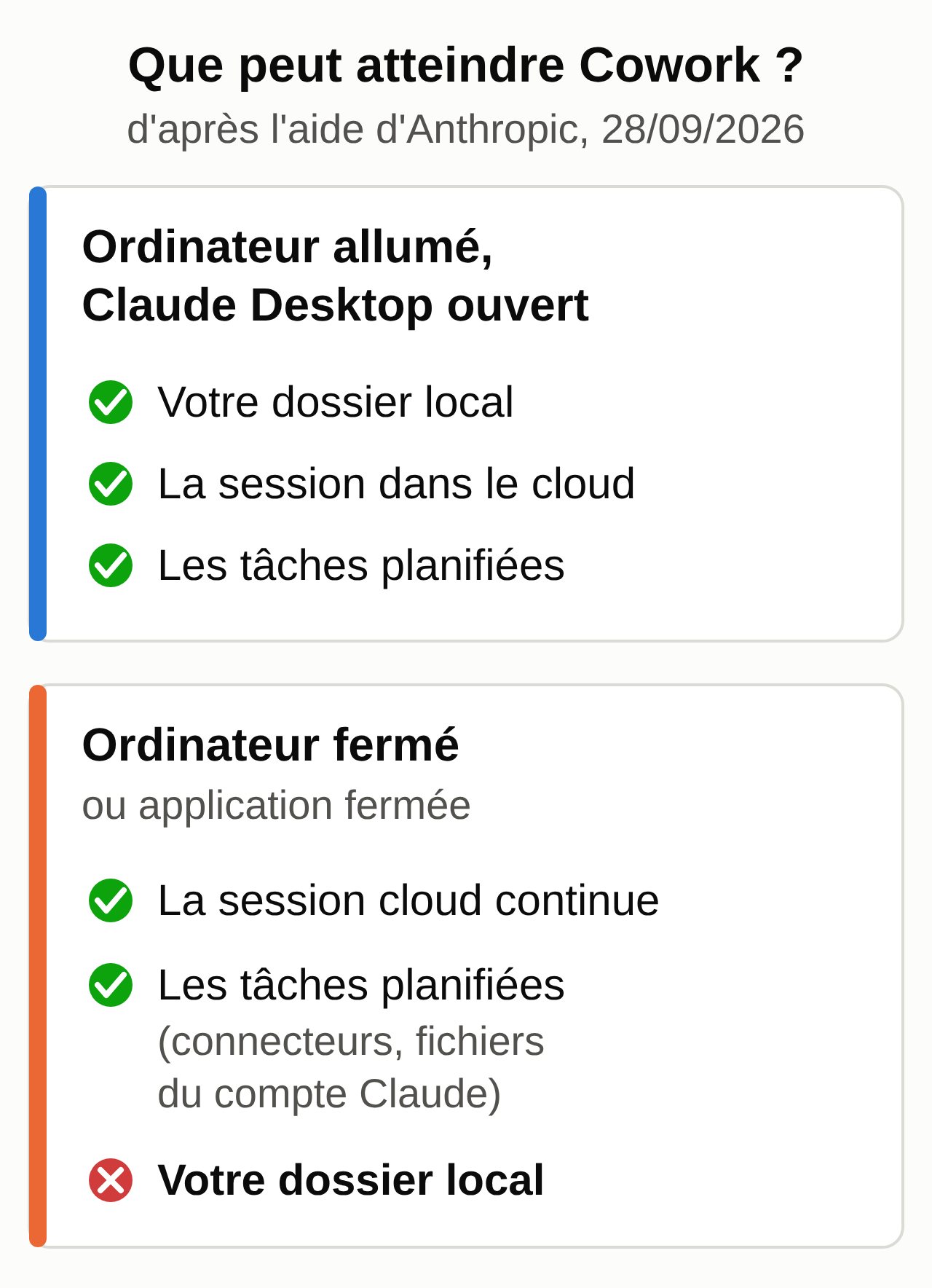
- Your local folders are only accessible while the desktop app is running on the computer that holds them, for a session started from that computer. Invoices stored on a closed laptop stay out of reach. What stays on your computer and what is saved in your account is detailed in Claude’s memory, explained.
- All the setup is up to you: folders, connectors, permission mode, instructions, scheduled tasks to review, usage quota to watch, since a multi-step task uses more than a question. To keep that quota under control, see what to do when you hit the limit on Claude Pro.
- A session can’t be shared with a colleague. Only the items produced during the session (the artifacts) can be shared.
- The tool keeps changing. The merger with chat on September 16, 2026 has already moved the global instructions and the permission setting. A workflow that works today may need adjusting next month.
Checklist for your next session
- Install or update Claude Desktop, and on Windows check the “Virtual Machine Platform” feature.
- Create the
cowork-essaisfolder with the sample files, and nothing else. - Paste your standing instructions and check your privacy setting.
- Do the three tasks in Manual mode and compare each result with the answer key provided.
- Before moving to real files, decide which ones you’re willing to hand over, and keep a copy of the originals.
- For examples tailored to your line of work, see our guide to using AI in your profession.
If you’d rather hand off the setup
Cowork suits you if you like setting up your tools and following each task yourself. If you’d rather not handle that setup yourself, MACCUS installs, hosts and updates a personal assistant in Telegram: you write to it or send it a voice message, in French, English or Dutch. Connections to your tools are decided with you, case by case. To see whether it fits the way you work, learn about the MACCUS AI assistant.