

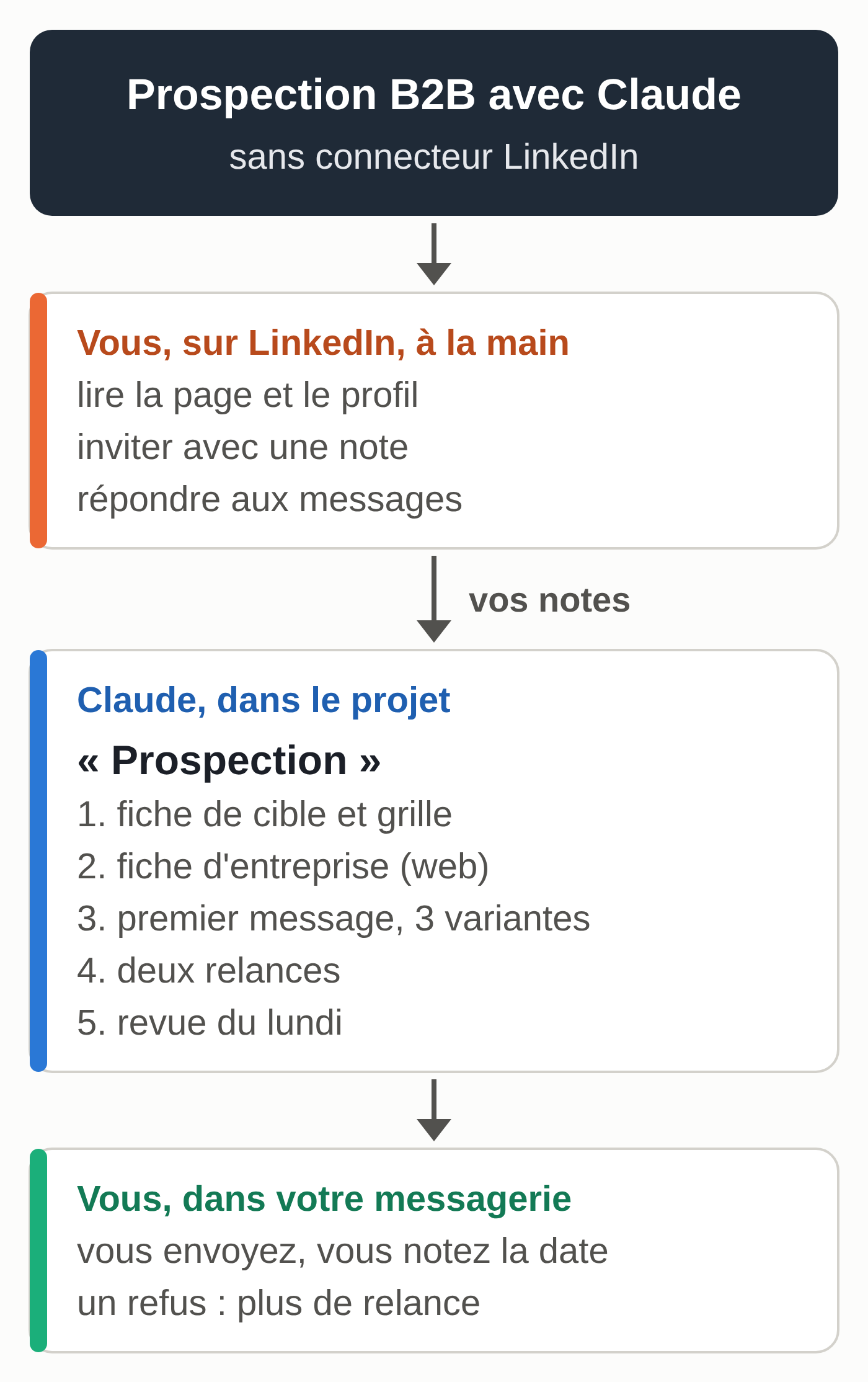
A tool that collects LinkedIn profiles or sends messages for you breaks LinkedIn’s terms of use, unless LinkedIn has given written permission. To prospect with Claude, you therefore act on LinkedIn by hand, and Claude prepares everything else in a project: company research, messages, follow-ups and tracking.
This guide is for freelancers, salespeople, consultants and small businesses in Belgium and France. By the end, you’ll have a Claude project called “Prospecting” with your instructions, a target profile, a qualification grid, sourced company profiles, a first message in three versions, two follow-ups and a tracking sheet for Google Sheets or Excel. All the examples are fictional.
LinkedIn’s prohibitions, word for word
LinkedIn’s User Agreement (the version in effect since November 3, 2025, read on October 6, 2026) lists its prohibitions in section 8.2. Two of them target scraping and automation directly. You agree that you will not:
“Develop, support or use software, devices, scripts, robots or any other means or processes (such as crawlers, browser plugins and add-ons or any other technology) to scrape or copy the Services, including profiles and other data from the Services;”
“Use bots or other unauthorized automated methods to access the Services, add or download contacts, send or redirect messages, create, comment on, like, share, or re-share posts, or otherwise drive inauthentic engagement;”
LinkedIn’s help page on prohibited software and extensions adds that LinkedIn doesn’t allow browser extensions that “scrape, modify the appearance of, or automate activity” on its site. Members who use such tools risk having their accounts “restricted or shut down.”
On the Claude side, the Claude in Chrome extension (paid plans) reads, clicks and navigates a website for you, according to Anthropic’s help center. Asking it to read profiles or send invitations on LinkedIn matches the case described on that help page. The same goes for tools that promise to “warm up” prospects by liking and commenting for you.
Section 8.2 also prohibits copying or using information obtained on LinkedIn without its owner’s consent. So don’t paste whole profiles into Claude: write down the useful part yourself, in a single line.
Set up the “Prospecting” Claude project
Projects are available on every plan, including the free one (five projects at most on the free plan, according to Anthropic’s help center updated on September 30, 2026). A project keeps your instructions and files for all of its conversations.
- In the claude.ai sidebar, click “Projects,” then “+ New Project” at the top right. Name the project “Prospecting.”
- Click “Set project instructions” and paste the text below, after replacing the example with your own business.
- Add a page to the project files that describes your offer: what you sell, to whom, your prices if you share them, and the references you’re allowed to cite.
- Check that web search is turned on: the “+” button at the bottom left of the chat window, then “Web search.” In the new version of Claude, being rolled out gradually on Pro and Max, there is no longer a toggle: Claude searches when it’s useful.
Sample instructions, for a fictional company:
You help me prepare my B2B prospecting. I'm Julien Delvaux, manager of
Réseaux Delvaux SRL in Mons. We install and maintain Wi-Fi and phone
networks for offices of 5 to 50 people, in Hainaut and in northern France.

Rules:
- You prepare and you write. You send nothing and you don't log in to any
  LinkedIn account.
- Every fact about a company has its source (link). If you can't find it,
  write "not found." You don't make up any figure, name, news item
  or compliment.
- You don't look for personal email addresses and you don't guess any.
- Messages: formal tone, 90 words maximum, a single question at the end,
  no superlatives, no attachment on first contact.
- Every email ends with my name, my company, its city, then this
  opt-out sentence: To stop receiving messages from me,
  reply "no thanks."
- You flag any named email address (firstname.lastname@) at a
  Belgian company.
All the prompts in this guide are collected in one file (in French): prompts-prospection.txt.
Build the target profile and the qualification grid
You do this step once, then correct it after your first ten contacts.
Based on my offer (project file), suggest a target profile in
8 lines at most: industries, size, area, who decides, signals that show
a need, reasons to rule out a company.
Then suggest a qualification grid of 5 criteria scored 0, 1 or 2,
with the definition of each score. Total out of 10: priority A from 7,
B from 4 to 6, C at 3 or below.
Ask me three questions first if any part of my offer is unclear.
Sample result, after correction:
Target: accounting firms, group medical practices, real estate
agencies, architecture firms. 5 to 50 people. Hainaut and northern France.
Decision-maker: manager or partner.
Signals: move, second office, hiring, renovation work.
Rule out: fewer than 3 people, network run by an in-house IT
department.

Grid (0, 1 or 2 per criterion):
1. Size: 5 to 50 people = 2; 3 to 4 or 51 to 150 = 1; otherwise 0
2. Industry: in the target = 2; adjacent = 1; outside the target = 0
3. Dated signal: less than 6 months = 2; older = 1; none = 0
4. Likely need: several sites or an old network = 2; uncertain = 1
5. Permitted channel found: form or generic address = 2;
   LinkedIn by hand only = 1; none = 0

Fiduciaire Lemaire & Associés: 2 + 2 + 2 + 2 + 2 = 10, priority A
Imprimerie Collard: 1 + 0 + 1 + 1 + 2 = 5, priority B
Boulangerie du Beffroi: 0 + 0 + 0 + 1 + 2 = 3, priority C
Human check: redo the additions and read criterion 5 in light of the email rules further down. The error to watch for is a 2 given for lack of information. Reply “Information not found counts as 0” and run it again.
Research each company with a web search
For each company you keep, one conversation in the project is enough.
Prepare the profile of Fiduciaire Lemaire & Associés, Charleroi,
website www.fiduciaire-lemaire.example.
Search the web: the company's website, its entry in the public
register (BCE in Belgium, Annuaire des Entreprises in France) and its
news from the last 12 months.
Return 6 lines: business, known size, locations, recent signal
with its date, hook for my offer, public contact channel (form,
generic address). One source per line, "not found" if nothing.
Then apply the qualification grid and give the total.
Sample result (fictional company):
Business: accounting for small businesses and freelancers [site, "The firm"]
Size: 14 staff listed [site, "Team"]
Locations: Charleroi, second office in Gosselies [site, "News"]
Signal: Gosselies office opened, August 2026 [site, "News"]
Hook: two offices to connect, shared phone system
Channel: contact form on the site; no generic address published
Qualification: 2 + 2 + 2 + 2 + 2 = 10, priority A
Human check: open every link. Check the city and the company number, since two companies can have similar names. A signal without a date doesn’t count.
On LinkedIn, look at the company page and the manager’s profile yourself. Add a line of your own to the company profile, for example “partner, posted about e-invoicing in September.”
Web search counts toward your usage limits, according to Anthropic’s help center; if you keep hitting the caps, read what to do when you reach the Claude Pro limit.
Write the first message in three versions
For Fiduciaire Lemaire & Associés, write three versions of the first
contact, based on the signal in the profile, with its place and date:
1. a two-sentence LinkedIn invitation note, which I will send myself;
2. an email of 90 words maximum for their contact form;
3. a 60-word script for a call or a voicemail.
A single open question at the end. No promises with numbers.
Sample of version 2:
Subject: Your Gosselies office

Hello,

Your firm opened a second office in Gosselies in August. Connecting two
sites usually raises the same questions: one network or two, a shared
phone system, access to files from both addresses. We install and
maintain this kind of network for offices of 5 to 50 people in
Hainaut. How do you connect your two offices today?

Julien Delvaux, Réseaux Delvaux SRL, Mons
To stop receiving messages from me, reply "no thanks."
Human check: reread the fact cited (place and date), the full identity and the opt-out sentence. Keep the LinkedIn invitation note short. Errors to watch for: a compliment such as “your well-known firm,” or “ignore this message” in place of the opt-out sentence. Correct the text and remind Claude of the project rule.
B2B prospecting email rules in France and Belgium
This summary is based on the official pages read on October 6, 2026. It doesn’t replace legal advice.
In France
The CNIL page on commercial prospecting by email (June 10, 2026) allows prospecting a professional on the basis of legitimate interest “when the subject of the solicitation is related to the profession of the person contacted.” The person must be informed and be able to object simply and free of charge. The same page states that generic addresses of legal entities, such as info@ or contact@, “are not subject to the principles set out above.”
In every case, each message must state the identity of the organization sending it and offer a simple way to refuse further messages.
In Belgium
Article XII.13 of the Code of Economic Law prohibits advertising email “without the prior, free, specific and informed consent of the recipient of the messages.” Every advertisement must also inform the recipient of the right to object and give an electronic way to do so. The royal decree of April 4, 2003, provides two exceptions. The first covers your customers, for similar products or services, if you obtained their address during a sale and let them refuse from that moment on. The second covers legal entities, when the electronic contact details used are “impersonal.”
The report to the King that accompanies this decree specifies that an address such as lastname.firstname@company.be belongs to an individual. No advertising to that address without the person’s prior consent, and it is up to the advertiser to prove it is exempt from consent. Anyone can also ask to stop receiving your email advertising: you must acknowledge receipt, honor the request within a reasonable time and keep the list of these requests up to date.
The Belgian Data Protection Authority (APD) points out on its direct marketing page that the GDPR applies. Its updated recommendation adds two useful points. A functional address such as info@ can be personal data, for example when a single person manages it and signs emails with their own name, so the APD calls for caution before relying on the impersonal-address exception. And in its “Black Tiger” decision, the APD ruled that supplying files drawn from the Crossroads Bank for Enterprises (BCE) for direct marketing failed the purpose test, because the commercial-use license for that data prohibited such use.
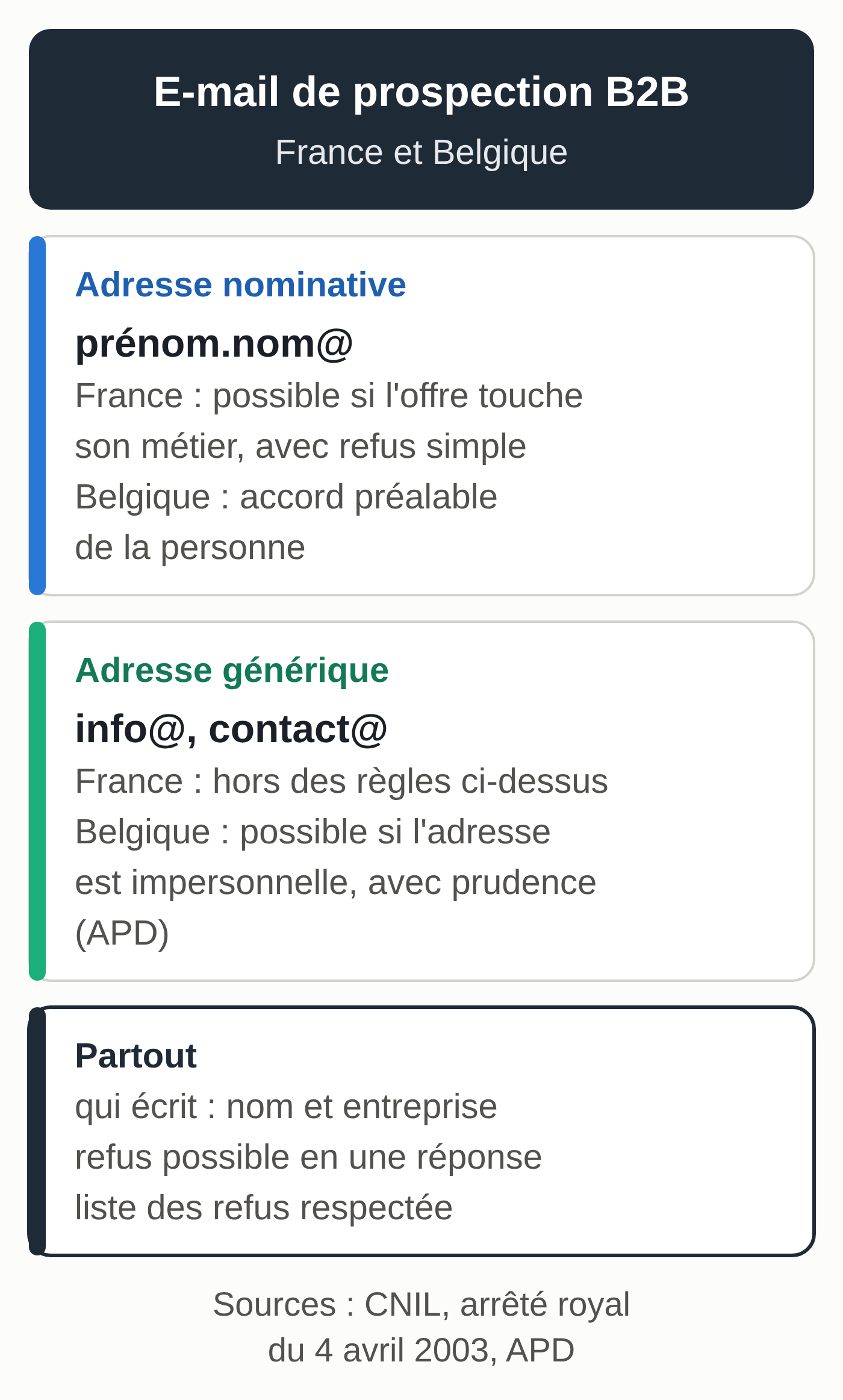
Applied to the cases in this guide, these texts come down to the following:
- France, named address: sending is allowed if the offer relates to the person’s profession, with information and a simple opt-out.
- Belgium, named address: the person’s prior consent.
- Belgium, generic address: an exception for legal entities, if the offer is aimed at them, with the caution the APD asks for.
- Everywhere: sender identity, a simple way to opt out, and an up-to-date list of refusals (the CNIL calls it a suppression list). After a refusal, no more messages.
Get a lawyer’s advice before buying or renting a list, before bulk sends, if you prospect consumers, if your industry is regulated, if you prospect in several countries, or as soon as you receive a complaint.
Send two follow-ups, then close
The sequence in this guide: follow-up 1 at seven days, follow-up 2 at fourteen days, closed at twenty-one days without a reply. Any reply stops the sequence. A “no thanks” moves the row to opted out, permanently.
First contact sent on Monday, October 12, 2026, to Cabinet médical des
Tilleuls, at their generic address (info@).
Write follow-up 1 for Monday, October 19, and follow-up 2 for Monday,
October 26.
Follow-up 1: 50 words, one useful new piece of information, no "I'm just
following up."
Follow-up 2: 40 words, last attempt, offer to close the topic.
Keep my identity and the opt-out sentence.
Sample result:
Follow-up 1
Hello,
In a medical practice, we check five points, including the separation
between the waiting room Wi-Fi and the workstation network.
I can send you this list. Is your patient Wi-Fi separate from the
practice network?
Julien Delvaux, Réseaux Delvaux SRL, Mons
To stop receiving messages from me, reply "no thanks."

Follow-up 2
Hello,
As I haven't heard back, I'll close the topic here. If the network
question comes up again, you can reply to this address.
Julien Delvaux, Réseaux Delvaux SRL, Mons
To stop receiving messages from me, reply "no thanks."
To automate follow-ups from a file, our guide to building an AI agent without coding walks through this kind of agent step by step, using quote follow-ups.
Keep a tracking sheet and review it every Monday
Download the fictional template suivi-prospection.csv (semicolon-separated, column names and values in French), then import it into Google Sheets or open it in Excel. The columns: company, country, city, channel, address type, score, priority, first contact, follow-up 1, follow-up 2, status, opted out, next action.
To see the scheduled dates, add three calculated columns in date format: =H2+7 (follow-up 1), =H2+14 (follow-up 2) and =H2+21 (close), where H is the first-contact column.
Every Monday, attach the exported file to a conversation in the project:
Today is Monday, October 19, 2026. Here is my tracking sheet
(suivi-prospection.csv attached, dates in YYYY-MM-DD format).
Rules: nothing for a row marked "replied" or "closed," or if
opted out = yes, and never contact an opted-out row again.
Follow-up 1 if it hasn't been done and the first contact is 7 days
old or more. Follow-up 2 if follow-up 1 is done, not follow-up 2, and the
first contact is 14 days old or more. Close without a reply if both
follow-ups are done and the first contact is 21 days old or more.
Show the calculation for each row, then return four lists: follow-up 1,
follow-up 2, to close, nothing to do (with the reason or the next date).
The correct result with the sample file:
Follow-up 1: Cabinet médical des Tilleuls (first contact on October 12)
Follow-up 2: Fiduciaire Lemaire & Associés (first contact on October 5)
Close without a reply: Bureau Vandamme Architectes (first contact
on September 28, both follow-ups done)
Nothing to do: Agence Dumont Immo (follow-up 1 on Tuesday, October 20),
Comptalis Nord (replied), Imprimerie Collard (opted out, do not
contact again)
Human check: recalculate at least two rows. After each send, fill in the date and the status, or the same rows will come back the following Monday. The error to watch for is days counted from the last follow-up instead of the first contact. The “show the calculation” instruction makes that error visible.
Connect Gmail and schedule the review
Claude’s Google Workspace connector (Gmail, Calendar, Drive) is available to all users, according to Anthropic’s help center updated on October 1, 2026. Claude can search and read your emails, create drafts, and send or reply; by default, it asks for your approval before each send. It can therefore spot who has replied and prepare the follow-ups as drafts in Gmail. The details are in our guide to connecting Claude to Gmail, Drive and Calendar. For Outlook, Anthropic’s connector directory lists a Microsoft 365 connector (your company’s SharePoint, OneDrive, Outlook and Teams): check that it’s available on your plan. If you still write from a personal Gmail address, create a professional email address on your own domain name before your first sends.
On paid plans, a scheduled task can run the Monday review on its own, according to Anthropic’s help center updated on September 29, 2026. It runs remotely, even with your computer asleep or the app closed, with your connectors and the files saved in your Claude account; a task that needs files from your computer only runs locally. For example, keep your sheet in Google Drive, and keep the approval step before each send. Pro costs €18 excl. VAT per month on monthly billing (price checked on claude.ai on September 28, 2026; the dollar prices on Anthropic’s pricing page were unchanged on October 6); the details are in our guide to choosing a Claude plan. If you pay for Pro or Max for your business, read the Anthropic terms of use that apply to your account.
Adjustments for real estate agents, consultants and salespeople
Real estate agents: your sellers and buyers are often consumers. Prospecting email to a consumer requires their prior consent, in France as in Belgium, except for your own customers. The method is mainly useful for your professional partners: notaries, property managers, companies that relocate staff. For the rest of the job, see AI for real estate agencies.
Consultants: the company profile becomes your preparation for the first meeting, and the proposal follows the template in AI for freelance consultants.
Salaried salespeople: first ask your employer which tools and which data you’re allowed to use. The customer file belongs to the company.
Where to find prospects without scraping
- Claude’s web search: websites, news, published job openings, with a source for every fact.
- In Belgium, BCE Public Search to check a company’s number, address, business and status. The “Black Tiger” decision mentioned above concerns direct marketing files drawn from BCE data.
- In France, the Annuaire des Entreprises, the public service on data.gouv.fr for looking up a company’s legal information. To build a list of accounts from it, see the Sirene recipe in our guide to GTM engineering.
- Contact forms on websites.
- Trade shows, events and business clubs. After a conversation, ask whether you can send some information by email: an answer is better than an assumption.
- LinkedIn used by hand: posting, commenting, inviting with a personal note, or LinkedIn’s own paid tools, such as Sales Navigator. To post every week, see our guide to preparing LinkedIn and Instagram posts with Claude. Write those posts and comments from your own point of view, because LinkedIn shows less of what it classifies as AI slop outside your network.
Someone still has to watch the inbox and the calendar
The method holds up as long as someone maintains it. A reply comes in on a Wednesday evening. A “no thanks” has to take the contact out of the sequence the same day. An accepted meeting has to land in the calendar, and the Monday follow-up should only go out if the row is up to date.
Connectors and scheduled tasks exist, but someone has to set them up on your accounts, choose what goes out, approve the sends and check every week that nothing has gone off track. If you’d rather hand off this monitoring, the MACCUS AI assistant works in Telegram, by text or voice message, in French, English or Dutch; connecting it to your Gmail or Outlook is decided with you, based on your tools and your rules.
Your next prospecting session
- Create the “Prospecting” project and paste your instructions.
- Have Claude suggest the target profile and the grid, then correct them yourself.
- Prepare five company profiles and open every source.
- Choose the permitted channel for each one, based on the country and the type of address.
- Send the first five contacts yourself and record the date.
- Put the Monday review in your calendar.
- Keep the list of people who have opted out up to date.