

Anthropic offers Claude in six plans: Free, Pro (€18 a month), Max (€90 a month), Ultra (€180 a month), Team (from $20 per seat a month) and Enterprise. We recorded the Pro, Max and Ultra prices, excluding tax, with a Belgian account on claude.ai/upgrade on September 28, 2026. An Anthropic invoice for Ultra dated November 8, 2026 still shows €180. Team and Enterprise are listed here in dollars, at the US prices on Anthropic’s pricing page: you only see their euro price after creating a team with a work email address.
For a freelancer, Pro is enough in most cases. Max makes sense when you run into the limits several days a week, and Ultra when Max isn’t enough. Team is for when several people need to share projects and a single invoice. This guide gives you a one-week test and two calculations to decide based on your own numbers.
Still torn between two assistants? Read Claude or ChatGPT for a small business first.
Claude plans and prices as of November 2026
| Plan | Price excluding tax | Who it’s for |
|---|---|---|
| Free | €0 | Trying it out, occasional use |
| Pro | €18 a month, or €180 a year (€15 a month) | A freelancer, every day |
| Max | €90 a month | Heavy use |
| Ultra | €180 a month | Very heavy use |
| Team Standard | $25 per seat per month, or $20 a month billed annually | Teams of 2 to 150 people |
| Team Premium | $125 per seat per month, or $100 a month billed annually | Heavy users within a team |
| Enterprise | $20 per seat per month (annual), plus usage at API rates | Large organizations |
Max and Ultra were called Max 5x and Max 20x until October 30, 2026. Anthropic renamed them that day without changing their prices. On November 21, 2026, the pricing page still listed the US prices: Pro at $20, Max at $100 and Ultra at $200 a month, excluding tax.
What each plan adds, according to Anthropic:
- Free: chat on the web, desktop and mobile, web search, memory, connectors, up to 5 projects, with the Sonnet and Haiku models.
- Pro: more usage, the Opus model, projects without the five-project limit, Research, Claude Code (Anthropic’s coding tool), Claude in Chrome and Microsoft 365, delegated and scheduled tasks. Fable models are the most powerful in Claude’s lineup. On Pro, you pay for them with usage credits, bought in advance and explained in the limits section below.
- Max: everything in Pro, with 5 times Pro’s usage per five-hour session and per week, plus priority access at peak times. Fable models are included, up to half of the weekly limit. Monthly billing only. Since October 2026, Max also includes a $100 monthly API credit for building Claude into software, covered in our article on Claude Haiku 5.5.
- Ultra: everything in Max, with 10 times Pro’s weekly usage and a $200 monthly API credit. Once Anthropic has verified the account, the five-hour limit goes away. Monthly billing only.
- Team: shared projects, centralized billing and administration, single sign-on (SSO), admin control over connectors. Two members minimum. The team gets a shared monthly API credit: $20 per Standard seat and $100 per Premium seat, up to $500 for the whole team. The Claude for Startups program, which offered young companies a free year of Team, stopped taking applications on October 13, 2026: see who keeps the Claude for Startups offer.
- Enterprise: SCIM, audit logs, custom data retention. The seat price only covers access, and usage is billed on top at API rates. If you sign up on your own (self-serve), the minimum is 20 seats.
Since September 16, 2026, Anthropic has been merging chat and Cowork, the Claude feature that handles longer, multistep tasks, into a single new experience. It is rolling out gradually to Pro, Max and Ultra. How long-running tasks work is explained in the Claude Cowork tutorial for your office tasks. What Pro changes for artifacts (link sharing, saved data, connected apps) is covered in Claude artifacts explained for freelancers.
Claude prices in euros, with VAT, on the web and in the App Store
On the web, claude.ai/upgrade shows the table prices excluding tax, with the note “+ tax” (Belgian account, September 28, 2026). Annual Pro is listed there at €180 a year, with “Save 17%”.
On a personal account, VAT is added: 21% in Belgium, 20% in France. At those rates, the monthly prices with VAT are: Pro €21.78 in Belgium and €21.60 in France, Max €108.90 and €108.00, Ultra €217.80 and €216.00. A VAT-registered business that enters its VAT number is billed at 0%. That is the reverse charge: you account for the VAT yourself.
In the iPhone app, the subscription goes through Apple. On November 21, 2026, the App Store in France and Belgium listed these prices, VAT included:
- Pro monthly: €22.00
- Pro annual: €249.99
- Max: €149.99
- Ultra: €299.99
With VAT included, the web works out cheaper: Max costs €108.90 a month there with Belgian VAT, compared with €149.99 in the App Store. For a business, the web also has two documented advantages: Anthropic issues the invoice itself (on mobile, it’s Apple or Google), and you can enter your VAT number and company name.
The tax is based on the address of the card you pay with. On the web, only credit and debit cards are accepted. For VAT accounting, in Belgium as in France, show the first invoice to your accountant.
Claude Pro and Max limits, explained simply
Here is what Anthropic’s help center documents about the limits, and what it doesn’t publish.
- The session limit covers five hours: it starts with your first message and resets in full five hours later.
- Paid plans also have a weekly limit that covers all models. It resets on a fixed day and time specific to your account. Max and Ultra add a separate weekly limit for Fable models.
- There is no fixed number of messages. A long conversation, a large file, a more powerful model, a high effort setting, web search, connectors and multistep tasks all use up your allowance faster.
- The web, the desktop app, mobile and Claude Code all draw from the same allowance.
- The published multipliers, per five-hour session: Pro gives at least 5 times Free’s usage, a Team Standard seat 1.25 times Pro’s and a Team Premium seat 6.25 times Pro’s. Max gives 5 times Pro’s usage, per session and per week. Ultra gives 10 times Pro’s weekly usage.
- Not published: the number of messages per session and the size of Pro’s weekly limit, which the other plans are measured against. Anthropic can also add other caps at its discretion.
You can see where you stand in Settings > Usage: one bar for the current session with the time left, one bar for the week with the reset date. On a verified Ultra account, the session bar no longer appears. If you hit the limit too often, start with seven settings to make Claude Pro last.
Since October 30, 2026, Anthropic has been removing the five-hour limit from verified Ultra accounts in stages. Verification is automatic and based on account and payment history. Max keeps its five-hour limit.
On November 6, a U.S. federal judge let a class action over Max 5x and Max 20x move forward. Those are the plans now called Max and Ultra. The suit accuses Anthropic of selling them as offering 5 or 20 times Pro’s usage. According to the plaintiffs, the weekly limit did not keep pace.
Three days later, in its amended prospectus, Anthropic acknowledged that customer demand still exceeds the computing power it has, despite about $895 billion in commitments.
When you hit the limit, you can wait, move up to the next plan or turn on usage credits. You pay for usage credits in advance, at API rates. You can set a monthly cap on them, and their price is shown in your account’s currency when you buy. Anthropic also sells credit bundles with a discount of 10 to 30%.
As a rule, credit purchases are nonrefundable. Credits bought on or after December 7, 2026 also expire 12 months after purchase. Both rules can differ by country, and Settings > Usage shows your expiration dates.
Fable models follow their own rules. On Pro and Team Standard seats, they run only on usage credits. On Max and Ultra, and on Team Premium seats, they can use up to half of the weekly limit.
For the Fable 5.2 launch, Fable models were included on Pro plans and Team Standard seats from November 9 to 16, 2026, up to half of the weekly limit. That week is over.
Max and Ultra subscribers and Team Premium seats that were already paying before the launch got one to three resets of their Fable limit. The number depended on how long they had subscribed. These resets are good until March 8, 2027 at 11:59 p.m. Pacific time. A subscription started after the launch gets none.
Mythos is the same model as Fable, but no plan includes it. Anthropic reserves it for organizations accepted into its cybersecurity and biomedical research programs. Enterprise customers can also reach it through Claude Security, Anthropic’s tool for finding vulnerabilities in code.
Which plan for which profile
Each profile comes with a one-week test; you read the results in Settings > Usage.
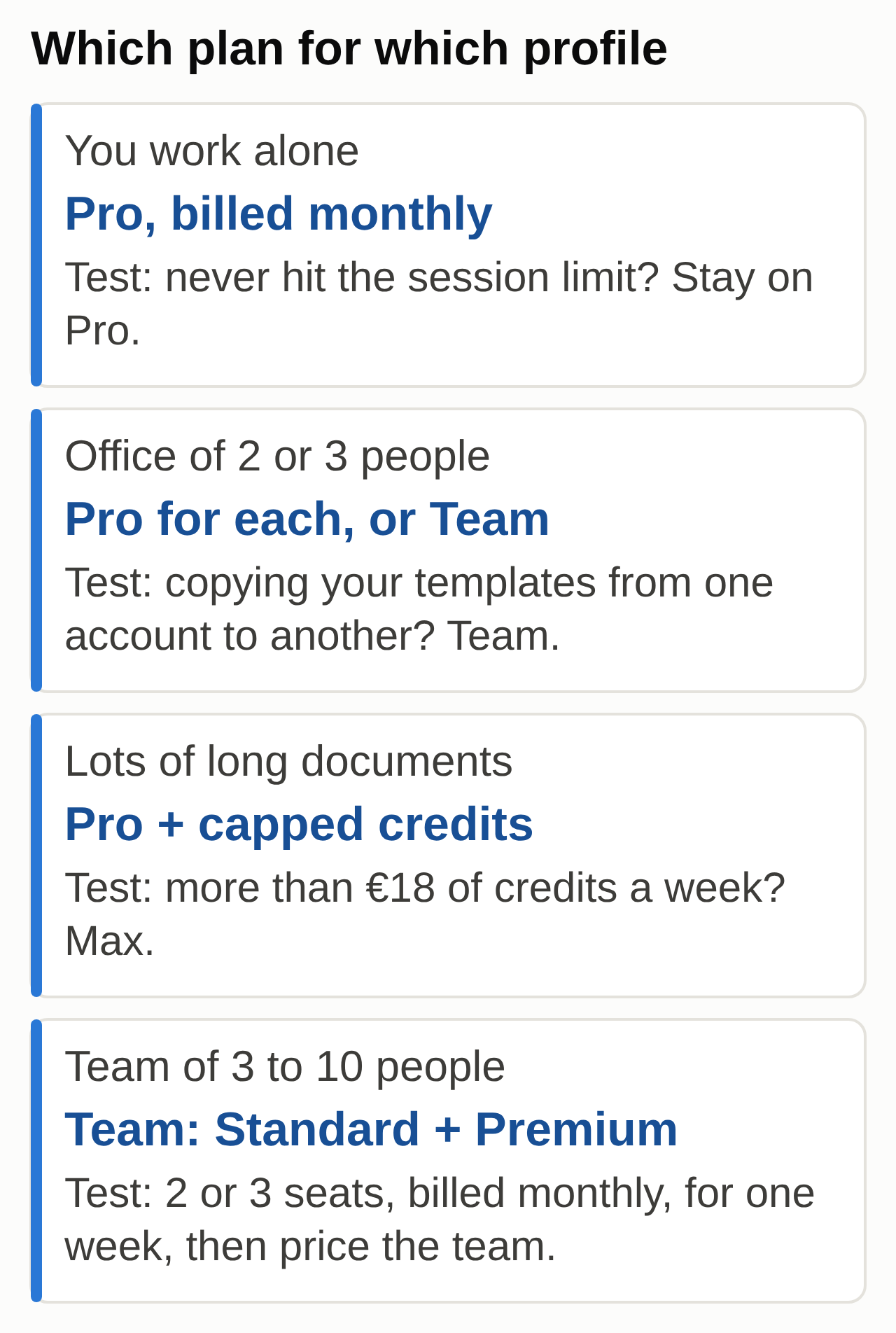
You work alone: Pro
Emails, quotes, meeting notes, a few documents a day. Take Pro with monthly billing.
One-week test: open Settings > Usage every evening and note whether you hit the session limit. If you never do, stay on Pro and switch to annual billing after a month: €180 instead of €216 a year, excluding tax.
Pro for each person or Team for a small office of two or three
Two Pro accounts cost €36 a month excluding tax. Team Standard for two costs $50 a month on monthly billing or $40 a month on annual billing, at US prices: compare them with the euro price shown once the team is created. Team brings shared projects, a single invoice and Anthropic’s commercial terms. If you’re building a tool for a client, also read what Claude’s usage policy of November 12, 2026 says about reselling access.
Since November 12, 2026, Team also gives access to the Claude Meetings beta, which brings Claude into Google Meet calls to take notes.
One-week test: create the same “Office templates” project in each account, with your instructions and document templates. If you spend your time copying files from one account to the other, what you’re missing is Team’s project sharing.
Pro plus credits for lots of long documents, then the math
Contracts, 100-page reports, bid responses, bookkeeping. Start on Pro with capped usage credits.
One-week test: keep the usage log and run the calculation in the next section. Ultra only makes sense if Max still isn’t enough.
Team for a group of 3 to 10 people
Take Standard seats by default and a Premium seat for each heavy user. You can add seats mid-period. Some large firms also set a budget per person. Since October 1, 2026, Accenture has funded only $29 of Claude a month per employee, and projects pay the rest (see our article on Accenture’s $29 Claude rule).
One-week test: start on monthly billing with two or three seats and create a shared project with your templates. At the end of the week, read Team’s usage analytics, then price the full team with the method below.
The calculation that settles Claude Pro versus Max
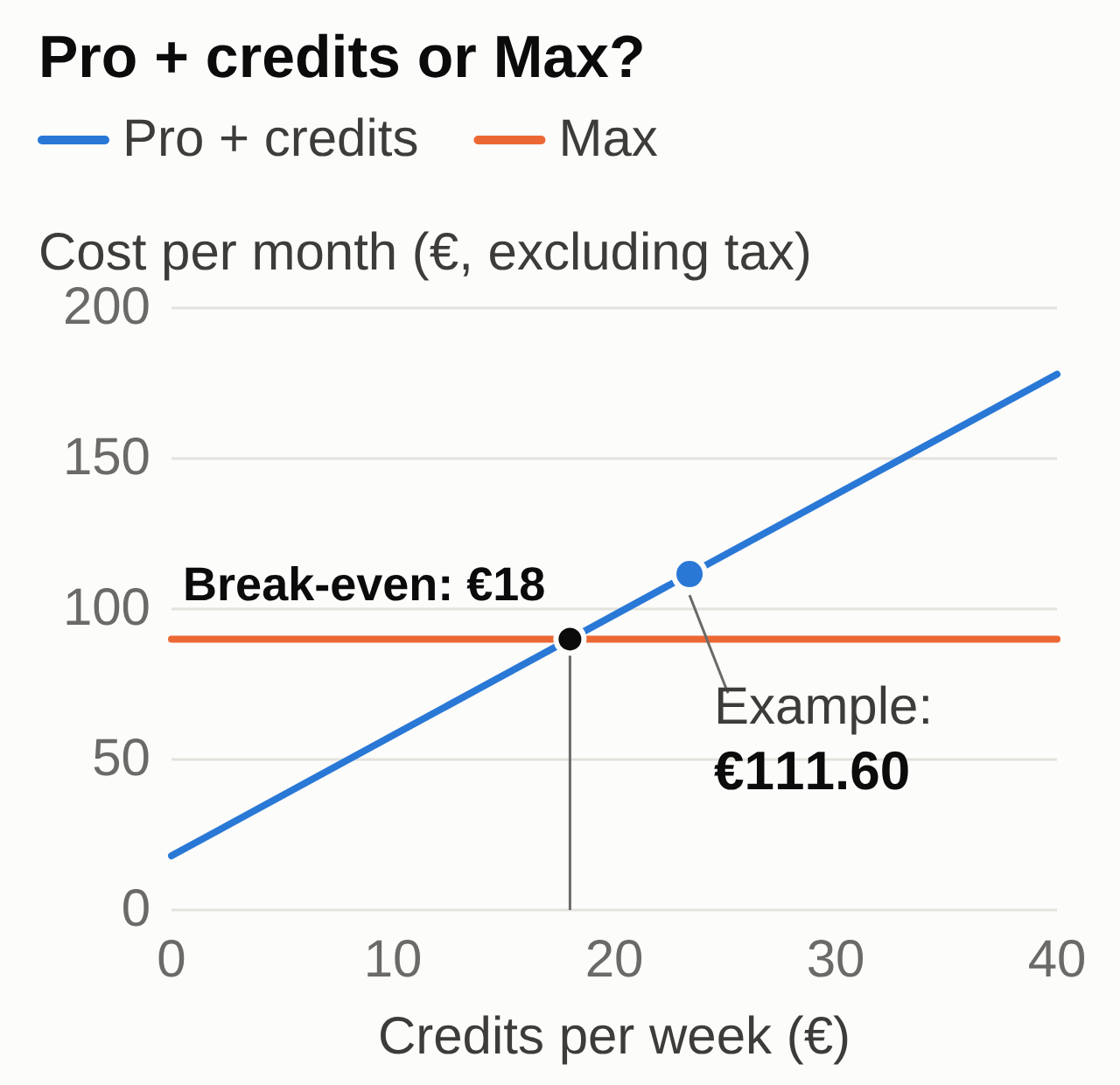
The principle: Max costs €72 more than Pro per month, excluding tax (€90 versus €18). If you spend more than €72 of credits a month, or €18 a week, Max works out cheaper. That assumes Max’s higher limit covers that extra use. Its weekly limit is 5 times Pro’s, but Anthropic doesn’t publish the size of Pro’s limit.
Sample files, fictional: journal-usage-semaine.csv and calcul_formule.py (zip) to redo the calculations (both in French).
- In Settings > Usage, turn on usage credits, add a small amount and set a low monthly cap.
- Every evening for five working days, write three things in the log: your main work, whether you hit the session limit (yes or no) and the credits spent that day. To get that day’s credits, take the month’s total shown in Settings > Usage and subtract the previous day’s total.
- At the end of the week, open a new conversation, paste the prompt below, then the contents of the log.
- Redo the sum yourself before you change plans.
Prompt to copy:
Here is my Claude usage log for one week (CSV). Columns: date,
main_work, session_limit_hit (yes/no), credits_eur.

1. Count the days when the session limit was hit.
2. Add up the week's credits, then multiply by 4 to estimate
   a month.
3. Calculate the monthly "Pro + credits" cost with Pro at 18 euros a month.
4. Compare with Max at 90 euros a month and say which one is cheaper.
5. Show every addition and every multiplication so I can check them.
6. Don't make up any line. If a value is missing, flag it instead of
   guessing.
7. End with one sentence: which plan to take next month, and under
   what condition to revisit that choice.

My log:
[paste the contents of journal-usage-semaine.csv here]
Expected result with the sample file:
Days with the limit hit: 3 out of 5 (September 21, 23 and 25)
Credits for the week: 6.80 + 9.40 + 7.20 = €23.40
Estimate for a month: 23.40 x 4 = €93.60
Pro + credits: 18 + 93.60 = €111.60 a month
Max: €90 a month
Max is cheaper by €21.60, if this week is representative.
Human check: recount the three “yes” lines and the sum of the credits. Was it a normal week? A month-end close or a big bid response inflates the figure: in that case, measure again during an ordinary week. After switching to Max, see whether you still hit the limit: if you do, run the same calculation between Max and Ultra.
Common mistake and fix: the assistant multiplies by 4.33 or by 30 days, or counts the Pro price every week. Restate the instruction: “Multiply the week’s credits by 4, add 18 only once.” The amounts are in euros excluding tax, at Belgian account prices: if your screen shows other prices, replace them in the prompt.
Pricing Claude Team seats for a group
For a business Claude subscription, the question becomes: how many Standard seats, how many Premium, monthly or annual, and what individual accounts would cost. Team seats are priced in dollars here, since there is no euro price before the team is created. Individual accounts are priced in euros.
Sample file, fictional: equipe-sieges.csv (in French), six people including a manager who reads long documents every day.
- List the people and their expected use: occasional, regular, heavy.
- Give a Premium seat to heavy users, Standard to the others.
- Paste the prompt below, then your list.
- Check the totals by hand.
Prompt to copy:
Here is the list of people on my team (CSV) with the planned seat.
Claude Team prices as of November 21, 2026, in USD excluding tax (US prices),
per seat per month: Standard 25 (monthly) or 20 (annual), Premium 125
(monthly) or 100 (annual). Individual prices in euros excluding tax, per month:
Pro 18 (monthly) or 15 (annual), Max 90 (monthly only).

1. Count the Standard and Premium seats.
2. Calculate the Team total per month and per year, in USD, with monthly
   billing and then annual billing.
3. Calculate in euros the monthly cost of individual accounts: Pro for each
   Standard seat, Max for each Premium seat, with monthly Pro
   and then annual Pro.
4. Don't convert anything and don't compare a USD amount with a euro
   amount.
5. Present the result in short lines, calculations visible, currency on
   every line.
6. Don't add any price or feature I didn't give you.

My team:
[paste the contents of equipe-sieges.csv here]
Expected result with the sample file:
Seats: 5 Standard, 1 Premium
Team monthly: 5 x 25 + 1 x 125 = 250 USD a month (3,000 USD a year)
Team annual: 5 x 20 + 1 x 100 = 200 USD a month (2,400 USD a year)
Individual accounts, monthly Pro: 5 x 18 + 1 x 90 = €180 a month
Individual accounts, annual Pro: 5 x 15 + 1 x 90 = €165 a month
Human check: recount the seats and every multiplication. The dollar and euro lines can’t be compared with each other: once the team is created, redo the Team line with the euro price shown.
Team also brings project sharing, a single invoice, access administration and the commercial terms. It adds a shared monthly API credit: 5 x 20 + 1 x 100 = $200 a month for the sample team. A Premium seat gives slightly more usage per session than Max: 6.25 times Pro’s usage, against 5 times.
Common mistake and fix: the assistant applies the annual price to monthly billing, puts the manager on a Standard seat or converts the dollars with a made-up rate. Reread the “siege” (seat) column in the file and have it redo the calculation line by line, with no conversion.
Subscription, API and Claude Code are three different things
- The subscription, from Free to Enterprise, gives you Claude on the web, desktop and mobile, with its usage limits.
- The API is for building Claude into software. You buy it separately, in the Claude Console, and pay by volume. Pro has no API credit, but Max, Ultra and Team come with one each month: $100 on Max, $200 on Ultra and up to $500 for a team. You link that credit to an organization in the Console, and unused credit doesn’t roll over to the next month. The credit doesn’t work in the Claude apps or in interactive Claude Code.
- Claude Code is Anthropic’s coding tool, used in the terminal or in a code editor. It is included in the paid plans and draws from the same allowance as your conversations. Watch out: if an ANTHROPIC_API_KEY variable is set on your computer, Claude Code bills the API instead of your subscription. A concrete example: turning a Claude mockup into a WordPress site the client edits themselves, then putting it online with a domain and a business email address.
Usage credits are separate from this API credit. They are billed at API rates, but they stay in your Claude account and don’t give you an API key. To understand the model families (fast, balanced, reasoning) and choose one by task, see the guide choosing an AI model and organizing work with several agents.
Data and privacy by plan
Pro, Max and Ultra fall under Anthropic’s consumer terms. Their version for the European Economic Area is aimed at consumers: if you pay for Pro, Max or Ultra for your business, read it before subscribing. On model training, the pricing page says “Opt-out available”: check the option in your privacy settings.
If you leave model training on, Anthropic can keep your conversations in de-identified form for up to 5 years. A deleted conversation disappears from your history right away and from the servers within 30 days, with exceptions (flagged content, legal obligation). Incognito conversations aren’t used to improve Claude, even if the option is on.
Team, Enterprise and the API fall under the commercial terms. There, the customer business is the data controller and Anthropic the processor. Content isn’t used for training by default, and a data processing addendum (DPA) with standard contractual clauses is built into the terms. The consumer terms for Pro, Max and Ultra don’t include one.
No plan makes you GDPR compliant on its own. To run customers’ personal data through Claude, you need a legal basis, a data processing agreement with the provider and only the minimum data necessary. The data protection authorities are the APD in Belgium and the CNIL in France. While you learn, work on fictional documents like the ones in this guide.
Five settings before your first payment
- Subscribe on the web, from claude.ai/upgrade, if you want an invoice from Anthropic.
- In Settings > Billing, open the option to update your payment method. Enter your VAT number, and check “Use a different name on invoices” to put the company name on them. An issued invoice can’t be corrected.
- Choose your model improvement setting in your privacy settings (claude.ai/settings/data-privacy-controls) before your first work conversation.
- If you turn on usage credits, set a monthly cap and leave auto-reload off during the test.
- Note the weekly reset day and time shown in Settings > Usage.
In the European Economic Area, Anthropic lets you request a refund in the app during the 14-day withdrawal period. Start on monthly billing. Annual billing is available for Pro and Team, while Max and Ultra are monthly only. Switch to it once you’re sure of the plan.
The choices the subscription leaves to you
On a paid plan, Claude keeps a memory across conversations and connects to Google Drive, Gmail or Microsoft 365 through connectors. Our article on Claude’s memory explains what it really retains and how to check it. The mobile app supports dictation and voice mode.
The new experience that merges chat and Cowork is rolling out on Pro, Max and Ultra. With it, Claude keeps working on a task in the cloud when you close your laptop or leave the page. It also runs scheduled tasks, and you can follow or start a task from your phone.
You set these features up account by account. Access to your files and Claude’s control of your computer are also set device by device, and both need the desktop app open. A setup where a voice note triggers actions in your own tools only exists if someone builds it, connects it and keeps it running.
What the subscription doesn’t decide for you:
- Which connectors to set up, with what access. Some software needs a custom connector: see the guide to Claude connectors for Gmail, Drive and Calendar and, for an ERP, connecting Claude to Odoo.
- The instructions, projects and review rules: someone has to write them and keep them up to date. To decide what goes in a project or in a skill, see Claude skills for non-developers.
- The level of autonomy. With the new experience, Auto mode is gradually becoming the default on Pro, Max, Ultra and Team. In Auto mode, Claude moves through the steps of a task without asking you each time. In Manual mode, it asks before acting, and switching back to it is your call.
- Monitoring: a scheduled task that fails, access that expires, a plan or a limit that changes.
- Responsibility for what goes out in your name.
If you’d rather hand off the setup, the connections and the upkeep, that’s the role of the MACCUS AI assistant. It lives in Telegram: you write to it and send it voice notes and documents, in French, English or Dutch.
It runs on your own Claude Pro, Max or Ultra subscription, in your name: you choose the plan and you see your usage. Connections to your tools are decided case by case, with your access. What goes out in your name remains your responsibility.
Your checklist for the trial week
- Subscribe to Pro monthly on the web, after the five settings above.
- Keep your customers’ personal data out of the tool until the framework is in place.
- Fill in the usage log every evening, five days in a row.
- At the end of the week, run the Pro versus Max calculation, or the seat calculation for a team.
- Check the first invoice: name, VAT number, tax amount.
- Review your choice after a month, and only then switch to annual billing.
Next, pick a first concrete task in the guide to AI by profession.